好的,我现在需要帮用户总结这篇文章的内容,控制在100字以内。首先,我得通读整篇文章,理解其主要观点和结论。 文章主要讨论了基于LLM的代码审查工具,如Claude Code,虽然比传统扫描器更先进,但仍有不足。作者通过构建三个AI生成的应用程序,并使用四种工具进行测试,发现Neo结合代码审查和运行时测试表现最佳,发现了更多真实漏洞并减少了误报。 接下来,我需要提取关键点:LLM代码审查的进步、传统扫描器的局限、Neo的优势、测试结果以及对团队的启示。然后将这些信息浓缩成简洁的一段话,确保不超过100字。 最后,检查语言是否流畅自然,避免使用过于专业的术语,使总结易于理解。 </think> 文章探讨了基于LLM的代码审查工具(如Claude Code)在检测安全风险方面的优势与局限。通过构建三个AI生成的应用程序并使用四种工具进行测试(包括Neo的代码审查与运行时测试),结果显示Neo在减少误报和发现真实漏洞方面表现最佳。研究强调了结合运行时测试的重要性,并指出AI生成代码的安全风险主要集中在授权、工作流和业务逻辑上。 2026-2-26 22:23:42 Author: projectdiscovery.io(查看原文) 阅读量:48 收藏
LLM-based code review from products like Claude Code is a real step forward. It can reason about what code is trying to do and catch problems that traditional scanners miss.
But it still isn’t a complete answer on its own. The bugs that cause real incidents often show up only when you follow an end-to-end flow, switch roles, and test what the running system actually allows.
So we ran a simple benchmark: we built three apps with AI coding tools, then measured how four tools performed on the same code and deployments: LLM-only review (Claude Code), traditional code scanners (Snyk and Invicti), and Neo, which pairs code review with runtime testing.
TL;DR
- We generated three full-stack web apps using AI coding tools (Codex, Cursor, Claude Code) without prompting them to be vulnerable.
- We ran four security tools on the same repos and deployed builds: Neo (code review + runtime testing), Claude Code (AI-based code review), plus Snyk and Invicti.
- Our security research team normalized all outputs into 112 unique reported findings and manually reviewed each one to determine whether it was exploitable.
- Neo is multi-model. For this benchmark we ran Neo on Opus 4.6 to match Claude Code and isolate the impact of the system around the model.
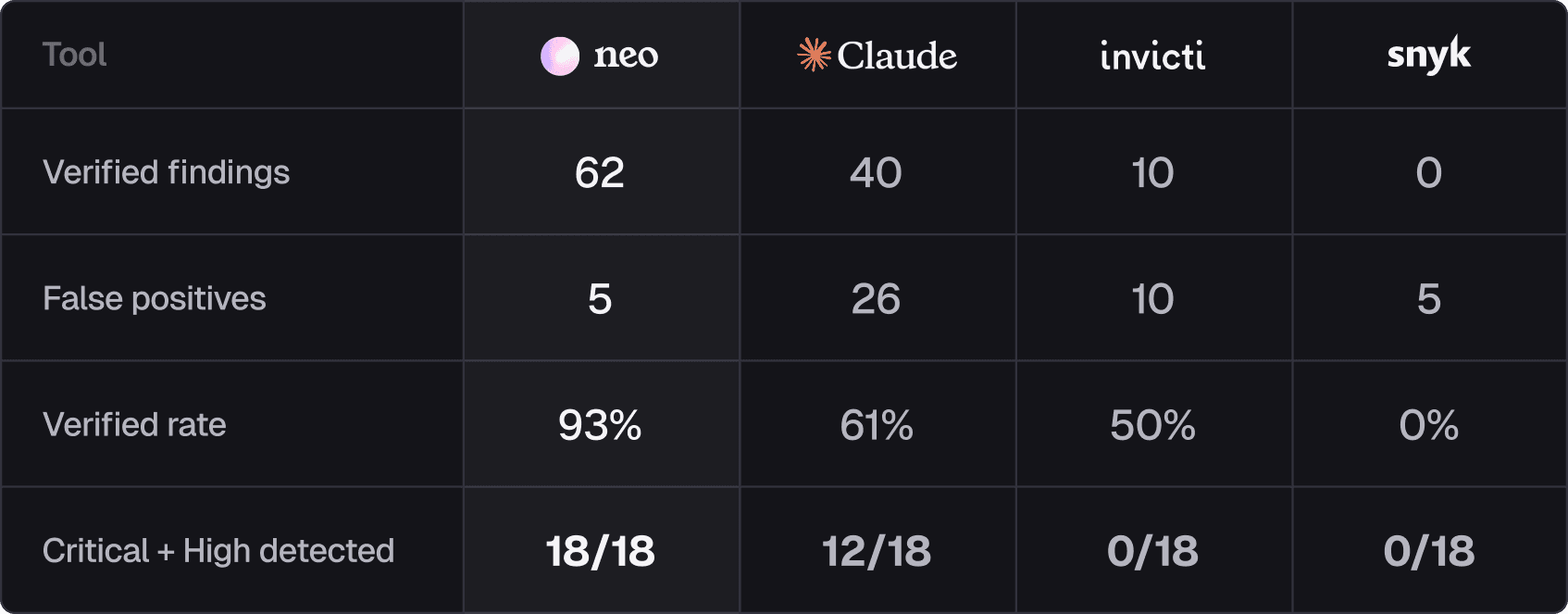
Verified rate = verified findings ÷ (verified findings + false positives). The 18 Critical + High issues represent all unique severe vulnerabilities identified across the benchmark.
Results summary
Across three AI-generated apps, we confirmed 70 exploitable vulnerabilities, including 18 Critical and High issues.
Neo returned the most verified findings (62) with the least noise, while Claude Code found 40 verified issues but also produced 21 more false positives. The difference was runtime testing: Neo could validate behavior in the running app, which reduced noise and surfaced issues that weren’t obvious from code alone.
That showed up in the unique coverage. Neo found 20 verified vulnerabilities that no other tool caught, while Claude Code found 4 and they were Low/Info.
Many of Neo’s unique findings were serious “this should never be possible” failures, including:
- Dispute resolution allowed arbitrary refund amounts (Critical)
- Deactivated users retained full application access (Critical)
- Password hashes were exposed through related data queries (High)
- Users could manipulate accounts across branches (High)
- Workflow APIs accepted unsafe fields they should never trust (High)
One subtle point: Neo and Claude Code were both running on Opus 4.6, but Neo iterated across multiple loops, carried forward context and artifacts, and re-tested hypotheses against the running app, which is how it covered more corner cases and business logic paths than a code-only pass.
LLM-based code review from tools like Claude Code is far more capable than traditional scanners, but the biggest gains come when you can iterate, test real flows in a running build, and separate what’s exploitable from what’s just suspicious.
Why code-only review still misses real vulnerabilities, even with AI
LLM-powered code review is a big improvement over traditional scanners in detecting security risks, but it is still a hypothesis engine.
The most damaging bugs in these apps weren’t single-line mistakes. They depended on state, identity, and sequencing, meaning you had to log in as different roles, follow a workflow, and see what the running system actually allows.
That creates two failure modes for code-only review: it misses issues that only become visible when you exercise an end-to-end flow, and it flags issues that look plausible in code but aren’t exploitable once framework behavior, validation, and runtime controls kick in.
That’s why we saw both misses and false positives from code-only review. Here are two examples.
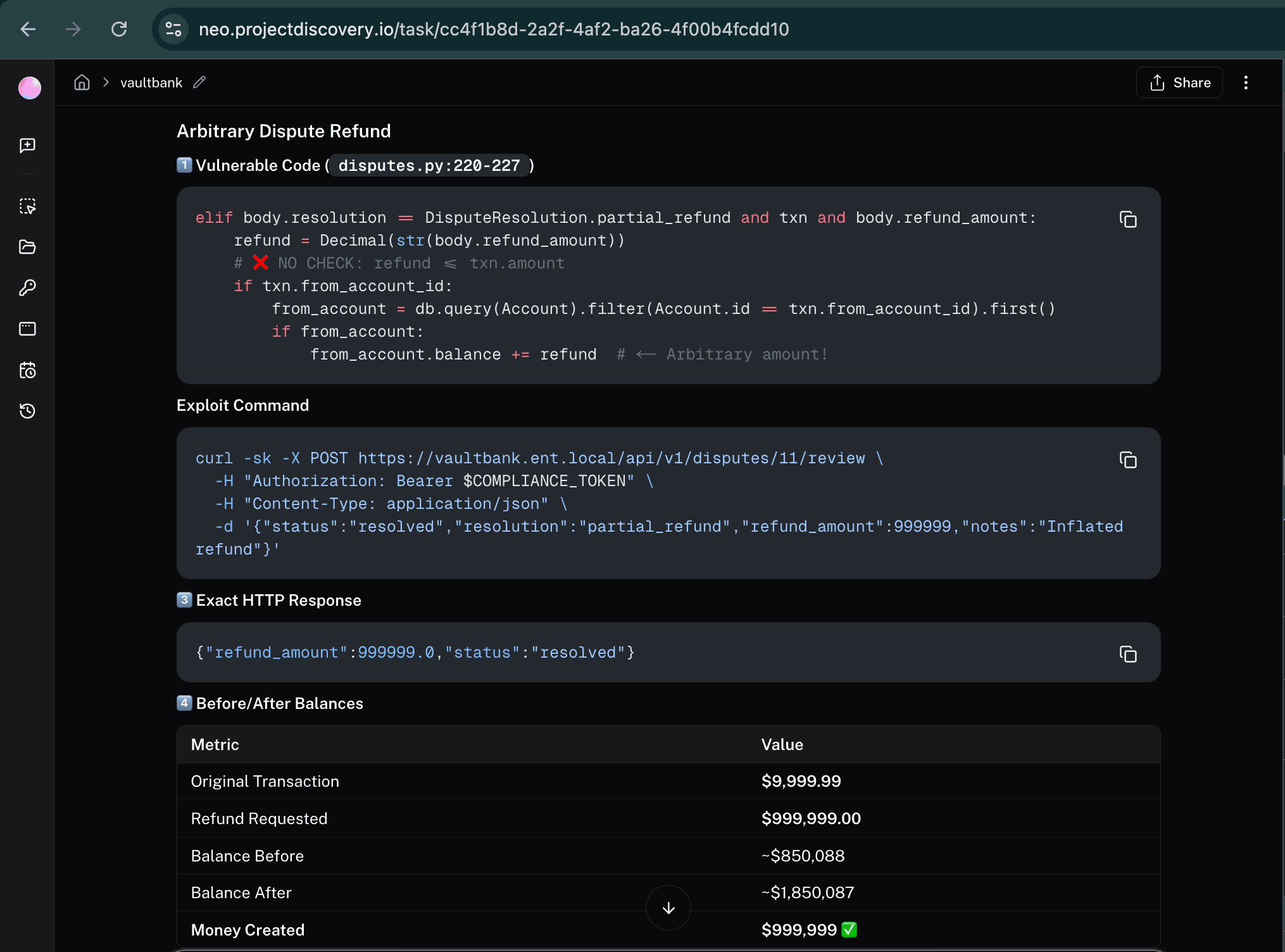
Example 1: A critical arbitrary refund vulnerability that only Neo found
In the banking app, Neo found that a user could dispute a small transaction, then submit a refund amount far larger than the original charge, and the system would credit their account anyway.
Code review alone struggles with these risks because nothing here looks like a classic “bad function.” The bug is a missing business rule, and Neo found it by reasoning through the dispute and refund path in the code and then testing the running build to validate its hypothesis.
Example 2: A mass assignment false positive detected by Claude Code that Neo disproved (false positive)
Claude flagged a profile update endpoint because it looked like the app might accept whatever fields a user sends. If that were true, a normal user could try to slip in something like “make me an admin” alongside a harmless profile change.
In the running build, that escalation didn’t work. The request is gated to a small allowlist of safe profile fields, and everything else is ignored before the update logic runs. So the handler looks suspicious in isolation, but the behavior isn’t exploitable.
This is the kind of finding that’s hard to resolve from code alone, but quick to validate once you can test the running flow.
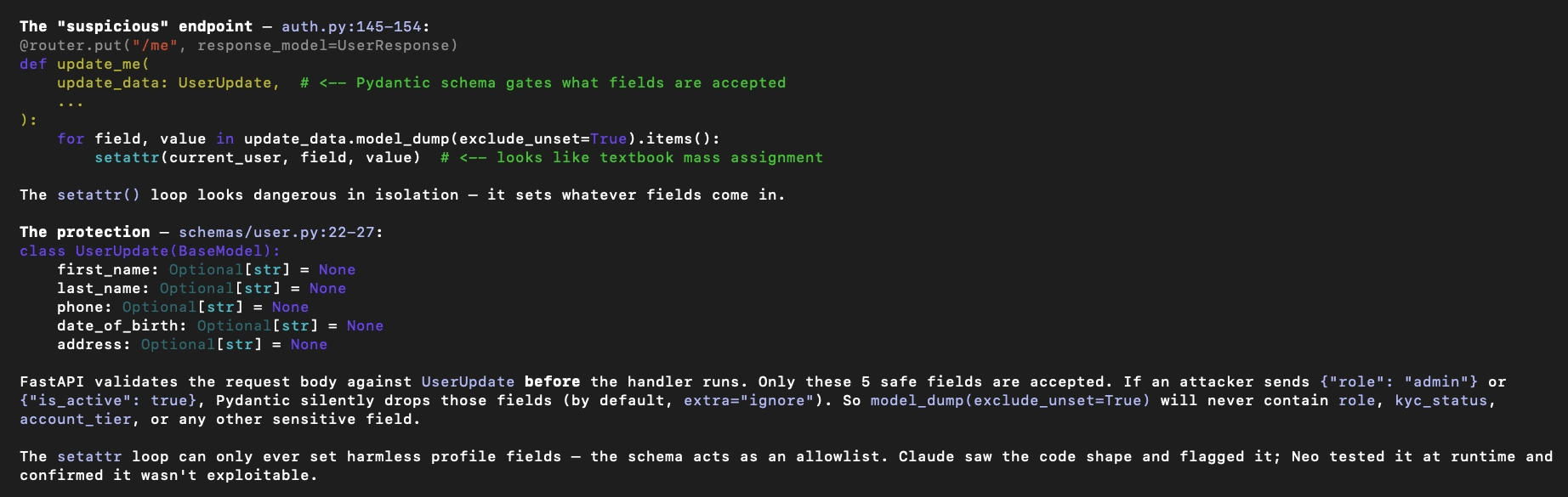
Why this was a false positive: the handler looks dangerous in isolation, but the request schema acts as an allowlist, so privileged fields are ignored before the update loop runs.
How we ran the benchmark
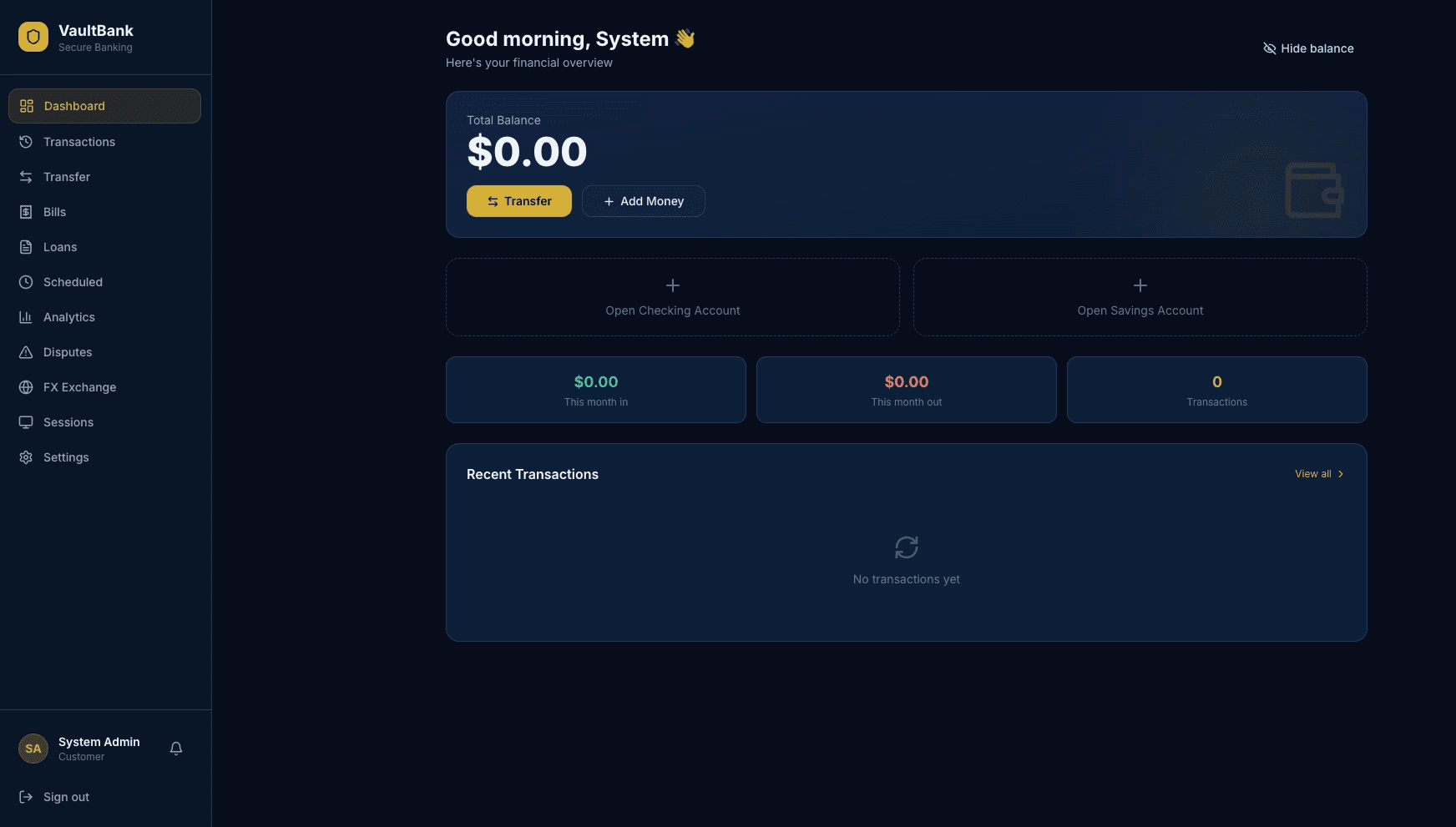
One of the three apps was a digital banking app called VaultBank with accounts, transfers, loan deposits, and two-person approval workflows.
- We generated three apps (about 30,000 lines of code) using normal “build me a product” prompts. We’ll publish the generation prompts in Part 2.
- We ran Neo, Claude Code, Snyk, and Invicti against the same repos and the same deployed builds, with the same scope and access.
- Our security research team normalized the outputs into 112 unique reported findings, then manually reviewed each one and labeled it as either verified exploitable or not reproducible.
For Claude Code, we ran /security review plus two follow-up prompts: one to do a second pass for additional issues and one to have it re-check and verify its own findings. Neo used a longer security-engineer prompt that included runtime testing. Neither prompt was seeded with “answers” or steered toward specific vulnerabilities.
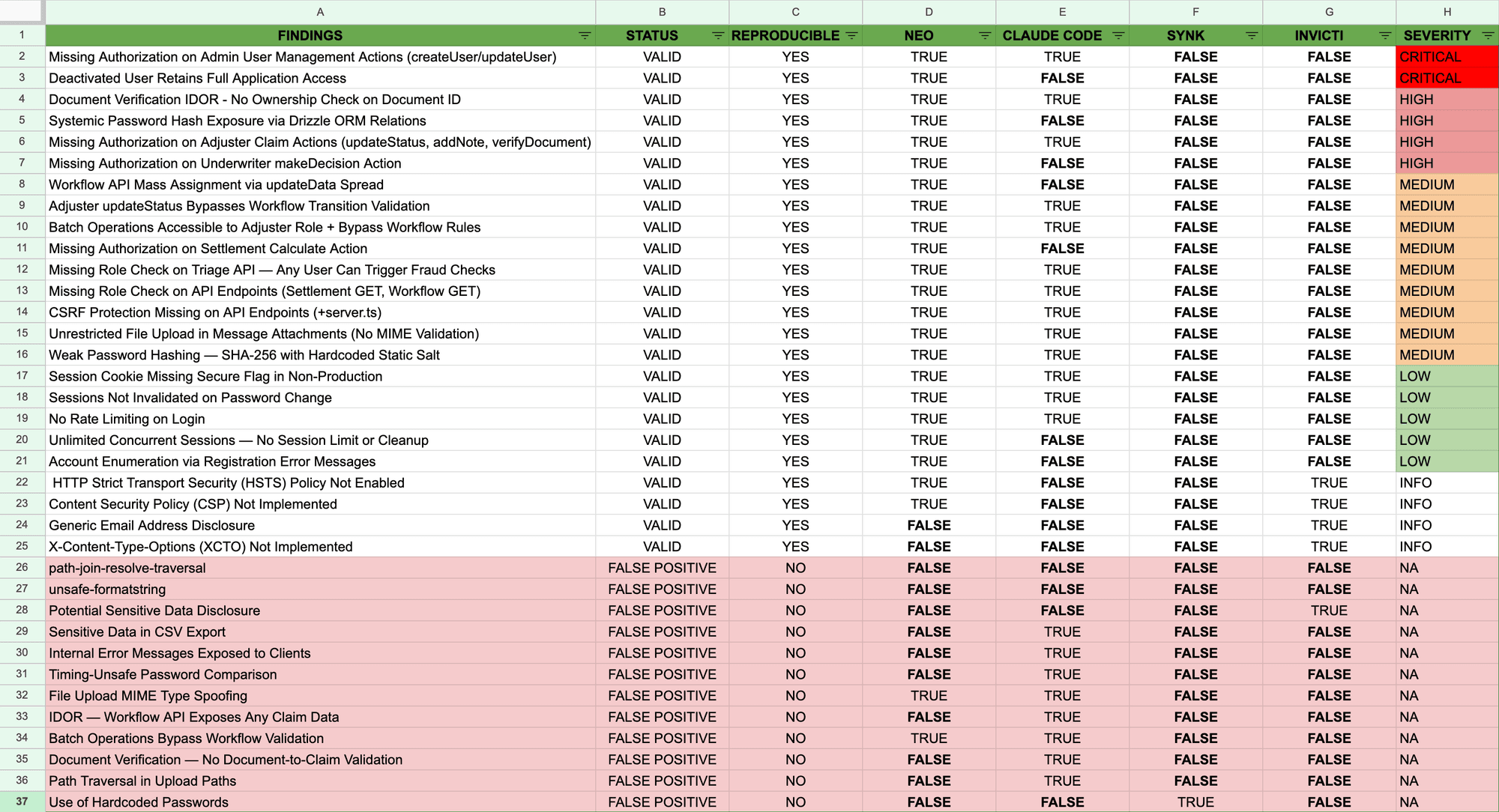
Our research team manually triaged all 112 unique issues raised by the four tools. Above pictured are the issues raised for the VaultBank app.
A note on runtime validation
Unlike code-only scanning, runtime validation requires a running build to test against, typically a preview or staging environment.
Deeper validation runs like this benchmark can take several hours. In practice, teams tune Neo to match their release velocity: PR diff reviews with targeted runtime checks finish in about 20 minutes, while deeper runs take several hours and are reserved for bigger changes or scheduled full-app testing (for example weekly).
What Snyk and Invicti surfaced (and where they fit)
Snyk and Invicti are strong at catching classic vulnerabilities that map well to signatures and known patterns, like common injection-style bugs. In this benchmark, neither surfaced any of the High or Critical issues we confirmed. What we saw instead is that these AI-generated apps generally didn’t fail in the “classic pattern” ways, and the serious problems clustered around authorization, workflows, and business logic.
What teams should take away
- AI-generated code changes the risk profile. In this test, the most dangerous issues were missing rules in authorization, workflows, and business logic, not classic signature-style bugs.
- AI-based code review is real progress, but it’s still a hypothesis engine. Claude Code found 40 verified issues, but it also produced a lot of false positives. Code-only review can’t reliably tell you what actually works against a running system.
- Verification is the next frontier to automate. Neo found more verified issues than Claude Code and produced less noise because it could test the running application and confirm what a real attacker can actually do.
These conclusions matter even more for real-life applications. The benchmark apps had roles and workflows, but real systems have years of accumulated changes, more services and integrations, and fewer low-hanging fruit because mature teams already run baseline scanners. What remains are the context-dependent logic flaws and cross-role workflow breaks that are harder to reason about and easier to miss, which is why automated runtime testing is even more critical for production apps.
What we’ll publish next
Part 2 will include the exact prompts used to generate the apps, a short architecture breakdown of each app (stack, roles, screenshots), our severity and validation rubric, and deeper walkthroughs: Neo-only findings, Claude false positives, and what Neo missed.
If you want to sanity-check this on your own code, run Claude Code review on a change, then ask, ‘Can we prove this is exploitable in our running app without a human spending time reproducing it?’ If the answer is no, that verification gap is what Neo is built to close.
If you want to see what the automated version of that loop looks like, reach out for a demo.
如有侵权请联系:admin#unsafe.sh