好的,我现在需要帮用户总结一篇文章的内容,控制在100字以内。用户的要求是直接写描述,不需要开头的总结语。首先,我得通读整篇文章,抓住主要信息。 文章讲的是LokiLocker勒索软件,它是一个RaaS,从2021年8月开始活跃,针对Windows系统。它使用.NET开发,并用了NETGuard和KoiVM保护。加密方法是AES和RSA。此外,它会删除备份和影子副本,并有擦除功能,破坏MBR。 攻击者还利用AttackIQ的攻击图来模拟其行为,帮助企业测试安全控制。文章详细描述了LokiLocker的初始访问、持久化、防御规避、发现和加密阶段。 接下来,我需要将这些关键点浓缩到100字以内。要确保涵盖勒索软件的基本信息、技术细节、攻击阶段以及AttackIQ的作用。 可能会遗漏一些具体的技术细节,比如具体的API调用或注册表修改,但核心信息必须保留:它是RaaS,针对Windows,使用AES和RSA加密,删除备份和影子副本,并有擦除功能。同时提到AttackIQ用于测试防御措施。 最后检查字数是否符合要求,并确保语言简洁明了。 </think> LokiLocker是一种针对Windows系统的勒索软件即服务(RaaS),自2021年8月起活跃。它使用.NET开发并采用AES和RSA加密技术,在加密文件的同时删除备份和影子副本,并可擦除非系统文件及破坏主引导记录(MBR)。AttackIQ通过模拟其行为帮助企业测试安全控制能力。 2026-2-26 18:26:58 Author: securityboulevard.com(查看原文) 阅读量:0 收藏
LokiLocker is a Ransomware-as-a-Service (Raas) that has been active since at least mid-August 2021 targeting Windows systems. The ransomware is developed in .NET and protected with NETGuard and KoiVM. Despite the similarity in naming, LokiLocker should not be confused with Locky, a high-profile ransomware family active primarily in 2016, or LokiBot, an information-stealing malware focused on credential theft.
LokiLocker encrypts files across local drives and accessible network shares using symmetric encryption (AES) to encrypt file content and asymmetric encryption (RSA) to protect the generated keys. In addition to encryption, it attempts to ensure impact by deleting backups and shadow copies. LokiLocker also employs an optional wiper functionality that will wipe all non-system files and overwrite the Master Boot Record (MBR), rendering the system unusable.
AttackIQ has released a new attack graph that emulates the Tactics, Techniques, and Procedures (TTPs) associated with the deployment of LokiLocker ransomware to help customers validate their security controls and their ability to defend against this threat.
Validating your security program performance against these behaviors is vital in reducing risk. By using this new emulation in the AttackIQ Adversarial Exposure Validation (AEV) Platform, security teams will be able to:
- Evaluate security control performance against baseline behaviors associated with the LokiLocker ransomware.
- Assess their security posture against an opportunistic adversary, which does not discriminate when it comes to selecting its targets.
- Continuously validate detection and prevention pipelines against a playbook similar to those of many of the groups currently focused on ransomware activities.
[Malware Emulation] LokiLocker ransomware – 2022-03 – Associated Tactics, Techniques and Procedures (TTPs)
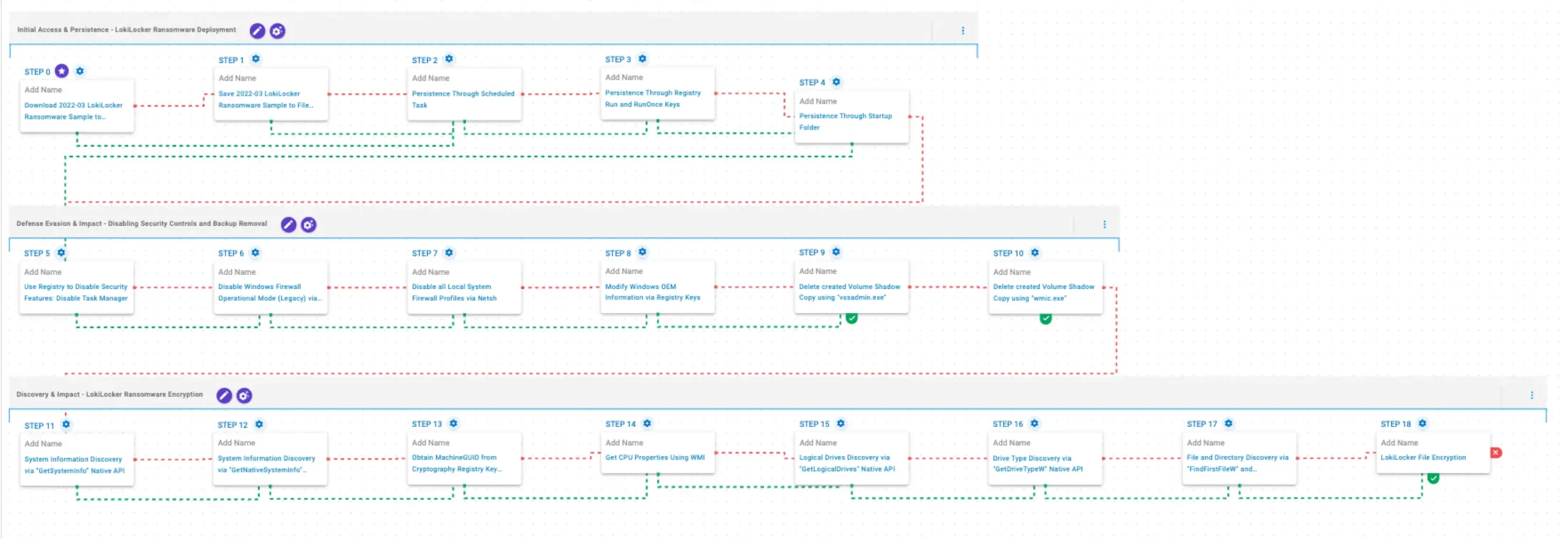
This emulation replicates the sequence of behaviors associated with the deployment of LokiLocker ransomware on a compromised system with the intent of providing customers with the opportunity to detect and/or prevent a compromise in progress.
The emulation is based on the behaviors reported by BlackBerry on March 16, 2022 as well as internal analysis.
Initial Access & Persistence – LokiLocker Ransomware Deployment
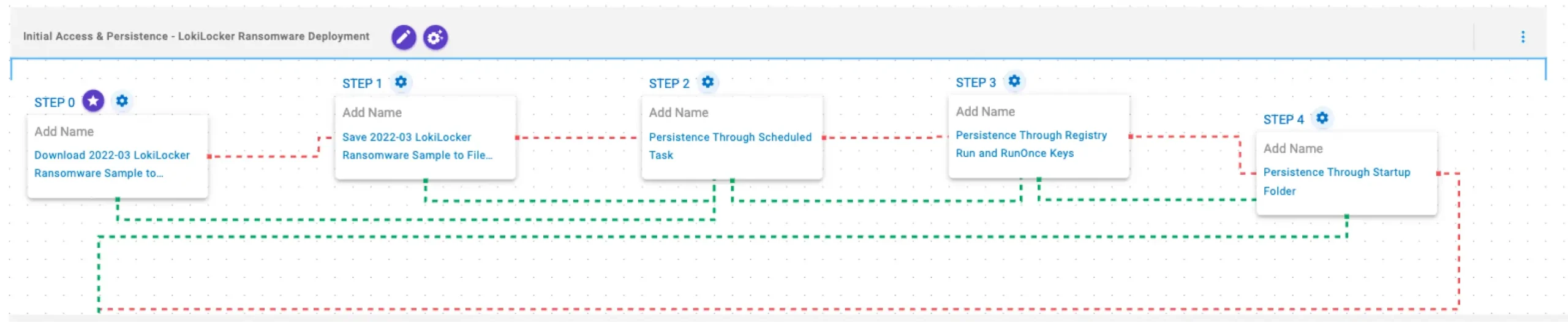
This stage begins with the deployment of LokiLocker Ransomware. To maintain access, it establishes persistence by creating Scheduled Tasks, modifying Registry Run keys, and placing a copy of itself in the Windows Startup folder, ensuring execution after reboot.
Download and Save Scenarios (T1105): These scenarios download to memory and save to disk in two separate scenarios to test network and endpoint controls and their ability to prevent the delivery of known malicious samples.
Persistence Through Scheduled Task (T1053.005): This scenario creates a new scheduled task for persistence using the schtasks utility.
Persistence Through Registry Run and RunOnce Keys (T1547.001): This scenario creates an entry under the HKLM\Software\Microsoft\Windows\CurrentVersion\Run registry key to be run at system startup and acquire persistence.
Persistence Through Startup Folder (T1547.001): This scenario acquires persistence by adding files to the operating system Startup Directory.
Defense Evasion & Impact – Disabling Security Controls and Backup Removal

In this stage, LokiLocker focuses on weakening system defenses and hindering recovery. It disables Task Manager to limit user intervention, turns off the Windows Firewall using netsh, and modifies OEM information through Registry changes. Finally, it deletes Volume Shadow Copies using vssadmin and wmic to prevent file restoration.
Use Registry to Disable Security Features: Disable Task Manager (T1112): This scenario modifies the registry value DisableTaskMgr under the key HKCU\Software\Microsoft\Windows\CurrentVersion\Policies\System to 1, which disables Task Manager.
Disable Windows Firewall Operational Mode (Legacy) via Netsh (T1562.004): This scenario uses legacy netsh configuration parameters to disable the Windows Firewall.
Disable all Local System Firewall Profiles via Netsh (T1562.004): This scenario uses the netsh command with the allprofiles mode to disable Windows Firewall.
[New!] Modify Windows OEM Information via Registry Keys (T1112): This scenario modifies the Manufacturer and SupportPhone values under HKEY_LOCAL_MACHINE\SOFTWARE\Microsoft\Windows\CurrentVersion\OEMInformation, setting both fields to Encrypted by Loki locker.
Delete created Volume Shadow Copy using “vssadmin.exe” (T1490): This scenario executes the vssadmin.exe utility to delete a recent Volume Shadow Copy created by the assessment template.
Delete created Volume Shadow Copy using “wmic.exe” (T1490): This scenario executes the wmic shadowcopy delete command to delete a Volume Shadow Copy created by the emulation.
Discovery & Impact – LokiLocker Ransomware Encryption

In this stage, LokiLocker performs system reconnaissance and prepares for encryption. It gathers general system information using the GetSystemInfo and GetNativeSystemInfo APIs, retrieves the MachineGUID via reg query, and collects CPU details through WMI. It then identifies available logical drives using GetLogicalDriveStringsW and GetDriveTypeW. After profiling the system, LokiLocker traverses the filesystem and enumerates files with FindFirstFileW and FindNextFileW, ultimately encrypting data using AES-256 in GCM mode for file encryption and RSA-2048 to protect the encryption keys.
System Information Discovery via “GetSystemInfo” Native API (T1082): This scenario executes the GetSystemInfo Windows native API call to retrieve system information. This can be used to detect sandboxes, create unique identifiers, and adjust execution behaviors.
System Information Discovery via “GetNativeSystemInfo” Native API (T1082): This scenario executes the GetNativeSystemInfo Native API call to retrieve information associated to the system.
Obtain MachineGUID from Cryptography Registry Key using “reg query” Command (T1012): This scenario executes the reg query command to obtain information from the registry. It targets the MachineGUID entry within the HKLM\SOFTWARE\Microsoft\Cryptography registry key, which contains a unique identifier of the system.
Get CPU Properties Using WMI (T1497.001): This scenario uses Windows Management Instrumentation (WMI) to obtain details about the processors installed on the system.
Logical Drives Discovery via “GetLogicalDrives” Native API (T1082): This scenario executes the GetLogicalDrives Windows API call to retrieve the currently available disk drives.
Drive Type Discovery via “GetDriveTypeW” Native API (T1120): This scenario retrieves information about the system’s physical disks using the GetDriveTypeW Windows API call.
File and Directory Discovery via “FindFirstFileW” and “FindNextFileW” Native API (T1083): This scenario executes the FindFirstFileW and FindNextFileW Windows native API calls to enumerate the file system.
[New!] LokiLocker File Encryption (T1486): This scenario performs the file encryption routines used by common ransomware families. Files matching an extension list are identified and encrypted in place using similar encryption algorithms as used by LokiLocker ransomware.
Wrap-up
In summary, this emulation will evaluate security and incident response processes and support the improvement of your security control posture against the behaviors exhibited by LokiLocker ransomware. With data generated from continuous testing and use of this assessment template, you can focus your teams on achieving key security outcomes, adjust your security controls, and work to elevate your total security program effectiveness against a known and dangerous threat.
AttackIQ is the industry’s leading Continuous Threat Exposure Management (CTEM) platform, enabling organizations to measure true exposure, prioritize risk, and disrupt real-world attack paths. By moving beyond static vulnerability data, AttackIQ operationalizes CTEM by continuously validating exposures against real adversary behavior and defensive controls. The platform connects vulnerabilities, configurations, identities, and detections into adversary-validated attack paths—quantifying the likelihood of attacker movement and impact. This evidence-based approach empowers security leaders to focus on what matters most, optimize defensive investments, and strengthen resilience through threat-informed, AI-driven security operations.
如有侵权请联系:admin#unsafe.sh