好的,我现在需要帮用户总结一篇文章的内容,控制在100字以内。首先,我得仔细阅读文章,理解其主要信息。 文章标题是“Using Self Service+ as a privilege elevation tool”,看起来是关于如何使用Self Service+来提升权限的工具。接着,文章提到Jamf将Jamf Connect的功能整合到Self Service+中,特别是权限提升功能。这意味着Self Service+可以用来管理普通用户的管理员权限,包括提升和降级。 文章还详细介绍了相关的设置和配置,比如临时用户提升、时间限制、次数限制等。此外,还提到了日志记录和通知功能。最后,文章提供了一个配置文件示例和使用界面的截图。 总结一下,文章主要讲的是Self Service+如何作为权限提升工具,帮助管理员临时赋予普通用户管理员权限,并通过各种设置来控制这一过程。同时,还提到了相关的日志管理和用户界面操作。 现在需要将这些信息浓缩到100字以内。要确保涵盖主要功能、目标用户以及关键点如临时权限、管理和日志记录。 最终的总结应该是简洁明了的,直接描述文章内容而不需要开头语。 </think> 文章介绍了如何使用Self Service+作为权限提升工具,允许普通用户临时获得管理员权限,并通过设置管理提升时长、次数及原因记录等。该功能依赖Jamf Connect或身份提供商,并提供日志记录和通知功能以确保安全性和可追溯性。 2026-2-18 17:5:46 Author: derflounder.wordpress.com(查看原文) 阅读量:22 收藏
Home > Mac administration, macOS, Self Service+ > Using Self Service+ as a privilege elevation tool
Using Self Service+ as a privilege elevation tool
As part of developing Self Service+, Jamf built in functionality which originally came from their Jamf Connect tool. Among the functionality added to the Self Service+ app is Jamf Connect’s ability to serve as a privilege elevation tool. This means that Self Service+ can be used as a privilege elevation tool for those shops who are interested in providing and managing admin privileges to standard user accounts on macOS. For more details, please see below the jump.
One thing that’s important to know is that this privilege elevation functionality will not manage an account which already has admin privileges. It is designed to manage an account which has standard user privileges, by promoting that account to have admin privileges and then (if configured to do so) demote that account back to having standard user privileges. Jamf has documentation available which covers this topic, which is available via the link below:
The privilege elevation settings are documented here:
Some of the privilege elevation functionality is dependent on Jamf Connect and an identity provider, but there are several settings which can be set independently for Self Service+ and do not depend on Jamf Connect or an identity provider:
This file contains hidden or bidirectional Unicode text that may be interpreted or compiled differently than what appears below. To review, open the file in an editor that reveals hidden Unicode characters.
Learn more about bidirectional Unicode characters
| Management key | What it does | Value | |
|---|---|---|---|
| TemporaryUserPromotion | Enables the feature for user promotion in Self Service+ | Boolean | |
| UserPromotionTimer | Enables the feature for user promotion in Self Service+ | Boolean | |
| UserPromotionDuration | Duration in minutes for user to be promoted | Integer | |
| UserPromotionLimit | Enforces a maximum number of times that a user can request rights in one calendar month | Integer | |
| UserPromotionReason | Requires the user to provide a reason for promotion which will be recorded in system logs | boolean | |
| UserPromotionChoices | A list of default reasons for promotion. An 'other' field will be provided automatically with a 200 character maximum input limit. | Array | |
| UserPromotionBiometrics | Require users to use Touch ID as a form of authentication prior to a temporary elevation session | Boolean | |
| URLCommandLineElevation | Restricts users from using the privilege elevation feature through the command-line interface or URL schemes | Boolean |
For example, you can configure Self Service+ to act as a privilege elevation tool for standard users with the following settings configured:
- Standard users can elevate to having admin privileges using the Self Service+ menubar icon.
- Elevated users will be demoted back to standard user privileges after fifteen minutes.
- User will see a countdown clock appearing in the Self Service+ menubar icon.
- Elevated users can choose to be demoted back to standard user privileges before the fifteen minute deadline using the Self Service+ menubar icon.
The profile shown below will enforce these settings:
This file contains hidden or bidirectional Unicode text that may be interpreted or compiled differently than what appears below. To review, open the file in an editor that reveals hidden Unicode characters.
Learn more about bidirectional Unicode characters
| <?xml version="1.0" encoding="UTF-8"?> | |
| <!DOCTYPE plist PUBLIC "-//Apple//DTD PLIST 1.0//EN" "http://www.apple.com/DTDs/PropertyList-1.0.dtd"> | |
| <plist version="1"> | |
| <dict> | |
| <key>PayloadUUID</key> | |
| <string>41B2AEAE-34D4-49A7-96EB-8E6D151911B6</string> | |
| <key>PayloadType</key> | |
| <string>Configuration</string> | |
| <key>PayloadOrganization</key> | |
| <string>Company Name</string> | |
| <key>PayloadIdentifier</key> | |
| <string>41B2AEAE-34D4-49A7-96EB-8E6D151911B6</string> | |
| <key>PayloadDisplayName</key> | |
| <string>Self Service+ Privilege Elevation Management</string> | |
| <key>PayloadDescription</key> | |
| <string>Configure Self Service+ to enable privilege elevation management</string> | |
| <key>PayloadVersion</key> | |
| <integer>1</integer> | |
| <key>PayloadEnabled</key> | |
| <true/> | |
| <key>PayloadRemovalDisallowed</key> | |
| <false/> | |
| <key>PayloadScope</key> | |
| <string>System</string> | |
| <key>PayloadContent</key> | |
| <array> | |
| <dict> | |
| <key>PayloadDisplayName</key> | |
| <string>Custom Settings</string> | |
| <key>PayloadIdentifier</key> | |
| <string>D7CA074E-C112-4B53-9E4C-9FBE8F429351</string> | |
| <key>PayloadOrganization</key> | |
| <string>Company Name</string> | |
| <key>PayloadType</key> | |
| <string>com.apple.ManagedClient.preferences</string> | |
| <key>PayloadUUID</key> | |
| <string>D7CA074E-C112-4B53-9E4C-9FBE8F429351</string> | |
| <key>PayloadVersion</key> | |
| <integer>1</integer> | |
| <key>PayloadContent</key> | |
| <dict> | |
| <key>com.jamf.connect</key> | |
| <dict> | |
| <key>Forced</key> | |
| <array> | |
| <dict> | |
| <key>mcx_preference_settings</key> | |
| <dict> | |
| <key>TemporaryUserPermissions</key> | |
| <dict> | |
| <key>TemporaryUserPromotion</key> | |
| <true/> | |
| <key>UserPromotionTimer</key> | |
| <true/> | |
| <key>UserPromotionDuration</key> | |
| <integer>15</integer> | |
| </dict> | |
| </dict> | |
| </dict> | |
| </array> | |
| </dict> | |
| </dict> | |
| </dict> | |
| </array> | |
| </dict> | |
| </plist> |
Here’s how this looks for a logged-in standard user on macOS Tahoe 26.3.0 with the Self Service+ app installed:
You can also request privilege elevation and demotion within the Self Service+ app. Here’s how this looks for a logged-in standard user on macOS Tahoe 26.3.0 with the Self Service+ app installed:
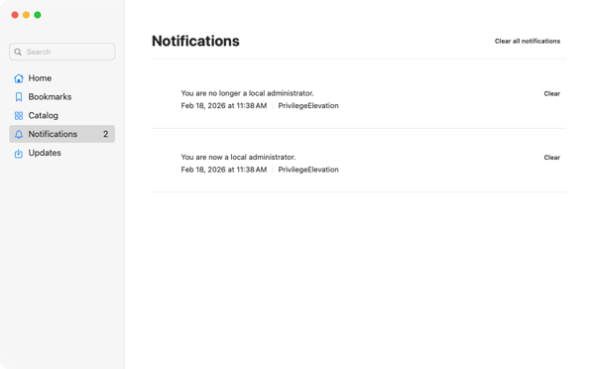
You will be able to see notifications of when privilege elevation began and ended in the Self Service+ app.

This information is also logged to the unified system logs, with documentation on how to gather that data available via the link below:
如有侵权请联系:admin#unsafe.sh