
好的,我现在需要帮用户总结这篇文章的内容,控制在100字以内,而且不需要用“文章内容总结”之类的开头。首先,我得仔细阅读这篇文章,了解它的主要目的和内容。 文章主要介绍了一个叫做SafeUpdater的项目,这是一个为Electron应用设计的安全更新工具。作者在实习期间与Valencia理工大学和Doyensec合作开发了这个工具。文章详细讨论了现有的Electron更新机制的不足之处,比如缺乏对某些类型攻击的防护,然后提出了SafeUpdater作为解决方案。 接下来,我需要提取关键点:SafeUpdater的功能、它解决的问题、以及它的设计特点。比如,它使用Ed25519签名和SHA-512校验来确保更新的完整性和真实性。同时,它还处理了降级攻击、完整性攻击、竞态条件攻击和未测试版本攻击等威胁。 现在我要把这些信息浓缩到100字以内。要确保涵盖项目的目的、主要功能和优势。同时,语言要简洁明了,直接描述内容。 可能的结构是:介绍项目名称、开发背景、解决的问题、主要安全措施以及适用范围。这样可以在有限的字数内传达最重要的信息。 最后检查一下是否符合要求:没有使用特定的开头语句,控制在100字以内,并且准确反映了文章的核心内容。 </think> 文章介绍了SafeUpdater项目,旨在为Electron应用提供更安全的更新机制。通过Ed25519签名验证、SHA-512完整性检查等技术,解决现有更新机制中的降级攻击、完整性攻击等问题,并支持跨平台扩展。 2026-2-16 17:45:26 Author: blog.doyensec.com(查看原文) 阅读量:38 收藏
16 Feb 2026 - Posted by Michael Pastor
Introduction
In cooperation with the Polytechnic University of Valencia and Doyensec, I spent over six months during my internship in a research that combines theoretical foundations in code signing and secure update designs with a practical implementation of these learnings.
This motivated the development of SafeUpdater, a macOS updater vaguely based on the update mechanisms used by Signal Desktop, but otherwise designed as a modular extension.
SafeUpdater is a package designed for MacOS systems, but its interfaces are easily extensible to both Windows and Linux.
Please note that “SafeUpdater” is not intended to be used as a general-purpose package, but as a reference design illustrating how update mechanisms can be built around explicit threat models and concrete attack mitigations.
⚠️ This software is provided as-is, is not intended for production use, and has not undergone extensive testing.
The State of Electron Auto-Updates
A software update is the process by which improvements, bug fixes, or changes in functionality are incorporated into an existing application. This process is crucial for maintaining the security of the app, improving performance, and ensuring compatibility with different systems. Because updates are central to both the maintenance and evolution of software, the update mechanism itself becomes one of the most sensitive points from a security perspective.
In Electron applications, an updater typically runs with full user privileges, downloading executable code from the Internet, and may install it with little or no user interaction. If this mechanism is compromised, the result is effectively a remote code execution channel.
Being one of the most widely used application frameworks for desktop apps, Electron also represents one of the most attractive targets for attackers. While the official framework update mechanism provides a ready-to-use solution for most applications, it doesn’t protect against certain classes of attacks.
Currently, there are two main solutions for implementing an auto-update system in ElectronJS:
autoUpdater
The first is the built-in auto-updater module provided by Electron itself. This module handles the basic workflow of checking if there are updates available, downloading the update, and applying it, using standard HTTP(S) and relying on code signing and framework-specific metadata for file integrity.
One of the simplest ways to use it is with update-electron-app, a Node.js drop-in solution that is based on Electron’s standard autoUpdater method without changing its underlying security assumptions. The following code snippet shows an example of its implementation:
const { updateElectronApp, UpdateSourceType } = require('update-electron-app')
updateElectronApp({
  updateSource: {
    type: UpdateSourceType.StaticStorage,
    baseUrl: `https://my-bucket.s3.amazonaws.com/my-app-updates/${process.platform}/${process.arch}`
  }
})
This module builds on top of Electron’s autoUpdater, providing a higher-level interface:
  autoUpdater.setFeedURL({
    url: feedURL,
    headers: requestHeaders,
    serverType,
  });
electron-updater
The second solution is using Electron-Builder’s electron-updater library, which offers a more integrated approach for managing application updates. When the application is built, a release file named latest.yml is generated, containing metadata about the latest version. These files are then uploaded to the configured distribution target.
The developer is responsible for integrating the updater into the application lifecycle and configuring the update workflow.
Differences between “autoUpdater” and “electron-updater”
| Feature | Electron Official (autoUpdater) |
Electron-Builder (electron-updater) |
|---|---|---|
| Publication server requirement | Requires self-hosted update endpoints | Uses built-in providers (e.g. GitHub Releases) |
| Code signature validation | macOS only | macOS and Windows (custom and OS validation) |
| Metadata and artifact management | Manual upload of metadata and artifacts required | Automatically generates and uploads release metadata and artifacts |
| Staged rollouts | Not natively supported | Natively supported |
| Supported providers | Custom HTTP(S) only | Multiple providers (GitHub Releases, Amazon S3, and generic HTTP servers) |
| Configuration complexity | Higher, especially with a custom server | Minimal configuration |
| Cross-platform compatibility | Platform-specific tools (Squirrel.Mac, Squirrel.Windows) | Unified cross-platform support (Windows, macOS, Linux) |
Now that we have a clear picture of the software update mechanisms available in ElectronJS today, we can shift our focus to two specific threats that are not mitigated by any of the existing open-source solutions. It is worth noting that most of the considerations discussed here are not specific to ElectronJS itself, but apply more broadly to software updaters for desktop applications in general.
At the core of these issues lies a fundamental limitation of modern operating systems: the lack of a reliable, built-in mechanism to fully validate the integrity of the software currently running on the system. While macOS, thanks to its relatively closed ecosystem, does provide native capabilities such as code signing and notarization to help verify software integrity at runtime, this is not the case on Windows. As a result, Windows applications cannot rely on the operating system alone to assert that the updater or the application binary has not been tampered with.
Because of this gap, software updaters must implement additional safeguards and workarounds to compensate for the missing integrity guarantees. These compensating controls are often complex, error-prone, and inconsistently applied across projects, which ultimately leaves room for entire classes of attacks that remain unaddressed even in the most popular desktop applications.
The Missing Threats
In all software updater implementations, the following assets are considered critical and must be protected:
- Update Binary: The new version of the application to be installed
- Update Manifest: Contains metadata such as version number, hashes, and file locations
- Signing Keys: Cryptographic keys used to sign update binaries and manifests
- Distribution Channel: The method used to deliver updates to the client (e.g., a dedicated update server, an S3 bucket, or a CDN).
In this post, we focus only on the threats that are not mitigated by the default ElectronJS software update mechanisms. In fact, given the absence or limited capabilities around software integrity checks at the OS level, the following threats remain unaddressed:
Attacks Summary
| Threat | Attack Vector | Threat Actor | Potential Impact |
|---|---|---|---|
| Downgrade (Rollback) Attack | Manipulation of update manifest or version metadata to serve older releases | Malicious third party, MITM (Man-in-The-Middle), compromised server | Reintroduction of known vulnerabilities |
| Integrity Attack | Tampering with update binaries, installers, or metadata | MITM (Man-in-The-Middle), compromised CDN, update server, or build pipeline | Arbitrary code execution |
| Race Condition Attack | Replacing verified update files between verification and installation | Local attacker with system access | Execution of malicious code, privilege escalation |
| Untested Version Attack | Serving signed but non-production (alpha/beta/dev) builds via update channel | Malicious third party, MITM (Man-in-The-Middle), insider threat | Exposure to unreviewed features, debug functionality, or new vulnerabilities |
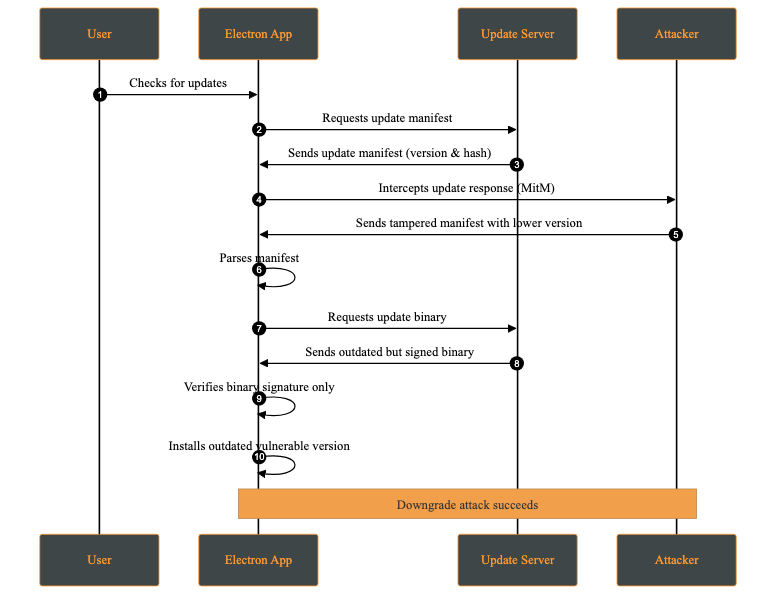
1- Downgrade (Rollback) Attack
A downgrade attack occurs when an attacker forces the application to install an older, vulnerable version instead of the latest secure release. This may happen by compromising the update server, or intercepting via a MITM (Man-in-The-Middle) attack and modifying the update manifest to offer a lower version.
The attacker’s objective is to reintroduce previously fixed vulnerabilities by deploying an outdated version of the application. Once installed, the attacker can exploit these known weaknesses.
Attack Steps:
- The attacker manipulates the update mechanism to force the application to download and install an older, vulnerable version (Downgrade Attack).
- A version is selected where known security flaws remain unpatched.
- After installation, the attacker exploits a known vulnerability to compromise the system.
2- Integrity Attack
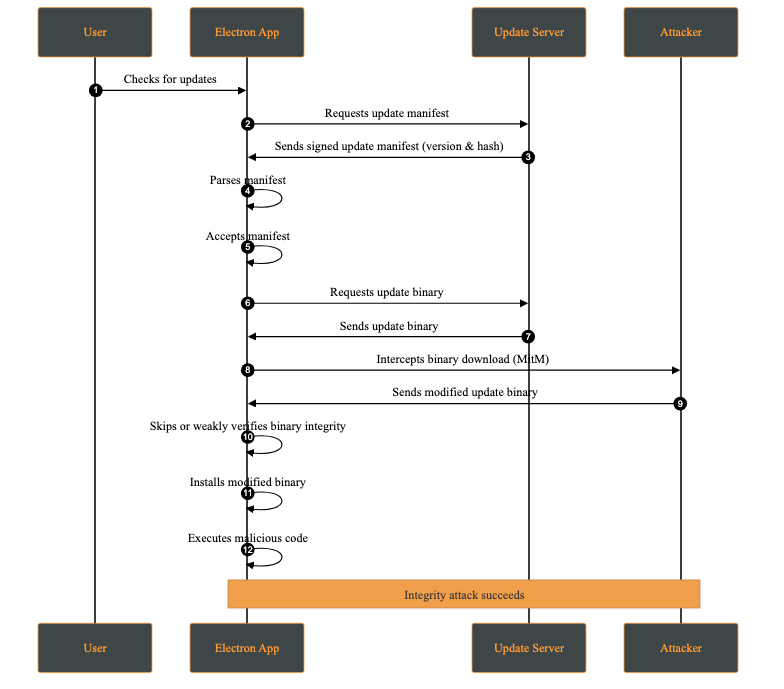
An integrity attack involves the unauthorized modification of update artifacts, such as binaries, installation packages, or metadata, either at rest or during transmission. The attacker’s goal is to have the system execute altered code while believing it originates from a trusted source.
Attack Steps:
- The attacker modifies the update package or metadata through a compromised distribution channel (e.g., CDN, update server, or build pipeline), or via a MITM attack in the absence of proper transport security.
- The client downloads the modified update, assuming it is legitimate.
- The altered package is installed and executed.
- The attacker gains arbitrary code execution.
3- Race Condition Attack
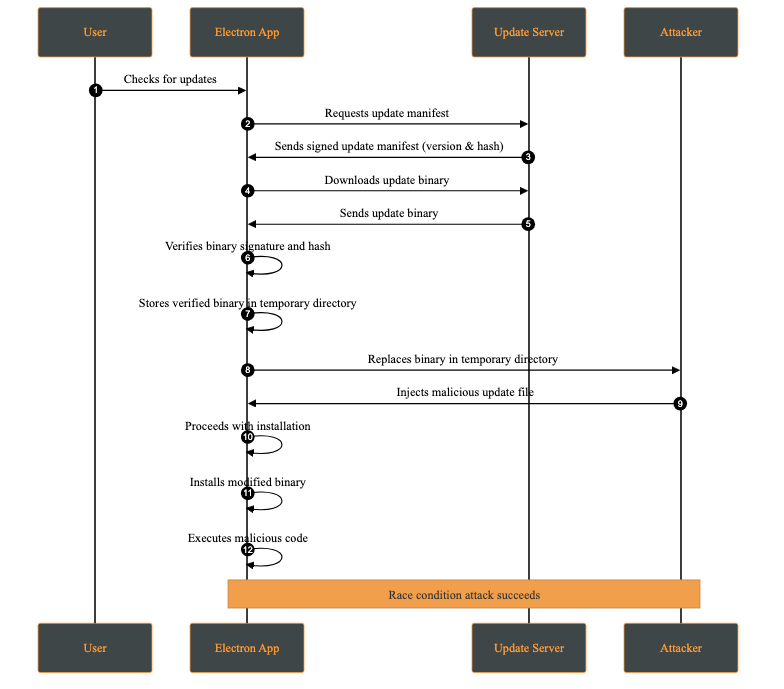
A race condition attack occurs when multiple processes access and modify shared resources concurrently, and the final outcome depends on the timing of those operations. In the context of software updates, this may allow an attacker with local access to replace or modify update files between verification and installation.
This attack requires the attacker to have access to the victim’s machine. While this may appear unlikely, multi-user systems or shared environments make this a realistic threat.
A practical case occurs when the attacker has access to the temporary directory where the update files are stored. This attack is possible whenever signature verification and update application are not performed atomically on the same file descriptor.
Attack Steps:
- The application downloads the update to a temporary directory.
- The update’s signature and hash are verified.
- Before installation, the attacker replaces the verified file with a malicious one.
- The application attempts to apply the modified update.
4- Untested Version Attack
An untested version attack occurs when an attacker causes the client to install a development, pre-production, or experimental version of the application (e.g., alpha or beta) instead of a stable production release. This typically occurs when development and production releases are not cryptographically separated, for example when the same signing keys or update channels are shared across environments.
Although such versions may be signed, they often contain unreviewed features, experimental dependencies, or debug functionality that introduces new vulnerabilities.
Attack Steps:
- The attacker intercepts the update request.
- A signed but non-production version is served.
- The client installs the update without distinguishing between environments.
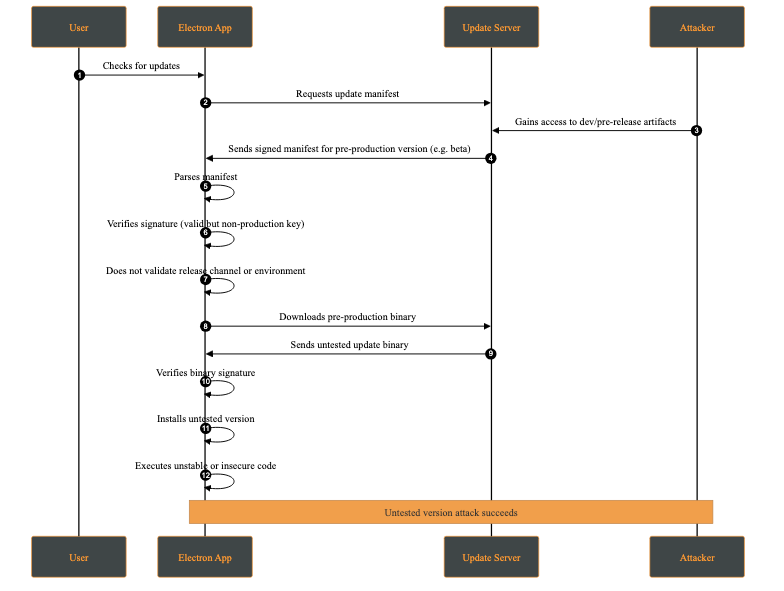
This behavior makes the client fail to distinguish between production and non-production releases at a cryptographic or policy level.
SafeUpdater
Our SafeUpdater is built around a set of core security mechanisms designed to protect the update process against the impact of attacks such as downgrade attacks, integrity violations, man-in-the-middle interference, and local race conditions. Each mechanism addresses a specific set of threats identified in the threat model.
The updater is designed to integrate with Electron Builder for application builds; however, this integration is optional, as the manifest can be generated independently.
1. Ed25519 Signature Verification
All update components are cryptographically signed using Ed25519, a modern elliptic-curve signature known for its strong security guarantees. By verifying signatures using a public key embedded in the application, SafeUpdater ensures that update manifests and binaries are from a trusted source and haven’t been tampered with. Any modification to a signed file makes the signature check fail, causing the update to be rejected.
The deterministic message signing is composed of:
This prevents unauthorized downgrade attacks by cryptographically binding the update to a specific version identifier.
Once the update asset is received, a signing message is generated. This message will later be used to verify the corresponding signature file:
async function generateMessage(updatePackagePath, version) {
  const hash = await _getFileHash(updatePackagePath);
  const messageString = `${Buffer.from(hash).toString('hex')}-${version}`;

  return Buffer.from(messageString);
}
After generating the message, it is compared against the signature provided alongside the update file. The verification uses the public key associated with the application’s signing infrastructure. If the signature does not match, the update is rejected, preventing malicious modifications from being applied:
export async function verify(publicKeyBuffer, messageBuffer, signatureBuffer) {
  return ed.verify(signatureBuffer, messageBuffer, publicKeyBuffer);
}
2. SHA-512 Integrity Checks
In addition to signature verification, SafeUpdater checks the SHA-512 hash on the downloaded update binaries. The expected hash is stored in the signed update manifest and compared against the hash of the downloaded file. This layered approach ensures end-to-end integrity, protects against accidental corruption as well as intentional binary tampering during transmission or storage.
// Verify file integrity
const computedHash = createHash('sha512').update(fileContents).digest('base64');
if (computedHash !== expectedSHA512) {
  throw new Error('Integrity check failed');
}
3. Immutable Version Manifests
Update metadata is distributed through an immutable version manifest that describes available releases, including version numbers, file locations, and cryptographic hashes. Since these manifests are signed, this prevents manifest tampering if the attacker is trying to reintroduce vulnerable versions or pointing them to a malicious location.
4. Secure Temporary File Handling
To mitigate local attacks such as race conditions (TOCTOU vulnerabilities), SafeUpdater stores temporary update files in restricted directories with owner-only permissions. Verification and installation operate on the same file path, which limits opportunities for tampering. However, these steps are not fully atomic (for example, they do not verify and install using the same file descriptor), so complete elimination of time-of-check to time-of-use risks is not guaranteed.
Update Flow Overview
SafeUpdater ensures secure and reliable updates for Electron applications. This update lifecycle follows a structured process from version check to installation:
1. Start & Scheduling
- The application schedules periodic polling for updates
- An initial update check is triggered immediately on launch
2. Checking for Updates
- Fetch the manifest from the server
- Verify the manifest’s signature to ensure authenticity
- Parse available versions, and if downgrades are allowed, show a version selection UI
- Fetch the metadata for the selected version
- Download and verify the metadata signature
- Parse metadata to extract files, SHA-512 hashes and vendor-specific information
- Return the update information or determine no update is needed
- If explicitly enabled by the developer for operational or recovery purposes, a controlled version selection UI is presented to allow authorized downgrades
3. Downloading Updates
- Check the cache for existing update files
- Verify cached files using SHA-512 hashes
- If needed, download update files from the server:
- Update package (ZIP or DMG)
- Signature file
- Write files to a temporary directory with write permissions only for the owner
- Return update file path and signature for verification
4. Verifying Signatures
- Load the public key from configuration
- Compute a SHA-256 hash of the update file
- Construct a signature message:
${sha256Hex}-${version} - Verify the Ed25519 signature against the message
- Reject the update if the signature is invalid
5. Installing the Update
- Determine whether installation is silent or interactive
- Call platform-specific installUpdate() logic:
- macOS: write feed JSON and trigger autoUpdater
- Wait for user confirmation or automatically apply the update
- Restart the application with the new version
Configuration
SafeUpdater is highly configurable through environment-based JSON files using the config package.
The primary configuration file config/default.json includes the following settings:
1. updatesPublicKey (required)
The Ed25519 public key used to verify update signatures. This key must be hex-encoded (64 hex characters).
{
  "updatesPublicKey": "<..>"
}
Note: You can generate the key using the
generateKeys.jsscript from thetoolsfolder:
node tools/generateKeys.js  # Outputs public.key
cat public.key
2. updatesUrl (required)
The base URL for your update server. SafeUpdater constructs paths for manifests and binaries automatically:
{
  "updatesUrl": "https://updates.yourcompany.com"
}
Path construction examples:
Releases manifest: ${updatesUrl}/releases/versions.json
Version metadata: ${updatesUrl}/releases/${version}/${version}.yml
Update binaries: ${updatesUrl}/releases/${version}/${filename}
3. updatesEnabled (required)
A master switch for the update system:
{
  "updatesEnabled": true
}
Provide a PEM-encoded X.509 certificate for TLS validation. This is useful for self-signed certificates during development or as part of a certificate pinning strategy in production.
{
  "certificateAuthority": "-----BEGIN CERTIFICATE-----\nMIIDXTCCAkWgAwIBAgIJAKL...\n-----END CERTIFICATE-----"
}
5. allowInsecureTLS (optional, default: false)
Disables TLS certificate validation.
{
  "allowInsecureTLS": true
}
Warning: Never use this in production! Only for development environments with self-signed certificates.
6. downgradeEnabled (optional, default: false)
Enables the ability to roll back to a previous version of the app.
{
  "downgradeEnabled": true
}
Allows cryptographically verified downgrades and enforces a minimum version to prevent unsafe rollbacks.
Update Server
For debugging purposes only, we have developed a set of tools under the /tools folder, which provides all tools required to generate the Ed25519 key pairs, sign release artifacts, and produce signed manifests.
This repository allows developers to:
- Generate a long-term Ed25519 key pair for signing releases.
- Sign all application binaries, metadata, and manifest files.
- Organize and host updates in a structured release directory, ensuring the updater can verify both the signature and integrity of every file.
- Run a development HTTPS server to safely test update delivery before production.
By following the two-step process below, SafeUpdater ensures that end users only receive verified, unmodified updates, protecting against downgrade attacks, tampering, or malicious binaries.
1. Sign Version Manifest & Files
Sign release artifacts after building your application using electron-builder. It is crucial to sign every artifact that will be downloaded or trusted by the updater.
# Sign ZIP file
node tools/sign.js /path/to/my-app-2.0.0-mac.zip "2.0.0"

# Sign DMG file
node tools/sign.js /path/to/my-app-2.0.0.dmg "2.0.0"

# Sign YAML metadata
node tools/sign.js /path/to/2.0.0.yml "2.0.0"
2. Server Deployment
For local testing, you can serve updates over HTTPS using a self-signed certificate.
server.py:
from http.server import HTTPServer, SimpleHTTPRequestHandler
import ssl

port = 443

httpd = HTTPServer(('0.0.0.0', port), SimpleHTTPRequestHandler)
httpd.socket = ssl.wrap_socket(
    httpd.socket,
    keyfile='key.pem',
    certfile='server.pem',
    server_side=True
)

print(f"Server running on https://0.0.0.0:{port}")
httpd.serve_forever()
This server is intended strictly for development and testing purposes. In production, deploy behind a properly secured, scalable, and monitored infrastructure.
Conclusion
Even when using modern and widely adopted frameworks, software update mechanisms must compensate for several shortcomings introduced by the underlying operating systems themselves. These limitations place a non-trivial burden on application developers, who are often forced to re-implement critical security guarantees that should ideally be enforced at the platform level.
This project set out to analyze the current limitations of software update mechanisms in ElectronJS and to propose a safer alternative to the approaches commonly used today. By providing strong cryptographic guarantees and a well-defined, transparent update flow, our reference implementation (SafeUpdater) aims to reduce the attack surface associated with software updates and to make secure design choices the default rather than an afterthought. In doing so, it allows developers to focus on building application features without compromising on update security.
SafeUpdater was developed as part of my university thesis at the Polytechnic University of Valencia and during my internship at Doyensec. While the project would still require extensive performance evaluation, security auditing, and real-world testing before being considered production-ready, we believe it offers a solid foundation and a practical starting point for building more robust and trustworthy software update mechanisms for ElectroJs-based applications.
如有侵权请联系:admin#unsafe.sh