TL;DR You can get the chrome extension on the Chrome WebStore.
Earlier this week I wanted to see how much I've spent on uber across my roughly 4 years on the platform. I realized there was no easy way to do this. One option would be to go through my bank statements, but I have used a ton of different cards over the years. I could connect all my accounts to a service like Mint and search for it there, but that was time consuming and cumbersome. The goal would be to have a first party solution provided by uber, but no such service exists.
I started poking around Uber's rides website. It was surprisingly rich in data - it provided cost, start and end times, distance, and more. I wanted to see how they were getting the data. If they were server side rendering it then it would be significantly harder to scrape it and it would remove the possibility of interesting data that was returned but not used in the front end. Fortunately for us they just had a getTrips endpoint. The endpoint was a POST request to:
https://riders.uber.com/api/getTripsForClient
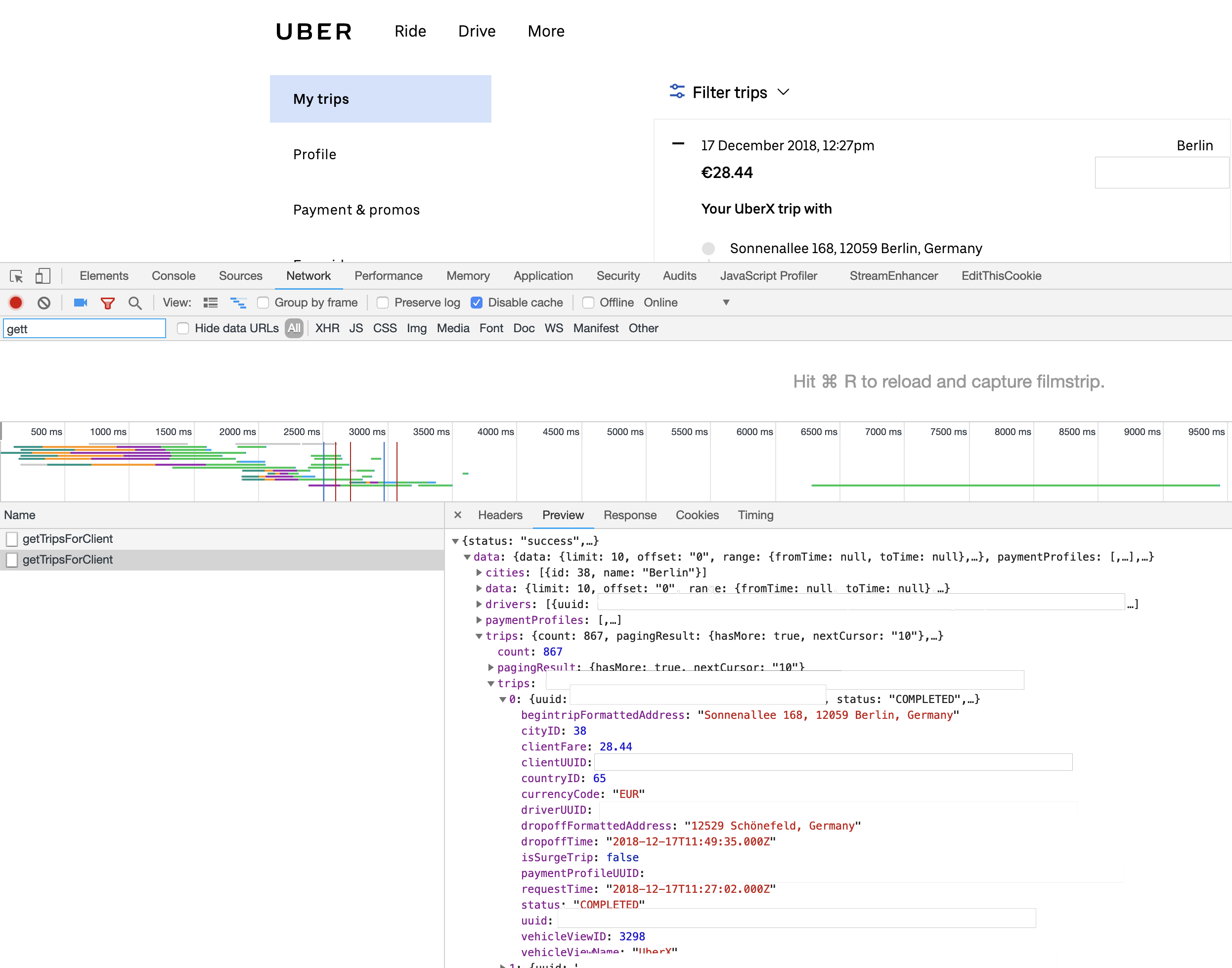
Uber network request
The response from the API
From there I could just start make the XMLHTTPRequest from any JavaScript file injected into the page. The best way to do that (and have it be easily deployed and installable) was a chrome extension.
I tried it at first and kept getting Unauthorized errors. I realized that the request was missing the CSRF token. However, since this was a Chrome Extension running code in the same context as the page, and since it had full access to the DOM, I could just retrieve it and pass it along. Fortunately it was stored in a <script> tag at the very beginning of the HTML, with id=__CSRF_TOKEN__. I took this token, added it as a header, and the API began replying back succesfully.
if (!csrf) {
  let text = $("#__CSRF_TOKEN__").text();
  csrf = text.replace(/\\u0022/g, ''); //Strip unicode quotes
}

$.ajax({
  method: 'POST',
  url: TRIP_ENDPOINT,
  data: {
    "tripUUID": tripUUID
  },
  headers: {
    "x-csrf-token": csrf
  },
  ...
}
Their API returns a maximum of 50 results per query, so I simply make the first one and then call it NUM_TOTAL / 50 times more.
if (trips.pagingResult && trips.pagingResult.hasMore && isFirstRun) {
  // Request all results in increments of MAX_LIMIT until we've reached the total amount of trips
  let next = MAX_LIMIT;
  while (next < trips.count) {
    requestDataFromUber(csrf, MAX_LIMIT, next, false);
    next += MAX_LIMIT;
  }
}
A trip data element looks like:
{
  "uuid": "redacted",
  "status": "COMPLETED",
  "clientUUID": "redacted",
  "driverUUID": "redacted",
  "paymentProfileUUID": "redacted",
  "cityID": 38,
  "countryID": 65,
  "vehicleViewName": "UberX",
  "vehicleViewID": 3298,
  "clientFare": 28.44,
  "currencyCode": "EUR",
  "isSurgeTrip": false,
  "begintripFormattedAddress": "Sonnenallee 168, 12059 Berlin, Germany",
  "dropoffFormattedAddress": "12529 Schönefeld, Germany",
  "requestTime": "2018-12-17T11:27:02.000Z",
  "dropoffTime": "2018-12-17T11:49:35.000Z"
}
However the trip data returned didn't include some information, such as the full receipt, car information, or the map.
Further investigation lead to an endpoint where you can query information about a specific trip.
https://riders.uber.com/api/getTrip
This endpoing took a POST request with a body containing the uuid from the request above. It contained the following extra fields.
{
  "tripMap": {
    "url": "<maps.google.com link from start to finish>",
    "mapType": "UBER",
    "mapTypeCompatible": true
  },
  "receipt": {
    "car_label": "Switching Option",
    "distance": "14.23",
    "distance_label_short": "km",
    "trip_time_label": "Trip time",
    "distance_label": "kilometers",
    "car_make": "Toyota",
    "duration": "19 min",
    "vehicle_type": "UberX",
    "car_make_label": "Make"
  }
}
Unfortunately the "Split Payment" wasn't returned as JSON, it was a server side rendered HTML blob. I could scrape it but did not think it would be worth the effort - plus, it would be an additional API call that slowed down the initial data collection.
This was now enough data to start running some queries. I wanted to visualize this on a page, so I built out a page that would receive the data and iterate over it to create a few graphs and populate some stats, such as how much you've spent in every currency.
// $ spent stats
$("#total-payment").text("$" + totalAcrossAllCurrencies.toFixed(2));
let totalSpentText = "";
let currencyKeys = getSortedKeysFromObject(totalSpent, true);
for (const key of currencyKeys) {
  let currencySymbol = getSymbolFromCode(key);
  totalSpentText += `<span className={"subheading"}>${key}</span><span className={"stat"}> ${
    currencySymbol + totalSpent[key].toFixed(2)
  }</span><br />`;
}
$("#total-spent").html(totalSpentText);
Using that data I made UberStats (source code here), which is live on the Chrome Web Store here.
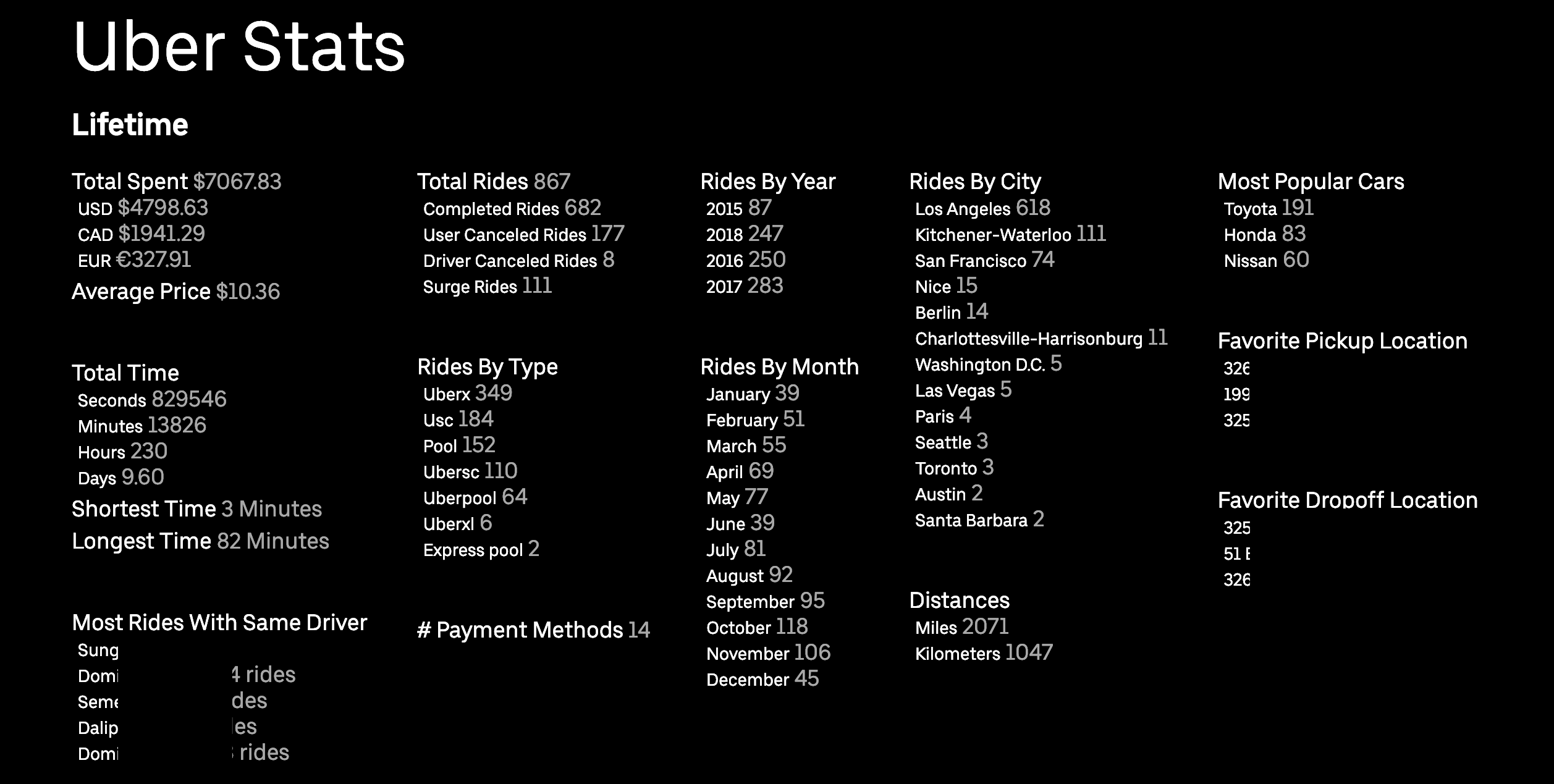
Uber stats
Stats (personal info redacted) on my uber history
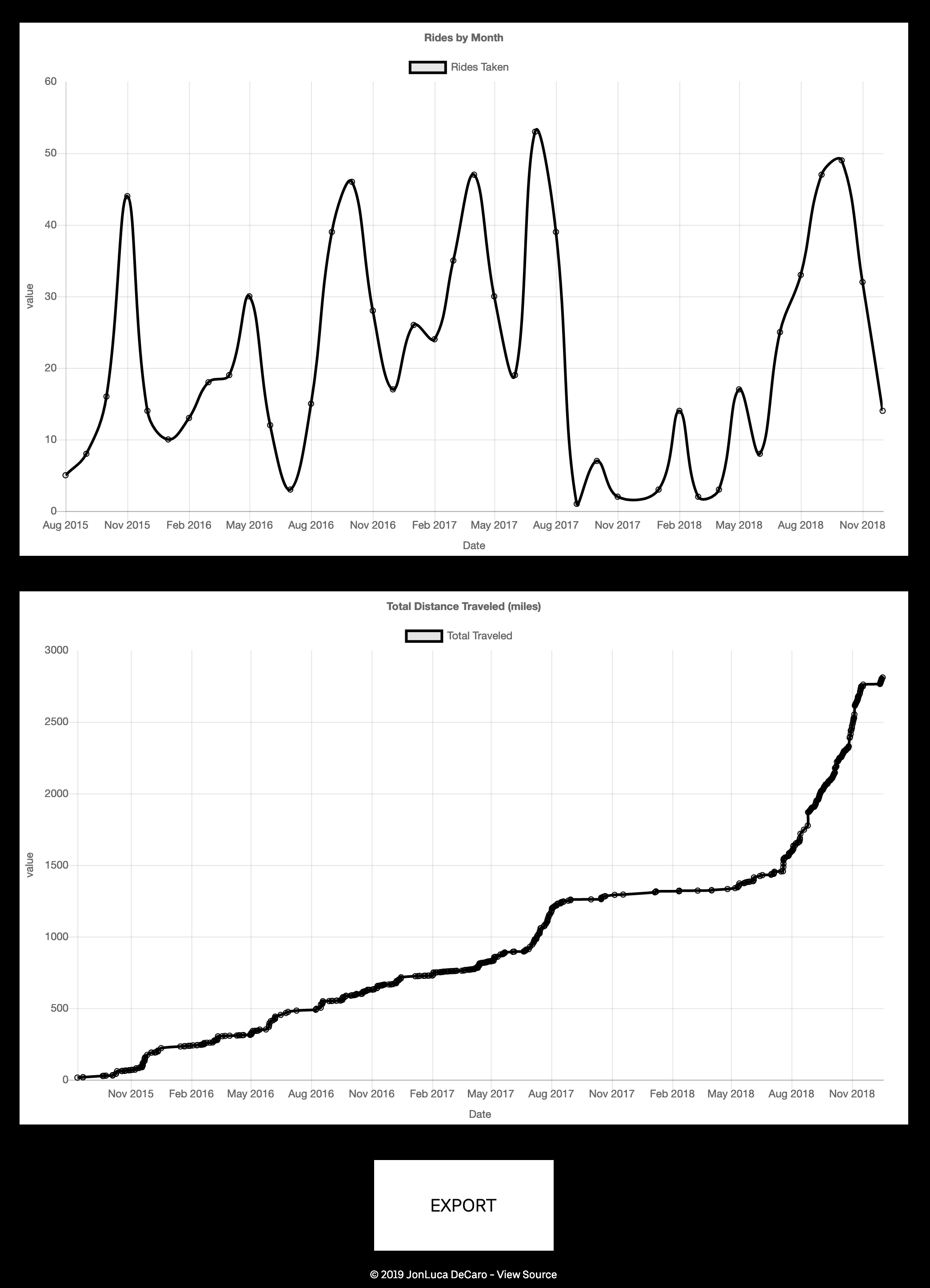
Uber stats graph
Graphs of months I've taken Ubers
You can get it here.