好的,我现在需要帮用户总结一篇文章的内容,控制在100字以内,并且不需要特定的开头。首先,我得仔细阅读文章,理解其主要内容。 文章主要讲的是微软发布了一个名为Copilot Studio的扩展,适用于Visual Studio Code(VS Code)。这个扩展允许开发者直接在VS Code中构建和管理Copilot Studio代理。微软提到这个扩展支持将代理定义拉取到本地工作区,进行修改,并与云端版本比较,还支持通过Git进行版本控制和集成到部署管道中。此外,它还集成了AI编码助手,如GitHub Copilot和Claude Code。该扩展免费提供,并已被下载超过13,000次。 接下来,我需要将这些信息浓缩成100字以内的总结。要抓住关键点:发布扩展、功能、支持的工具、集成以及下载情况。 可能会这样组织语言:“微软推出Copilot Studio扩展,集成至VS Code,支持开发者构建、管理和版本控制AI代理,并与GitHub Copilot等AI助手协作。该免费工具已获1.3万次下载。” 这样既涵盖了主要功能,又提到了下载量和集成工具。 检查一下字数是否符合要求,并确保没有遗漏重要信息。看起来已经涵盖了所有关键点,并且简洁明了。 </think> 微软推出Copilot Studio扩展,集成至VS Code,支持开发者构建、管理和版本控制AI代理,并与GitHub Copilot等AI助手协作。该免费工具已获1.3万次下载。 2026-1-15 19:15:58 Author: www.bleepingcomputer.com(查看原文) 阅读量:0 收藏
Microsoft announced that the Copilot Studio extension for the Visual Studio Code (VS Code) integrated development environment is now available to all users.
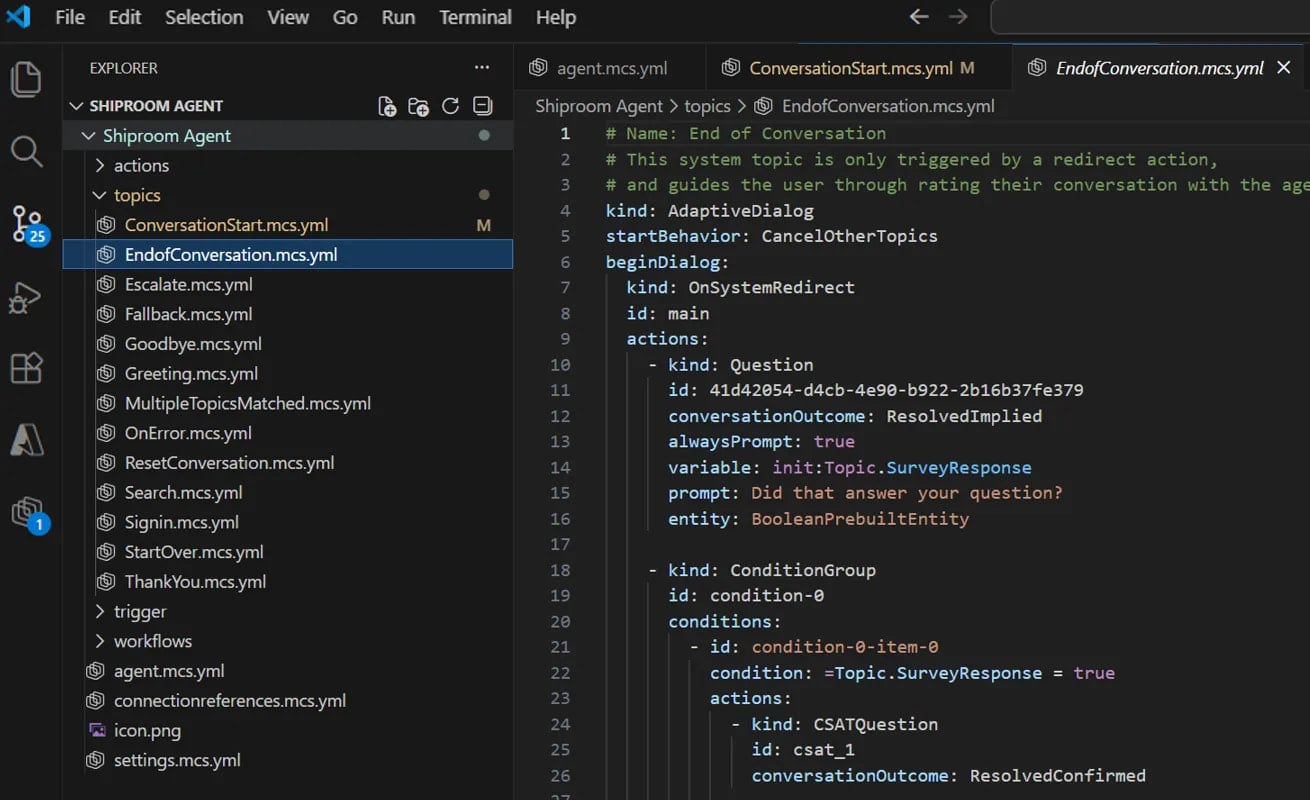
Developers can use it to build and manage Copilot Studio agents directly from VS Code using standard software development workflows.
The VS Code cross-platform code editor is used by a large number of developers worldwide to write and review code, with Git integration and support for CI/CD pipelines.

It comes with support for extensions that extend the core capabilities of the IDE, such as more integration choices for tools and services, or modification and customization options.
The Copilot Studio extension enables developers to treat Copilot Studio agents as code, integrating them into the development workflow.
Microsoft says that opens up the following capabilities:
- Developers can pull the full agent definition from Microsoft Copilot Studio into a local workspace, making the full context of the agent available.
- Agent components can be modified in VSCode using a structured definition format; IDE features like syntax highlighting and IntelliSense-style completion are available to reduce errors.
- Changes can be previewed and compared against the cloud version, helping teams resolve conflicts and avoid overwriting each other’s work.
- Updates are synced to the cloud to test agent behavior and evaluate iterations
- Agent definitions can be versioned in Git and integrated into standard deployment pipelines, allowing agents to move through environments with the same rigor as code.
Source: Microsoft
Microsoft says that the extension is designed for development teams managing complex or collaborative agent projects, supporting standard Git integration, request-based review pulling, modification history, and commonly used keyboard shortcuts.
It also integrates with AI coding assistants such as GitHub Copilot and Claude Code, enabling faster drafting, updating, and troubleshooting of agent definitions.
The Copilot Studio extension is available for free on the VSCode Marketplace and has already been downloaded more than 13,000 times.
In July 2025, Microsoft announced that it would open-source the GitHub Copilot Chat extension for VS Code, giving the developer community access to the full implementation of the chat-based coding assistant, including the "agent mode."
While the two serve different purposes, as Copilot Chat focuses on AI-assisted coding inside the editor, while Copilot Studio targets the development and lifecycle management of AI agents, both moves reinforce VSCode’s role as Microsoft’s primary surface for AI-driven development workflows, moving away from browser-centric AI tools.

7 Security Best Practices for MCP
As MCP (Model Context Protocol) becomes the standard for connecting LLMs to tools and data, security teams are moving fast to keep these new services safe.
This free cheat sheet outlines 7 best practices you can start using today.
如有侵权请联系:admin#unsafe.sh