本文探讨了安全运营中心(SOC)面临的挑战及解决方案。通过自动化技术处理重复任务,提升效率并减少误报。AI驱动的决策使威胁检测更精准。推荐工具如VMRay DeepResponse和Splunk SOAR助力高效运营。未来趋势强调人机协作,提升整体安全性。 2026-1-12 17:25:1 Author: www.vmray.com(查看原文) 阅读量:6 收藏
Another Monday morning in the SOC. You’ve got 3,000 alerts waiting in the queue, half your team is burned out, and that critical vulnerability patch still needs validation. Sound familiar?
If you’re reading this, you already know the problem. What you need are the solutions that actually work—not marketing promises, but tools that cut through alert fatigue and help your team focus on real threats.
Here’s what we’ll cover: what SOC automation actually means in 2026 (spoiler: it’s not your 2023 playbook anymore), the evolution toward AI-driven operations, the best tools on the market right now, and how to pick the right fit for your environment without adding more complexity to your stack.
What Is SOC Automation (And Why It Matters More Than Ever)
SOC automation is about using technology to handle the repetitive, time-consuming tasks that drain your analysts’ energy. We’re talking alert triage, threat enrichment, indicator lookups, containment actions, and report generation—the stuff that’s important but doesn’t require human creativity or judgment.

But here’s the thing: automation isn’t just about saving time anymore. In 2026, it’s about survival.
Recent research shows that the average SOC analyst receives over 4,000 alerts per day, but only has time to investigate about 10% of them. That means 90% of your alerts get ignored, delayed, or triaged by exhausted humans at 2 AM. What could possibly go wrong?
The numbers tell the story. Organizations with mature SOC automation capabilities reduce their mean time to respond (MTTR) by up to 90%. They also see dramatic drops in false positives, better analyst retention (because nobody wants to manually pivot through the same phishing campaign for the 500th time), and improved threat detection rates.
SOC Automation 2.0: The AI Evolution in Security Operations
Traditional SOC automation relied on if-this-then-that logic. Alert comes in, playbook runs, action happens. Simple, right? Except real threats don’t follow scripts.
Enter SOC Automation 2.0—the shift from rule-based playbooks to AI-driven decision-making that adapts to what it sees.
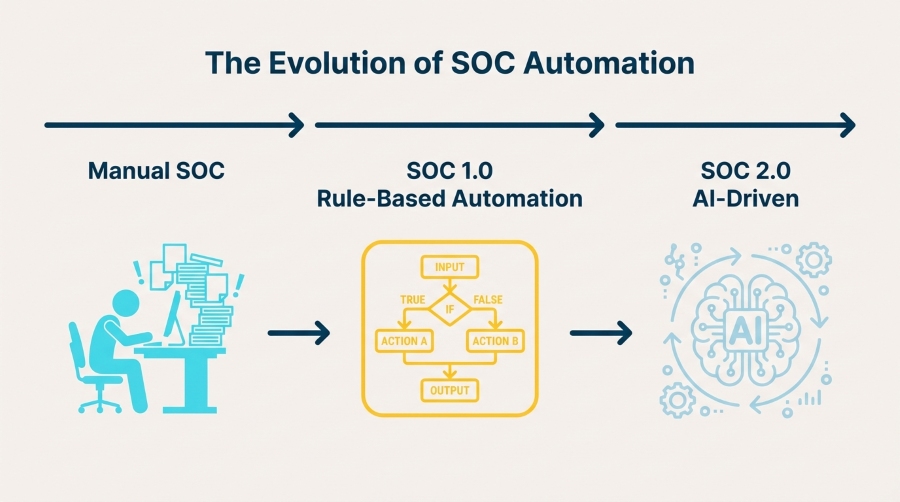
How AI Changes the Game
In 2026, AI isn’t just helping with alert triage (though it does that brilliantly). Modern AI-powered SOC platforms can:
- Distinguish signal from noise: Machine learning models trained on millions of security events can spot subtle patterns that human analysts miss—and ignore the junk that wastes their time
- Adapt to new threats: Instead of waiting for someone to write a new detection rule, AI systems learn from behavioral patterns and flag anomalies automatically
- Provide context at speed: AI enrichment pulls together threat intelligence, historical data, and environmental context in seconds, not hours
- Take autonomous action: The latest agentic AI platforms don’t just recommend responses—they execute containment, quarantine hosts, and block malicious traffic based on verified evidence
What separates hype from reality? Look for platforms that can explain their decisions. If an AI system can’t show you why it flagged something or what evidence it used, you’re flying blind.
The Benefits of SOC Automation (Beyond the Obvious Time Savings)
Let’s talk outcomes. Why should you care about SOC automation beyond the “it makes life easier” pitch?
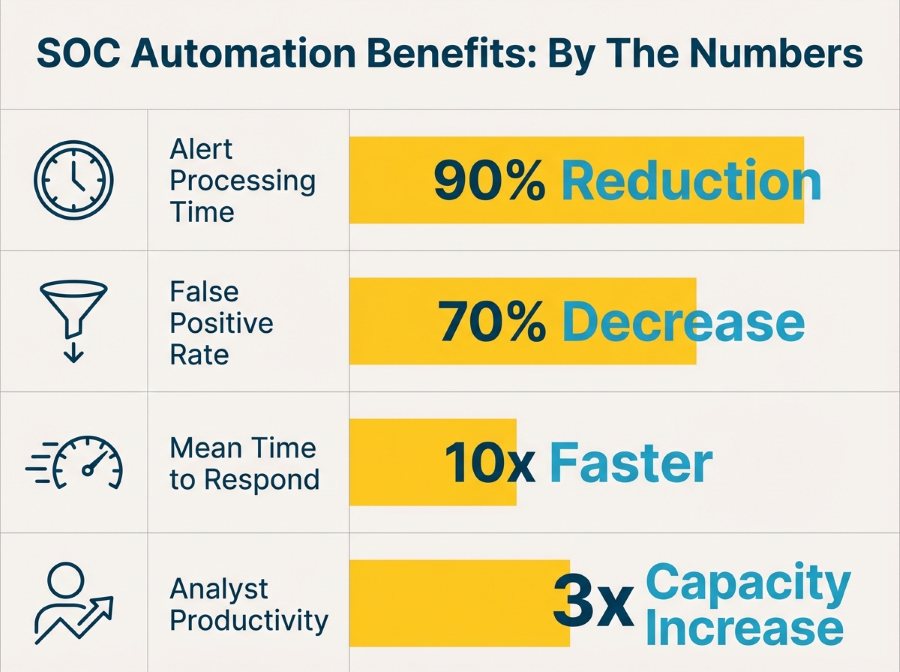
Faster Detection and Response
Threats move fast. According to IBM’s latest data breach report, the average time to identify and contain a breach is still over 200 days. That’s unacceptable. Automation cuts that window dramatically by handling initial triage, enrichment, and containment actions the moment a threat is detected—not when an analyst gets around to it.
Better Use of Analyst Time
Your analysts didn’t train in cybersecurity to copy-paste IOCs into VirusTotal. They want to hunt threats, investigate complex attacks, and build better defenses. Automation handles the grunt work so they can focus on what actually requires human intelligence and creativity.
Consistent, Repeatable Processes
Human analysts have bad days. They get tired, distracted, or overwhelmed. Automation doesn’t. Every alert gets the same thorough investigation, every threat gets the same rapid response, and every incident follows the same documented process. That consistency matters when you’re trying to demonstrate compliance or explain your security posture to the board.
Scalability Without Burnout
You can’t hire your way out of the cybersecurity talent shortage (believe me, everyone has tried). But you can multiply your existing team’s capacity by automating the repetitive parts of their workflow. One analyst with good automation can handle what used to require three people working overtime.
Proactive Security Posture
The best defense? Staying ahead of threats before they become incidents. Automated threat intelligence continuously enriches your environment with fresh IOCs, behavioral signatures, and attack patterns, turning blocked alerts into actionable insights that strengthen your entire security stack.
Best SOC Automation Tools in 2026
Now for what you came here for. These are the tools that SOC teams actually use—not the ones that just look good in demos.
1. VMRay DeepResponse
Let’s start with what we know best. VMRay DeepResponse is built for SOC and CERT teams that need deep malware analysis and threat intelligence without slowing down their incident response workflow.
What it does:
- Advanced dynamic analysis that stays invisible to evasive malware (no more “this sample detected a sandbox and went to sleep”)
- Automated IOC extraction with noise filtering—only the artifacts that matter
- Complete behavioral analysis mapped to MITRE ATT&CK framework
- API-first architecture that plugs directly into your SIEM, SOAR, or TIP
Why it matters:
When you’re investigating a suspicious file or URL, you don’t have time to wait 30 minutes for analysis results. DeepResponse delivers complete threat context in minutes, with up to 90% reduction in manual analysis time. The sandbox technology VMRay uses is agnostic—it monitors execution without relying on signatures or heuristics, which means it catches zero-days and polymorphic threats that other tools miss.
Best for: Malware analysis, phishing investigation, incident response acceleration, and feeding high-quality data into your automation workflows.
2. VMRay UniqueSignal
Speaking of high-quality data—if you’re building AI-driven automation or training machine learning models, the quality of your threat intelligence determines everything.
VMRay UniqueSignal is a threat intelligence feed built from actual malware behavior, not just hashes and domains scraped from public sources. Every indicator comes with deep context: what the malware did, what techniques it used, what families it belongs to, and why it matters.
What makes it different:
- Behavioral indicators that work even when malware morphs
- Automated daily updates from real sandbox analysis
- Low false positive rates (because it’s based on execution, not guesses)
- Ready for automation—structured data that your SOAR or SIEM can actually use
Best for: Threat intelligence platforms, SIEM enrichment, proactive threat hunting, and training AI models on reliable data.
3. Splunk SOAR
Splunk SOAR (formerly Phantom) is the gorilla in the SOAR space. If you’re already running Splunk Enterprise Security, SOAR is a natural extension that orchestrates actions across your entire security stack.
Strengths:
- Massive integration library (1,000+ apps and connectors)
- Playbook marketplace with pre-built workflows
- Visual playbook editor that doesn’t require coding
- Strong community support
Trade-offs: Complex to implement at scale, licensing can get expensive, and you’ll likely need dedicated resources to maintain playbooks.
Best for: Large enterprises with diverse security stacks and dedicated SOC automation teams.
4. Palo Alto Cortex XSOAR
Cortex XSOAR brings orchestration, case management, and threat intelligence into one platform. It’s particularly strong if you’re already invested in the Palo Alto ecosystem.
Strengths:
- Incident management built in (not just automation)
- Threat Intelligence Management module included
- ML-powered playbook recommendations
- Strong focus on analyst collaboration features
Trade-offs: Can feel overwhelming to set up, steep learning curve for playbook development.
Best for: Mid-to-large SOCs looking for an all-in-one platform with strong case management.
5. Microsoft Sentinel
If you’re running Microsoft infrastructure (and let’s face it, most organizations are), Sentinel makes a lot of sense. Native integration with Microsoft 365, Azure AD, and Defender creates powerful automation possibilities.
Strengths:
- Cloud-native architecture (no infrastructure to manage)
- Automated threat detection with built-in ML
- Logic Apps for workflow automation
- Cost scales with actual usage
Trade-offs: Less flexible than dedicated SOAR platforms, automation capabilities aren’t as mature as standalone tools.
Best for: Microsoft-heavy environments, cloud-first organizations, and teams that want fast time-to-value without complex deployments.
6. Swimlane
Swimlane has carved out a niche as the low-code automation platform that security teams can actually use without needing a development team.
Strengths:
- Drag-and-drop automation builder
- Strong focus on case management and reporting
- Good balance between power and usability
- Flexible deployment options (cloud, on-prem, hybrid)
Best for: Mid-size SOCs that want powerful automation without the complexity overhead of enterprise platforms.
7. Torq
Torq represents the newer generation of security automation platforms built cloud-first with a focus on developer-friendly workflows.
Strengths:
- Modern API-first architecture
- No-code and full-code options side by side
- Fast deployment and time-to-value
- Strong workflow versioning and testing capabilities
Best for: Forward-thinking SOCs comfortable with modern DevOps practices and API-driven integrations.
8. Radiant Security
Radiant Security brings agentic AI to SOC automation with a focus on autonomous investigation and response.
Strengths:
- AI agents that handle end-to-end incident investigation
- Human-in-the-loop design for sensitive decisions
- Strong explainability features
- Purpose-built for SOC workflows
Best for: SOCs looking to push beyond traditional automation into AI-driven autonomous operations.
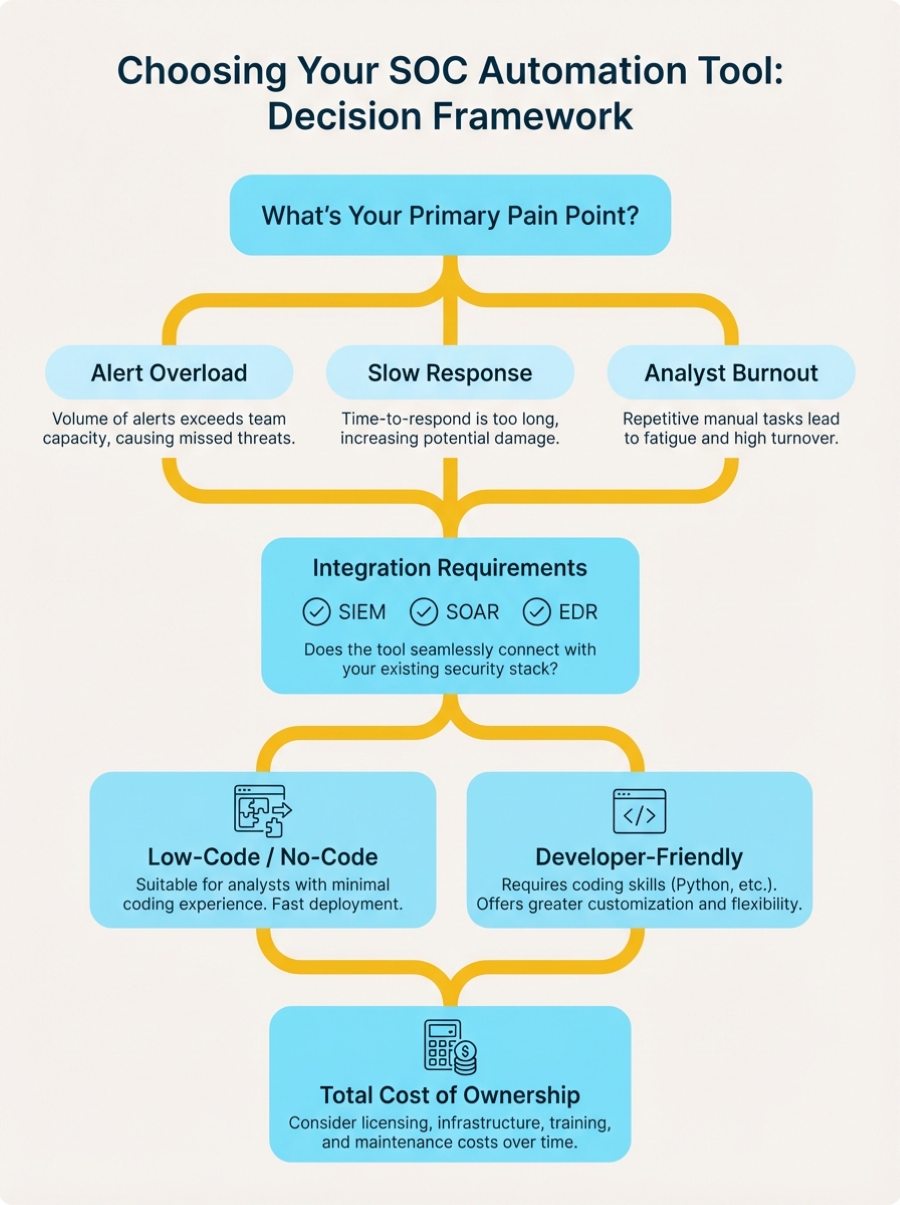
How to Choose the Right SOC Automation Tools for Your Team
Here’s the part where we get practical. Not every tool fits every environment, and buying the wrong platform wastes time, money, and political capital.
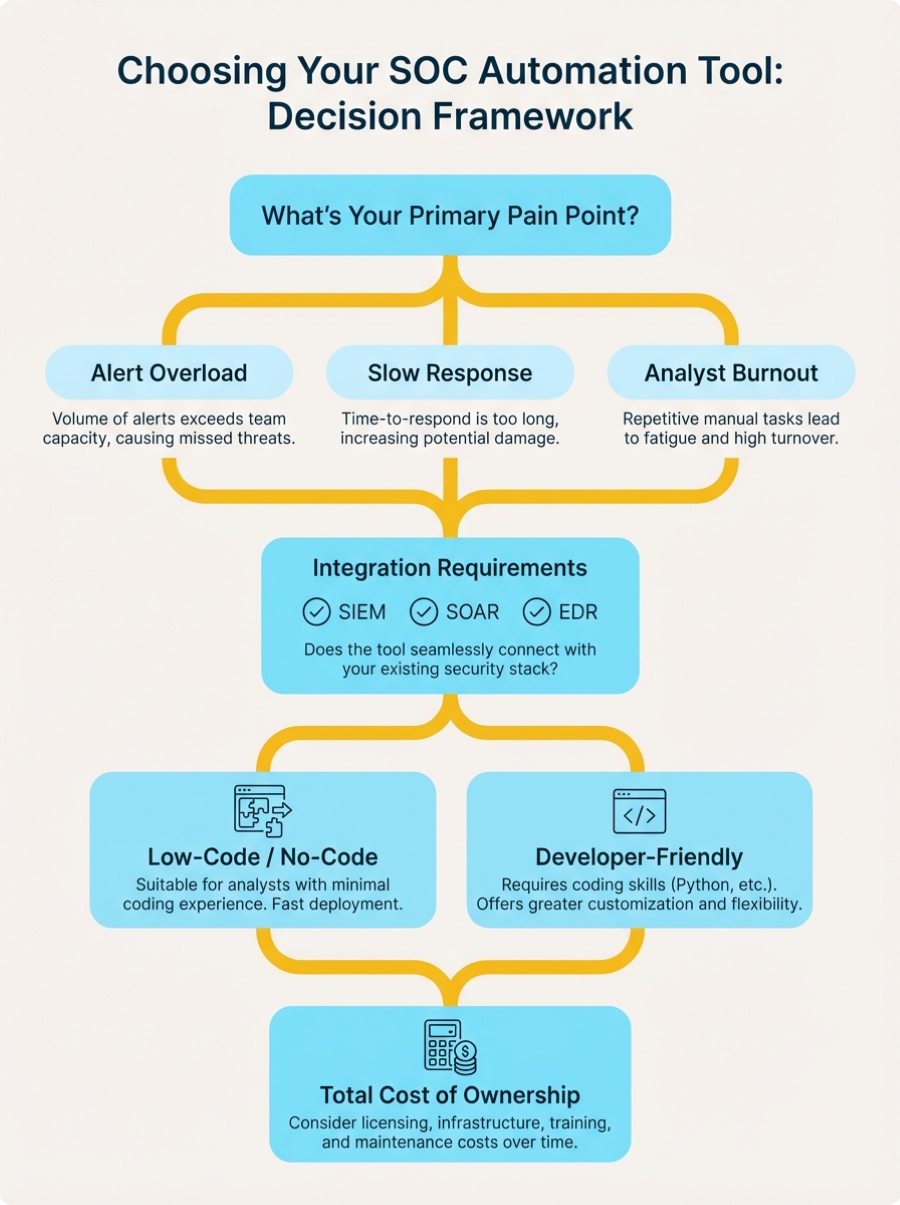
Start With Your Pain Points
Don’t buy a tool because it’s on every vendor’s top-10 list. Start with the problems you’re actually trying to solve:
- Drowning in alerts? Focus on tools with strong triage and enrichment capabilities
- Slow incident response? Look for platforms with fast playbook execution and broad integrations
- Can’t keep up with threat intelligence? Prioritize solutions that automate IOC enrichment and feed hunting workflows
- Analyst burnout? Choose tools that genuinely reduce manual work, not just shift it around
Integration Is Everything
The best automation tool in the world is useless if it can’t talk to your existing stack. Check for:
- Native connectors to your SIEM, EDR/XDR, firewall, and email security platforms
- API flexibility for custom integrations
- Webhook support for real-time event triggers
- Ease of adding new integrations as your stack evolves
VMRay’s platform, for example, connects seamlessly with major SIEM platforms (Splunk, Microsoft Sentinel, Elastic), SOAR tools, and EDR solutions through built-in connectors and REST API.
Data Quality Matters More Than You Think
If you’re building AI-powered workflows or training machine learning models, garbage in = garbage out. Automation amplifies whatever you feed it. High-quality threat intelligence becomes critical when decisions happen at machine speed.
Look for tools that provide:
- Explainable results (not just “malicious” but why)
- Low false positive rates
- Rich context and attribution
- Behavioral indicators, not just static IOCs
Think About Your Team’s Capabilities
Be honest: does your team have the engineering resources to build and maintain complex playbooks? Do you have dedicated automation engineers, or are your analysts handling it between incidents?
- Limited resources: Choose low-code platforms with strong marketplace support
- Strong engineering team: Go for flexible, API-first platforms that give you more control
- Mixed capabilities: Look for tools that support both approaches
Consider Total Cost of Ownership
The sticker price is just the beginning. Factor in:
- Implementation costs (time and services)
- Training requirements
- Ongoing maintenance burden
- Hidden costs (per-action pricing, data ingestion fees, additional modules)
Sometimes a tool that costs more upfront saves you money over time if it’s easier to maintain and requires less specialized expertise.
Common Pitfalls to Avoid
Let’s talk about what doesn’t work—the mistakes we see teams make when rolling out SOC automation:
Automating Bad Processes
Automation makes things faster. If your manual processes are broken, automation just breaks them faster. Before automating, clean up your workflows, document your logic, and get team buy-in on the approach.
Over-Automating Too Quickly
Start with high-value, low-risk use cases. Perfect your phishing triage workflow before trying to automate your entire incident response program. Build confidence gradually.
Ignoring the Human Element
Tools don’t fix organizational problems. If your team doesn’t trust the automation or understand how it works, they’ll work around it. Invest time in training, documentation, and change management.
Neglecting Playbook Maintenance
Your environment changes. Threats evolve. Those playbooks you built six months ago? They need regular updates. Treat automation workflows like code—version control, testing, and continuous improvement.
The Future of SOC Automation: What’s Next
We’re at an inflection point. SOC automation is moving from “nice to have” to “table stakes” for effective security operations.
The next wave? Agentic AI that doesn’t just execute playbooks but actually makes contextual decisions based on the evidence it gathers. Think AI investigators that can pivot through an incident end-to-end, gathering context, validating indicators, and recommending actions—all while documenting their reasoning for your review.
But (and this is important) the human analyst isn’t going away. The future is augmentation, not replacement. Your team’s judgment, creativity, and strategic thinking become more valuable when AI handles the tedious stuff.
Organizations that master this hybrid approach—combining human expertise with AI-powered automation—will have a massive advantage in 2026 and beyond.
Getting Started: Your Action Plan
Ready to level up your SOC automation game? Here’s how to start:
- Audit your current state: Where do your analysts spend the most time? What tasks are repetitive? What bottlenecks slow down your response?
- Prioritize quick wins: Pick 2-3 high-volume, low-complexity use cases where automation would make an immediate difference
- Evaluate tools: Don’t just take vendors’ word for it—run pilots with real data from your environment
- Build gradually: Start small, measure results, iterate, and expand
- Invest in your team: Training and change management matter as much as the technology
And remember: automation should make your analysts’ lives better, not just make them faster at doing work they hate. If your team isn’t excited about the automation you’re building, you’re probably building the wrong thing.
Final Thoughts
SOC automation isn’t about replacing human analysts—it’s about giving them superpowers. The best tools handle the repetitive, exhausting tasks that burn people out, freeing your team to do the creative, strategic work that actually requires human intelligence.
In 2026, the question isn’t whether to automate, but how quickly you can do it without breaking things. Start with your biggest pain points, choose tools that integrate with your existing stack, and build automation that your team will actually use.
Whether you’re investigating malware with advanced sandbox analysis, enriching alerts with behavioral threat intelligence, or orchestrating responses across your entire security stack, the right automation tools turn your SOC from a reactive alert factory into a proactive threat-hunting operation.
What’s the one workflow you’d automate today if you could wave a magic wand? That’s where you should start.
FAQs
What’s the difference between SIEM and SOAR?
SIEM (Security Information Event Management) collects and analyzes security logs from across your infrastructure to detect threats. SOAR (Security Orchestration Automation Response) orchestrates actions across multiple security tools and automates response workflows. They work together—SIEM detects threats, SOAR automates the response. Think of SIEM as your detection engine and SOAR as your automation engine.
How much does SOC automation cost?
SOC automation tools range from $10,000 to $500,000+ annually depending on deployment size, features, and vendor. Cloud-based platforms like Microsoft Sentinel use consumption pricing (pay per GB ingested), while enterprise SOAR platforms like Splunk and Cortex XSOAR typically charge $100,000-$300,000 per year based on analyst seats or use cases. Don’t forget implementation costs—budget 20-30% of license fees for professional services and training.
What are the best free SOC automation tools?
Open-source options include TheHive (case management), Shuffle (SOAR orchestration), Wazuh (SIEM), and MISP (threat intelligence). These work well for smaller teams or learning environments. However, enterprise-grade commercial tools like VMRay, Splunk SOAR, and Cortex XSOAR offer better integration ecosystems, dedicated support, advanced AI capabilities, and lower total cost of ownership when you factor in maintenance time.
What tasks should I automate first in my SOC?
Start with high-volume, low-complexity tasks that don’t require human judgment:
- Phishing email analysis – Automated URL/attachment scanning and user notification
- Alert enrichment – Automatic IOC lookups in threat intelligence feeds
- Tier 1 triage – Rule-based alert categorization and prioritization
- Known false positive filtering – Automatic closure of recurring benign alerts
- Basic containment actions – Automated host isolation for confirmed threats
These quick wins demonstrate value fast and build confidence before tackling complex workflows.
How long does it take to implement SOC automation?
Implementation timelines vary widely. Simple use cases (like automated phishing response) can go live in 2-4 weeks. Comprehensive SOAR deployments typically take 3-6 months including planning, integration, playbook development, testing, and training. Cloud-based platforms like Microsoft Sentinel deploy faster (weeks) than on-premise solutions (months). Plan for an additional 3-6 months of optimization as you refine playbooks based on real-world performance.
What’s the ROI of SOC automation?
Most organizations see positive ROI within 12-18 months. Typical benefits include:
- Time savings: 40-60% reduction in analyst hours spent on repetitive tasks
- Faster response: 80-90% reduction in mean time to respond (MTTR)
- Better detection: 30-50% improvement in threat detection rates
- Cost avoidance: Reduced breach costs (average breach costs $4.45M according to IBM)
- Retention: Lower analyst turnover due to reduced burnout
Calculate your ROI by multiplying analyst time saved by hourly cost, then add breach risk reduction value.
Can AI really replace security analysts?
No, and that’s not the goal. AI excels at pattern recognition, processing huge datasets, and executing consistent workflows at machine speed. Humans excel at creative thinking, understanding context, making judgment calls in ambiguous situations, and adapting to novel threats. The future of SOC automation is augmentation, not replacement—AI handles the repetitive work so analysts can focus on what requires human intelligence.
What’s the difference between SOC automation and AI-driven automation?
Traditional SOC automation uses predefined playbooks with if-this-then-that logic. AI-driven automation (SOC Automation 2.0) uses machine learning to make contextual decisions based on patterns it learns from data. For example, traditional automation might always quarantine files with certain hashes. AI-driven automation analyzes behavioral patterns, threat context, and environmental factors to decide the appropriate response level—and adapts as threats evolve.
How do I integrate SOC automation with my existing tools?
Most modern automation platforms offer three integration methods:
- Pre-built connectors – Out-of-the-box integrations with popular tools (SIEM, EDR, firewall, email security). Check vendor marketplaces for your specific tools.
- REST APIs – Custom integrations for proprietary or niche tools. Requires some development work but offers maximum flexibility.
- Webhooks – Real-time event triggers for tools that support them.
Start with tools you use most frequently (SIEM, ticketing system, threat intelligence platform) and expand from there. VMRay, for example, integrates with all major SIEM, SOAR, EDR, and TIP platforms through built-in connectors.
What are the biggest mistakes teams make with SOC automation?
The most common pitfalls we see:
- Automating broken processes – Automation makes things faster, including mistakes. Fix your workflows first.
- Starting too big – Trying to automate everything at once leads to complex, fragile systems. Start small and build gradually.
- Neglecting playbook maintenance – Your environment changes, threats evolve. Playbooks need regular updates or they’ll drift out of sync.
- Poor data quality – Automation amplifies whatever you feed it. Garbage in, garbage out.
- Ignoring the human element – If your team doesn’t trust or understand the automation, they’ll work around it.
如有侵权请联系:admin#unsafe.sh