
嗯,用户让我总结这篇文章的内容,控制在100字以内,而且不需要特定的开头。首先,我需要快速浏览文章,抓住主要观点。 文章主要讨论钓鱼攻击的防御策略,指出点击率并不是有效的衡量标准。作者强调了进入系统后的破坏能力,以及预防、检测和恢复的重要性。特别是提到了“遏制”这一层防御,如何限制攻击者的行动范围和破坏程度。 接下来,我需要把这些要点浓缩成简洁的语言。确保涵盖关键点:点击率不足、防御策略、遏制的重要性。同时,控制在100字以内。 可能的结构是:首先指出点击率的问题,然后说明防御策略包括预防、检测和遏制,最后强调遏制的作用。这样既全面又简洁。 最后检查一下字数和表达是否清晰,确保没有遗漏重要信息。 </think> 文章指出钓鱼攻击防御不应仅关注点击率,而应关注一旦攻击者进入系统后可能造成的损害。有效的防御需结合预防、检测与恢复及遏制措施,限制攻击者在入侵后的行为范围和破坏能力。 2026-1-9 15:45:31 Author: www.bleepingcomputer.com(查看原文) 阅读量:1 收藏

So many security teams still measure phishing with the click rate. It’s easy to track and easy to put in a slide deck, but it’s also misleading. Measuring clicks is like "measuring the tide coming and going"—it fluctuates naturally and rarely predicts real-world impact.
The more meaningful question is the one most programs can’t answer: If an attacker gets into a mailbox, how much damage can they do?
That is your true maturity metric. Not completion rates, and not who remembered to hover over a URL. Even if your click rates are minuscule, all it takes is a single employee not paying attention. Not to mention the growing prevalence of inbox breaches that occur without any phishing attack at all.
Phishing is just one possible entrance; the crisis happens next
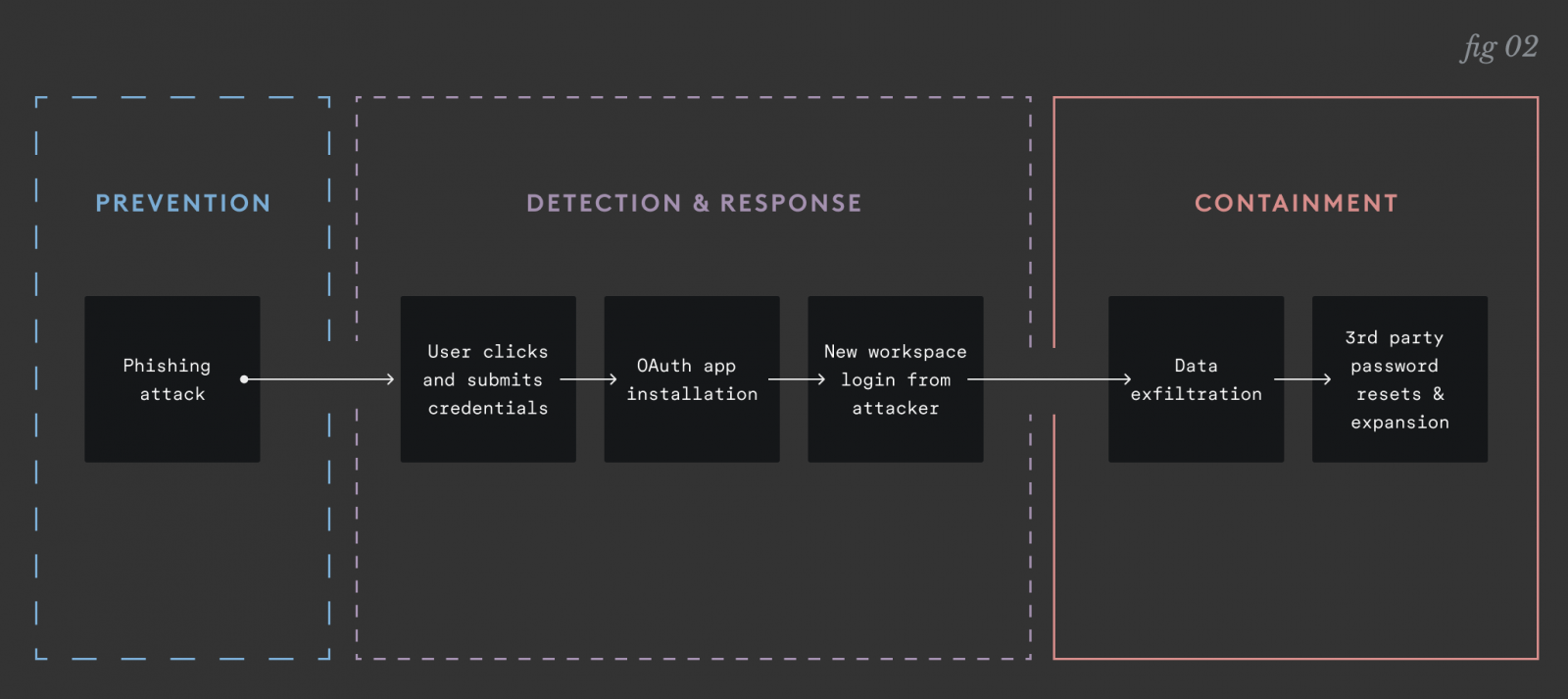
In the incidents that keep CISOs awake, phishing is just how access is obtained. The real problem is what happens once an attacker is inside:
- They exfiltrate years of sensitive mailbox data and shared files.
- They use the mailbox to reset passwords for downstream apps.
- They use the compromised identity to phish other employees from a trusted source.
MFA isn't a silver bullet here—there are plenty of ways into a cloud workspace that bypass it entirely. If compromises are inevitable, the goal shifts from perfect prevention to resilience.
Secure Your Google Workspace Without the Guesswork
By implementing automated remediation workflows for your cloud workspace, Material Security handles the tedious stuff—like clawing back sensitive attachments or revoking risky third-party app permissions—without requiring manual intervention for every event.
The layered approach to resilient email security
Most email security tools on the market today focus solely on stopping inbound attacks–prevention. And this is of course critical–but it can’t be the only protection. Modern attacks move too fast, they come at too great a scale, and they’re too sophisticated. Any program relying on inbound protection alone is insufficient.
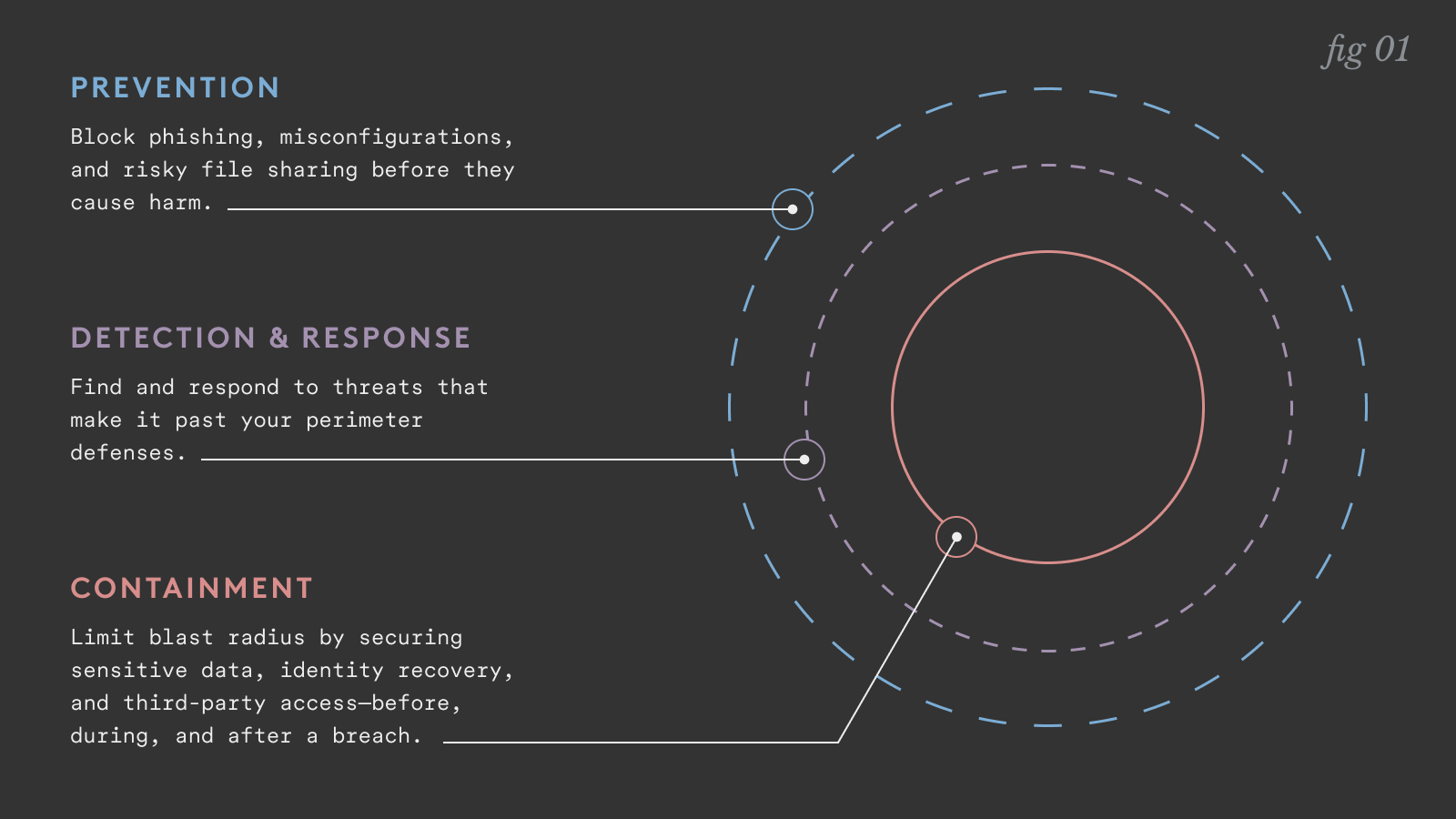
- Prevention - blocking inbound threats, fixing misconfigurations, shoring up risky file shares. Taking as many steps as possible to prevent attacks before they occur.
- Detect and recover - Having the visibility to spot signs of compromise and takeover before damage can be done. Not just unusual login behavior, but data access patterns, email forwarding rules, file sharing behavior, and other signs that an account isn’t behaving as it normally would.
- Containment - Always-on risk mitigation that reduces the blast radius and minimizes the damage an attacker can do once they breach an account. Limit their ability to exfiltrate sensitive data, move laterally, and spread the attack across the environment.
Most organizations do fairly well at prevention, though often too limited in scope. More mature organizations have some detection and response capabilities. But very few effectively manage containment.
The missing layer: containment
Containment isn’t glamorous and doesn’t fit neatly into an existing security category. But it can also have an incredible impact on the severity of a breach.
Think of it this way: prevention is maintaining your car, driving safely, and avoiding accidents. Detection and response is making sure everyone’s OK and calling for help after an accident. Containment is the seatbelt and airbags: the safety measures that make the crash less catastrophic.
Containment isn't a slogan; it’s a set of pragmatic controls aimed at an attacker's post-compromise goals:
- Make mailbox exfiltration harder: Why does gaining access to an account mean unfettered access to years of PII and financial reports? Internal segmentation—requiring extra verification for sensitive messages—limits what an attacker can "loot."
- Block lateral movement via password resets: If you want one control that changes a breach trajectory, it’s this: intercept password reset emails and force an additional MFA challenge so a compromised mailbox doesn't become a compromised identity.
- Fix "settings debt": Attackers love legacy defaults. Disabling IMAP/POP (which bypasses MFA) and cleaning up app-specific passwords are basic hygiene steps that significantly shrink your blast radius.
Moving beyond manual triage
The hurdle for most teams is time. No one has the bandwidth to manually audit every file permission or triage every user report.
If you're serious about containment, you need systems that do the boring work automatically—detecting risks and remediating them in the background—so your team only steps in when judgment is actually required.
What to measure instead
If click rate is just the tide, these metrics actually reflect your risk:
- Mailbox lootability: How much sensitive content is accessible without extra verification?
- Reset-path exposure: How many critical apps can be accessed via email-only password resets?
- Time-to-contain: How fast can you limit an attacker's actions once they are inside?
Email security has spent years obsessed with the front door. It’s time to start asking: if an attacker is in a mailbox right now, what can they do in the next ten minutes—and how quickly can you take that power away?
See how Material Security automates containment.
Sponsored and written by Material Security.
如有侵权请联系:admin#unsafe.sh