文章介绍了一种通过gRPC直接与Istio的外部授权服务通信的方法,并提供了两个示例代码来演示如何与不同类型的授权服务器进行交互。 2025-12-31 06:4:0 Author: thegreycorner.com(查看原文) 阅读量:4 收藏
- Introduction
- Enabling communication with the gRPC endpoint using Python
- Example 1: The Istio sample extauthz server
- Example 2: “Istio external authorization server”
- Conclusion
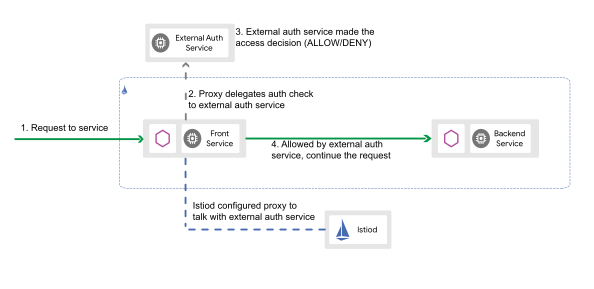
In Kubernetes environments using Istio you have the option of delegating access control decisions to a custom application rather than relying solely on Istio’s built-in Role-Based Access Control (RBAC). This concept is discussed in more detail here.
This approach works as follows: When a request hits an Istio ingress gateway or a sidecar proxy, Istio pauses the request and sends a “check” request using gRPC or HTTP to your custom authorisation service. Based on the response from that service (Allow or Deny), Istio either forwards the original request to the destination (with optional request modification) or returns a 403 Forbidden message to the requester.
When performing security assessments of these custom authorisers, there are a few factors that add friction to the testing process.
First, these authoriser services are usually packaged up as a container and can be isolated from direct communication when running in a Kubernetes cluster. For example the authoriser might be running as a sidecar in the target services pod with communication only allowed from the envoy sidecar within the same pod. In this case, you have to test the authoriser app inderctly - by first getting the request you want to assess to the gateway that uses the authoriser. This is not necessarily a problem, as it should be the only way that it gets accessed in actual use. However, it does mean that you are limited in the specifics of some request parameters you can assess by routing/communication configuration of the supporting Istio/Kubernetes configuration in the cluster (e.g. hostname and ports). If these change in future to some creative configuration you did not anticipate, exploitable configurations in the authoriser that were previously not reachable might appear.
Configuration of the authoriser application is also usually done through environment variables or configuration/data files mounted in the container filesystem. As a result, testing variations in configuration specific functionality introduces overhead. This is because you need to call the Kubernetes API and relaunch the authoriser container for configuration changes to take effect. The level of testing overhead this generates will depend on how much configuration churn is needed and how long it takes to perform each configuration changes (can you do directly call the Kubernetes API or do you need to gitops it, what is the cluster resource availability, etc?).
There are also factors that can make testing more difficult if you are not running locally such as gaining access to the authoriser apps logging stdout/stderr and deploying mock supporting services such as JWKS servers.
In addition, when the authoriser uses the gRPC protocol, as many exclusively do, communication with the service is performed using complex protobuf message structures that require encoding/decoding.
I wanted to find a way to directly communicate with one of these authoriser apps via gRPC. This would allow me to run the server directly on my machine without any Kubernetes/containerisation overhead or interference, directly view its logs, quickly change its configuration and run supporting mock services on my local machine.
This post discusses the methodology I used to achieve this, and includes example code for communicating with two different simple Istio extauth servers. Hopefully this will prove useful for anyone else who needs to perform something similar in future.
As mentioned in the introduction, the Istio authoriser services can communicate using either gRPC or HTTP. The HTTP communication method just involve directly sending the request to filter to the endpoint, but many authoriser services (including the particular one I wanted to test) do not support that method. The gRPC communication method involves encapsulating the HTTP request into a specific protobuf message and sending this to the authoriser using gRPC (essentially HTTP 2.0 with extra headers and protobuf messages). This is a protocol I have previously discussed on my blog with regard to communicating to the containerd socket, as mentioned here.
Getting the particular messages working in Python code is quite fiddly, and involves grabbing .proto definition files for multiple message types from six different git repositories and compiling them to Python equivalents locally. To make it a bit easier to reproduce I wrote a script to automate the dependency process on *nix systems. The following discusses the setup process.
First install the required Python modules. On systems with a managed Python install (e.g. Ubuntu) you may need to do this in a venv as the inbuilt validate module will break loading of the protobuf module with the same name. In that case do this first.
python -m venv .venv
source .venv/bin/activate
Then install the Python modules.
pip install protobuf grpcio-tools
Then install the protobuf command line compiler protoc and make sure its in your path. This can be obtained from here.
Now you are ready to run my script to setup the dependant Python protobuf modules. The script will download the necessary repositories to /tmp/code, copy the required protobuf file structures to the protoc_build in the pwd and compile the needed files to Python format.
wget https://raw.githubusercontent.com/stephenbradshaw/pentesting_stuff/refs/heads/master/protobuf/external_authoriser_dependency_adder.sh
chmod +x external_authoriser_dependency_adder.sh
cd protoc_build
The script will show a number of errors during the compilation phase, which is usually fine as a number of uneeded protobuf wont compile with the specific files the script downloads. As long as you end up with a few hundred files matching the pattern *_pb2.py in the protoc_build directory structure you are likely ok. Check like so:
find . -iname "*_pb2.py" | wc -l
698
From this point, any Python script you write to communicate with the gRPC authoriser endpoint will need to be run from within this protoc_build folder and will need to include the following to ensure that the Python path is modified to ensure the needed modules are loaded from this directory structure. There are more detailed full working Python script examples for two public authoriser programs using this code below in this post.
import sys
import os

sys.path.insert(0, os.getcwd())
For our first example to demonstrate communicating with the extauthz gRPC endpoint, we will use the Istio sample extauthz server, the code for which is available here.
Make sure you have go installed locally so you can compile these example servers.
Clone Istio locally:
git clone https://github.com/istio/istio.git
Change to the program folder and compile:
cd istio/samples/extauthz/cmd/extauthz
go build
Run the server:
./extauthz
2025/12/31 14:43:28 Starting gRPC server at [::]:9000
2025/12/31 14:43:28 Starting HTTP server at [::]:8000
Note from the above that this service is running both a gRPC and a HTTP endpoint. Communication with the HTTP endpoint on port 8000 is very straightforward - we can do it using curl. Below we can see both the request and the response from the authoriser service, which does include some additional header values.
curl -v -H'x-ext-authz: allow' http://127.0.0.1:8000/
*   Trying 127.0.0.1:8000...
* Connected to 127.0.0.1 (127.0.0.1) port 8000
> GET / HTTP/1.1
> Host: 127.0.0.1:8000
> User-Agent: curl/8.5.0
> Accept: */*
> x-ext-authz: allow
>
< HTTP/1.1 200 OK
< X-Ext-Authz-Additional-Header-Override:
< X-Ext-Authz-Check-Received: GET 127.0.0.1:8000/, headers: map[Accept:[*/*] User-Agent:[curl/8.5.0] X-Ext-Authz:[allow]], body: []
< X-Ext-Authz-Check-Result: allowed
< Date: Wed, 31 Dec 2025 04:55:31 GMT
< Content-Length: 0
<
* Connection #0 to host 127.0.0.1 left intact
This will generate the following log entry from the running authoriser service.
2025/12/31 15:55:31 [HTTP][allowed]: GET 127.0.0.1:8000/, headers: map[Accept:[*/*] User-Agent:[curl/8.5.0] X-Ext-Authz:[allow]], body: []
Not very interesting.
Now lets look at the gRPC service on port 9000. The following script (run from the protoc_build folder with dependencies we setup earlier) will send a request to this endpoint.
#!/usr/bin/env python
import sys
import os
import grpc

sys.path.insert(0, os.getcwd())

import external_auth_pb2
import external_auth_pb2_grpc

from envoy.service.auth.v3.attribute_context_pb2 import AttributeContext

# Reference extauth requestor for: https://github.com/istio/istio/blob/master/samples/extauthz/cmd/extauthz/main.go

def send_request():
    with grpc.insecure_channel("localhost:9000") as channel:
        stub = external_auth_pb2_grpc.AuthorizationStub(channel)
        checkrequest = external_auth_pb2.CheckRequest()
        attributecontext = AttributeContext()
        attributecontext.request.http.method = 'GET'
        attributecontext.request.http.headers["Host"] = "test.example.com"
        attributecontext.request.http.host = "test.example.com"
        attributecontext.request.http.path = "/"
        #attributecontext.request.http.protocol = "HTTP/1.1"
        attributecontext.request.http.scheme = "http"
        attributecontext.request.http.headers["x-ext-authz"] = "allow"
        attributecontext.destination.address.socket_address.port_value = 80
        #attributecontext.request.http.body = b'data'
        checkrequest.attributes.CopyFrom(attributecontext)
        response = stub.Check(checkrequest)
    print(f"Client received: {str(response)}")


if __name__ == "__main__":
    send_request()
This script is simulating the effect of the authorisation server being asked to make an access control decision on a HTTP 1.1 request to http://test.example.com/ with a x-ext-authz header value of allow received by the associated Istio gateway/proxy. This is similar to what would be generated by curl if we ran the following command (although the User-Agent and Accept request headers normally added by curl will be absent). Because we are encapsulating the request details in gRPC however, we can arbitrarily set the host and port settings for the request without worrying about routing details that we would need to consider for the HTTP endpoint for the request to be received.
curl -H'x-ext-authz: allow' http://test.example.com/
Running this prints out the following interpreted protobuf response from the server.
Client received:
status {
}
ok_response {
  headers {
    header {
      key: "x-ext-authz-check-result"
      value: "allowed"
    }
  }
  headers {
    header {
      key: "x-ext-authz-check-received"
      value: "destination:{address:{socket_address:{port_value:80}}}  request:{http:{method:\"GET\"  headers:{key:\"Host\"  value:\"test.example.com\"}  headers:{key:\"x-ext-authz\"  value:\"allow\"}  path:\"/\"  host:\"test.example.com\"  scheme:\"http\"}}"
    }
  }
  headers {
    header {
      key: "x-ext-authz-additional-header-override"
      value: "grpc-additional-header-override-value"
    }
  }
}
The following log entry is output from the server.
2025/12/31 16:21:33 [gRPCv3][allowed]: test.example.com/, attributes: destination:{address:{socket_address:{port_value:80}}} request:{http:{method:"GET" headers:{key:"Host" value:"test.example.com"} headers:{key:"x-ext-authz" value:"allow"} path:"/" host:"test.example.com" scheme:"http"}}
As you might be able to tell, this reference authorization server is essentially configured to “allow” HTTP requests with the x-ext-authz header set to a value of allow, and when such a request is received by the associated Istio gateway it will allow it and add the listed header values in the response.
Lets modify the following line in our script:
attributecontext.request.http.headers["x-ext-authz"] = "allow"
To this:
attributecontext.request.http.headers["x-ext-authz"] = "not allow"
Run the script again, and now we get the following “deny” response.
Client received:
status {
  code: 7
}
denied_response {
  status {
    code: Forbidden
  }
  headers {
    header {
      key: "x-ext-authz-check-result"
      value: "denied"
    }
  }
  headers {
    header {
      key: "x-ext-authz-check-received"
      value: "destination:{address:{socket_address:{port_value:80}}}  request:{http:{method:\"GET\"  headers:{key:\"Host\"  value:\"test.example.com\"}  headers:{key:\"x-ext-authz\"  value:\"not allow\"}  path:\"/\"  host:\"test.example.com\"  scheme:\"http\"}}"
    }
  }
  headers {
    header {
      key: "x-ext-authz-additional-header-override"
      value: "grpc-additional-header-override-value"
    }
  }
  body: "denied by ext_authz for not found header `x-ext-authz: allow` in the request"
}
Being a simple reference server this doesn’t have any complex authentication logic for us to test, but it does provide a good example of the request process and the accept/deny logic at play for these servers and the difference between the available HTTP and gRPC communication endpoints.
Lets look at one more example.
Another simple authorization server I found whilst developing this testing methodology is available here, with the server code here. Lets test the same approach with it.
Clone the code
git clone https://github.com/istio/istio.git
This server hard codes the filename of a required private key file to an absolute path in a folder structure that does not exist on my test system here. I like to modify this to a relative pathname as follows.
const (
        address string = ":50051"
        keyfile string = "key.pem"
)
With the modification made, build the server.
cd istio_external_authorization_server/authz_server
go build
Note if you are doing this on a newer Mac, you might see the error dyld[52734]: missing LC_UUID load command when trying to run this server built as above. You can resolve this by compiling with an additional linker flag as follows: go build -ldflags="-linkmode=external".
Now we need to prepare the environment a little, by generating a private key in the right format and setting an environment variable the server uses for access control decisions.
openssl genrsa -traditional -out key.pem 2048
export AUTHZ_ALLOWED_USERS=bob,trevor
Now we can run the server:
./main
2025/12/31 16:46:43 Starting gRPC Server at :50051
This server only has the gRPC endpoint, listening now at port 50051.
Our test script now looks like the following, modified for the new port and the new authorisation configuration.
#!/usr/bin/env python
import sys
import os
import grpc

sys.path.insert(0, os.getcwd())

import external_auth_pb2
import external_auth_pb2_grpc

from envoy.service.auth.v3.attribute_context_pb2 import AttributeContext

# Reference extauth requestor for: https://github.com/salrashid123/istio_external_authorization_server/blob/master/authz_server/grpc_server.go

def send_request():
    with grpc.insecure_channel("localhost:50051") as channel:
        stub = external_auth_pb2_grpc.AuthorizationStub(channel)
        checkrequest = external_auth_pb2.CheckRequest()
        attributecontext = AttributeContext()
        attributecontext.request.http.method = 'GET'
        attributecontext.request.http.headers["Host"] = "test.example.com"
        attributecontext.request.http.host = "test.example.com"
        attributecontext.request.http.path = "/"
        #attributecontext.request.http.protocol = "HTTP/1.1"
        attributecontext.request.http.scheme = "http"
        attributecontext.request.http.headers["authorization"] = "Bearer bob"
        #attributecontext.request.http.body = b'data'
        attributecontext.destination.address.socket_address.port_value = 80
        checkrequest.attributes.CopyFrom(attributecontext)
        response = stub.Check(checkrequest)
    print(f"Client received:\n{str(response)}")


if __name__ == "__main__":
    send_request()
This script is now simulating the effect of a request similar to that created by the following curl command being received by the Istio gateway associated with this authorization server.
curl -H'authorization: Bearer bob' http://test.example.com/
The following is the script output - an “allow” response including a new Authorization HTTP header value with a JWT token to add to the incoming request.
Client received:
status {
}
ok_response {
  headers {
    header {
      key: "Authorization"
      value: "Bearer eyJhbGciOiJSUzI1NiIsImtpZCI6IiIsInR5cCI6IkpXVCJ9.eyJ1aWQiOiJib2IiLCJhdWQiOlsiaHR0cDovL3N2YzIuZGVmYXVsdC5zdmMuY2x1c3Rlci5sb2NhbDo4MDgwLyJdLCJleHAiOjE3NjcxNjAxMzYsImlhdCI6MTc2NzE2MDA3Nn0.OuORclJm0RRuPC6e3lLb4hpl-7H7exZnwlVpxmsJgMz9UKkiWuMd701dN-av12eTSAkFDqyCox4d4bYwPE5IRsCQUPK7-R8GC4ws0n2zYm7SlED14o_uJEnu8A93987vBWy-dT0-TB6JFr18aoXIChdiKZwv9nZ-WS3sC637TR0y5qi66WNoh1883hBnqslmMWSotzoRdhBobsgBmlMRrMDdzIW_5F-a91Url97CQVDkW7HH2SKyL_8h8u5UlkBet1hvUSWY6IMLk-BbuVMMXXVuw2lV_dsB21FCUJ0Tw8OkXBEA2xAQAmA94PefuQO0UxEBsva-MoHcro6zsELB1Q"
    }
  }
}
The following log entries appear in the server output.
2025/12/31 16:47:56 >>> Authorization called check()
2025/12/31 16:47:56 Authorization Header Bearer bob
2025/12/31 16:47:56 Using Claim {bob [http://svc2.default.svc.cluster.local:8080/] {  [] 2025-12-31 16:48:56.921699108 +1100 AEDT m=+133.013451078 <nil> 2025-12-31 16:47:56.921699066 +1100 AEDT m=+73.013451036 }}
2025/12/31 16:47:56 Issuing outbound Header eyJhbGciOiJSUzI1NiIsImtpZCI6IiIsInR5cCI6IkpXVCJ9.eyJ1aWQiOiJib2IiLCJhdWQiOlsiaHR0cDovL3N2YzIuZGVmYXVsdC5zdmMuY2x1c3Rlci5sb2NhbDo4MDgwLyJdLCJleHAiOjE3NjcxNjAxMzYsImlhdCI6MTc2NzE2MDA3Nn0.OuORclJm0RRuPC6e3lLb4hpl-7H7exZnwlVpxmsJgMz9UKkiWuMd701dN-av12eTSAkFDqyCox4d4bYwPE5IRsCQUPK7-R8GC4ws0n2zYm7SlED14o_uJEnu8A93987vBWy-dT0-TB6JFr18aoXIChdiKZwv9nZ-WS3sC637TR0y5qi66WNoh1883hBnqslmMWSotzoRdhBobsgBmlMRrMDdzIW_5F-a91Url97CQVDkW7HH2SKyL_8h8u5UlkBet1hvUSWY6IMLk-BbuVMMXXVuw2lV_dsB21FCUJ0Tw8OkXBEA2xAQAmA94PefuQO0UxEBsva-MoHcro6zsELB1Q
This accept result is because the authorization header value we sent in the request for user bob was included in the environment variable we set using the command export AUTHZ_ALLOWED_USERS=bob,trevor.
Now lets change the following value in the script to a new value to see a deny response.
attributecontext.request.http.headers["authorization"] = "Bearer bob"
Try the following:
attributecontext.request.http.headers["authorization"] = "Bearer john"
The new response from the script should now be as follows:
Client received:
status {
  code: 7
}
denied_response {
  status {
    code: Unauthorized
  }
  body: "Permission Denied"
}
While these are some very simple examples, hopefully this was enough information to give anyone reading a good starting point for doing this type of work themselves. Example code supporting this post is here
如有侵权请联系:admin#unsafe.sh