嗯,用户让我总结一篇文章,控制在一百个字以内,而且不需要用“文章内容总结”之类的开头。首先,我得仔细阅读这篇文章,理解它的主要内容。 文章讲的是macOS Tahoe 26.2.0版本中新增了一个功能,允许设备管理设置在系统设置中显示。特别是PPPC权限现在可以在隐私与安全里看到。这满足了Mac管理员长期以来的需求。 接下来,我需要提取关键信息:新版本、PPPC权限、系统设置中的显示、管理员的反馈。然后把这些信息浓缩成一句话,不超过一百字。 可能会遇到的问题是如何简洁地表达这些内容而不遗漏重要点。比如,“新增功能”、“设备管理设置”、“系统设置中可见”、“PPPC权限”、“管理员反馈”这些关键词都需要包含进去。 最后,确保语言流畅,符合用户的要求。 </think> macOS Tahoe 26.2.0新增功能:设备管理设置现可在系统设置中查看,包括PPPC权限(如全盘访问)及其来源(配置文件),满足Mac管理员长期以来的反馈需求。 2025-12-12 21:50:43 Author: derflounder.wordpress.com(查看原文) 阅读量:34 收藏
Home > Jamf Pro, Mac administration, macOS, Management Profiles, Mobile Device Management > PPPC device management settings visible in System Settings on macOS Tahoe 26.2.0
PPPC device management settings visible in System Settings on macOS Tahoe 26.2.0
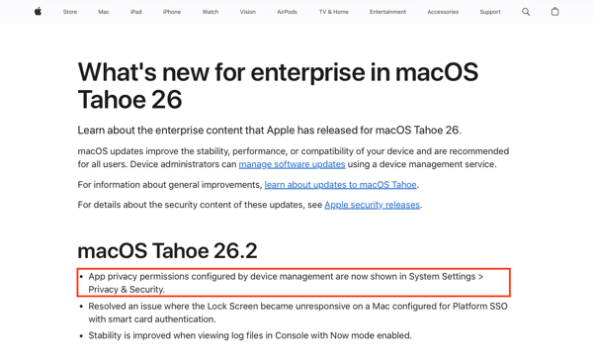
As part of the What’s new for enterprise in macOS Tahoe 26 release notes for macOS Tahoe 26.2.0, there’s this note:
App privacy permissions configured by device management are now shown in System Settings > Privacy & Security.

What this indicates is that a long-standing feature request by Mac admins has been fulfilled by Apple. For more details, please see below the jump.
As part of macOS 10.14 Mojave, Apple introduced a number of privacy controls for user data. At the same time, Apple also introduced device management options to allow authorized applications to access data protected by those privacy controls. These permissions are referred to collectively as Privacy Preferences Policy Control (PPPC) and are deployed via management profiles from an MDM server. However, up until macOS Tahoe 26.2, there was no way to see in the Privacy & Security section of System Settings which applications had which permissions granted via PPPC management profiles.
As an example, by default, Macs managed by Jamf Pro will get a management profile which allows the Jamf agent permission to access data stored in the user home folder via the PPPC permission known as full disk access. Here’s how this looks on macOS Tahoe 26.1.0:
Privacy Preferences Policy Control profile installed which enables full disk access to the Jamf agent.

No mention of the full disk access permissions granted to the Jamf agent in the Privacy & Security section of System Settings.


How this looks on macOS Tahoe 26.2.0:
Privacy Preferences Policy Control profile installed which enables full disk access for the Jamf agent.
Full disk access permissions granted to the Jamf agent is disclosed in the Privacy & Security section of System Settings. It is also disclosed that the permissions setting is configured by a profile.


如有侵权请联系:admin#unsafe.sh