
During a recent investigation, we uncovered a phishing operation that combines free hosting on developer platforms with compromised legitimate websites to build convincing banking and insurance login portals. These fake pages don’t just grab a username and password–they also ask for answers to secret questions and other “backup” data that attackers can use to bypass multi-factor authentication and account recovery protections.
Instead of sending stolen data to a traditional command-and-control server, the kit forwards every submission to a Telegram bot. That gives the attackers a live feed of fresh logins they can use right away. It also sidesteps many domain-based blocking strategies and makes swapping infrastructure very easy.
Phishing groups increasingly use services like Cloudflare Pages (*.pages.dev) to host their fake portals, sometimes copying a real login screen almost pixel for pixel. In this case, the actors spun up subdomains impersonating financial and healthcare providers. The first one we found was impersonating Heartland bank Arvest.
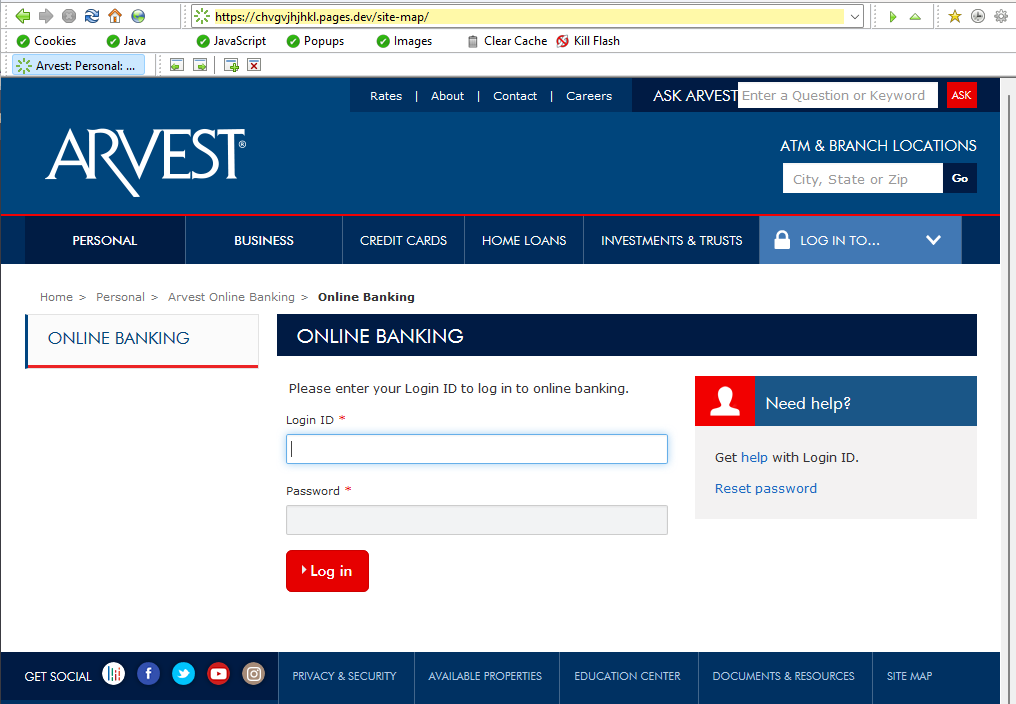
On closer look, the phishing site shows visitors two “failed login” screens, prompts for security questions, and then sends all credentials and answers to a Telegram bot.
Comparing their infrastructure with other sites, we found one impersonating a much more widely known brand: United Healthcare.
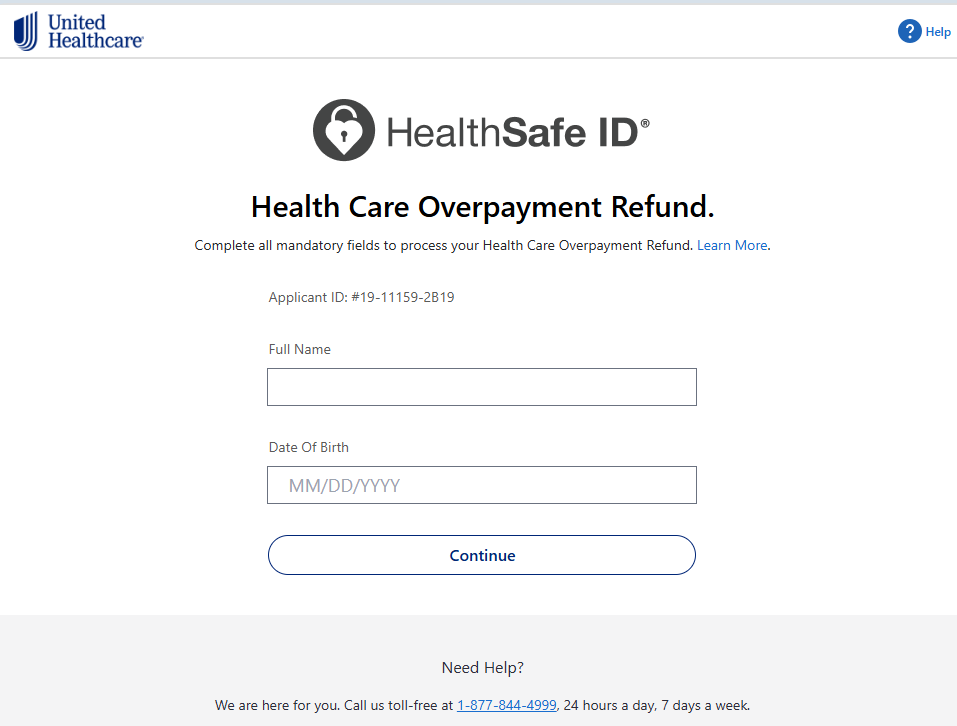
In this case, the phishers abused a compromised website as a redirector. Attackers took over a legitimate-looking domain like biancalentinidesigns[.]com and saddle it with long, obscure paths for phishing or redirection. Emails link to the real domain first, which then forwards the victim to the active Cloudflare pages phishing site. Messages containing a familiar or benign-looking domain are more likely to slip past spam filters than links that go straight to an obviously new cloud-hosted subdomain.
Cloud-based hosting also makes takedowns harder. If one *.pages.dev hostname gets reported and removed, attackers can quickly deploy the same kit under another random subdomain and resume operations.
The phishing kit at the heart of this campaign follows a multi-step pattern designed to look like a normal sign-in flow while extracting as much sensitive data as possible.
Instead of using a regular form submission to a visible backend, JavaScript harvests the fields and bundles them into a message sent straight to the Telegram API.. That message can include the victim’s IP address, user agent, and all captured fields, giving criminals a tidy snapshot they can use to bypass defenses or sign in from a similar environment.
The exfiltration mechanism is one of the most worrying parts. Rather than pushing credentials to a single hosted panel, the kit posts them into one or more Telegram chats using bot tokens and chat IDs hardcoded in the JavaScript. As soon as a victim submits a form, the operator receives a message in their Telegram client with the details, ready for immediate use or resale.
This approach offers several advantages for the attackers: they can change bots and chat IDs frequently, they do not need to maintain their own server, and many security controls pay less attention to traffic that looks like a normal connection to a well-known messaging platform. Cycling multiple bots and chats gives them redundancy if one token is reported and revoked.
What an attack might look like
Putting all the pieces together, a victim’s experience in this kind of campaign often looks like this:
- They receive a phishing email about banking or health benefits: “Your online banking access is restricted,” or “Urgent: United Health benefits update.”
- The link points to a legitimate but compromised site, using a long or strange path that does not raise instant suspicion.
- That hacked site redirects, silently or after a brief delay, to a *.pages.dev phishing site that looks almost identical to the impersonated brand.
- After entering their username and password, the victim sees an error or extra verification step and is asked to provide answers to secret questions or more personal and financial information.
- Behind the scenes, each submitted field is captured in JavaScript and sent to a Telegram bot, where the attacker can use or sell it immediately.
From the victim’s point of view, nothing seems unusual beyond an odd-looking link and a failed sign-in. For the attackers, the mix of free hosting, compromised redirectors, and Telegram-based exfiltration gives them speed, scale, and resilience.
The bigger trend behind this campaign is clear: by leaning on free web hosting and mainstream messaging platforms, phishing actors avoid many of the choke points defenders used to rely on, like single malicious IPs or obviously shady domains. Spinning up new infrastructure is cheap, fast, and largely invisible to victims.
How to stay safe
Education and a healthy dose of skepticism are key components to staying safe. A few habits can help you avoid these portals:
- Always check the full domain name, not just the logo or page design. Banks and health insurers don’t host sign-in pages on generic developer domains like
*.pages.dev,*.netlify.app, or on strange paths on unrelated sites. - Don’t click sign-in or benefits links in unsolicited emails or texts. Instead, go to the institution’s site via a bookmark or by typing the address yourself.
- Treat surprise “extra security” prompts after a failed login with caution, especially if they ask for answers to security questions, card numbers, or email passwords.
- If anything about the link, timing, or requested information feels wrong, stop and contact the provider using trusted contact information from their official site.
- Use an up-to-date anti-malware solution with a web protection component.
Pro tip: Malwarebytes free Browser Guard extension blocked these websites.

We don’t just report on threats—we help safeguard your entire digital identity
Cybersecurity risks should never spread beyond a headline. Protect your, and your family’s, personal information by using identity protection.