Jamf Pro 11.23.0新增了应用程序版本智能组和高级计算机搜索标准,支持通过Info.plist文件中的CFBundleShortVersionString和CFBundleVersion键分别报告Bundle Short Version和Bundle Version字段,以更准确地显示应用程序版本信息。 2025-12-2 23:26:21 Author: derflounder.wordpress.com(查看原文) 阅读量:44 收藏
Home > Jamf Pro, Mac administration, macOS > New application version smart group and advanced computer search criteria available as of Jamf Pro 11.23.0
New application version smart group and advanced computer search criteria available as of Jamf Pro 11.23.0
In macOS, applications record version information in the Information Property List file. This file is stored inside the Contents directory of the application bundle and is named Info.plist.

There’s two keys inside the Info.plist file for an application which store version information:
What’s the difference between the two?
- CFBundleVersion: This is the version information used by macOS to determine which version is the most recent version of an application.
- CFBundleShortVersionString: This is the version information which is displayed to the user in a Finder window or a Get Info window.
There is no requirement in macOS that both the CFBundleVersion and CFBundleShortVersionString keys in the Info.plist file contain the same version information. What can happen as a result? Let’s take a look at that the context of some Microsoft applications which record different information in the Info.plist file for those two keys. For more details, please see below the jump.
For this example, I installed the following Microsoft apps on a macOS 26.1.0 VM:
- Microsoft Excel.app
- Microsoft PowerPoint.app
- Microsoft OneNote.app
- Microsoft Outlook.app
- Microsoft Word.app
- OneDrive.app
- Windows App.app
For each app, I checked the following:
- CFBundleShortVersionString
- CFBundleVersion
- Reported version on the Mac
Microsoft Excel.app
- CFBundleShortVersionString: 16.103.3
- CFBundleVersion: 16.103.25113013
- Reported version on the Mac: 16.103.3
Microsoft PowerPoint.app
- CFBundleShortVersionString: 16.103.3
- CFBundleVersion: 16.103.25113013
- Reported version on the Mac: 16.103.3
Microsoft OneNote.app
- CFBundleShortVersionString: 16.103.3
- CFBundleVersion: 16.103.25113013
- Reported version on the Mac: 16.103.3
Microsoft Outlook.app
- CFBundleShortVersionString: 16.103.3
- CFBundleVersion: 16.103.25113013
- Reported version on the Mac: 16.103.3
Microsoft Word.app
- CFBundleShortVersionString: 16.103.3
- CFBundleVersion: 16.103.25113013
- Reported version on the Mac: 16.103.3
OneDrive.app
- CFBundleShortVersionString: 25.209.1026
- CFBundleVersion: 25209.1026.0002
- Reported version on the Mac: 25.209.1026
Windows App.app
- CFBundleShortVersionString: 11.2.9
- CFBundleVersion: 2810
- Reported version on the Mac: 11.2.9
As you can observe, what’s reported in these two fields can be very different. How does this affect Jamf Pro? Up until Jamf Pro 11.23.0, only one of those keys in the Info.plist file was being used to get version information for a macOS application:
CFBundleShortVersionString
This was reported as part of a computer inventory record as the following field:
- Version
The Version reporting also has matching smart group and advanced computer search criteria:
- Application Version


However, version information for Microsoft applications in particular were often being reported in Jamf Pro using the information contained in the following key:
- CFBundleVersion
If CFBundleVersion and CFBundleShortVersionString did not have the same version information, now you have a problem because what you see in Jamf Pro for version information for that Microsoft app and what you’re seeing reported in a Finder window for version infomation are two different things. To help address this, as of Jamf Pro 11.23 two new reporting fields as well as matching smart group and advanced computer search criteria have been added:
- Bundle Short Version
- Bundle Version
Here’s how they’re mapping to the keys in the application’s Info.plist file:
- Bundle Short Version: CFBundleShortVersionString
- Bundle Version: CFBundleVersion
The existing Version reporting field and matching Application Version smart group and advanced computer search criteria have not gone away, since up until Jamf Pro 11.23 it was your only option. The new reporting information has been added and does not replace previously gathered data, so nothing in anyone’s existing version reporting setup should break.
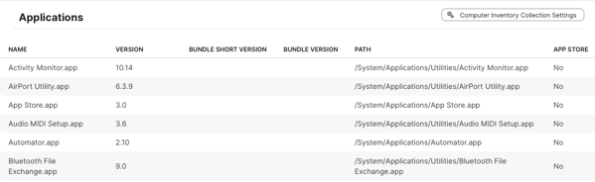
Here’s how it should look as of Jamf Pro 11.23.0 for a computer inventory record’s application listing:
- Name
- Version
- Bundle Short Version
- Bundle Version
- Path
- App Store

Note: The Bundle Short Version and Bundle Version fields may initially be blank for devices which have not sent in an inventory update since Jamf Pro was upgraded to 11.23.

The matching smart group and advanced computer search criteria are as follows:
- Applications inventory listing: Bundle Short Version
- Smart and advanced computer search criteria: Application Bundle Short Version


- Applications inventory listing: Bundle Version
- Smart and advanced computer search criteria: Application Bundle Version


如有侵权请联系:admin#unsafe.sh