
Key TakeawaysGmail uses AI-based filters and engagement signals to sort emails into the Prim 2025-11-19 06:57:25 Author: securityboulevard.com(查看原文) 阅读量:22 收藏
Key Takeaways
- Gmail uses AI-based filters and engagement signals to sort emails into the Primary inbox, Promotions tab, or Spam folder.
- Google’s 2024 bulk sender requirements mandate authentication and one-click unsubscribe for high-volume senders.
- Maintaining clean lists and consistent sending patterns helps prevent deliverability issues.
It’s more than an inconvenience when your carefully composed emails, instead of appearing in Gmail inboxes, wind up in spam folders. It is a business problem.

Google processes billions of emails daily, and its filtering technology helps to prevent an enormous number of phishing attacks from landing in the inbox while deciding which legitimate messages should be delivered there.
Google email deliverability refers to your ability to consistently land emails in Gmail inboxes rather than promotions tabs or spam folders. Unlike most other email service providers, Gmail has advanced authentication policies, AI-based content analysis, and engagement-based filtering that never stops learning about how your sender behaves.
This guide walks you through how Google’s deliverability system works and provides actionable strategies to improve your inbox placement rates. Whether you’re sending 100 or 100,000 emails daily, these proven techniques will help you navigate Gmail’s requirements and protect your sender reputation.
How Does Google’s Email Deliverability System Work?
Gmail does not treat each incoming email the same. Its multilayered filtering system considers dozens of signals before deciding where your message belongs.
Gmail’s classification system
Gmail automatically organizes your incoming mail into three types. The Primary Inbox receives personal correspondence and emails from trusted senders with a strong engagement history. The Promotions Tab handles marketing emails, newsletters, and bulk sends; it is still accessible but not as prominent. Messages marked as suspicious, those with weak authentication, or from senders having a bad reputation will be caught by the Spam Folder.
AI and engagement-based filtering
The filtering algorithm of Gmail uses user actions as patterns for the prediction of email categories. If recipients regularly open, reply to, or star your emails, then Gmail will read this as good engagement and send it to your inbox. Conversely, if your messages are deleted before being opened or marked as spam by the recipients, deliverability goes down.
The service uses machine learning to identify patterns whenever a spam, phishing attempt, or spoofed domain is detected. It checks email structure, sender authentication, content features, and sending history to assign a trust score to emails.
Sender reputation factors
Google evaluates sender reputation through multiple dimensions: domain reputation (historical sending behavior), IP address reputation (trust score of your servers), authentication compliance (SPF, DKIM, DMARC configuration), engagement metrics (open rates, reply rates, spam complaints), and sending patterns (consistency and volume fluctuations).
Common Reasons Emails Don’t Reach Gmail Inboxes
Even legitimate emails can miss the inbox if Gmail’s systems detect risk factors that resemble spam behavior.

Poor domain or IP reputation
Your sending domain and IP address carry reputations that Gmail tracks continuously. If either has been associated with spam complaints, high bounce rates, or suspicious patterns, Gmail applies stricter filtering. Shared IP addresses present unique challenges—other senders’ poor practices can affect your deliverability.
Missing or misconfigured authentication
Authentication protocols tell Gmail that you’re authorized to send emails from your domain. Missing SPF, DKIM, or DMARC records signals potential illegitimacy. Common mistakes include SPF records exceeding the 10 DNS lookup limit, incorrect DKIM implementation, DMARC policies set to “none,” and misalignment between sender domains and authentication domains.
High bounce and spam complaint rates
Gmail monitors recipient responses closely. Bounce rates above 2% indicate list quality problems. Spam complaint rates above 0.1% trigger reputation damage that’s difficult to repair. Each bounce or complaint signals that your email practices need improvement.
Spam-triggering content
Certain content characteristics raise red flags: excessive promotional language, poor HTML-to-text ratios, misleading subject lines, missing unsubscribe links, and inconsistent sender names. Gmail’s content filters detect deceptive formatting, invisible text, excessive punctuation, and manipulation tactics.
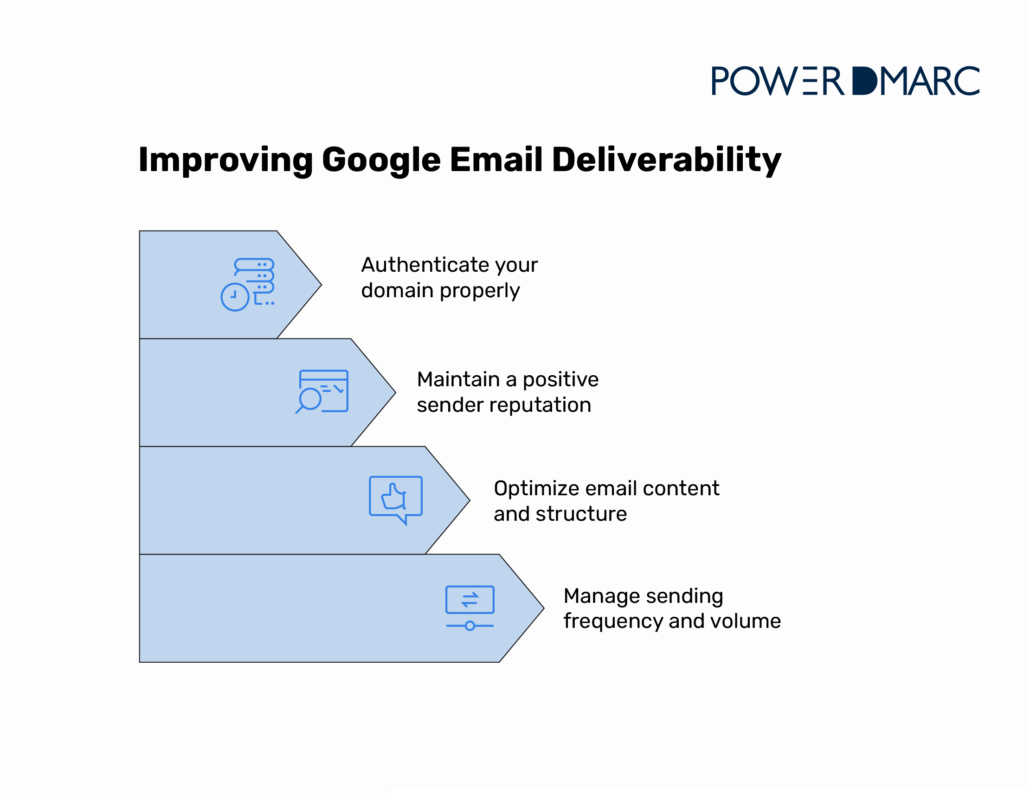
How to Improve Google Email Deliverability
Each step below helps ensure your messages consistently land in the inbox instead of the spam folder.
Authenticate your domain properly
Email authentication serves as your digital identity verification. Gmail relies heavily on these protocols to determine trust.
- Implement SPF, DKIM, and DMARC: SPF records specify which mail servers can send emails on behalf of your domain. Include all legitimate sending sources while staying under the 10 DNS lookup limit. DKIM adds a digital signature proving messages weren’t altered during transmission. DMARC builds on SPF and DKIM by telling receiving servers what to do when authentication fails. Start with a DMARC “none” policy to monitor results, then gradually move to “quarantine” or “reject” as your infrastructure stabilizes. Ensure alignment between your visible “From” address and authenticated domains, as misalignment suggests spoofing attempts.
- Use subdomains for bulk sends: Separate transactional emails from marketing campaigns using different subdomains (e.g., “mail.yourdomain.com” for transactional, “news.yourdomain.com” for newsletters). This isolation prevents marketing issues from affecting critical email delivery.
PowerDMARC simplifies authentication with one-click DNS publishing that automatically configures SPF, DKIM, and DMARC records correctly. Our hosted SPF with macros solution prevents DNS lookup limit issues that commonly break authentication.
Maintain a positive sender reputation
Maintaining a healthy reputation requires steady monitoring and responsible sending practices.
- Monitor with Google Postmaster tools: Google Postmaster Tools provides critical insights into how Gmail perceives your sending domain. Monitor your domain reputation score, IP reputation, spam rate, and authentication success rates. The tool shows reputation on a scale from “Bad” to “High,” spam complaint rates, authentication pass rates, and encryption statistics.
- Keep metrics healthy: Target bounce rates below 2% and spam complaint rates below 0.1%. Remove hard bounces immediately since continuing to send to invalid addresses damages reputation quickly. When recipients mark emails as spam, suppress them from future campaigns.
- Use consistent infrastructure: Stick with consistent domains and IP addresses so Gmail can establish reliable patterns for your sending behavior. Frequently changing infrastructure confuses reputation tracking and forces you to rebuild trust repeatedly. Avoid frequent sender name changes that erode recipient trust.
- Segment your audience: Send targeted content to engaged subscribers rather than blasting generic messages to your entire list. Segmentation improves engagement rates because recipients receive relevant content. Higher engagement signals to Gmail that your emails deserve inbox placement.
Optimize email content and structure
How your message looks and reads can influence whether it reaches the inbox or the spam folder, so clear, trustworthy content is essential to consistent deliverability.
- Avoid spam language: Write naturally without excessive promotional phrases, all-caps text, or multiple exclamation marks. Replace “ACT NOW!!!” with “See our new features” and “FREE money” with “Check out our special offer.”
- Balance text and images: Include both HTML and plain-text versions that match. Aim for at least 60% text content relative to images. Add descriptive alt text so messages remain understandable when images don’t load.
- Include required elements: Place visible, functional unsubscribe links prominently in the footer and process opt-out requests immediately. Include your physical mailing address and clear organizational identification. This transparency builds trust and ensures compliance.
- Personalize messages: Use recipient names, reference past interactions, and tailor content to individual preferences. Personalization improves engagement metrics that boost deliverability.
Manage sending frequency and volume
How often and how much you email affects how Gmail views your reputation.
- Warm up new infrastructure: New sending infrastructure starts with zero reputation. Gradually increase volume over 4-6 weeks: week 1 (100-500 emails daily), week 2 (200-1,000 daily), week 3 (500-2,000 daily), then continue scaling. This lets Gmail observe consistent engagement patterns before full-volume sending.
- Target engaged users: Avoid sending to subscribers who haven’t opened emails in months. Target users who’ve interacted in the past 90 days. Run re-engagement campaigns for 60-90-day inactive subscribers, then remove non-responders to protect engagement rates.
- Maintain consistency: Establish a regular sending cadence that recipients expect. Erratic patterns (silence followed by massive blasts) look suspicious. If you send weekly newsletters, don’t suddenly switch to daily promotions without gradually adjusting.
- Use double opt-in: Require new subscribers to confirm their email addresses before receiving campaigns. This eliminates invalid addresses, reduces spam traps, and ensures your list contains genuinely interested recipients.
Aligning with Google’s 2024 Bulk Sender Guidelines
In February 2024, Google implemented stricter requirements for bulk email senders. Compliance isn’t optional for high-volume senders (5,000+ messages daily to Gmail addresses). In November 2025, Google announced tightening enforcement for these requirements, with non-compliant emails facing temporary and permanent rejections.
Authentication requirements
Gmail now requires bulk senders to implement SPF and DKIM authentication, add DMARC records with enforcement policies, and ensure PTR records match sending domains. These requirements close authentication loopholes that spammers previously exploited.
One-click unsubscribe
Gmail requires bulk senders to include one-click unsubscribe functionality in marketing emails. Recipients must opt out without logging into external websites or navigating complex processes. Include the List-Unsubscribe header in email headers, process unsubscribe requests within 48 hours, and maintain visible unsubscribe links in email content.
Spam rate thresholds
Google enforces a strict spam complaint threshold: bulk senders must maintain spam rates below 0.3%, with 0.1% as the target. Exceeding these thresholds triggers progressive filtering actions, from promotions tab placement to complete message blocking.
Penalties for non-compliance
Senders who ignore these rules face increasingly severe consequences. At first, Gmail may flag their messages with spam warnings or route them to the junk folder. Continued non-compliance can trigger stricter filtering, temporary rate limits that slow or block message delivery, and, in serious cases, full domain-level suspension.
Regular compliance audits
Set up quarterly reviews of your email authentication and sending practices. Verify SPF, DKIM, and DMARC records remain properly configured and test one-click unsubscribe functionality. Additionally, review spam complaint rates through Postmaster Tools and check that sending volumes align with your established reputation.
The Bottom Line
Reaching Gmail inboxes requires systematic attention to authentication, reputation, content quality, and compliance with Google’s evolving standards. To begin, audit your existing authentication setup via Google Postmaster Tools to establish your reputation benchmark. Afterward, methodically begin addressing authentication improvements, list hygiene, and content optimization.
With strong technical configuration and a responsible sending program, your emails are much more likely to reach the inbox and create longstanding trust with Gmail (and your recipients).
Ready to ease the pain of email authentication and protect your deliverability? PowerDMARC’s system configures SPF, DKIM, and DMARC with ease and provides you with real-time reputation monitoring of your domain so you have the keys to keep it safe. Schedule a free demo to learn how we can make Gmail inbox delivery easy and safe.
Frequently Asked Questions (FAQs)
How long does it take to fix poor Gmail deliverability?
It’ll generally take 4-8 weeks of consistent good behavior to fully recover deliverability. You’re going to clear up authentication errors, clean your lists, raise engagement, and show a good sending pattern before Gmail fully trusts that you’re a reputable sender again.
Can I test if my emails are landing in Gmail spam folders?
Yes, either purchase seed testing services or create test Gmail accounts to monitor inbox placement. Google Postmaster Tools also gives you spam rate data, which tells you what percentage of your emails get marked as spam by Gmail users and can be indicative of filtering problems.
*** This is a Security Bloggers Network syndicated blog from PowerDMARC authored by Ayan Bhuiya. Read the original post at: https://powerdmarc.com/google-email-deliverability/
如有侵权请联系:admin#unsafe.sh