
When your Umbraco site goes from “content platform” to “enterprise platform,” the first thing 2025-11-14 09:28:13 Author: securityboulevard.com(查看原文) 阅读量:8 收藏
When your Umbraco site goes from “content platform” to “enterprise platform,” the first thing that breaks isn’t the CMS — it’s authentication.
Umbraco does many things right. Out of the box, you get:
-
Member logins
-
Backoffice user management
-
OAuth/OpenID Connect
-
Active Directory integration
-
Role-based access
-
Plugins for external providers
And for most teams, that’s more than enough.

But when you start closing deals with mid-market and enterprise customers (especially in B2B SaaS, education, healthcare, or fintech), the requirements change overnight:
-
Do you support SAML SSO?
-
Can you integrate with our Okta / Azure AD?
-
Do you offer SCIM provisioning?
-
Where can we download audit logs?
-
We need role sync + deactivation sync.
-
Is your system SOC 2 / ISO compliant?
Suddenly, your comfortable Umbraco setup starts feeling… a bit small for the room.
This is exactly why SSOJet exists.
Umbraco is not a product built for enterprise identity challenges — nor should it be. It’s a CMS, not an IAM platform.
Once you start selling your Umbraco-powered SaaS to larger customers, you face new identity expectations:
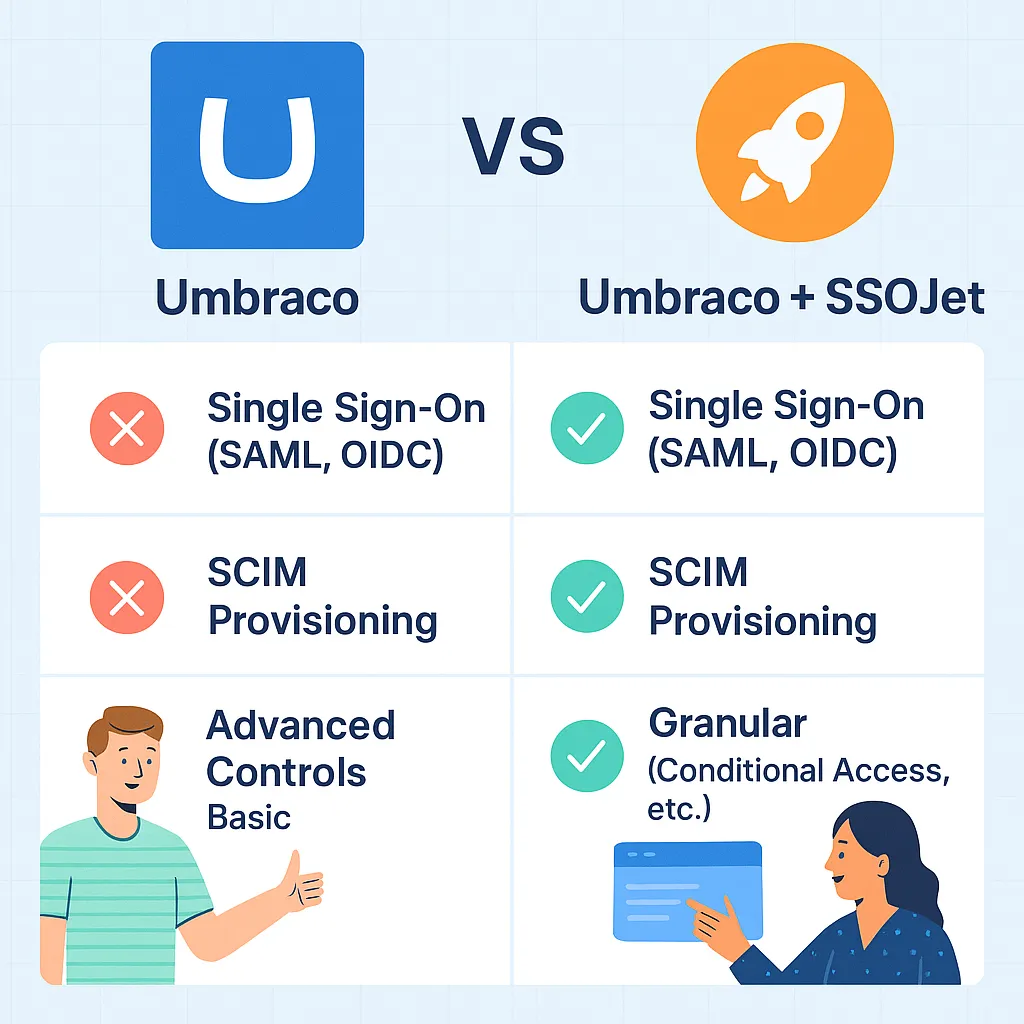
Enterprise requirements that Umbraco doesn’t natively cover
| Requirement | Native Umbraco | With SSOJet |
|---|---|---|
| SAML 2.0 SSO | ❌ No | ✅ Yes |
| Okta / Azure AD / Ping integrations | Limited | 25+ providers |
| SCIM user provisioning | ❌ No | ✅ Yes |
| Department/role provisioning | Manual | Automated |
| Deactivation sync | ❌ No | Auto-remove access |
| Audit logs | Basic | Full enterprise audit layer |
| Compliance (SOC 2, ISO, HIPAA) | Requires add-ons | Built-in |
So the question becomes:
How do you upgrade Umbraco without rebuilding your entire authentication system?
Enter SSOJet — a modern, developer-friendly identity extension built for existing systems like Umbraco.
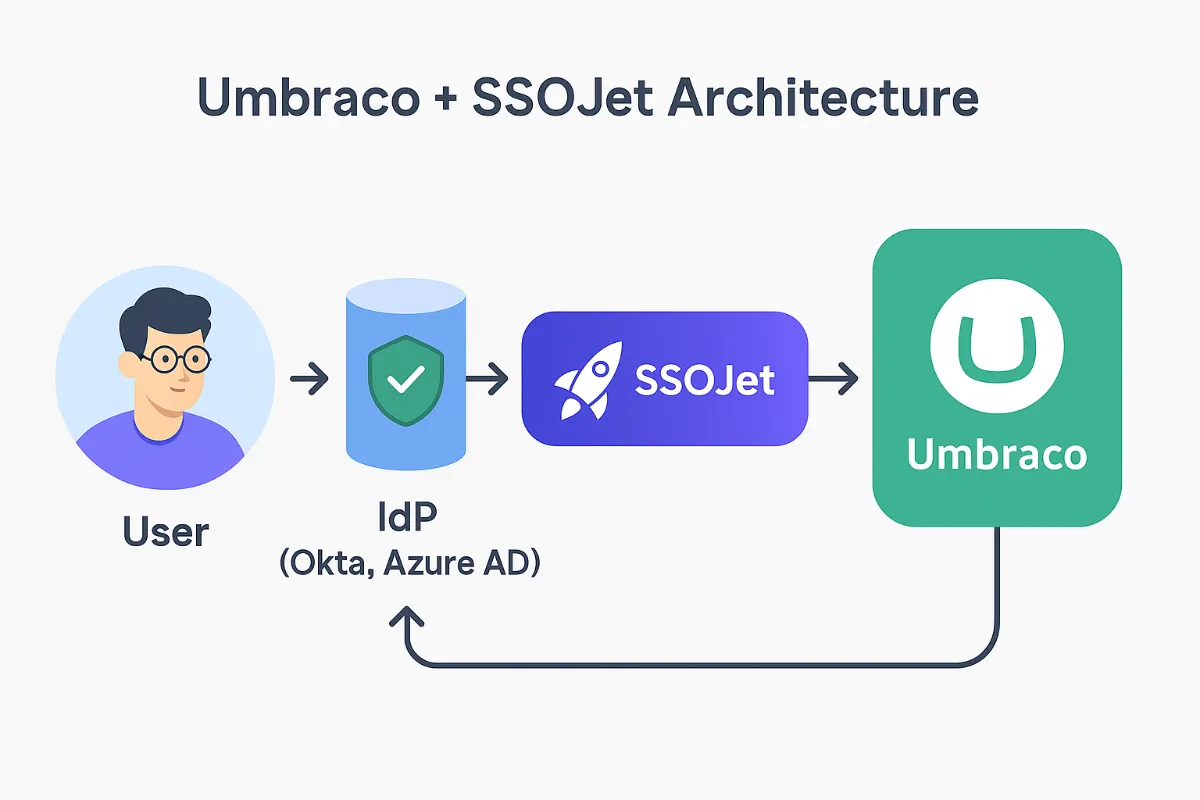
If you learn best by reverse-engineering code (most developers do), start here:
GitHub Example — Umbraco + SSOJet (OIDC Integration) → [https://github.com/ssojet/umbraco-ssojet-openidconnect-example)
This repo shows:
- OIDC integration
- Callback handler
- Claims mapping
- Login/logout
Keep this open — you’ll reference it throughout the guide.
SSOJet sits adjacent to your Umbraco app — you keep your CMS, your templates, your workflows.
You simply outsource the complicated identity parts.
SSOJet gives your Umbraco app:
1. SSO for all major enterprise IdPs
-
Okta
-
Azure AD / Entra
-
Ping Identity
-
OneLogin
-
Google Workspace
-
JumpCloud
-
Duo
-
CyberArk
-
On-prem AD via ADFS
No custom ACS URL hacks.
No reinventing SAML code.
No maintaining IdP-specific exceptions.
2. SCIM Provisioning (Zero-Touch User Sync)
Enterprise expects this:
-
When a user joins → automatically created in your app
-
When a user changes department → their roles update
-
When a user leaves → immediate access removal
SSOJet gives you a full SCIM server so your Umbraco app becomes enterprise-ready instantly.
3. Role Mapping & Claim Transformation
You can map:
-
Azure AD "Department" → Umbraco Role
-
Okta “Groups” → Member Types
-
Ping "Entitlements" → Custom Access Claims
All without modifying your Umbraco codebase.
4. Compliance Layer (SOC 2, ISO, GDPR)
SSOJet provides:
-
Authentication audit logs
-
IdP login trails
-
Access review support
-
Strong encryption
-
Zero-trust principles
-
Data residency controls
Essentially: everything your security questionnaire asks for.
Imagine you run a content-heavy SaaS platform built on Umbraco.
A large enterprise customer approaches you and says:
“We want to onboard 2,500 employees.
We need Azure AD SSO + SCIM for deactivation.”
Traditionally, you would:
-
Build custom SAML handlers
-
Maintain IdP-specific metadata
-
Patch SAML vulnerabilities
-
Implement SCIM spec (very painful)
-
Add configuration UI
-
Build audit logs
-
Pass a SOC 2 audit
That’s 2–4 months of engineering work at minimum.
With SSOJet?
Hours, not months.
You configure a connection, add OIDC middleware, and you’re done.
(This is the high-level version. You can also publish a detailed developer doc separately.)
Step 1 — Create your SSOJet project
-
Go to SSOJet dashboard
-
Create a new connection
-
Select “OIDC” or “SAML”
-
Choose your IdP (Okta, Azure AD, Ping, etc.)
Step 2 — Add SSOJet middleware to your Umbraco app
appsettings.json
"Authentication": {
  "SSOJet": {
    "ClientId": "...",
    "ClientSecret": "...",
    "Authority": "https://ssojet.com/<tenant>/",
    "CallbackPath": "/signin-oidc"
  }
}
Startup.cs
services.AddAuthentication(options =>
{
    options.DefaultAuthenticateScheme = CookieAuthenticationDefaults.AuthenticationScheme;
    options.DefaultChallengeScheme = OpenIdConnectDefaults.AuthenticationScheme;
})
.AddCookie()
.AddOpenIdConnect("SSOJet", options =>
{
    options.ClientId = config["Authentication:SSOJet:ClientId"];
    options.ClientSecret = config["Authentication:SSOJet:ClientSecret"];
    options.Authority = config["Authentication:SSOJet:Authority"];
    options.CallbackPath = "/signin-oidc";
    options.SaveTokens = true;
});
Step 3 — Map SSOJet claims to Umbraco roles
Examples:
-
"groups"→ Umbraco role -
"department"→ Member Type -
"email"→ Username
Step 4 — (Optional) Enable SCIM Provisioning
Your enterprise customer adds your SCIM URL in:
-
Azure AD SCIM Config
-
Okta Lifecycle Management
-
Ping Provisioning
And your users sync automatically.

1. Zero-rewrite approach
Your current Umbraco login stays intact — SSOJet sits beside it.
2. Enterprise-proofing your product
You don’t lose deals due to missing SSO, SCIM, or compliance features.
3. Faster onboarding
Enterprise customers can connect their IdP in minutes.
4. No vendor lock-in
You keep your Umbraco app.
SSOJet only handles the IAM layer.
5. Simple pricing (no MAU overages)
Unlike Auth0/Stytch, SSOJet pricing is connection-based, not MAU-based.
This guide applies to:
-
B2B SaaS built on Umbraco
-
Member portals
-
Customer service portals
-
B2E internal tools
-
Digital experience platforms
-
Intranets/extranets
-
Healthcare/finance apps needing compliance
If you’re trying to win enterprise deals, SSOJet is the identity layer you add before your next big demo.
-
SSOJet SAML Login → https://ssojet.com/saml-login
-
SSOJet OIDC → https://ssojet.com/openid-connect
-
SCIM User Provisioning → https://ssojet.com/scim-directory-sync
-
Enterprise SSO Overview → https://ssojet.com/enterprise-sso
-
Blog Index → https://ssojet.com/blog
*** This is a Security Bloggers Network syndicated blog from SSOJet - Enterprise SSO & Identity Solutions authored by SSOJet - Enterprise SSO & Identity Solutions. Read the original post at: https://ssojet.com/blog/modern-authentication-for-umbraco-add-sso-scim-compliance-with-ssojet
如有侵权请联系:admin#unsafe.sh