For the last few months, we’ve been hard at work on today’s release, Binary Ninja 5.2 (Io)! Th 2025-11-13 13:33:7 Author: binary.ninja(查看原文) 阅读量:40 收藏

For the last few months, we’ve been hard at work on today’s release, Binary Ninja 5.2 (Io)! This release delivers some of our most impactful and highly requested features yet, including bitwise data-structure support (second most requested), container support (fifth most requested), full Hexagon architecture support for disassembly and decompilation, and much more. Under-the-hood, 5.2 also contains some other improvements that will help us chart a course toward even bigger improvements in the future.
Let’s dig in!
- Free Candy
- Initial Bitfield Support
- Container Support
- Custom Strings / Constants
- Ghidra Import
- WARP Server
- Hexagon
- Cross References
- TTD Queries and Analysis
- Objective-C
- Open-Source Contributions
- Everything Else

Free Candy
Well, not quite free candy, but it might seem like it if you’re a user of the Free edition of Binary Ninja! In 5.2, we’re adding many new features from the paid versions to Free:
Initial Bitfield Support
Previous versions of Binary Ninja had no support for bitwise structure members, commonly referred to as bitfields. With 5.2, we can now represent structure members at a given bit position and bit width.
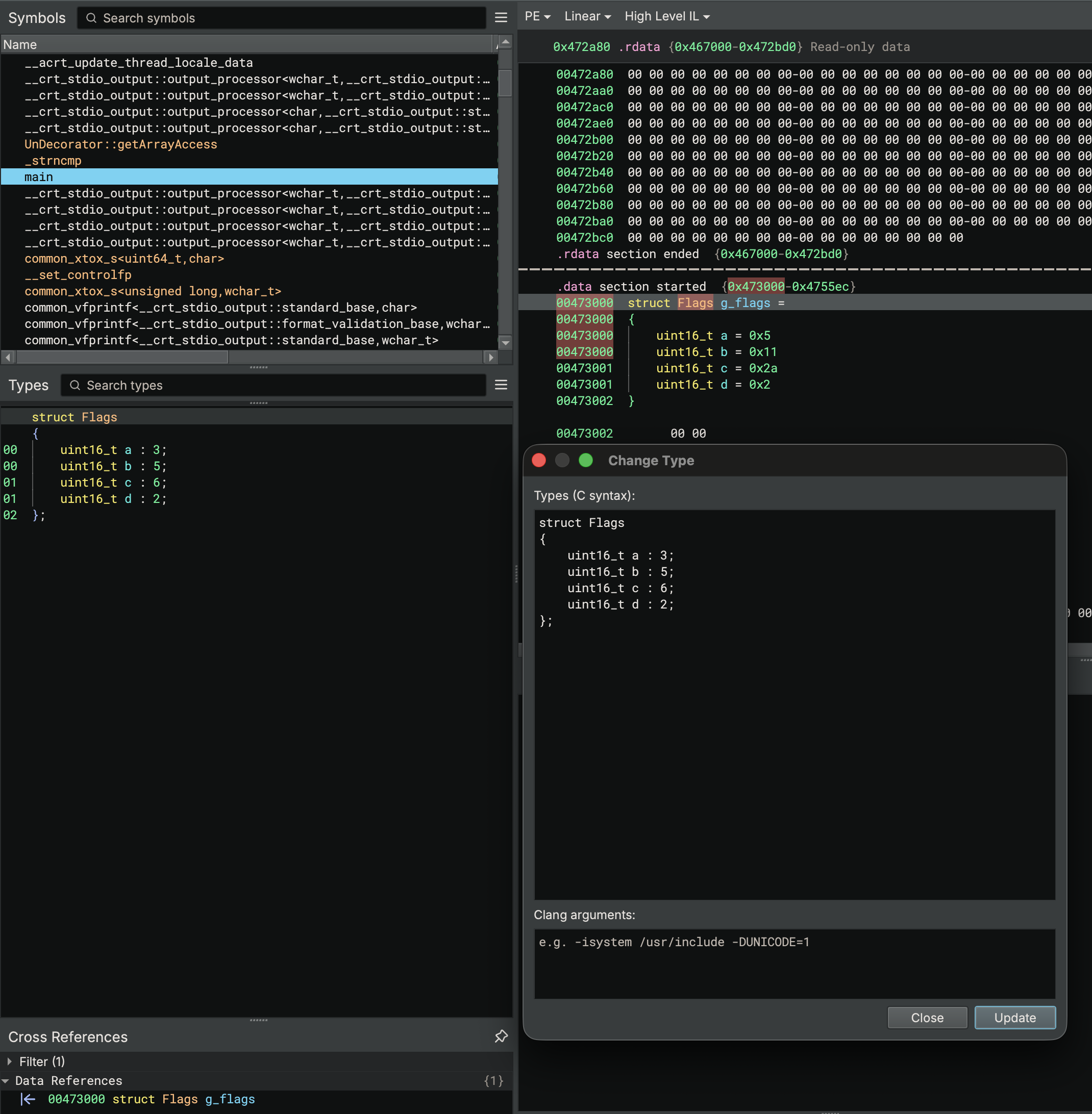
Currently, we use bitfield information when rendering structures in the data renderer, as shown above. The included debug info plugins (e.g. DWARF, PDB) have been updated to express bitfields alongside other plugins like the built-in SVD import, where MMIO peripherals make heavy use of bitfields.
In an future release, we will extend our analysis to resolve common access patterns for bitfields in Medium and High Level IL.
Container Support
One of our most-requested features is finally here: full container support. With the introduction of [Container Transforms](https://de-docs.binary.ninja/dev/containertransforms.html), Binary Ninja can now seamlessly handle nested formats like ZIP, IMG4, or CaRT directly in-memory — no manual extraction required.
At its core, container support lets you browse inside archives and automatically follow transformation layers to reach the data you care about. When a container resolves to a single target, Binary Ninja can transparently open it for analysis. Combined with the files.container.defaultPasswords setting, this makes it effortless to open password-protected samples or malware archives safely — everything happens in memory, so nothing ever touches disk and you can create an analysis database immediately.
When there are multiple payloads, the new Container Browser lets you explore and choose exactly which one to load:
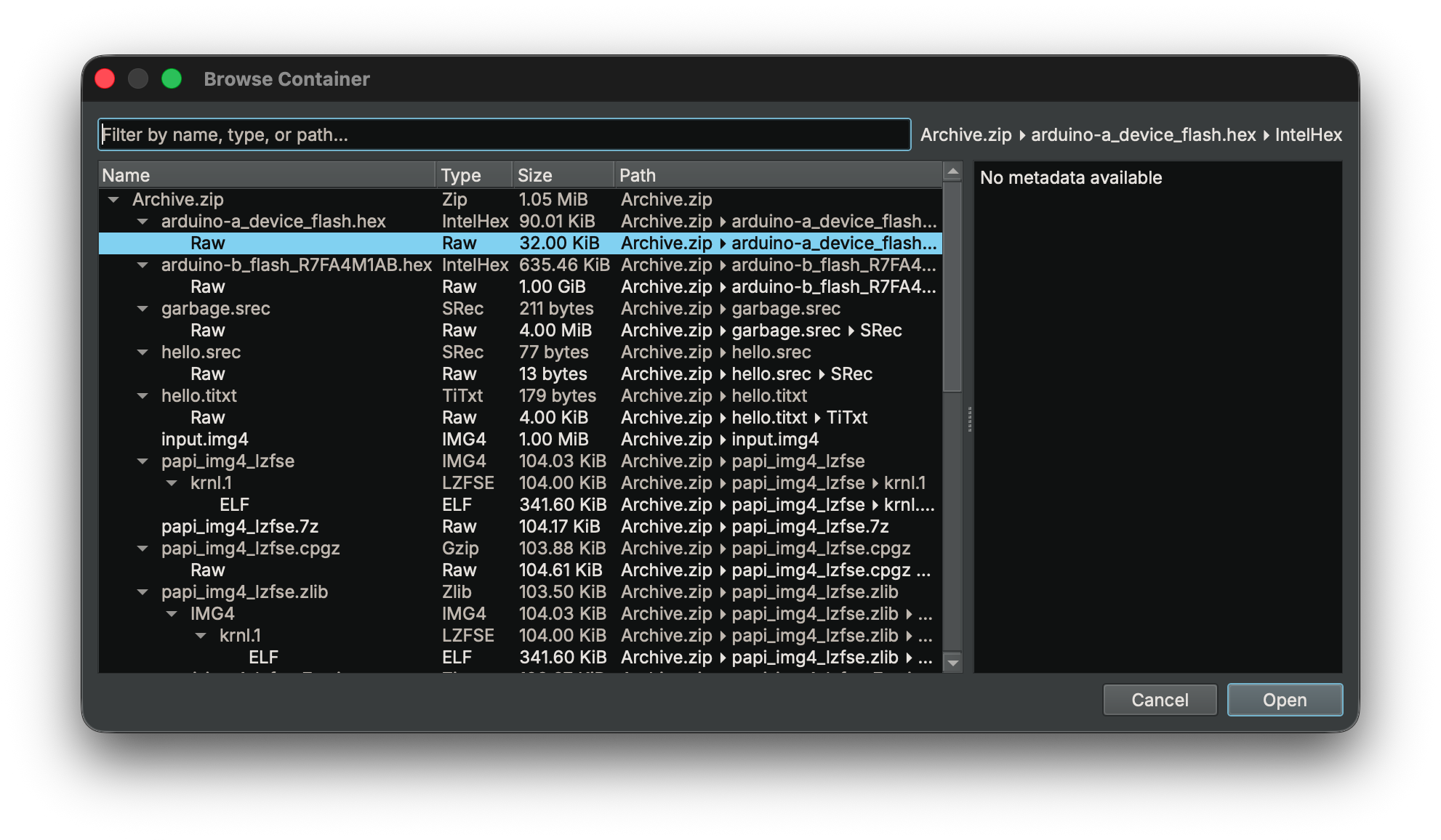
You can easily extend this functionality since it leverages the Transform API. A complete ZipInfo example is included with the API, so you can add support for whatever container formats you need.
Custom Strings / Constants
Want to add your own custom string deobfuscator that can be automatically applied merely by adding a type? How about support for custom string formats for a new language? Here’s some of the changes we made in this release to support it:
- Custom String Rendering: These new APIs allow for custom callbacks, enabling strings to be rendered with different logic than just standard C-style strings.
- Type Attributes: These are useful for annotating which strings to use a custom renderer on in a file that has a mix of obfuscated strings and regular C-style strings.
- Better type-propagation: For the example plugin below, we had to add some additional type propagation features that would automatically propagate the types (including attributes).
- Custom Constant Rendering: The constant renderer system makes similar changes to strings as the custom string rendering but applied to constants. For example, consider automatically converting constants passed to a library hashing function into their string representations.
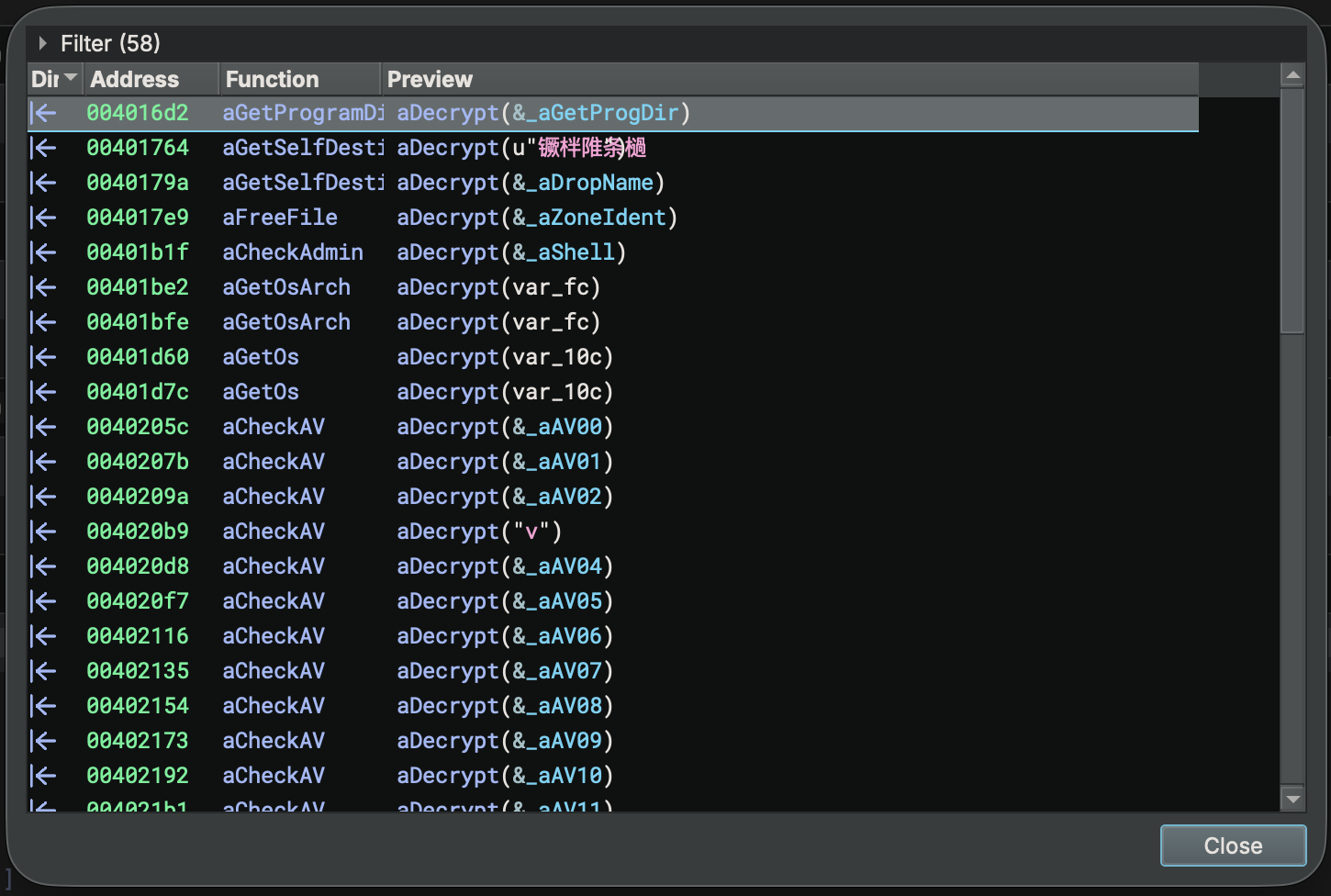
We’ll show off more details in an upcoming blog post, but here are a few examples to whet your appetite. First, we asked one of our favorite YouTubers and malware analysis trainers Josh Reynolds from InvokeRE for a good sample that uses a custom string obfuscation implementation. He suggested a recent Amadey variant(1, 2). Next, we wrote a quick example plugin that allows us to deobfuscate strings using simple type annotations which is useful for lots of other samples as well.
- Load the example plugin (copy it or symlink it into your plugin folder from the install path).
- Open the sample linked above (
4cfd8b1592254d745d8f654e97b393c620ed463e317e09caa13b78d4cd779fdd, 1, 2). - Create a new type. Attributes can contain parameters that can be accessed by your plugin making this infinitely useful! This type was created from observing the
aDecryptfunction using a hard-coded subtraction key from offset00405000. Navigate to that location, right-click on the string and chooseCopy As/Binary/Raw Hex. Thesub_encodedattribute will be used by our plugin from step 1 above to automatically replace strings.
typedef char __attr("sub_encoded", "31656537366531313932396130373434356335616264373434616134303764623239613037343435633561626437343461613430376462")* deobfuscate;
- Now apply the type directly to the
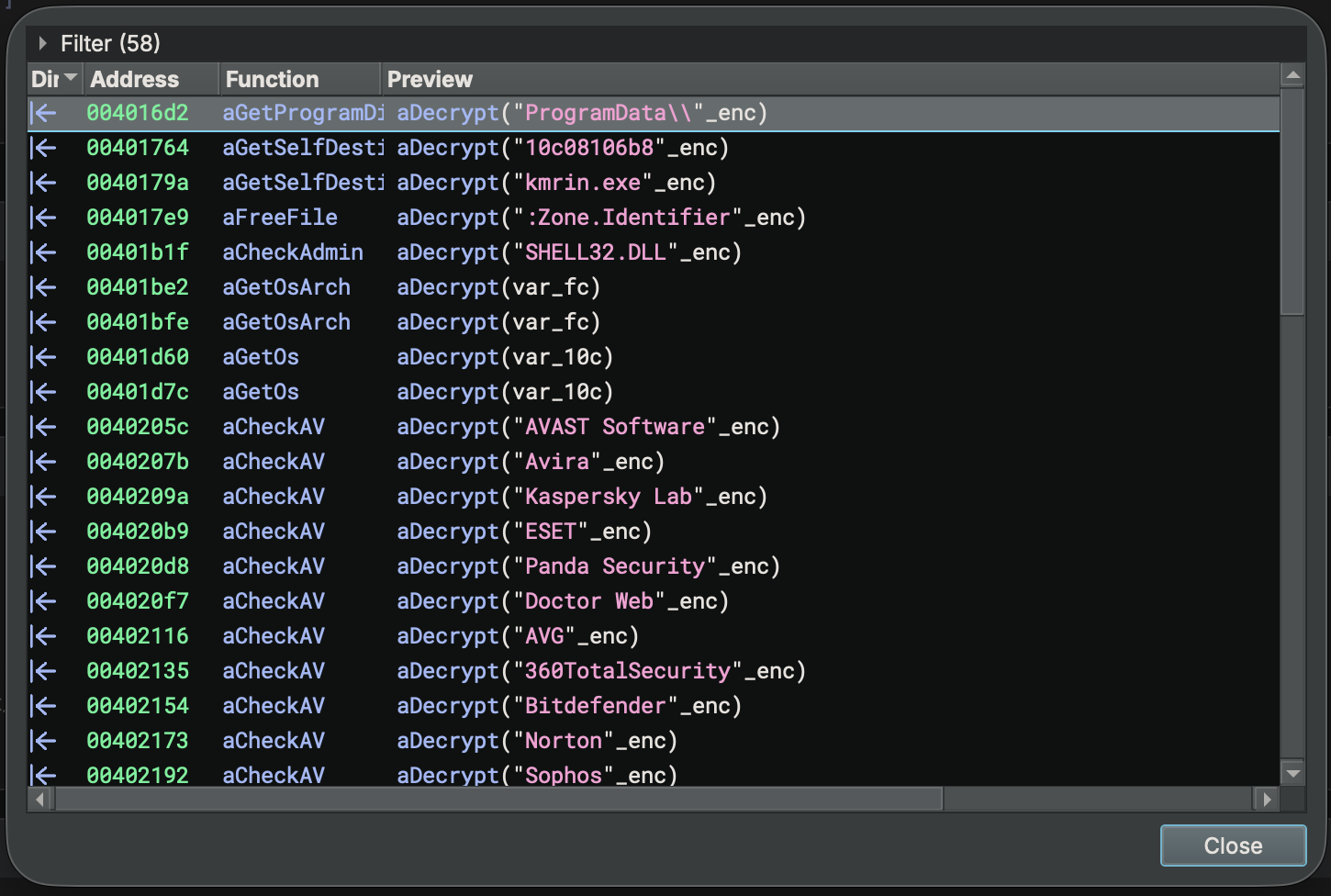
aDecryptfunction:int32_t aDecrypt(deobfuscate arg1)(Note: the type is NOT a pointer since we want to apply the transformation directly). - That’s it! See how the strings are automatically de-obfuscated everywhere that function is used!
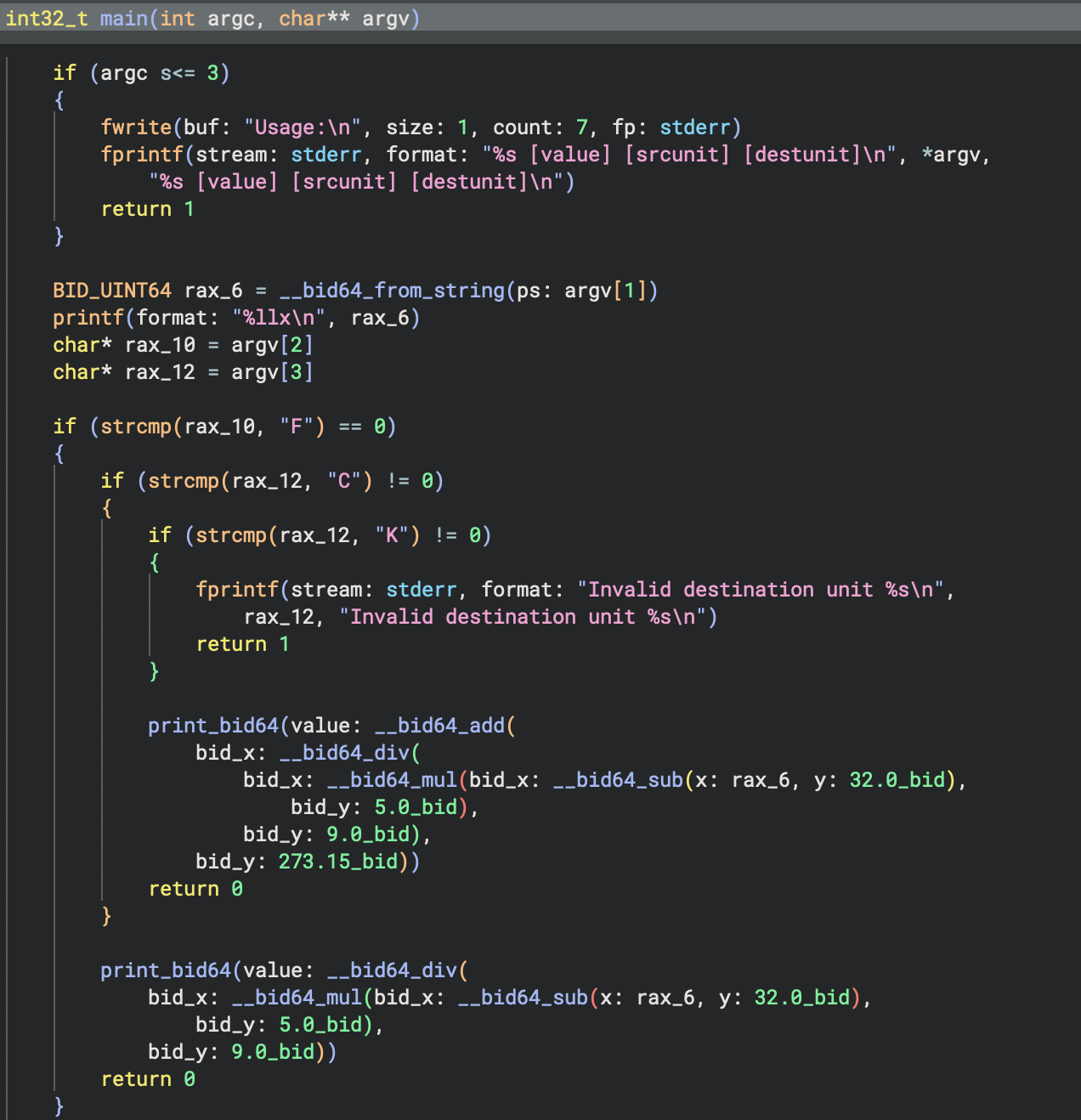
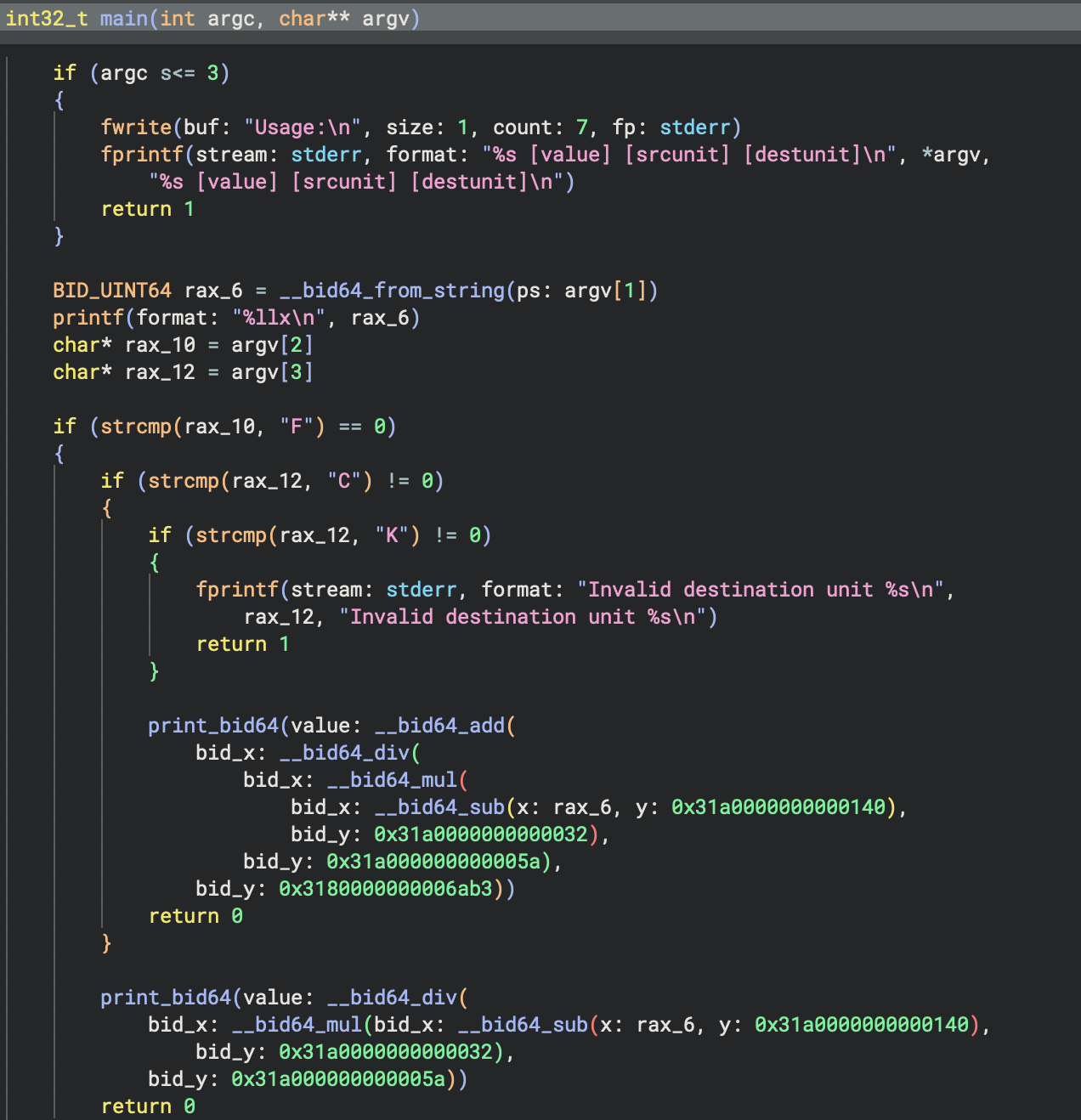
Another useful feature is custom constant rendering. Check out how the bid64_constant.py example plugin handles rendering a lesser-known floating point format.
We didn’t just make custom string renderers for this specific feature. Part of the vision for Binary Ninja over the next few releases is a push toward language-specific decompilation. You can already see that with our current Objective-C support. A lot of the work over the past few releases has been in core APIs and features needed to support specific architectures or languages, and custom string support is one such feature. Many languages have their own string representations and encodings, so keep an eye as we really begin to take advantage of this over the next several releases.
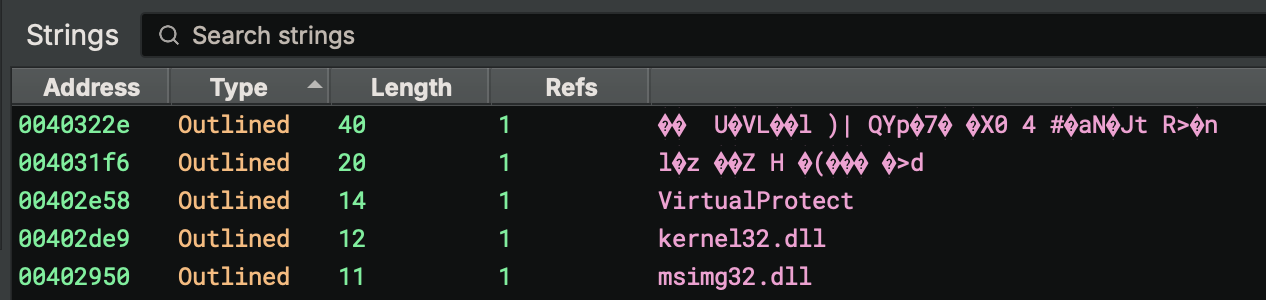
As a side-benefit, any strings identified by __builtin_strcpy and related functions will now also show up in the string list as Outlined. This makes it even more useful in quickly identifying stack-strings that might previously not have been shown in the strings view despite being identified during analysis.
Ghidra Import
Stuck working with co-workers who prefer another reverse engineering tool? While Binary Ninja has had IDB import support for some time now, with 5.2, you can also import directly from Ghidra!
You can either import the data into an existing file using the Plugins/Ghidra Import/Import Database... menu (or command-palette action), or just open the database directly with Plugins/Ghidra Import/Open Database... instead. You’ll be able to select a single .gbf or use the file browser from a .gpr to select the specific file to apply or load.
When importing, you can choose with categories of information to import into your current analysis:
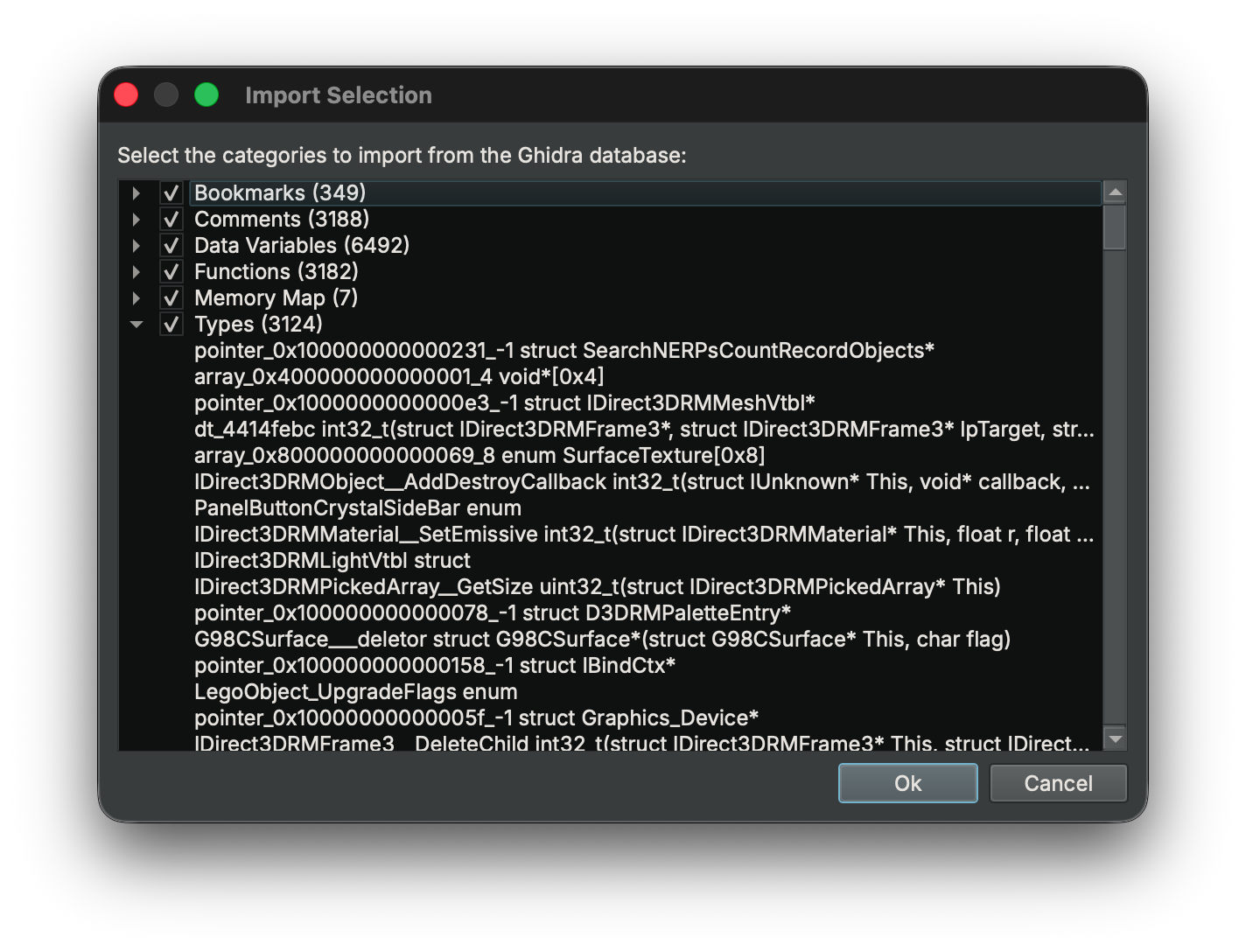
With Commercial and above editions, you can also directly import part or all of a Ghidra project into a Binary Ninja project using Plugins/Ghidra Import/ Import Project... if you run it inside of an existing Binary Ninja Project.
We plan to include Ghidra export support as well in a future version of Binary Ninja for bi-directional compatibility when working with collaborators who are using Ghidra.
WARP Server
WARP, our function signature matching plugin, can now optionally push and retrieve function and type information from a server! This allows user-contributed signatures so you can more easily share reverse engineering information with others using our WARP server. Another benefit is that we can provide signatures for uncommon libraries or one-off functions without worrying about the size on disk for users that may never need them.
Downloading Signatures
While the first network implementation of WARP is being implemented in Binary Ninja, we have publicly documented the format and API and look forward to other tools including WARP support. Our goal is to make WARP a common format for all reverse engineering tools to support sharing function signatures no matter what your tool of choice is.
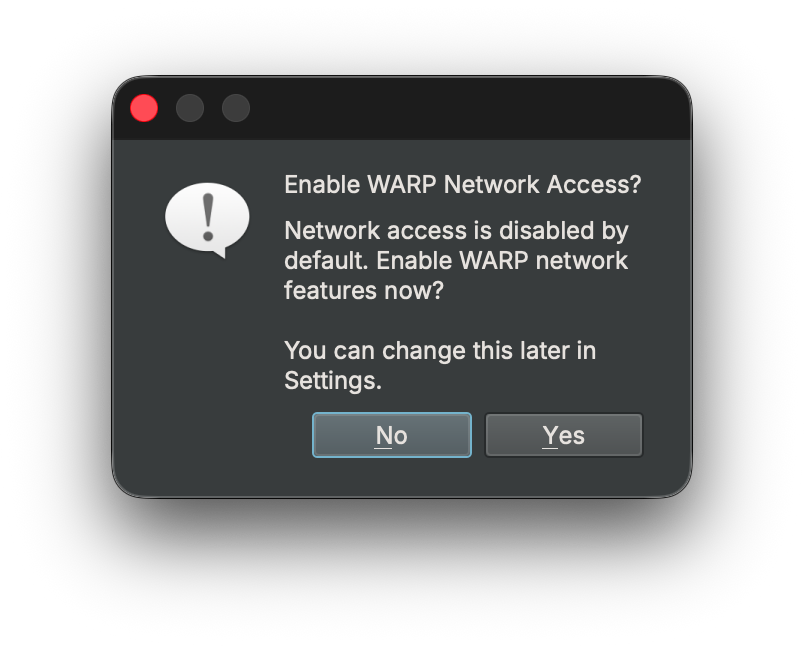
By default, WARP’s network functionality is disabled. The first time you access the WARP sidebar icon in Binary Ninja, you’ll be asked whether you want to enable the setting.
When fetching from a server, we send the function’s GUID along with the platform name, keeping transmission of sensitive information to a minimum. No authentication is required to query the database, though authentication is required to push changes to the server.
Pushing Signatures
You can also push signatures to a WARP server using a free Binary Ninja account. See the documentation for more details!
Enterprise
Version 2.0 of the Enterprise server is scheduled for the Io Release 2 milestone and includes an integrated WARP server for all of our enterprise customers.
More
For more information regarding WARP server support, see the documentation and the WARP website and be sure to keep an eye out for another blog post showing several examples of using the WARP network service.
Hexagon
With Binary Ninja 5.2, we’re excited to announce we’ve added support for the Qualcomm Hexagon DSP architecture in our Ultimate and Enterprise editions.
Hexagon is a particularly tricky target for decompilation due to several characteristics of the DSP’s pipeline. In particular we support hardware loops which we believe to be an industry first! We’ll be back with a blog post with more details on those features and how we were able to add support, but you might remember in 5.1 when we mentioned how the custom basic block analysis was a precursor for some tricky architectures — this is the first architecture released using that new system.
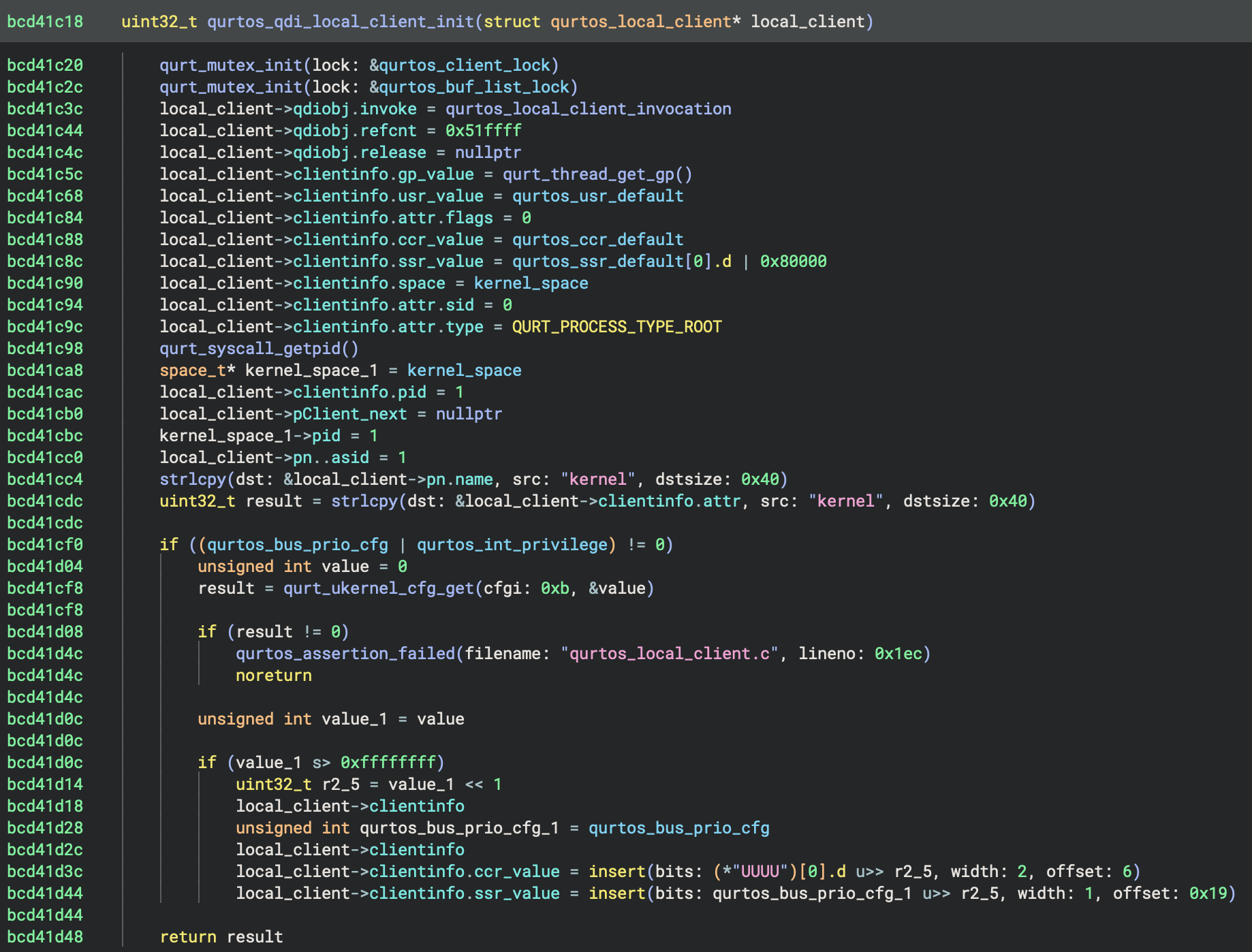
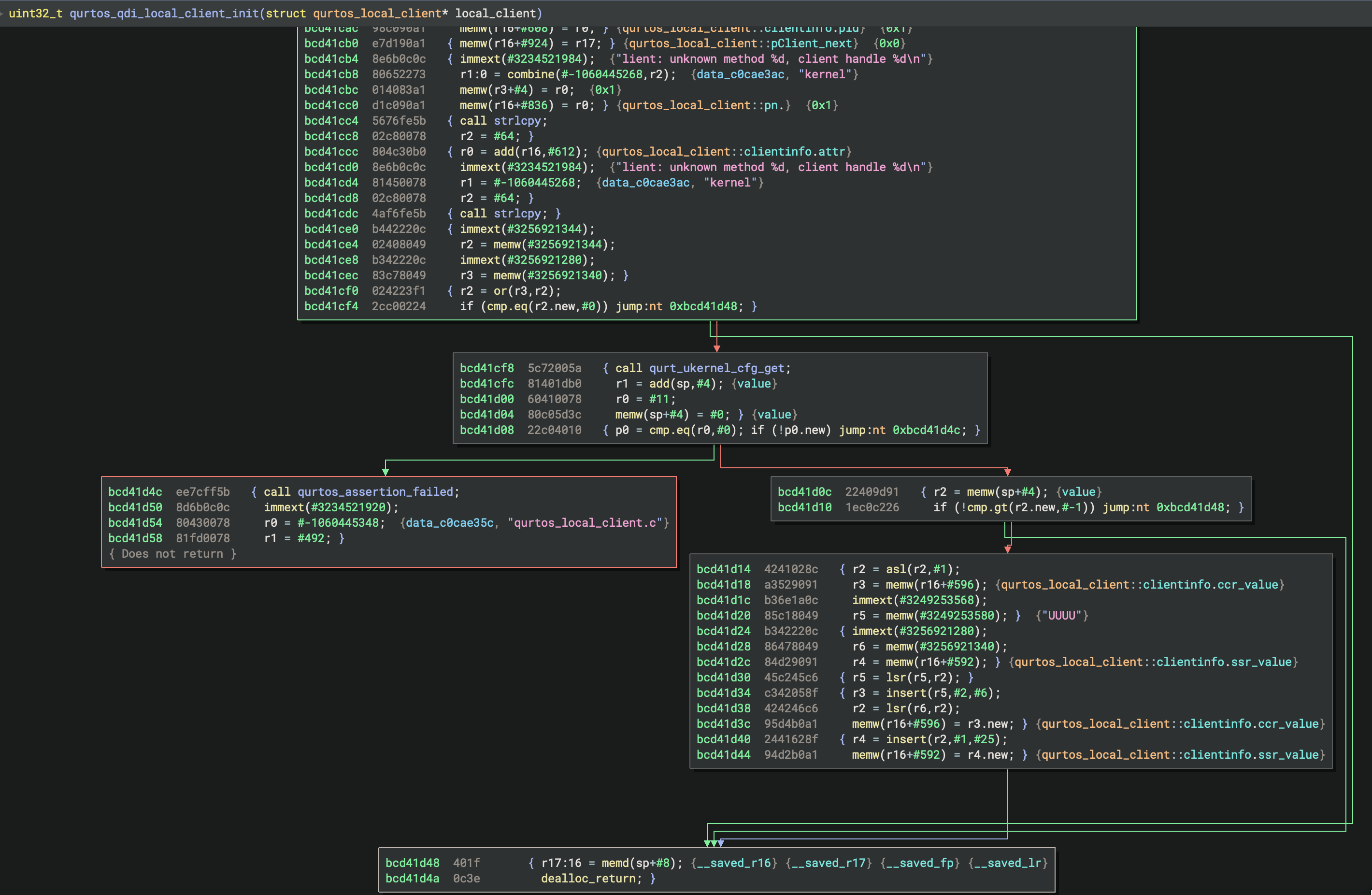
That brings the total count of first-party supported architectures for decompilation to 17 in Ultimate and above! Our Commercial and Non-Commercial editions include first-party support for 12 architectures, all of which are open source [1, 2, 3]. Of course, there are even more third-party architectures available in the extension manager, so the total count is even higher.
Cross References
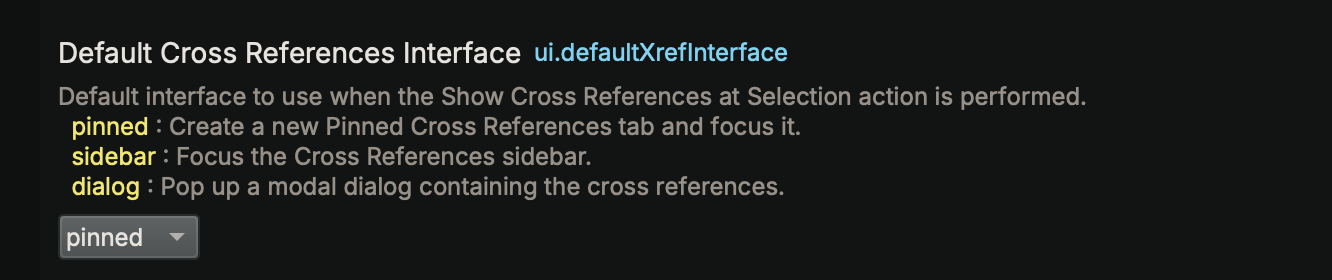
One of the very first design decisions we made in Binary Ninja was to do things differently from other tools with our Cross References (xrefs). We love having a small xrefs window available that updates as you click around. That said, there’s plenty of people with muscle memory from other tools, so who are we to limit your choice? We now support three different modes of xrefs, available in the ui.defaultXrefInterface setting.
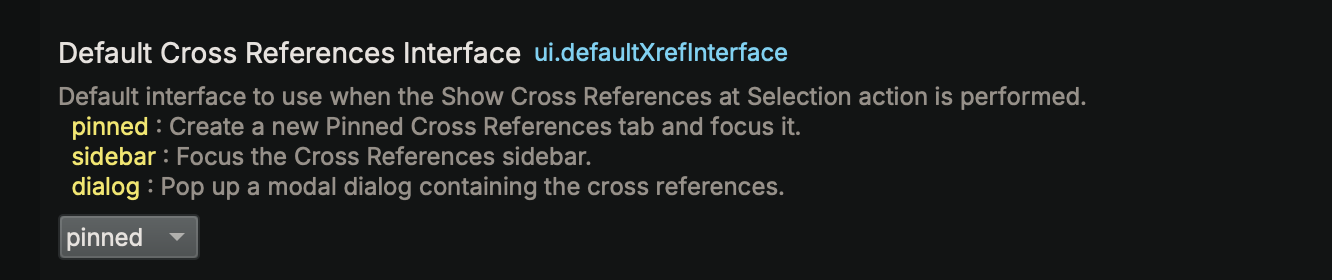
- pinned: Pinned xrefs are persistent and do not change if you move your focus. You can have multiple pins in the same UI, similar to how Ghidra’s xrefs work. This is the new default setting and what you’ll get when you press the
xhotkey. - sidebar: The sidebar setting maintains the behavior from previous versions of Binary Ninja, where our always-on xrefs sidebar is focused when you press the
xhotkey. - dialog: For those who really prefer a modal dialog (how IDA Pro shows xrefs by default), use this setting. You can see the results here in the custom string section above.
Can’t decide which you like best? No problem, you can even bind all of them to different hotkeys and keep them all at your fingertips if you prefer:
- pinned:
Pin Cross References - sidebar:
Focus Cross References - dialog:
Cross References Dialog...
TTD Queries and Analysis
This release brings major enhancements to WinDbg TTD (Time-Travel Debugging) integration. A TTD trace is a vast information source, and efficient querying is the key to unlocking its full potential. We’ve added powerful new widgets to make running TTD queries easier and expanded the Python API to enable seamless automation.
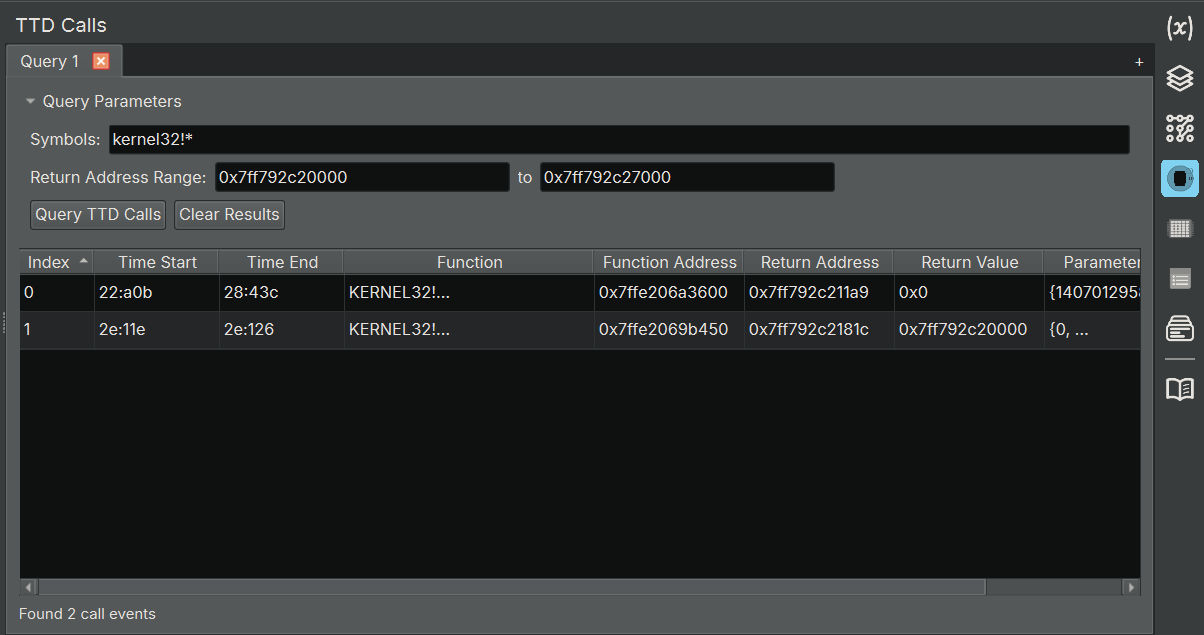
TTD Calls Widget
The TTD Calls widget allows you to query and analyze function call events from your TTD trace. This is equivalent to WinDbg’s dx @$cursession.TTD.Calls() functionality, but integrated directly into Binary Ninja. It also lets you set a return address range, which in most cases identifies the caller, so you can limit results to calls from one specific module to another. This is invaluable for extracting API usage patterns and getting high-level behavioral information.
TTD Memory Widget
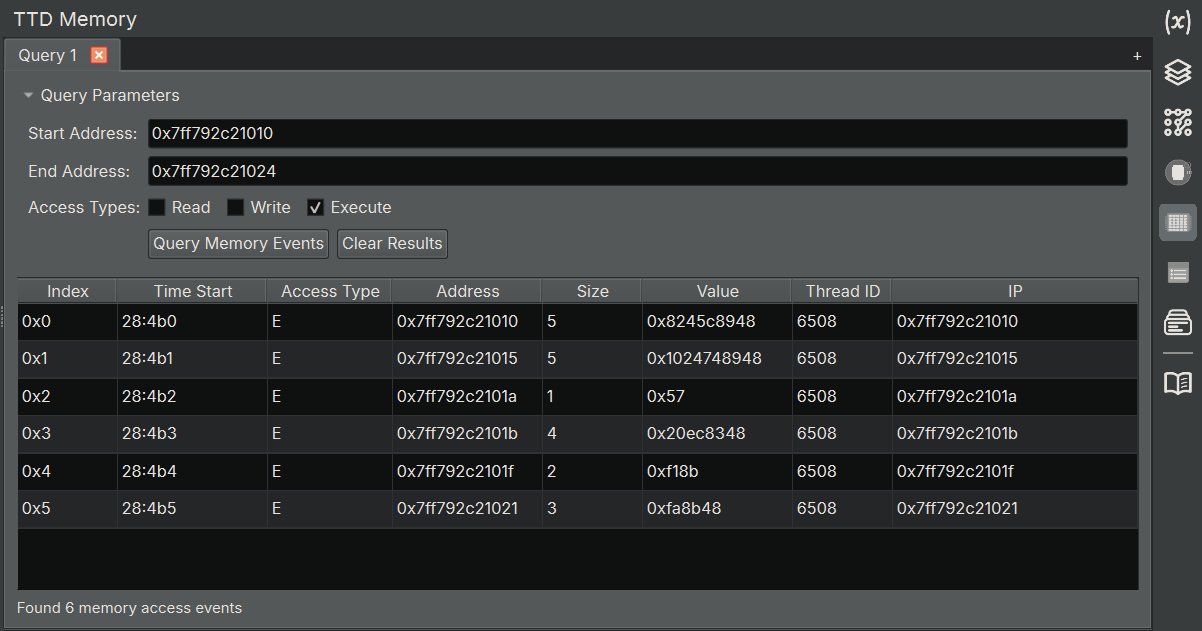
The TTD Memory widget allows you to query memory access events from your TTD trace. This is equivalent to WinDbg’s dx @$cursession.TTD.Memory() functionality. Use it to query read/write/execute operations in a given address range. This is especially helpful for surgical access to the trace—whether you’re hunting for specific memory accesses or tracking down executed instructions.
TTD Events Widget
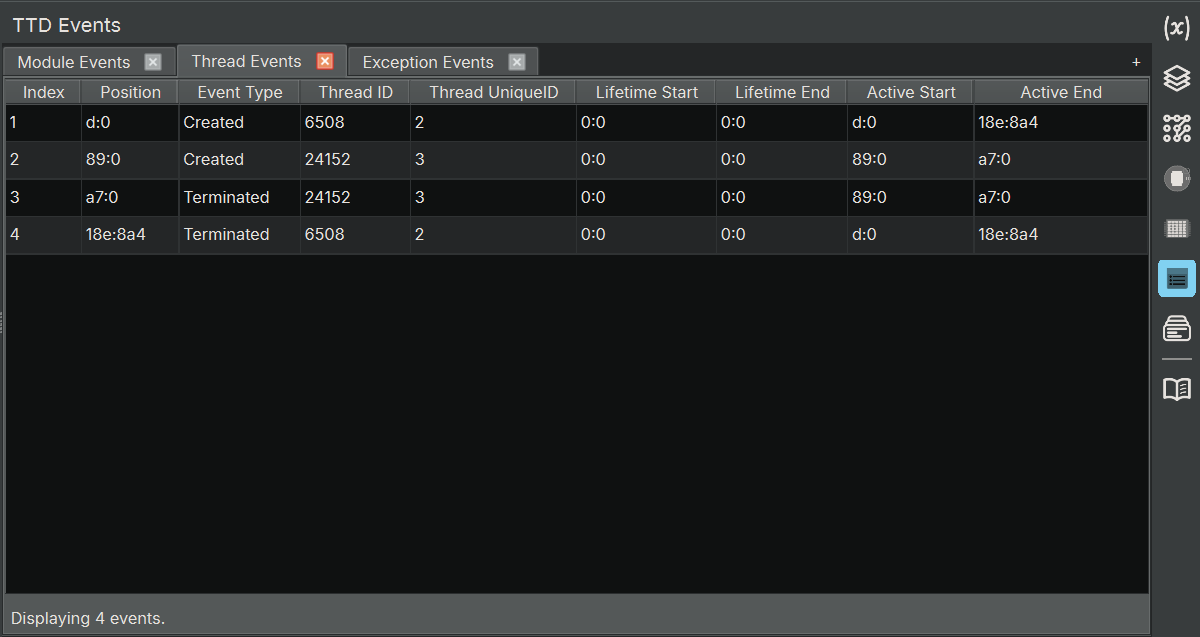
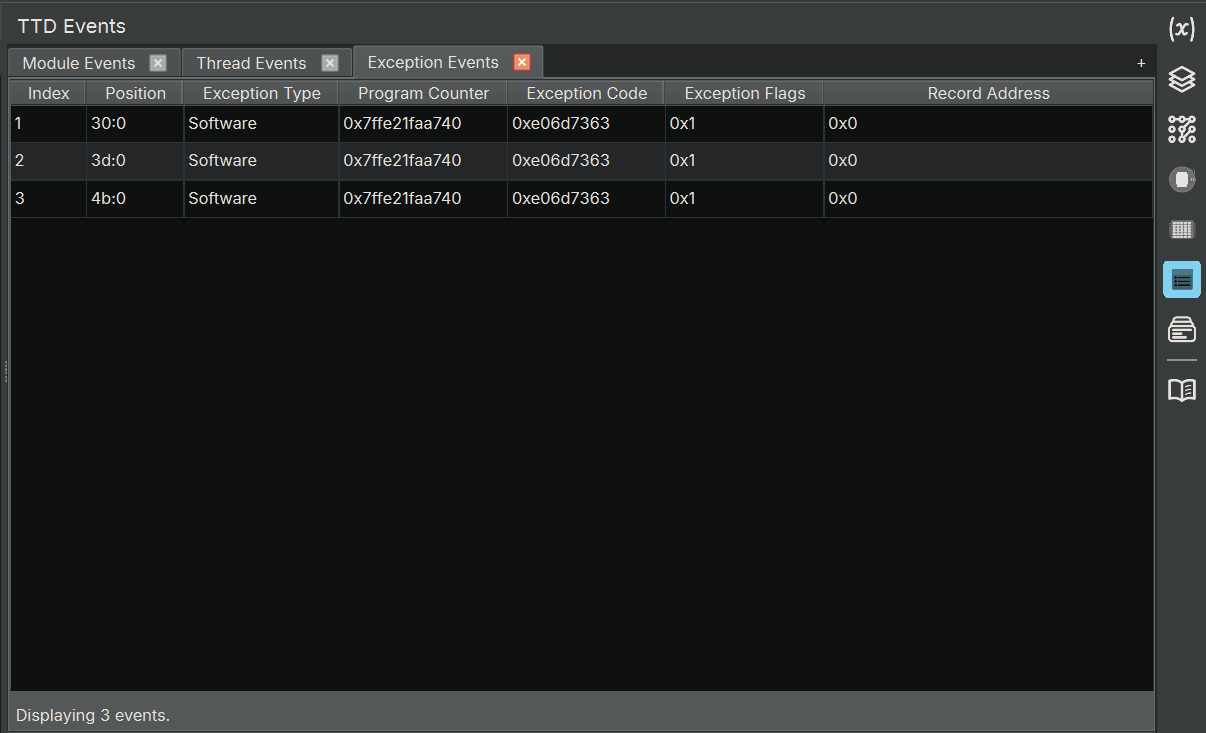
The TTD Events widget displays important events that occurred during the TTD trace, such as thread creation/termination, module loads/unloads, and exceptions. This is equivalent to WinDbg’s dx @$cursession.TTD.Events() functionality. It creates three tabs by default, showing module/thread/exception information, giving you a high-level overview of the program’s behavior.
- Module Events tab: list all of the module loads and unloads
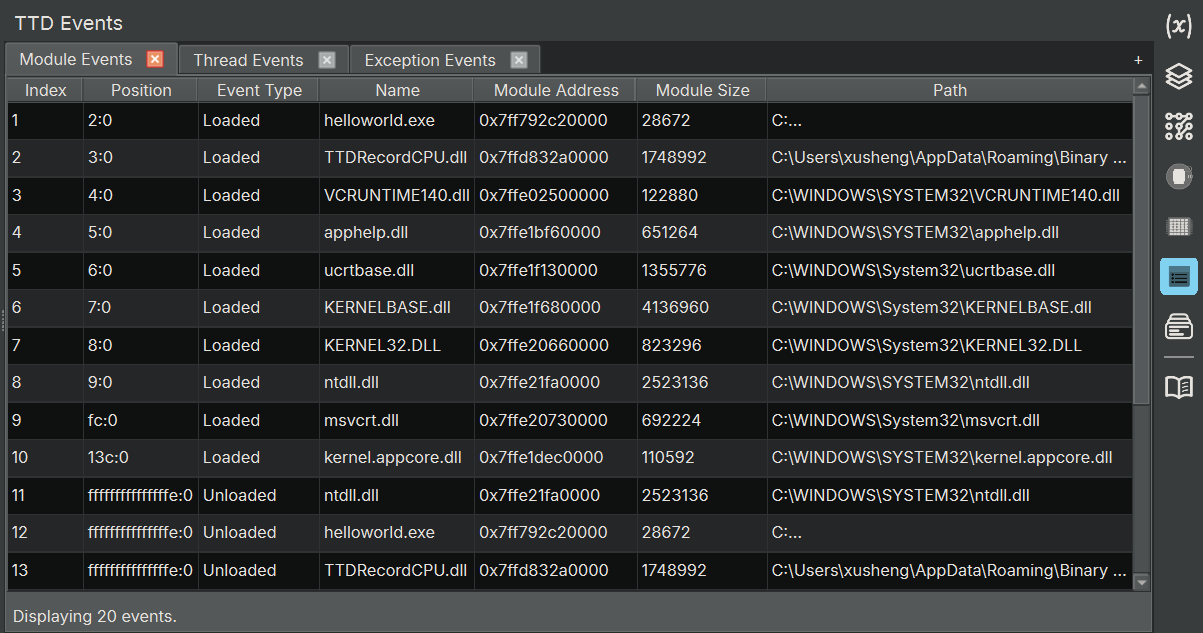
- Thread Events: list all of the thread creations and terminations
- Exception Events: list all of the exceptions that occurred during execution
TTD Analysis
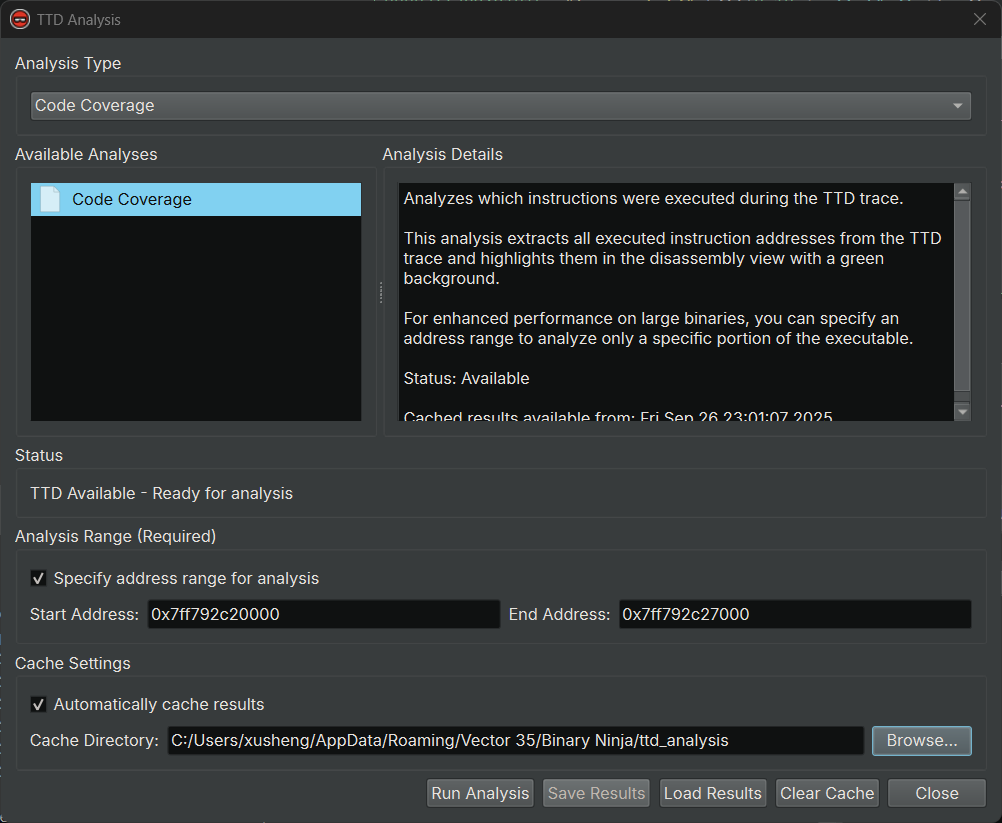
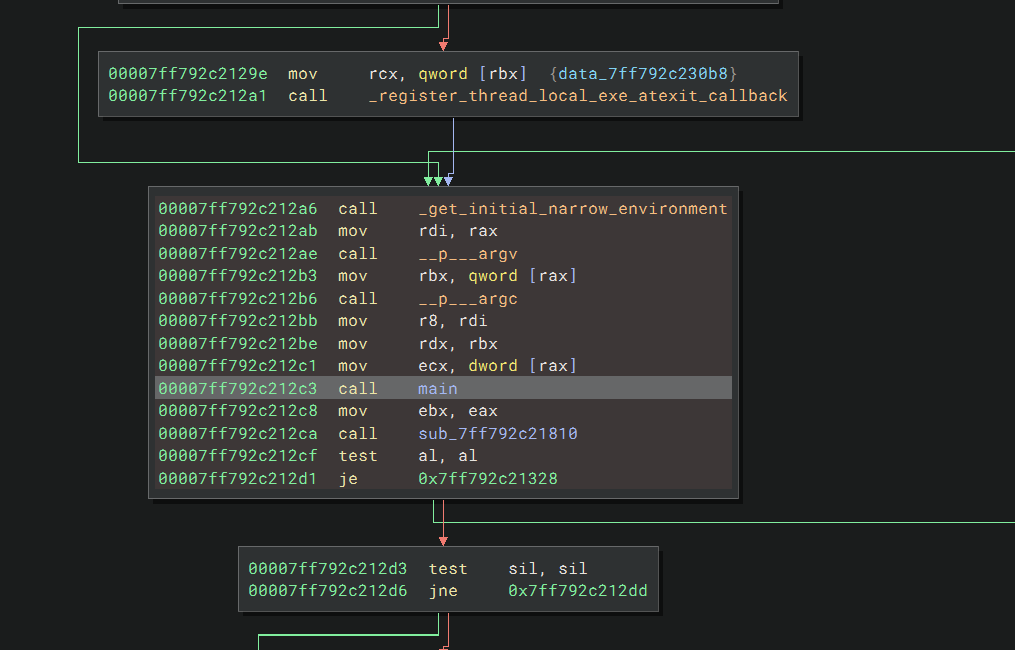
Creating UI widgets for TTD data model queries is great, but we can do even better! If you’ve ever used lighthouse or bncov, you know how valuable code coverage visualization is in reverse engineering. Here’s the exciting part: your TTD trace already contains that information! We’ve included TTD Code Coverage Analysis, which processes the coverage data and uses a render layer to highlight executed instructions directly in disassembly. More TTD analyses are coming soon!
- TTD Analysis Dialog
Python API for TTD
We created Python APIs that allows you to access TTD queries easily and enable building your own analysis. Here is a quick example:
# Get the debugger controller
dbg = binaryninja.debugger.DebuggerController.get_controller(bv)

# Query all calls to a function
calls = dbg.get_ttd_calls_for_symbols("user32!MessageBoxA")
print(f"Found {len(calls)} calls to MessageBoxA")

# Query memory writes to an address range
events = dbg.get_ttd_memory_access_for_address(0x401000, 0x401004, "w")
print(f"Found {len(events)} writes to 0x401000-0x401004")

# Query all TTD events
print(dbg.get_ttd_events())
If you haven’t yet explored TTD, now is the perfect time to transform your dynamic analysis workflow! Read the documentation, or check out an awesome list of TTD resources.
Objective-C
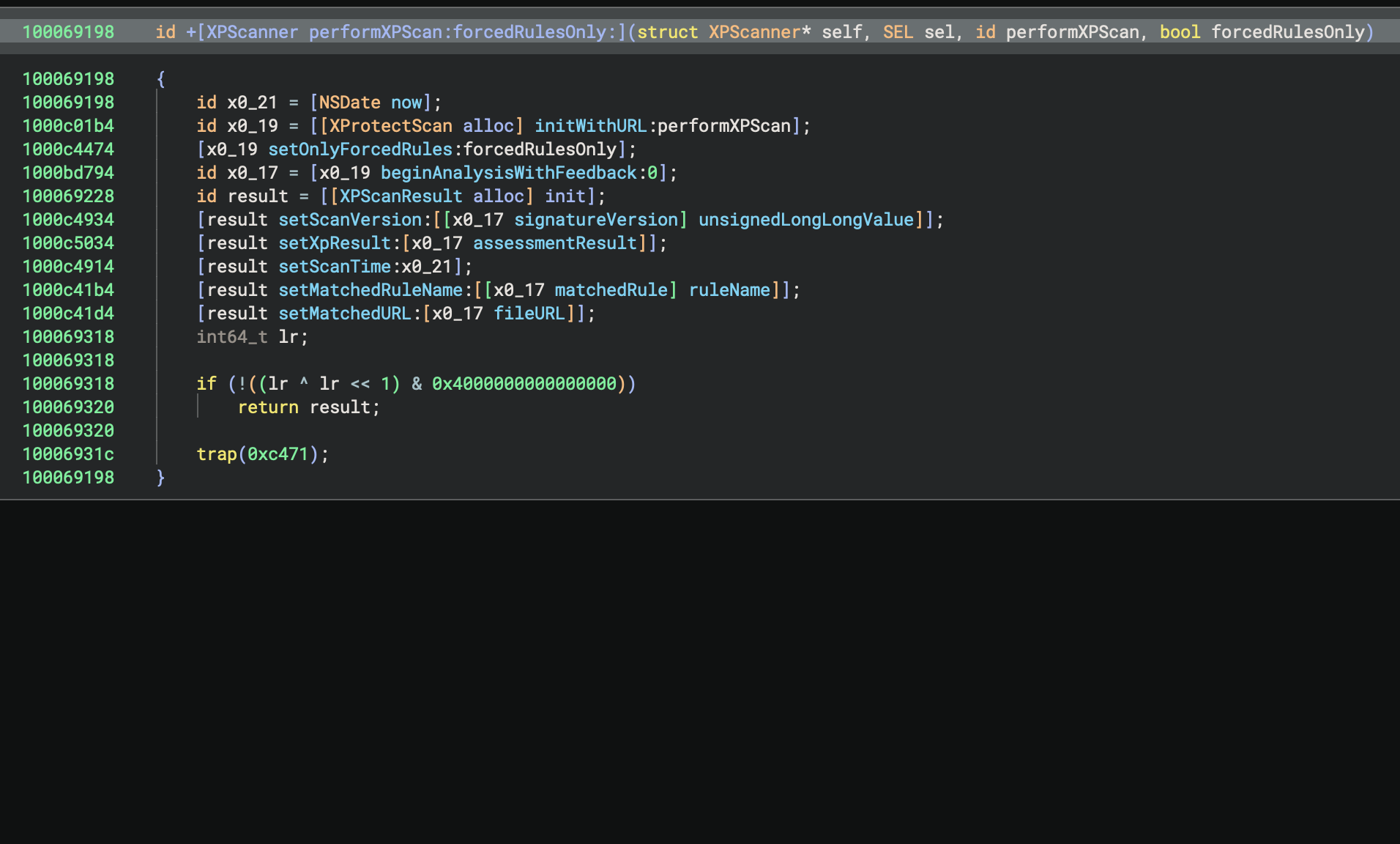
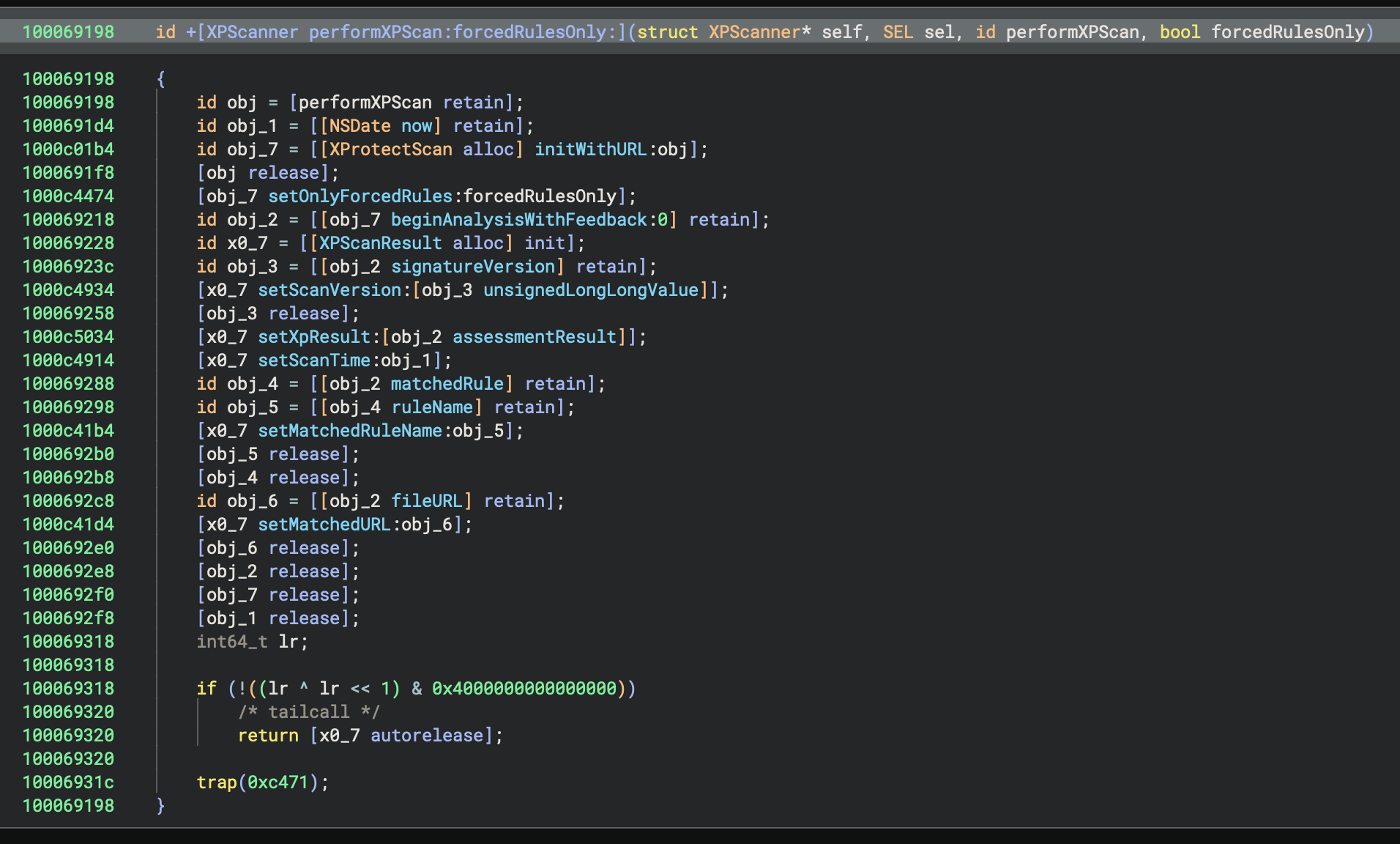
In 5.2, we continue to work on ensuring we have the best Objective-C decompilation around. We’ve rewritten our Objective-C workflow in Rust, and added two new features that drastically improve decompilation.
First, we propagate type information from [super init], which you can see below:
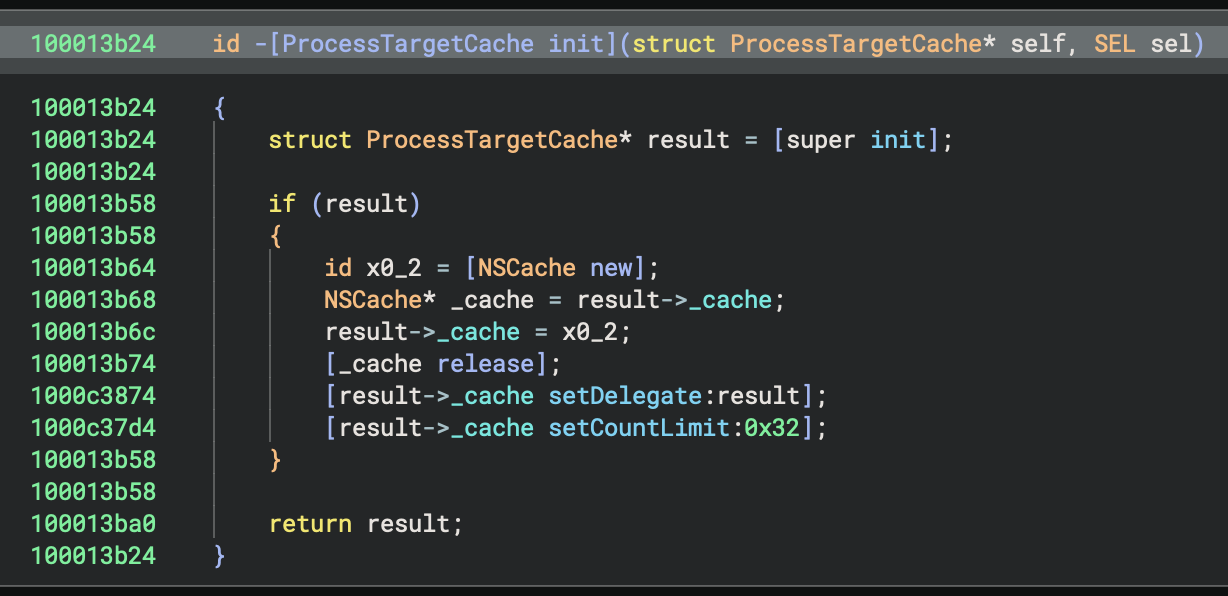
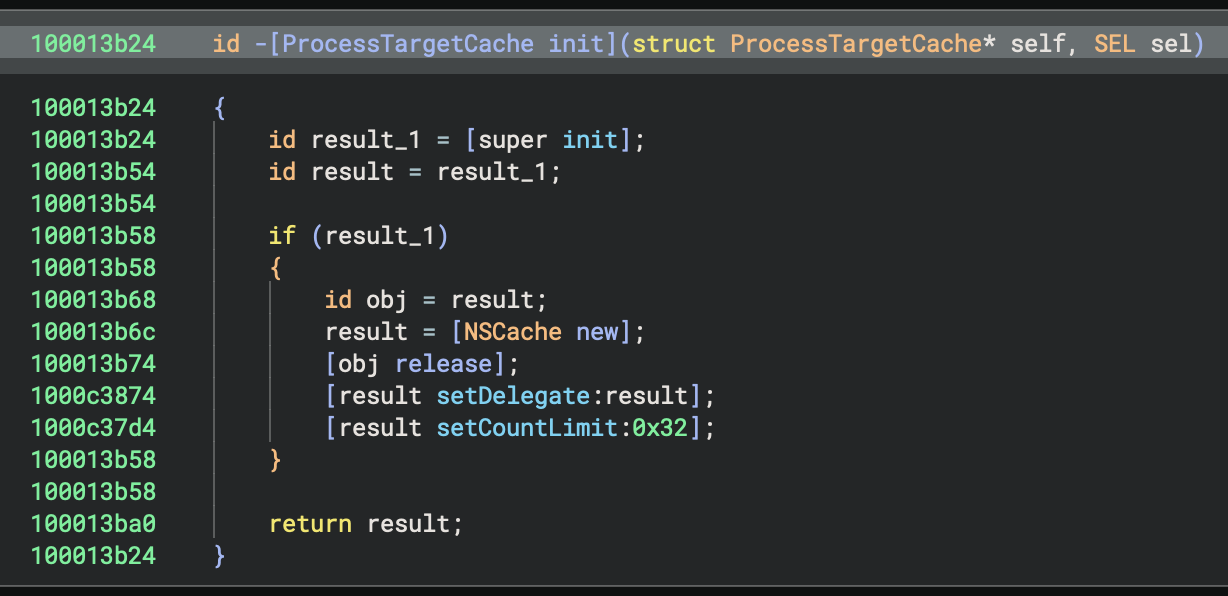
Second, we added a setting to remove reference counting calls which can really simplify decompilation in the Pseudo Objective-C view:
Let us know if you have any other feature requests for Objective-C, but just as a teaser, we’re already working on giving Swift the same treatment with a decompilation workflow and support for types, symbol demangling, debug information, and more.
Special thanks to the following open source contributors whose PRs were merged into this release:
- 3rdit [#873]
- Alkalem [#7257]
- SlidyBat [#11] (thanks for being our first SCC contributor!)
- WeiN76LQh [#7477]
- chedahub [#7515, #7517, #7544, #7553, #7559, #7560]
- ex0dus-0x [#7123]
- kiwids0220 [#905]
- lukbukkit [#7351, #7438]
- mostobriv [#7313]
- nshp [#7014]
- spoonmilk [#7271, #7294, #7321]
- tbodt [#7368]
- yrp604 [#7296, #7307]
- james-a-johnson [#7423]
We appreciate your contributions!
Analysis / Core
- Feature: Added names to segments
- Feature: Enabled volatile structure support in analysis
- Improvement: Added propagation of enum types across bitwise
ANDoperations - Improvement: Enhanced stack string detection using improved alias analysis
- Improvement: Utilize pointer display type for discovered jump table array members
- Fix: Fixed a crash when loading a BNDB with corrupt types
- Fix: Fixed interaction between demangled and user-specified
void*types - Fix: Improved handling of DWARF information, especially unnamed function parameters recovery
- Fix: Fixed various crashes in analysis related to type propagation and mixed interactions
- Fix: Ensured Pseudo-C correctly generates
[round](https://github.com/Vector35/binaryninja-api/issues/7263)and rendersHLIL_SPLIToperands - Fix: Do not overwrite original export names
UI
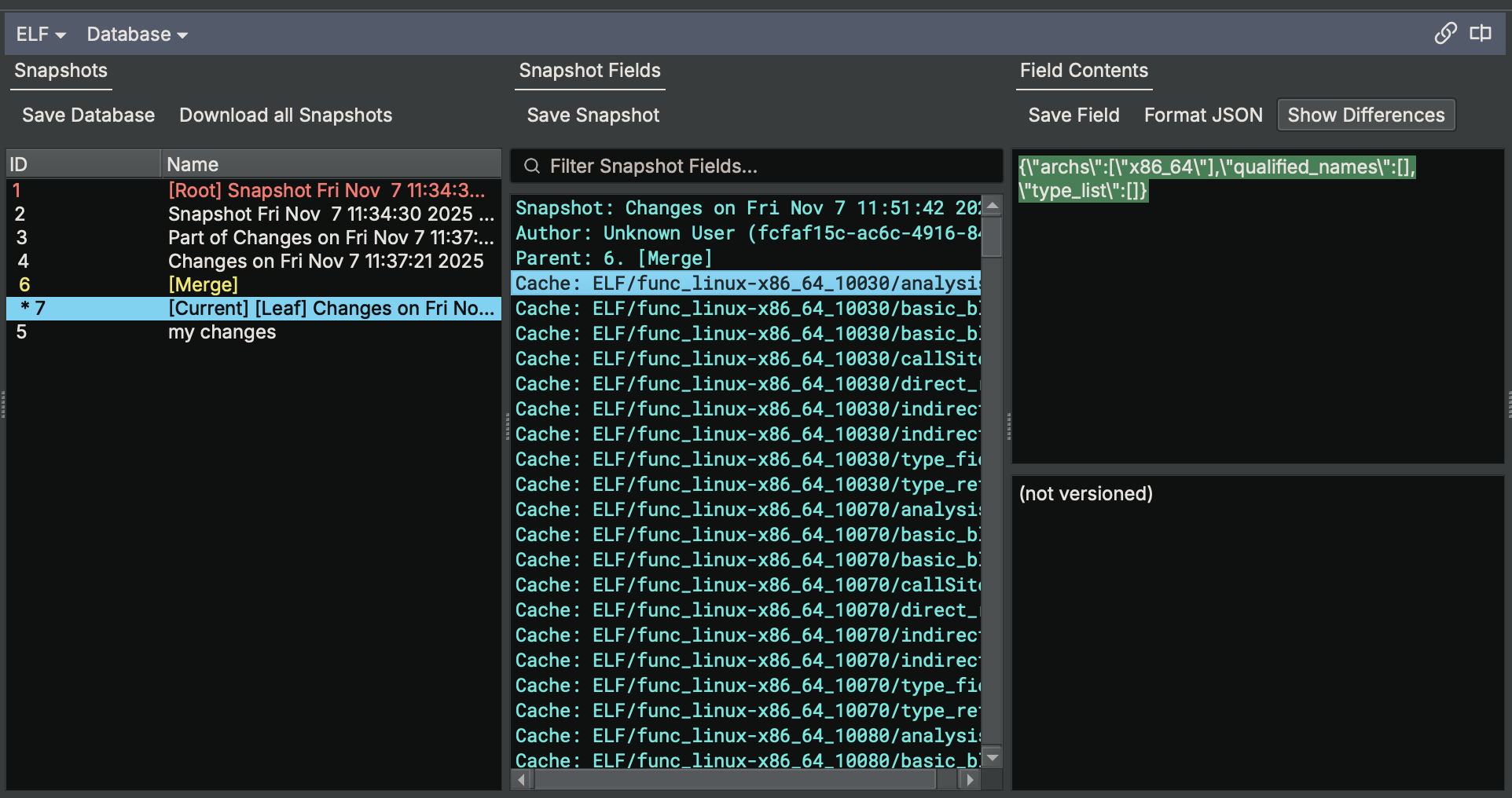
- Feature: Added new features to Database View including JSON formatting toggle, Show Differences option, Download All Snapshots button, and filtering snapshot fields (WARNING: backup your database before using this!)
- Improvement: Updated the tab hover text to show the project file path instead of the on-disk file path and updated tab names to remove project and remote name
- Improvement: Improved .got and .extern entries by showing cross references to their PLT entries
- Improvement: Extended Graph View to allow toggling between HLIL and Disassembly using the Tab hotkey
- Improvement: Added ‘Copy Project Path’ option to right-click menu in project manager
- Improvement: Added optional basic block placeholder label to linear in graph view
- Improvement: Show block labels at MLIL and HLIL when available, fixing some rendering bugs in the process
- Improvement: Improved focus and hotkey integration in the type browser
- Improvement: Improved UI handling of view state on file load
- Improvement: Improved offset handling when adding fields to a union in the type editor
- Improvement: Improved regex validation in filter boxes for safer input
- Improvement: Improved performance in the type editor’s function/field type textbox with large type databases
- Improvement: Enhanced tooltips for the feature map, showing data type information
- Improvement: Creating large amounts of types no longer selects all types
- Improvement: Enabled multi-select and copy functionality from import/export tables in Triage view
- Improvement: Improved filter, focus, and hotkeys for the Load Image by Name dialog in DSC
- Improvement: Enhanced the ListsView by setting default sorting of table views by address
- Improvement: Improved handling of sidebar icons with added theming and focusing support
- Improvement: Fixed and optimized triage view hash calculations for large files
- Improvement: Improved performance of scrolling in linear view by caching some settings
- Improvement: Add overload for pixmapForBWMaskIcon with QColor
- Fix: In views with large address spaces, the
Create Arraydialog would sometimes fail - Fix: Improved ‘find type’ behavior in the Search widget to prevent showing empty parentheses
- Fix: Enhanced toolbar visibility by improving the ‘More’ button display on the default theme
- Fix: Data variable rendering issue
- Fix: Resolved a UI lag issue that occurred when opening large files due to the search functionality
- Fix: Line formatting accidentally removed the
[u"](https://github.com/Vector35/binaryninja-api/issues/7427)string prefix - Fix: Corrected file offset display issues in the GoTo dialog
- Fix: Fixed unneeded warnings when defining extern function-type
DataVariables - Fix: Corrects handling of multi-character constants to match C standards
- Fix: Resolved issue where clicking on a label in Disassembly Graph would make Stack Sidebar Panel go blank
- Fix: Fixed issue where local label symbols would not appear in jump tables
- Fix: Fixed crash when Workflow view was opened with the Stack widget
- Fix: Fixed theming of the “hidden options” flyout
- Fix: Corrected plugin visibility and functionality for remote project file descriptions
- Fix: Corrected brace and indent mismatch issues in Pseudo-C formatter
- Fix: Improved layout for graphs with disjoint cycles
- Fix: Fixed invalid instructions not being copyable in linear view
- Fix: Fixed a crash when viewing a type in the types view
- Fix: Fix renaming/retyping inherited struct members
Architectures and Platforms
- Feature: Added support for TriCore 1.8
- Feature: Lifting support for the ARM64 Memory Tagging Extension (MTE) instructions
- Feature: Added support for Always/Never Branch patching for
TBZ/TBNZandCBZ/CBNZon AArch64 - Feature: Added a setting to control the use of x86 MPX extensions
- Feature: Added new line tokens in disassembly
- Feature: FEAT_CSC AArch64 instructions for iOS 26.0 kernel
- Improvement: Better macOS/iOS ARM64 syscall calling conventions support
- Improvement: Handle more relocation types for TriCore architecture
- Fix: Fixed incorrect GPR encoding for the PPCVLE architecture to enhance instruction accuracy
- Fix: Corrected lifting for ldrsw
ldrswARM64 instruction - Fix: Resolved Obj-C metadata errors in Mach-O due to incorrect handling of some chained fixups
- Fix: Fixed incorrect mask generation for
tbnzcondition on ARM architectures - Fix: Ensured
Architecture::GetRegisterInfohandles invalid register IDs gracefully - Fix: Fixed long-standing bug in SCC across multiple architectures
Core Plugins
- Improvement: Rewrite Obj-C workflow in Rust
- Improvement: Added support for loading DWARF information with relocations
- Improvement: Defined metadata types only if they don’t already exist on the view
- Improvement: Remove unnecessary BeginUndoActions / ForgetUndoActions for ObjC
- Improvement: Use download provider API instead of reqwest in WARP
- Improvement: Use enterprise download provider when available for WARP
- Fix: Improved image identification in DYLD shared cache
Collaboration / Projects
- Feature: Add project file dependencies and support automatic downloading
- Feature: Add support for automatically loading PDB/DWARF info from sibling files in projects
- Improvement: Improve error handling in project APIs
- Fix: Fix error caused by saving snapshots pulled through collaboration
API
- Feature: Add GetTypeCount API
- Feature: Add log functions to log the current stack trace without an active exception
- Feature: Add LogForException / log_error_for_exception APIs
- Feature: Add support for MLIL expression mappings in C++
- Feature: Add type attribute APIs
- Feature: Added new IL attribute
ILTransparentCopy - Feature: Expose DebugFunctionInfo.local_variables to the Python API
- Feature: Expose GetFilePathInProject API for context menu
- Feature: Add API to dereference named type references
- Feature: Add helpers for determining whether a function is exported
- Feature: Add Type::SetIgnored API
- Feature: Expose binding for LLVM MC disassembler
- Improvement: Add support for Transforms to pass along metadata for display and storage
- Improvement: Use IL-specific types in return type annotations for
get_basic_block_at - Improvement: Add DecodeWithContext method to Transform API
- Improvement: Improve IL iterators to be compatible with
std::find_if - Improvement: Include function parameter types in
FunctionTypeInfoequality checks - Improvement: Dramatic AddUserSection performance improvement
- Improvement: Adds setter for max_size_reached in
[BasicBlockAnalysisContext](https://api.binary.ninja/binaryninja.architecture-module.html#binaryninja.architecture.BasicBlockAnalysisContext) - Improvement: Allow types.get_types to accept
strorQualifiedName - Improvement: Improve comparisons for
[PossibleValueSet](https://github.com/Vector35/binaryninja-api/issues/7484) - Improvement: Improve parsability of
api_REVISION.txt - Improvement: Make fatal database errors cause load failures
- Improvement: Provide better isValid handler to
Type//*context menu - Improvement: Remove indenting APIs from Logger due to thread safety issues
- Improvement: Return existing source id when adding a file to a disk container for WARP.
- Improvement: Simplified logic for URL/file path CLI argument handling
- Fix: Additional error handling for
UTF8decoding - Fix: Add missing rebased notification to Python API.
- Fix: Improved handling of circular Named Type References (prevents potential crashes)
- Fix: Fix generating core API stubs on Windows.
- Fix: Fix HighLevelILInstruction CoreArrayProvider using instr index instead of expr index.
- Fix: Fix leaking a BinaryView when loading a sibling DWARF file.
- Fix: Fix memory leak in LZFSE transform along with some other fixes.
- Fix: Fix very large binaries from being prevented from creating WARP files of all the functions.
- Fix: Only merge chunks in create from view command if an existing file was given.
- Fix: Python bindings do not account for invalid UTF-8 strings.
- Fix: Replace calls to
unwrap()in dwarf_import to handle errors more gracefully. - Fix: Multiple NULL deserialization issues
- Fix: Ensure all callee functions are included in ‘function callees’.
- Fix: Fix CalcRORValue and CalcROLValue.
- Fix: Fix crash in Python bindings for Transform API.
- Fix: Fix crash when creating folder in project with description
None - Fix: Fix generating core API stubs on Windows platform
- Fix: Fix GetTagTypeById not respecting deleted tag types
- Fix: Fix Type object leaks in the Python type API.
- Fix: Fix shared object start address without program header
- Fix: Fixed exception caused by function tag merge conflict in the Ultimate edition.
- Fix: Fixed Function.callers to exclude fnptr references where necessary.
- Fix: Fixed issue with C++ plugin template on Windows being broken by CMake definitions.
- Fix: Fixed Python API issue where setting data variable name altered symbol type to DataSymbol.
- Fix: Fixes null pointer dereference when opening and saving a bndb with a missing calling convention
- Fix: Corrected unicode line formatting
Rust API
- Feature: Add a type-safe builder API for Activity configuration
- Feature: Add builder API for creating workflows
- Feature: Add option to build Rust API without linking to core
- Feature: Add project path file retrieval related functions
- Feature: Add TypeBuilder::set_child_type feature
- Feature: Implement custom data renderer API
- Feature: Support pointer base types and offsets
- Feature: Add data renderer API
- Feature: Add GET and POST helper functions for
DownloadInstance - Feature: Add MemoryMap::add_unbacked_memory_region
- Feature: Add BinaryViewExt::image_base API
- Feature: Add LowLevelILFunction::{get_ssa_register_value, get_ssa_flag_value}
- Improvement: Make fields of LookupTableEntry public
- Improvement: Take download callbacks by reference to improve performance
- Improvement: Make Project::{from_raw,ref_from_raw} public
- Improvement: Make rust il.undefined return a ValueExpr for use as a sub-expr.
- Improvement: Refactor download provider module to allow for custom implementations
- Improvement: Change Rust API to accept
impl AsRef<Path>for path arguments - Improvement: Enhance workflow API ergonomics
- Improvement: Expose a non log specific function for sending logs to a Logger
- Improvement: Implement Debug for DownloadProvider
- Improvement: Update repository API following updated Core APIs
- Improvement: Improved LLIL processing and intrinsic operations in Rust API.
- Fix: Fix custom SecretsProvider implementation requiring data to be passed back in
get_data - Fix: Fix Rust LowLevelILFunction owner function method
- Fix: Fix user stack var APIs
- Fix: Correct usage of expression vs instruction indexes in
HighLevelILFunction
Debugger
- Feature: Introduced copy/paste functionality to debugger breakpoints widget
- Feature: Enhanced debugger with support for debugging Windows PE files on Linux via Wine
- Feature: Added breakpoint enabling/disabling
- Feature: Implemented the TTD.Events API and added a UI widget for time travel debugging events
- Feature: Introduced a configurable max number of results for TTD queries
- Feature: Added Python API access to TTD.Memory and TTD.Calls
- Feature: Added UI and C++/Python API to time travel to a given timestamp with a custom icon
- Feature: Supported multiple initialization commands in LLDB
- Feature: Added support for child process tracing during TTD recording
- Feature: Enabled ‘Run back to here’ functionality in TTD debugging
- Feature: Displayed TTD code coverage using a render layer
- Feature: Added support for debugging processes with administrator privileges on Windows
- Feature: Added ‘Copy All’ action to debugger modules widget
- Feature: Added copy actions to the stack trace widget
- Feature: Implemented support for GDB RSP ‘S’ stop packet in multiple adapters
- Feature: Show results from TTD memory and calls queries
- Improvement: Enhanced the debugger status bar with function and address information utilizing stack trace symbolization
- Improvement: TTD coverage coloring highlights executed instructions in red
- Improvement: Linked libxml2 into LLDB to support more recent linux distributions
- Fix: Fixed issue where lldb-server crashes immediately after startup
- Fix: Fixed crash when trying to launch debugger in safe mode
- Fix: Fixed crash in debugger when caused by hex integer parsing
- Fix: Fixed conflict on Windows with BinExport when using the debugger
- Fix: Fixed TTD Widgets actions registration and unified action names
- Fix: Fixed remote debugging launch prompt behavior
- Fix: Improved DbgEng target state transitions to address multiple issues
- Fix: Fixed GDB RSP adapter crash when connecting to WineDBG
- Fix: Fixed attach failure and prevented race condition crashes in Windows debugger.
- Fix: Fixed various issues with querying TTD.Memory and TTD.Calls
- Fix: Show active thread first in stack trace view
- Fix: Fixed issue with debugger adapter availability when a new view is created
Documentation
- Feature: Add outlining documentation to support new outlining features
- Feature: Implemented multi-language code block documentation tab syncing
- Improvement: Document limitations of AddMemoryRegion regarding undo actions during binaryview creation
- Improvement: Include examples of file and database loading in the Python script cookbook
- Improvement: Upgrade cppdocs to support newer Doxygen versions, improving documentation clarity.
- Improvement: Update Python API docs for BinaryView.save() and perform_save() functions with references to
.create_database(). - Improvement: Add documentation for ‘open with options’
- Improvement: Move to newer doxygen and new CSS theme for C++ API docs
- Fix: Fix truncated RenderLayer Python API Documentation for improved display
- Fix: Correct documentation for Function.add_tag in the Python API
- Fix: Some missing functions in documentation
Other
- Improvement: Allow generating and linking to stubs from CMake
- Feature: Added memory map undo actions
- Feature: Introduced Lumina-style feature with networked WARP
- Feature: Support added for custom string types
- Feature: Added a C++ example workflow for unflattening
- Feature: Implemented support for declarative downstream dependencies in Workflows
- Improvement: Multiple improvements to database save/load performance
- Improvement: Improved performance for purging snapshots/undo history in large BNDBs
- Improvement: Finalized settings update for version 5.2
- Improvement: Fixed various CSS issues and enhanced styling with automatic theme switching.
- Improvement: Updated Rust open source license files and added MPL-2.0 to accepted licenses.
- Improvement: Improved loading process for SVD files
- Improvement: Updated idb_import tool to fix invalid offsets, improve handling and upgrading to version 0.1.12.
- Improvement: Introduced a new define for LogTrace control, replacing the use of _DEBUG.
- Improvement: Updated projects to use the C++20 standard across the board
- Improvement: Optimized Rust builds by running
cargo checkonly if inputs change - Improvement: Improved Python code generation by adding dependency tracking
- Improvement: Improved CMake support by setting CONFIGURE_DEPENDS for file GLOB patterns
- Fix: Fixed issue where the base offset does not work if it is higher than the detected base offset.
- Fix: Resolved an issue with TemporaryFile failing for files larger than 4GB
- Fix: Fixed database corruption issue after a crash
- Fix: Fixed crash caused by EXCEPTION_ACCESS_VIOLATION
- Fix: Fixed CMake warning during configuration for SCC
- Fix: Fixed several build and compile-related issues, improving CMake and MachO build processes.
- Fix: Fixed a recursion bug related to tab syncing
- Fix: Fixed
@installedkeyword search in the Plugin Manager - Fix: Fixed Rust import issue in WARP
- Improvement: Improved automatic loading of PDB/DWARF files in projects
- Improvement: Investigated and improved handling of unknown DW_CFA_* errors from DWARF samples.
- Improvement: Demoted WARP server disconnect failure to a warning
- Improvement: Added the number of matched functions to the ending log message for WARP
- Improvement: Improved support for network operations within WARP
- Fix: Rectified loading of local variables from DWARF for non-relocatable images
- Fix: Resolved OffsetOutOfBounds error in DWARF Import
- Fix: Resolved IDB import parsing issues
- Fix: Fixed crash when holding the arrow up key in the scripting console
Deprecations
- Improvement: Deprecate Workflow::Instance in favor of Workflow::Get and Workflow::GetOrCreate
- Improvement: Deprecate some Rust MediumLevelILFunction methods in favor of Function implementations
Even this massive list isn’t everything! For even more items that were not included here including the usual assortment of performance improvements and more, check out our closed milestone on GitHub.
如有侵权请联系:admin#unsafe.sh