



官方公众号企业安全新浪微博

FreeBuf.COM网络安全行业门户,每日发布专业的安全资讯、技术剖析。

FreeBuf+小程序

新闻显示
1、数据库构建
   早期数据库和使用模板的数据库字段名不一样,需要根据代码来进行修改,下图为模板引入时的数据库,之前的根据	下面代码很容易构建
2、简单新闻内容的显示
3、引申:由于页面的简单,所以我们需要对其进行大量的htmL代码编写来达到渲染效果,这时我们就考虑能不能开发一个页面,就和模板一样只要替换其中的数据即可

<?php
include 'config.php';

$id = $_GET['id'];
$sql = "select * from new where id = $id";
$data = mysqli_query($con,$sql);

while ($row=mysqli_fetch_row($data)) {
    echo "标题:<h1>".$row['1']."</h1><br>
";
    //title标签必须放在head标签下面才可以执行
    echo $row['2']."<br>
";
    echo $row['3']."<br>
";
    echo "<img src = '$row[4]' width='100' height='30'></img><br>
";
}
模板的使用
1、模板的本质使用就是将HTMl页面进行引用  $template=file_get_contents('new.html');
2、然后将其中的关键字进行替换为我们数据库中的信息
3、最后使用eval() 函数,其功能在下方使用处会提到 -- 来使得替换后的页面成功执行
4、这也解释了为什么我们访问php文件而不是.html文件,也解释了为什么恶意代码只有在访问php文件时才会被调用

这是调用的html模板

<!DOCTYPE html>
<html>
<head>
    <meta charset="UTF-8">
    <title>{page_title}</title>
    <style>
        /* 一些样式 */
        body {
            font-family: Arial, sans-serif;
            margin: 0;
            padding: 0;
        }
        header {
            background-color: #4CAF50;
            color: white;
            text-align: center;
            padding: 20px;
        }
        nav {
            background-color: #f2f2f2;
            display: flex;
            justify-content: space-between;
            padding: 10px;
        }
        nav a {
            color: black;
            text-decoration: none;
            padding: 10px;
            border-radius: 5px;
            transition: background-color 0.3s ease;
        }
        nav a:hover {
            background-color: #4CAF50;
            color: white;
        }
        .container {
            max-width: 1200px;
            margin: 0 auto;
            padding: 20px;
        }
        h1 {
            font-size: 36px;
            font-weight: bold;
            margin-bottom: 20px;
        }
        p {
            font-size: 18px;
            line-height: 1.5;
            margin-bottom: 20px;
        }
        ul {
            margin-left: 20px;
            margin-bottom: 20px;
        }
        li {
            margin-bottom: 10px;
        }
    </style>
</head>
<body>
<header>
    <h1>{heading}</h1>
</header>
<nav>
    <a href="#">首页</a>
    <a href="#">新闻</a>
    <a href="#">留言</a>
    <a href="#">关于</a>
</nav>
<div class="container">
    <h1>{subheading}</h1>
    <p>{content}</p>

    <img src="{$item}" width="1000" height="3000"></img>

</div>
</body>
</html>

<!--<?php phpinfo();?>-->

下面这是调用的后端语言
<?php
include './config.php';
$template=file_get_contents('new.html');
//获取要调用html页面的内容
$id = $_GET['id'];
$sql = "select * from new where id = $id";
$data = mysqli_query($con,$sql);
if (mysqli_query($con,$sql)) {
    echo 'ok';
} else {
    echo 'fales';
}
while ($row=mysqli_fetch_row($data)) {
    $page_title = $row[1];
    $heading = $row[2];
    $subheading = $row[3];
    $content = $row[4];
    $item = $row[5];
}

$template=str_replace('{page_title}',$page_title,$template);
$template=str_replace('{heading}',$heading,$template);
$template=str_replace('{subheading}',$subheading,$template);
$template=str_replace('{content}',$content,$template);
$template=str_replace('{item}',$item,$template);
//将html页面中的关键字使用数据库中的信息进行替换

eval('?>'.$template);
//将字符串中的内容当作PHP代码与html代码混合内容解释
//eval() -- 用于执行字符串类型的PHP代码,
/*'?>' -- PHP的闭合标签,进入HTML解析模式*/
?>
//这里出现了显示不完全的错误,我们可以去查看页面源代码即可知道哪些数据库信息没有被成功调用
//其实模板本质就是将HTML页面包含进php页面并且进行关键字替换,然后使用eval()函数在php中执行html代码
远程代码执行漏洞
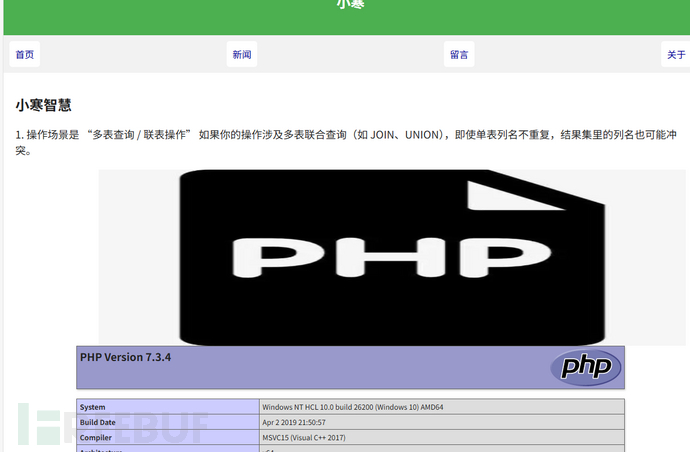
1、当我们在html代码中插入比如<?php phpinfo();? > 直接调用时不会执行
2、但是当我们将该页面调用到php中执行,那么插入的php恶意代码就会执行 如下图所示
第三方模板的引入
1、当我们使用第三方的模板时(比如:Smarty渲染模板)就不会直接出现这种模板注入的情况,因为其本身设置了过滤机制
2、首先来进行Smarty的引用,

#Smarty模版引用
下载:https://github.com/smarty-php/smarty/releases
使用:
1、创建一个文件夹,命名为smarty-demo。
2、下载Smarty对应版本并解压缩到该文件夹中。
3、创建一个PHP文件,命名为index.php,并在文件中添加以下代码:
<?php
// 引入 Smarty 类文件
require('smarty-demo/libs/Smarty.class.php');
// 创建 Smarty 实例
$smarty = new Smarty;
// 设置 Smarty 相关属性
$smarty->template_dir = 'smarty-demo/templates/';
$smarty->compile_dir = 'smarty-demo/templates_c/';
$smarty->cache_dir = 'smarty-demo/cache/';
$smarty->config_dir = 'smarty-demo/configs/';
// 赋值变量到模板中
$smarty->assign('title', '欢迎使用 Smarty');
//注意,这里是没有办法直接使用我们的替换语法的,要按照人家所给的title --> {title}
// 显示模板
$smarty->display('index.tpl');
?>
3、先按照上面的提示在目录下新建一个templates目录
4、然后在其中创建一个名为index.tpl的模板文件,并将以下代码复制到上述点定义文件夹中
<!DOCTYPE html>
<html>
<head>
<title>{$title}</title>
</head>
<body>
<h1>{$title}</h1>
<p>这是一个使用 Smarty 的例子。</p>
</body>
</html>


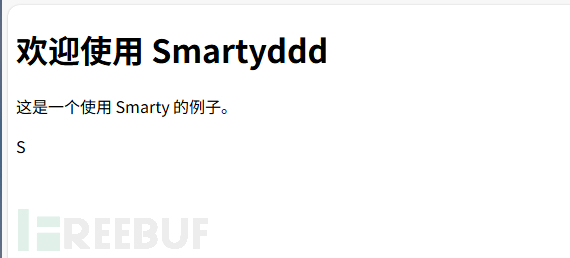
3、接下来我们进行实验 --> 在index.tpl模板中写入 <?php phpinfo();?> 语句,点击访问index.php,发现并没有phpinfo()的执行,表明模板有效阻止了这种人工编写利用函数造成的危害
第三方模板漏洞利用复现
1、这里我们提到人工编写存在漏洞,第三方模板阻止了,但是第三方模板同样存在漏洞
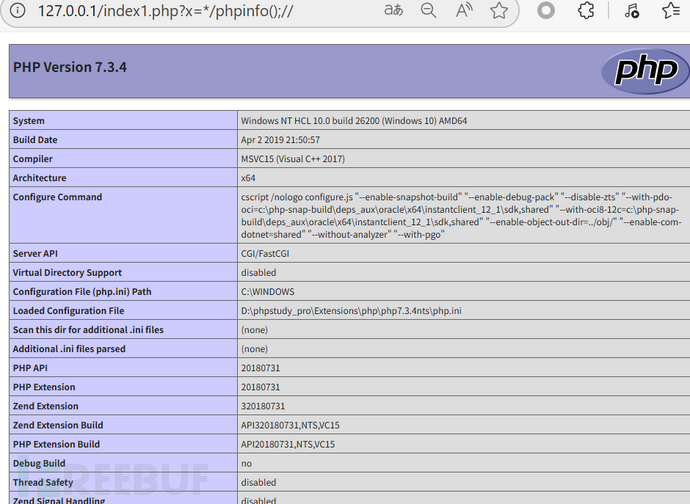
2、漏洞 CVE-2017-1000480 Smarty<3.1.32 代码执行漏洞
   流程可以直接去网上搜索
3、漏洞结果查看
4、可以发现,即使是第三方的模板依然会存在漏洞,这个也是我们在渗透测试过程中可以考虑的目标之一
收获
代码审计(审什么):
   (1) 本身编写的代码
   (2) 第三方插件(ueditor)
   (3) 第三方模板(Samrty)
   (4) 第三方组件(shiro fastjson)
 已在FreeBuf发表 0 篇文章
本文为 独立观点,未经授权禁止转载。
如需授权、对文章有疑问或需删除稿件,请联系 FreeBuf
客服小蜜蜂(微信:freebee1024)