嗯,用户让我总结一篇关于macOS 26.1.0虚拟机问题的文章,控制在100字以内。首先,我需要理解文章内容。文章提到更新到26.1.0后,虚拟机没有生成有效的系统序列号,导致iCloud等功能无法正常工作。苹果的发布说明中提到了这个问题,目前无法手动设置序列号,只能等待修复。 接下来,我需要将这些信息浓缩到100字以内。要抓住关键点:版本、问题现象、影响、解决方案以及现状。确保语言简洁明了,不需要复杂的结构。 可能会遇到的问题是如何在有限的字数内涵盖所有重要信息。比如,是否需要提到iCloud和相关应用?是的,因为它们是受影响的主要部分。另外,苹果的解决方案是什么?目前没有,只能等待修复。 最后,组织语言:macOS 26.1.0虚拟机无法生成有效序列号,导致iCloud等应用无法正常工作。苹果已知此问题(编号),无法手动设置序列号,需等待修复。 这样应该能满足用户的要求。 </think> macOS 26.1.0虚拟机无法生成有效系统序列号,导致iCloud等应用无法正常工作,苹果已知此问题,目前无法手动设置序列号,需等待修复。 2025-11-4 18:35:50 Author: derflounder.wordpress.com(查看原文) 阅读量:37 收藏
Home > Mac administration, macOS, Virtualization > macOS 26.1.0 virtual machines do not generate valid system serial numbers
macOS 26.1.0 virtual machines do not generate valid system serial numbers
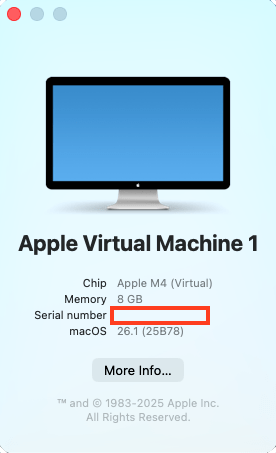
After updating to macOS Tahoe 26.1.0 yesterday, I then did what I normally do and began building new virtual machines to test with. I built a VM for macOS 26.1.0 and then noticed something odd. The virtual machine did not have an assigned system serial number. Instead, where you would expect to see the serial number displayed, there is a blank entry.


I built a macOS 26.0.1 VM and saw the serial number appear.

I then upgraded the VM from macOS 26.0.1 to macOS 26.1.0. Poof, no more serial number.

After talking with colleagues in the Mac Admins Slack, I was pointed to a Known Issues entry for Virtualization in the macOS 26.1.0 release notes:
The serial number published for the virtual machine is 0, which prevents iCloud and related applications from functioning correctly. (163294564)

You can’t set a system serial number manually for macOS VMs running on Apple Silicon Macs, so it looks like this state of affairs is with us until Apple fixes it. Hopefully that is soon.
如有侵权请联系:admin#unsafe.sh