
好的,我现在需要帮用户总结一篇关于Windows 11新更新的文章,控制在100字以内。首先,我得通读整篇文章,抓住主要信息点。 文章提到Windows 11 Build 26220.7051已经发布给测试者,有三个新功能。第一个是任务栏上的“Ask Copilot”,允许用户通过文本或语音搜索互联网、本地文件和AI。这个功能目前是可选的,未来可能会取代现有的Windows搜索界面。 第二个新功能是针对Xbox用户的全新全屏体验(FSE),之前只在特定设备上可用,现在所有手持设备用户都可以使用了。第三个是蓝牙共享音频功能,支持同时向两个设备传输音频流。 此外,ARM电脑的性能也得到了提升,支持更多64位x86应用在模拟环境下运行。这些更新将在几周内向所有人推出。 现在我要把这些要点浓缩到100字以内。首先确定主要功能:任务栏AI搜索、Xbox全屏体验、蓝牙共享音频和ARM性能提升。然后用简洁的语言连接这些点,确保信息准确且流畅。 </think> Windows 11新版本发布测试,新增任务栏AI搜索、Xbox全屏体验及蓝牙共享音频功能,并优化ARM设备性能。 2025-11-1 16:45:21 Author: www.bleepingcomputer.com(查看原文) 阅读量:10 收藏
Windows 11 Build 26220.7051 is now rolling out to testers in the Insider Program, and there are at least three new features, including Ask Copilot on the taskbar.
Up until now, you could access Copilot on Windows 11 via the app or browser, but now you can use a new taskbar-based 'Ask Copilot' to interact with the AI.
My understanding is that this new Copilot taskbar search experience will replace the existing Windows Search UI at some point.

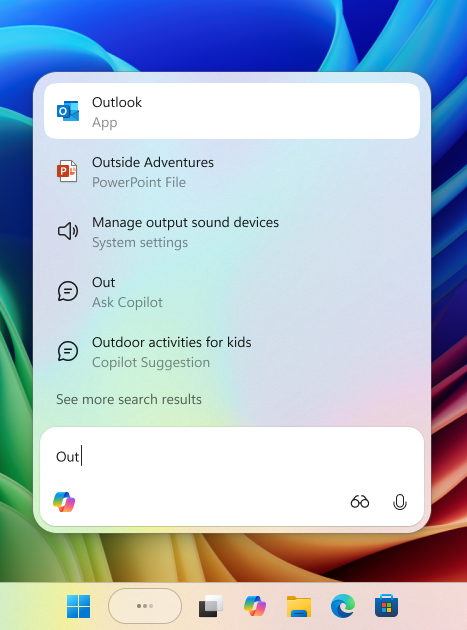
For now, Ask Copilot will remain an optional feature that you need to opt into.
You can use Copilot on the taskbar to search the internet, local files and AI using text and voice.
"You’re always in control. As you type, results appear and update instantly, making it easier than ever to find what you need," Microsoft explained in a blog post.
Microsoft says it's hopeful Copilot will eventually become a natural way of using PC.
To turn on the feature, open Settings > Personalization > Taskbar > Ask Copilot.
New Xbox experience rolls out to everyone
If you own a handheld device, you can now try the new full-screen experience (FSE), which was previously exclusive to the ASUS ROG Xbox Ally and ROG Xbox Ally X.
With full-screen experience (FSE), Microsoft says Windows performs better and allows you to focus only on gaming.
To enable FSE, go to Settings > Gaming > Full screen experience, then select Xbox as your home app.
Once enabled, you can access FSE from Task View and Game Bar or configure your handheld to enter full screen experience on startup.
Shared audio support for Bluetooth
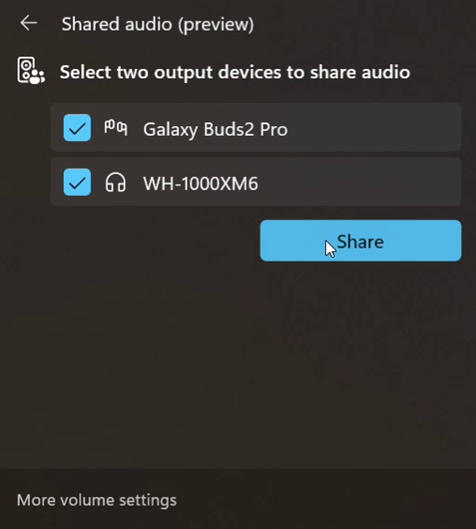
Microsoft is rolling out a new "shared audio," which is built on top of Bluetooth LE Audio broadcast technology.
Windows can now transmit an audio stream to two Bluetooth devices.
You can turn on the new “Shared audio (preview)” shortcut in quick settings to start sharing audio.
Last but not least, ARM PCs now have better performance after this update.
Microsoft has enabled support for more 64-bit x86 (x64) applications to run under emulation by adding support for more CPU features under emulation. This leads to better performance.
These features will roll out to everyone in the coming weeks.
If you want to try them today, join the Beta or Dev Channel of Windows Insider Program.

7 Security Best Practices for MCP
As MCP (Model Context Protocol) becomes the standard for connecting LLMs to tools and data, security teams are moving fast to keep these new services safe.
This free cheat sheet outlines 7 best practices you can start using today.
如有侵权请联系:admin#unsafe.sh