
好的,我现在需要帮用户总结一篇文章,控制在100字以内。首先,我得仔细阅读文章内容,理解其主要信息。 文章讲的是微软的File Explorer现在自动阻止从互联网下载的文件预览,以防止恶意文档窃取凭证。这个功能已经对安装了本月补丁星期二安全更新的Windows 11和Windows Server用户生效。 接着,微软在支持文档中解释说,默认情况下,预览功能会被禁用,针对的是在Internet区域共享文件夹中查看的文件以及标记有MotW(Web标记)的文件。MotW表明这些文件是通过浏览器下载、作为邮件附件接收或来自其他互联网来源的。 当尝试预览这些文件时,File Explorer的预览窗格會显示警告信息,提示用户可能有害,并建议如果信任文件和来源,则打开它来查看内容。 此外,安装2025年10月及以后发布的Windows安全更新后,此更改将阻止威胁参与者利用漏洞,在用户预览包含HTML标签(如<link>、<src>等)的文件时窃取NTLM哈希。这种攻击向量特别令人担忧,因为它不需要用户除选择文件进行预览之外的任何交互,并且不需要诱骗目标实际打开或执行它。 最后,微软提供了如何手动解除阻止的方法:右键点击文件,在属性中点击“解除阻止”按钮。但需要注意这可能不会立即生效,并且可能需要重新登录。 总结一下,主要内容是微软为了防止恶意文档攻击,在File Explorer中自动阻止从互联网下载的文件预览,并提供了解除阻止的方法。 </think> Microsoft's File Explorer now blocks previews for internet-downloaded files to prevent credential theft via malicious documents. This feature is active for users with the October 2025 security updates on Windows 11 and Server, targeting files marked with the Mark of the Web or from internet zones. Previews display warnings, and manual unblocking is possible via file properties. 2025-10-23 16:0:21 Author: www.bleepingcomputer.com(查看原文) 阅读量:8 收藏
Microsoft says that the File Explorer (formerly Windows Explorer) now automatically blocks previews for files downloaded from the Internet to block credential theft attacks via malicious documents.
The change is already live for users who have installed this month's Patch Tuesday security updates on Windows 11 and Windows Server systems.
As Redmond explains in a support document published this Wednesday, the preview functionality will be disabled by default only for files viewed on an Internet Zone file share and those marked with the Mark of the Web (MotW), which shows that they've been downloaded using a web browser, received as email attachments, and obtained from other internet sources.
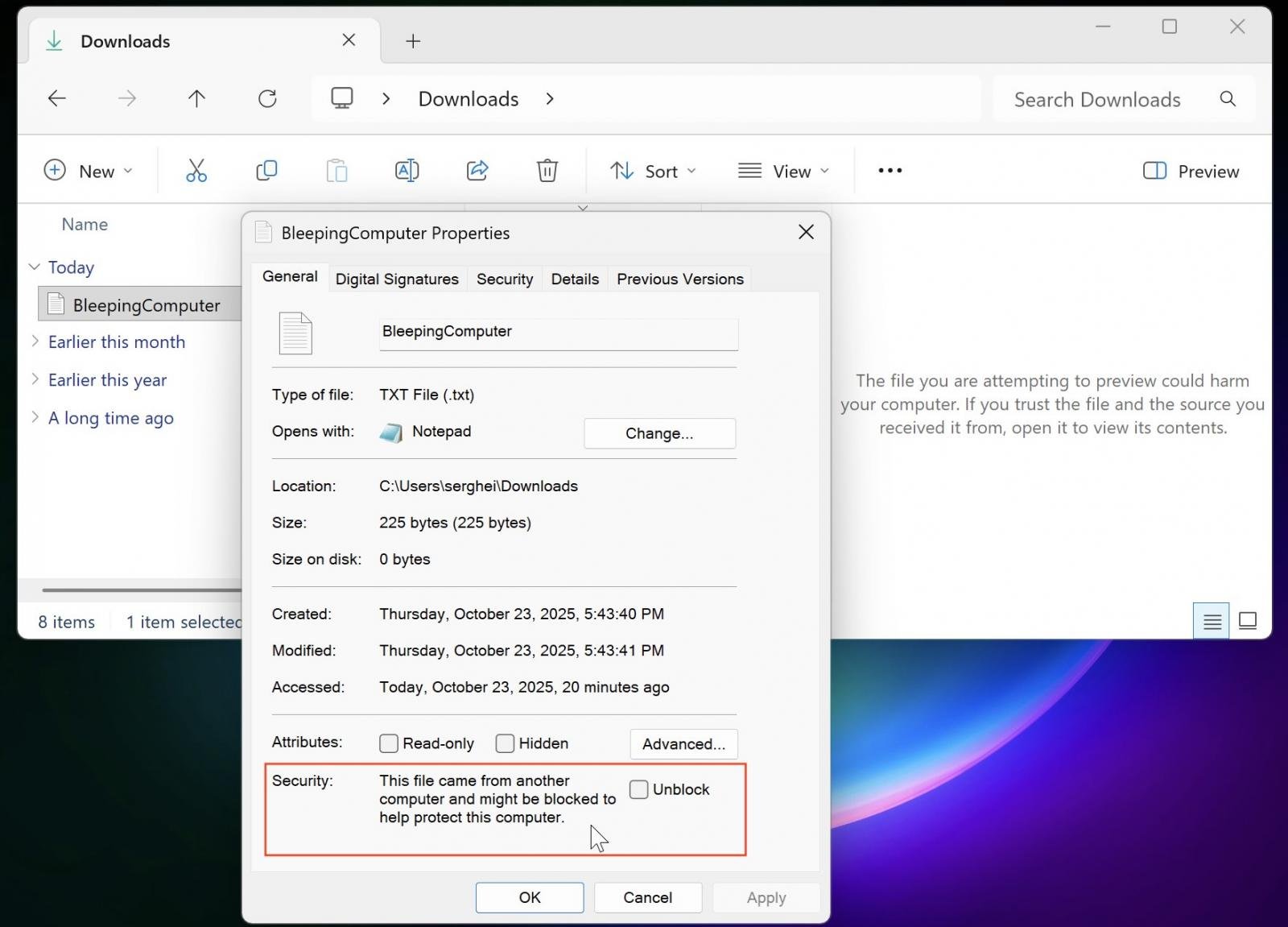
When attempting to preview such files, the File Explorer preview pane will display a warning message saying "The file you are attempting to preview could harm your computer. If you trust the file and the source you received it from, open it to view its contents."
After installing Windows security updates released after October 2025, this change will block threat actors from exploiting vulnerabilities that allow them to obtain NTLM hashes when users preview files containing HTML tags (such as <link>, <src>, and so on) that reference external paths on attacker-controlled servers.
This attack vector is particularly concerning because it requires no user interaction beyond selecting a file to preview and removes the need to trick a target into actually opening or executing it on their system.
"Starting with Windows security updates released on and after October 14, 2025, File Explorer automatically disables the preview feature for files downloaded from the internet," Microsoft says in a support document published this Wednesday.
"This change is designed to enhance security by preventing a vulnerability that could leak NTLM hashes when users preview potentially unsafe files."
For most users, no action is required since the protection is enabled automatically with the October 2025 security update, and existing workflows remain unaffected unless you regularly preview downloaded files.
If you need to preview a trusted file from a known source, you can manually remove the Internet security block. To do that, right-click the file in File Explorer, select Properties, and click the "Unblock" button at the bottom of the General tab.
However, it's important to note that this may not take effect immediately and could require signing out and signing back in.
The preview block can also be removed for all files on an Internet Zone file share by using the Internet Options control panel's Security tab to add the file share’s address to the Trusted sites or the Local intranet security zone.
如有侵权请联系:admin#unsafe.sh