文章介绍了APK Components Inspector工具,用于检测Android应用中的导出组件并生成ADB测试命令。该工具通过解析Smali代码和Manifest文件自动化流程,并提供交互式脚本执行命令。文章还强调了意图重定向漏洞的风险,并提供了修复建议。 2025-9-18 07:16:23 Author: www.mobile-hacker.com(查看原文) 阅读量:52 收藏

Security testing of Android apps often starts with identifying attack surfaces. One of the most critical is exported components. These are parts of an app (Activities, Services, Broadcast Receivers, Content Providers) that are exposed to other apps and can be invoked externally. If improperly secured, exported components become easy entry points for attackers to execute arbitrary code, access sensitive data, or manipulate the app’s behavior.
To make this discovery process faster and more efficient, a new tool — APK Components Inspector. It automates the detection of these exported components. On top of that I have built a script that would even generates ready-to-use ADB commands for testing and automatically run them on Android to automate the full process.

What Are Exported Components and Why They Matter
Exported components in Android allow different apps to interact. While this is a feature, not a bug, the security risk comes from unintentionally or improperly exported components — especially if they lack permission protection.
For example:
- An exported Activity can be launched by another app without user interaction.
- An exported Service can be started and fed malicious data.
- A Broadcast Receiver can be triggered to perform sensitive tasks.
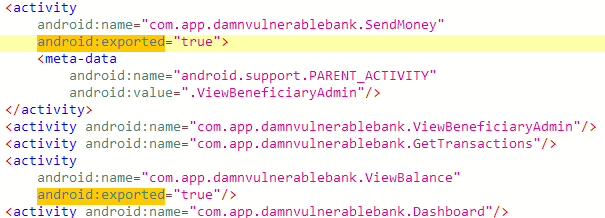
AndroidManifest.xmlThese components become attack vectors if they’re not secured. So, during security audits or pen-testing, enumerating exported components is a fundamental step.
APK Components Inspector: What It Does and Why It’s Useful
Imagine a standard workflow where you receive an APK file and need to test its exported components for vulnerabilities. The traditional approach is arduous and time-consuming:
- Decompiling the APK
- Manually parsing the AndroidManifest.xml file
- Searching for exported components
- Opening JADX-GUI to analyze each component
- Manually crafting ADB commands
- Testing and debugging these commands
For an app with 10-15 exported components, this can quickly accumulate hours of manual, repetitive work, assuming no problems. APK Components Inspector simplifies this task. It’s a lightweight, Python-based command-line utility designed for security researchers to automatically generate already crafted ADB commands for accessing exposed Android components. Here’s how it works:
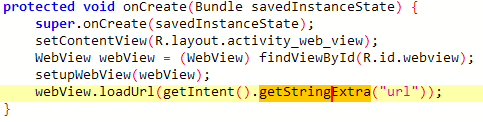
- Smart Smali Analysis: Unlike most other tools that only focus on the manifest file, APK Components Inspector automatically retrieves “intent extras” (parameters expected by components) directly from the app’s Smali code. This analysis eliminates the guesswork often involved in figuring out what data a component expects, allowing for more precise and accurate exploitation commands. For example, it can identify
getStringExtra("url")orgetParcelableExtra("redirect_intent")from the code and generate the corresponding ADB commands.


- Context-Aware Exploit Generation: The tool doesn’t just produce generic commands; it understands Android component lifecycles and generates context-specific exploits. This means it can create commands tailored for different scenarios, such as SQL injection attempts for providers, activity-clear-task for singleTask activities, or specific command execution for services

- Smart Detection of Test Values: The tool is designed to recognize when manual intervention might be beneficial, suggesting possible actions or data inputs. For instance, it might generate a command with a generic URL, prompting the user to investigate the Smali code for a specific, hardcoded URL required for a successful exploit

In short, the script would:
- Parses the APK file to list all exported components.
- Generates ADB command templates that can be used to trigger each component manually.
- Displays all information in a clean, readable output.
Installation and Usage
Getting started with APK Components Inspector is straightforward:
Requirements
- Python 3.x+
- apktool 2.6.0+
- Androguard 3.3.5 (
pip install androguard==3.3.5)
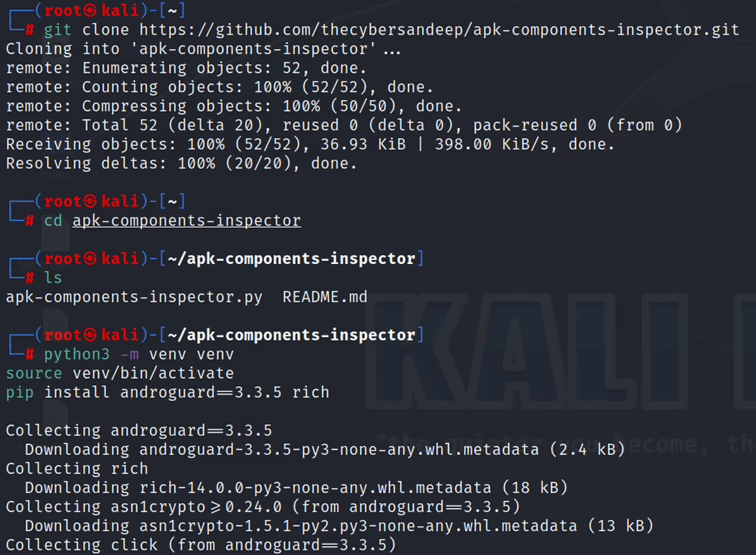
Installation Steps
- Clone the repository:
git clone https://github.com/thecybersandeep/apk-components-inspector - Navigate into the directory:
cd apk-components-inspector - Create and activate a virtual environment:
python3 -m venv venv and source venv/bin/activate - Install dependencies:
pip install androguard==3.3.5 rich
Usage
Once installed, simply run the tool with your APK file: python apk-components-inspector.py vulnerable-app.apk
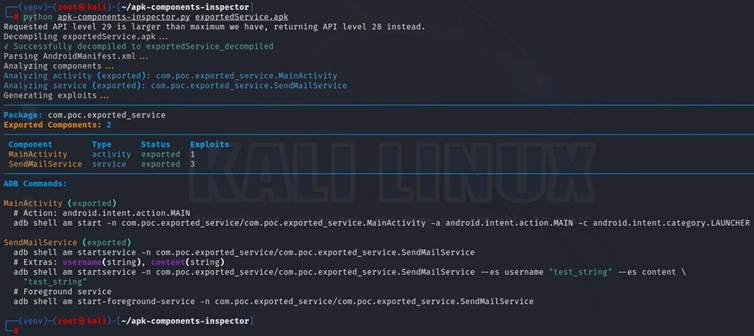
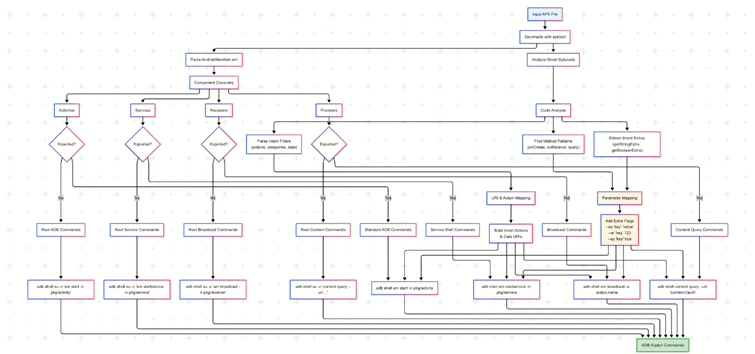
Diagram Workflow
Below is a simple visual explanation of the tool workflow.
Testing an App with the Tool
When tested against a sample APK, the output is clear and structured. You see each component listed with an appropriate ADB command like:
adb shell am start -n com.target.app/.ExportedActivity
adb shell am startservice -n com.target.app/.ExportedService
Also include a component summary:

com.jb.zcamera app (https://medium.com/@ostorlab/this-article-is-a-technical-deep-dive-showing-how-a-100m-installation-image-application-can-6343ce8ea076)However, while the tool is great with at generating these commands, it doesn’t execute them automatically. You’re still left with the task of manually copying each generated ADB command from the terminal output and pasting it into another terminal connected to your Android device to run it. This manual step slows down the workflow during a pentest or when auditing multiple apps.
Improve Automation: Execute ADB Commands Interactively
To further simplify the testing process and solve the manual execution bottleneck, I propose an “update script”. This script would take the output of the apk-components-inspector.py as its input. Its functionality would be as follows:
- Parse Output: It would parse the output from APK Components Inspector to
adbcommands.txtfile.
python apk-components-inspector.py dvba_v1.1.0.apk | tee adbcommands.txt; python run_adb_commands.py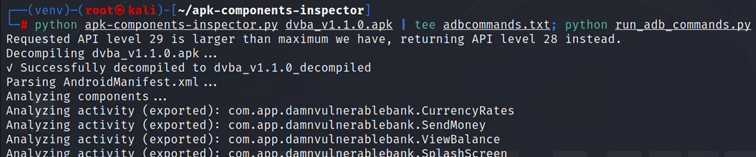
- Interactive Execution: Start
run_adb_commands.pyscript that will parse each identified ADB command fromadbcommands.txtfile and allows user to execute it. There is the workflow:- Print the command to the console.
- Prompt the user to press Enter to execute it. This allows for review before execution.
- Execute the command on the ADB-connected Android device.
- Iteration: This process would repeat sequentially for all detected ADB commands until every potential entry point has been tested.
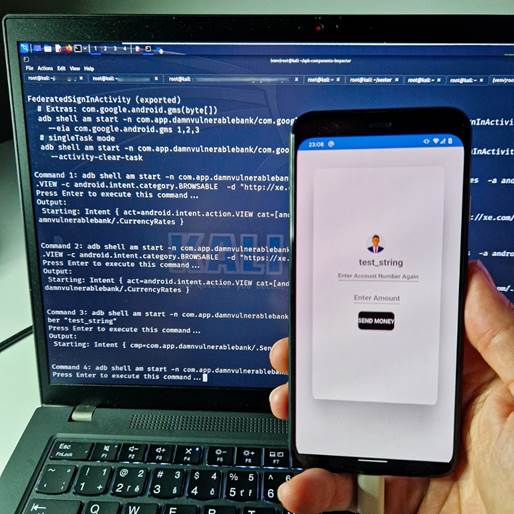
Here is a vibe coded run_adb_commands.py script:
import subprocess

def parse_adb_commands(file_path):
    with open(file_path, 'r') as file:
        lines = file.readlines()

    commands = []
    current_command = []

    for line in lines:
        stripped = line.strip()
        if stripped.startswith("adb "):
            current_command = [stripped]
        elif stripped.startswith("#") or not stripped:
            if current_command:
                full_command = ' '.join(current_command).replace(" \\\\ ", " ").replace("\\", "").strip()
                commands.append(full_command)
                current_command = []
        elif current_command:
            current_command.append(stripped)

    if current_command:
        full_command = ' '.join(current_command).replace(" \\\\ ", " ").replace("\\", "").strip()
        commands.append(full_command)

    return commands

# Example usage
file_path = 'adbcommands.txt'
parsed_commands = parse_adb_commands(file_path)

for i, cmd in enumerate(parsed_commands, 1):
    print(f"\nCommand {i}: {cmd}")
    input("Press Enter to execute this command...")
    try:
        result = subprocess.run(cmd, shell=True, check=True, text=True, capture_output=True)
        print("Output:\n", result.stdout)
        if result.stderr:
            print("Errors:\n", result.stderr)
    except subprocess.CalledProcessError as e:
        print(f"Command failed with error:\n{e.stderr}")
The benefit of this improvement is that it eliminates the need to manually copy and paste commands, saving time and reducing the chances of error, thereby accelerating the testing cycle even further.
On-the-Go Security Testing with an Android Phone
Another major advantage of APK Components Inspector is its ability to run directly from a Android smartphone, making it a powerful on-the-go tool for mobile security analysts. Since the tool is built in Python and relies on standard Android command-line utilities. This means you can analyze and extract exported components without needing a laptop or full desktop setup — perfect for live testing, or auditing apps in the field.
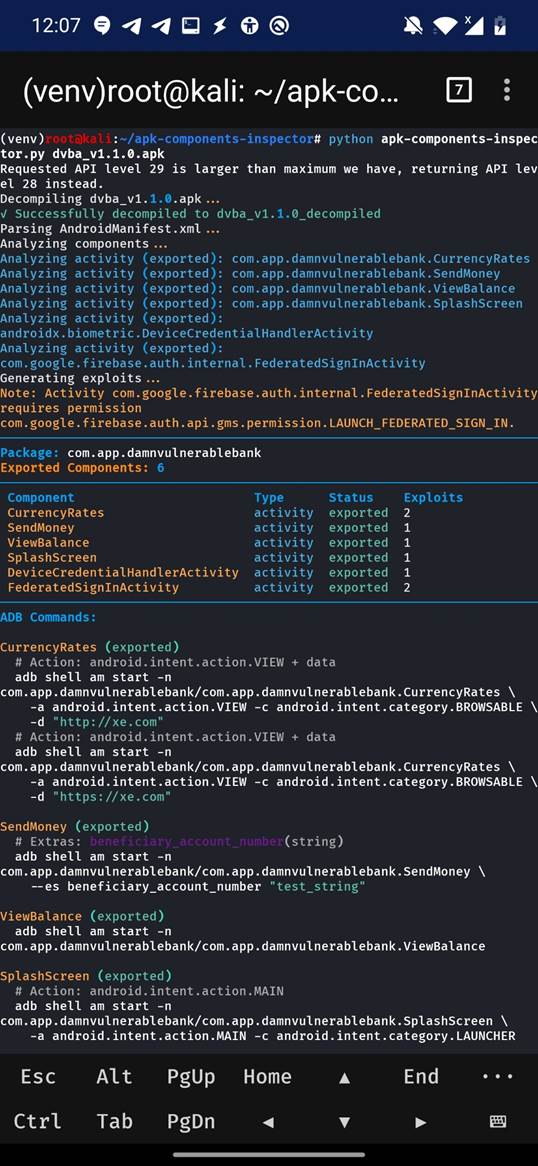
Other Tools for Exported Component Enumeration
While APK Components Inspector is fast and automation-friendly, there are other tools for similar purposes:
- MobSF (Mobile Security Framework) – Full static and dynamic analysis.
- Drozer – Classic tool for runtime component testing.
- Quark-Engine – Malware analysis with component review.
- APKTool – Manual decompilation and manifest review.
Why Intent Redirection Vulnerabilities Are More Dangerous Than You Think
One of the most critical issues associated with exported components is the Intent Redirection vulnerability (CWE-926). This happens when an app blindly forwards received Intents to other components — either within the app or externally — without validating the source or intent contents. Malicious apps can exploit this trust to hijack app flow, trigger privileged actions, or access sensitive components, often bypassing permission boundaries.
Several vulnerabilities have been discovered in recent years, demonstrating how serious this issue is:
- CVE-2025-55624: An intent redirection vulnerability in Reolink v4.54.0.4
- CVE‑2024‑26131: Element Android versions 1.4.3–1.6.10 had an Intent redirection flaw allowing attackers to start internal activities—leading to webview manipulation, JavaScript execution, PIN-bypass, or login hijacking.
- CVE‑2023‑44121: LG ThinQ Service (system app) exported a receiver that handled broadcasts with action
com.lge.lms.things.notification.ACTION. Attackers on LG devices could exploit this to trigger arbitrary components with system-level privileges - CVE‑2023‑30728: Vulnerability in Samsung’s PackageInstallerCHN (pre-13.1.03.00) let local attackers, via user interaction, exploit Intent redirection to access arbitrary files.
- CVE‑2022‑36837: Samsung Email (pre-6.1.70.20) accepted implicit Intents, allowing attackers to leak sensitive content.
- CVE-2021-4438: React Native Sms User Consent Intent Redirection Vulnerability
- CVE‑2020‑14116: Xiaomi’s Mi Browser didn’t validate Intents, enabling attackers to perform sensitive actions by redirecting Intents.
Remediation: How to Prevent Intent Redirection Issues
Google outlines clear guidance to mitigate these vulnerabilities:
- Avoid forwarding incoming Intents directly. Validate and sanitize all data before passing it on.
- Restrict exposed components: Use
android:exported="false"unless truly necessary. - Check calling identity using
getCallingPackage()orgetCallingActivity()to confirm the source of an Intent. - Use explicit Intents internally to avoid unintended redirection.
- Validate actions and data in received Intents. Don’t assume the caller’s intent is safe.
By combining tools like APK Components Inspector with awareness of common flaws like Intent Redirection, security testers and developers can reduce the attack surface of Android applications.
Final Thoughts
Identifying exported components is non-negotiable in Android app security. APK Components Inspector makes it easier than ever, turning static analysis into a fast and nearly hands-free process. Combined with the automation script above, you can reduce hours of manual testing to minutes.
Security is only as good as your visibility. Tools like these not only help you see vulnerabilities faster but also help you act on them with precision.
如有侵权请联系:admin#unsafe.sh