文章介绍了一种基于Gremlin Stealer恶意软件的威胁狩猎方法。通过分析静态特征(如文件哈希、元数据)和动态行为(如网络通信、文件操作),提取关键指标,并结合VirusTotal查询和YARA规则构建检测策略。同时,通过关联恶意软件基础设施(如C2服务器、控制面板),进一步识别相关样本和威胁行为者。该方法展示了如何从单一样本出发,系统性地提升检测能力并理解威胁行为者的活动模式。 2025-8-29 10:18:41 Author: viuleeenz.github.io(查看原文) 阅读量:21 收藏
If you are a threat researcher reading a blog post about a novel threat that could potentially impact your organization, or if you need to investigate this threat to enrich your internal telemetry for better tracking and detection, how would you proceed?
This was the question that come up in my mind, out of the blue, reading an article from Unit42 where they start to talk about a novel malware sold in the underground named Gremlin stealer. As always the article is very well detailed, carefully explaining the malware’s characteristics and objectives while also providing the SHA-256 hash of the analyzed sample.
Generally speaking, shared IOCs are invaluable resources for the security community, as detection capabilities often depend on the breadth of threat intelligence available in your platform. However, IOC collections can vary dramatically in quality and scope. Sometimes you’ll find comprehensive lists containing everything from phishing email hashes and malware stages to domains and JavaScript files. Other times, you’re left with minimal intelligence—perhaps just a single hash and a brief description—making threat hunting significantly more challenging.
💡When you encounter a new threat and there aren’t many resources to rely on, you must leverage your own internal data to collect additional intelligence. This allows you to extract valuable IOCs, pivot across related malware infrastructures, and discover additional hidden samples.
In this blog post, we’ll walk through a threat-hunting methodology using Gremlin Stealer as our primary case study. We’ll explore how to extract meaningful intelligence from a single malware sample — without heavily relying on reversing activities — and transform that knowledge into actionable hunting strategies capable of detecting broader threat actor operations.
Understanding Sample Relationships
Effective threat hunting begins with understanding how malware samples relate to each other. Static characteristics form the foundation of this analysis. File hash relationships are particularly valuable—searching for samples with the same imphash (import hash) can reveal binaries that use similar API patterns, while ssdeep and other fuzzy hashing techniques help identify files with comparable byte-level structures, even when their exact hashes differ due to minor modifications or repacking.
In addition to hashes, file metadata can provide another valuable layer of similarity indicators, helping connect samples that may belong to the same malware family or campaign. However, similarity analysis shouldn’t stop at static attributes. From a behavioral standpoint, distinctive indicators often emerge, such as: File creation paths, Command-line arguments, Registry modifications, Network communication patterns, etc..
When multiple samples shows overlapping behavioral traits — for instance, reaching out to the same C2 infrastructure or using identical file paths — it becomes much easier to cluster them under the same threat actor’s activity. In fact, for hunting purposes, behavioral indicators are often more reliable than static characteristics, since they reflect what the malware must do to achieve its objectives.
💡 Static characteristics are easily modified by threat actors, but behavioral requirements are functionally constrained. A threat actor can change how malware looks, but it’s much harder to change what it needs to do to succeed.
Static Indicators
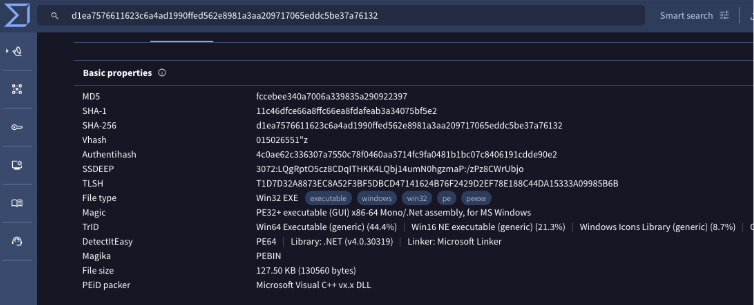
When examining our Gremlin Stealer sample in VirusTotal, several metadata characteristics immediately caught the attention. Each of these anomalies not only serves as a detection opportunity but also provides clues about the malware author’s techniques and intentions:
Anomalous Timestamp
The file’s reported creation date — 2041-06-29 19:48:00 UTC — is set in the future. This is a common anti-analysis technique used by malware authors to bypass certain detection mechanisms or confuse automated analysis pipelines.
Misleading Copyright Information
- “LLC ‘Windows’ & Copyright © 2024” ( Attempts to mimic legitimate Microsoft software, the naming convention is incorrect.)
.NET Assembly Metadata
Since Gremlin Stealer is a .NET binary, it exposes rich metadata that can be extremely useful for clustering related samples. Notably:
- Module Version ID (MVID):
8f855bb2-4718-4fa4-be9c-87ed0b588b5c - TypeLib ID:
7c11697d-caad-4bae-8b2a-0e331680a53b
These identifiers are generated during compilation and often remain consistent across samples built from the same source code or development environment. As such, they can be powerful static indicators for connecting related binaries within the same malware family
- Module Version ID (MVID):
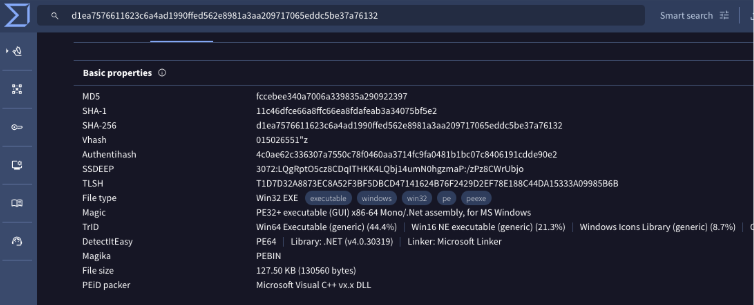
Figure 1: Gremlin Stealer Information
Behavioral indicators
While static analysis provides valuable initial insights, behavioral analysis through sandbox execution reveals how the malware actually operates in a live environment. VirusTotal’s sandbox capabilities allow us to observe Gremlin Stealer’s runtime behavior, uncovering network communications, file system interactions, and process execution patterns that static analysis alone cannot reveal.

Figure 2: Gremlin Stealer URLs
Gremlin Stealer’s behavior tab reveals distinct networking fingerprints:
IP Discovery Services → The malware reaches out to:
api.ipify.orgip-api.com
These requests are used to determine the victim’s external IP address, a common tactic among info-stealers for geolocation and target profiling.
Telegram API Endpoints → Connections to
api.telegram.org/botstrongly suggest that Telegram is used for data exfiltration.- This technique has become increasingly popular among cybercriminals due to encryption, ease of automation, and resilience against takedowns.
Hardcoded C2 Server →
207.244.199[.]46is embedded as a command-and-control endpoint.- This serves as both an immediate IOC and a pivot point for uncovering related infrastructure used by the same threat actor.
Moreover, digging deeper into the behavior tab reveals how Gremlin Stealer systematically harvests sensitive data from multiple browsers, including Chrome, Brave, Edge, and other Chromium-based derivatives. One particularly interesting technique involves launching browser instances with remote debugging enabled.
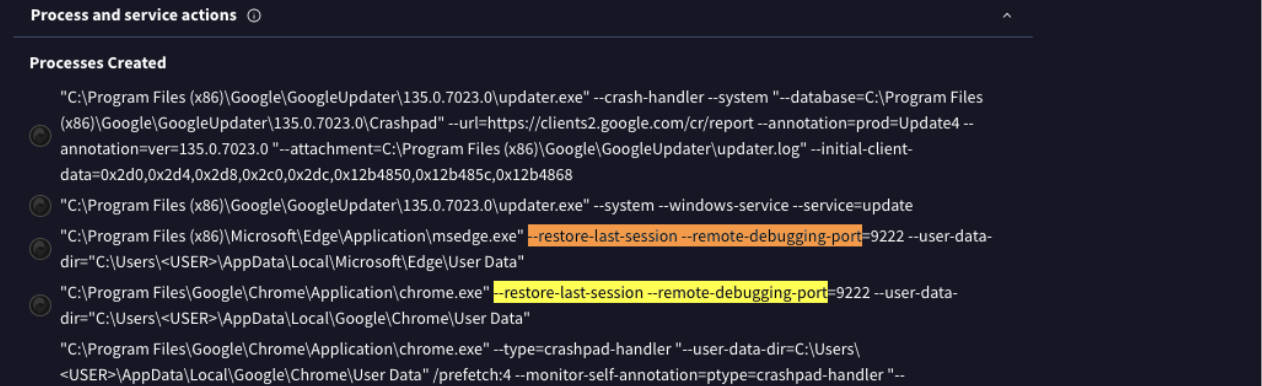
Figure 3: VirusTotal behvaior tab for Gremlin Stealer sample
💡 There is no single indicator you can always rely on. Threat hunting success depends on how much information you can extract from a sample and how effectively you correlate it with other intelligence. This process requires iterative analysis and cannot be treated as a one-time or “spot” activity.
Exploring VT Queries to collect more samples
Crafting effective VirusTotal hunting queries is both an art and a science. The challenge lies in balancing precision with coverage—queries that are too narrow will miss related variants, while overly broad searches generate overwhelming false positives. The sweet spot lies in identifying characteristics that are:
- Likely to remain consistent across the threat actor’s campaigns
- Unique enough to minimize noise during collection
Using the intelligence we’ve gathered so far from our Gremlin Stealer sample, we can start sketching out a VirusTotal hunting query:
generated:"2041-06-29T19:48:00"
signature:"LLC 'Windows' & Copyright ©  2024"
netguid:8f855bb2-4718-4fa4-be9c-87ed0b588b5c
behavior:"\"%ProgramFiles(x86)%\\Google\\Chrome\\Application\\chrome.exe\" --restore-last-session --remote-debugging-port=9222 --user-data-dir=\"%LOCALAPPDATA%\\Google\\Chrome\\User Data\""
Starting with the first one (generated:“2041-06-29T19:48:00”) ****we are able to collect a couple of samples.
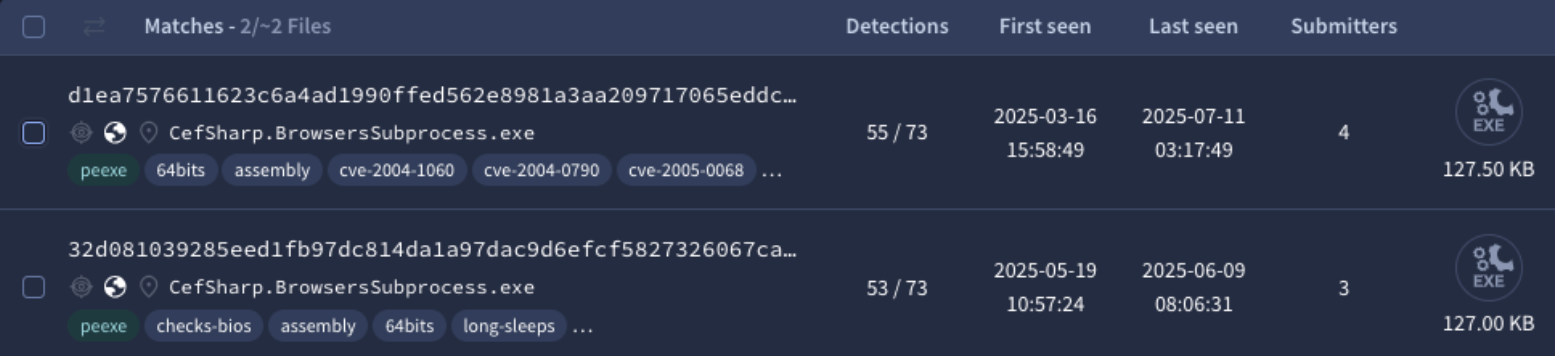
Figure 4: Potentially correlated sample with original Gremlin Stealer
As expected, the first match is our original sample. However, the second one appears to be a new potential candidate worth investigating based on its filename and metadata, which suggest it may be linked to the same campaign.
To validate this assumption, we need to cross-check indicators between our original sample and the new binary. Diving into the details and behavior tabs reveals strong overlaps:
- Matching signature strings
- Identical LegalTradeMark values
- Same .NET Module Version ID (MVID)
- Same TypeVersion metadata
Additionally, inspecting the functions list and external modules shows identical APIs and libraries in both binaries, suggesting a shared codebase.
💡 At this stage, you might feel like a single new sample isn’t enough — but resist the temptation to cast a wider net too early. Every hash you collect must be validated to ensure it’s truly related. Once you confirm multiple samples with strong correlations, you can safely expand your query and begin crafting high-confidence detection rules.
Comparing Disassembled Code
Sometimes, metadata alone isn’t enough to confidently determine whether two samples are related. In these cases, a deeper dive into the disassembled code can provide stronger evidence. By analyzing the code structure, function names, and implementation patterns, we can often spot significant overlaps that confirm a shared origin. In our case, we can clearly see that the two samples:
- Share a large number of identical functions
- Use the same function names
- Contain matching code blocks within those functions
This level of similarity strongly suggests that both binaries were compiled from the same source code or at least from closely related codebases.
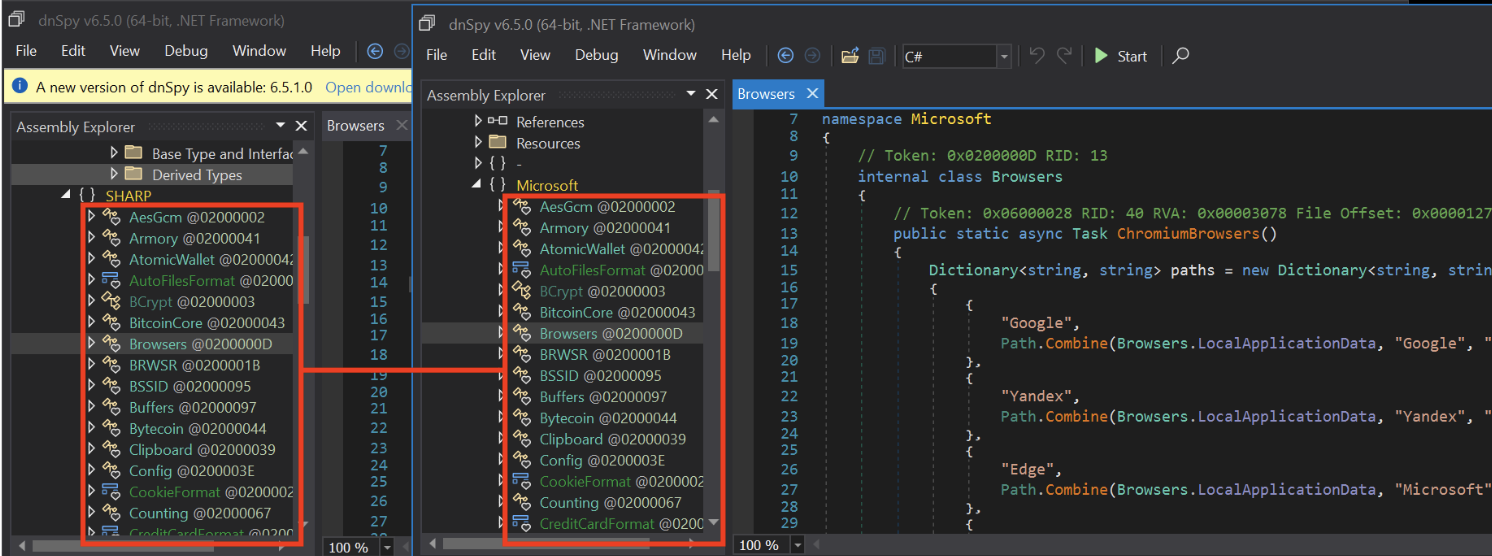
Figure 5: Gremlin Stealer code
💡 For C/C++-like binaries, a highly effective workflow is to combine IDA Pro for performing an in-depth analysis of one binary, and then leverage BinDiff to compare it against another. This highlights code-level similarities and discrepancies, making it easier to identify relationships and validate correlations between samples.
Analyzing additional result information
After completing the investigation on the previously identified sample, we can continue our research using the same hunting methodology, but this time pivoting on other high-confidence indicators such as the signature and the netguid we collected earlier. When we pivot on the signature, VirusTotal returns 15 matches. On the other hand, pivoting on the netguid produces 13 matches. This discrepancy raises important questions that can fuel further investigation. Some of these questions directly influence tactical hunting, while others provide paths toward strategic intelligence.
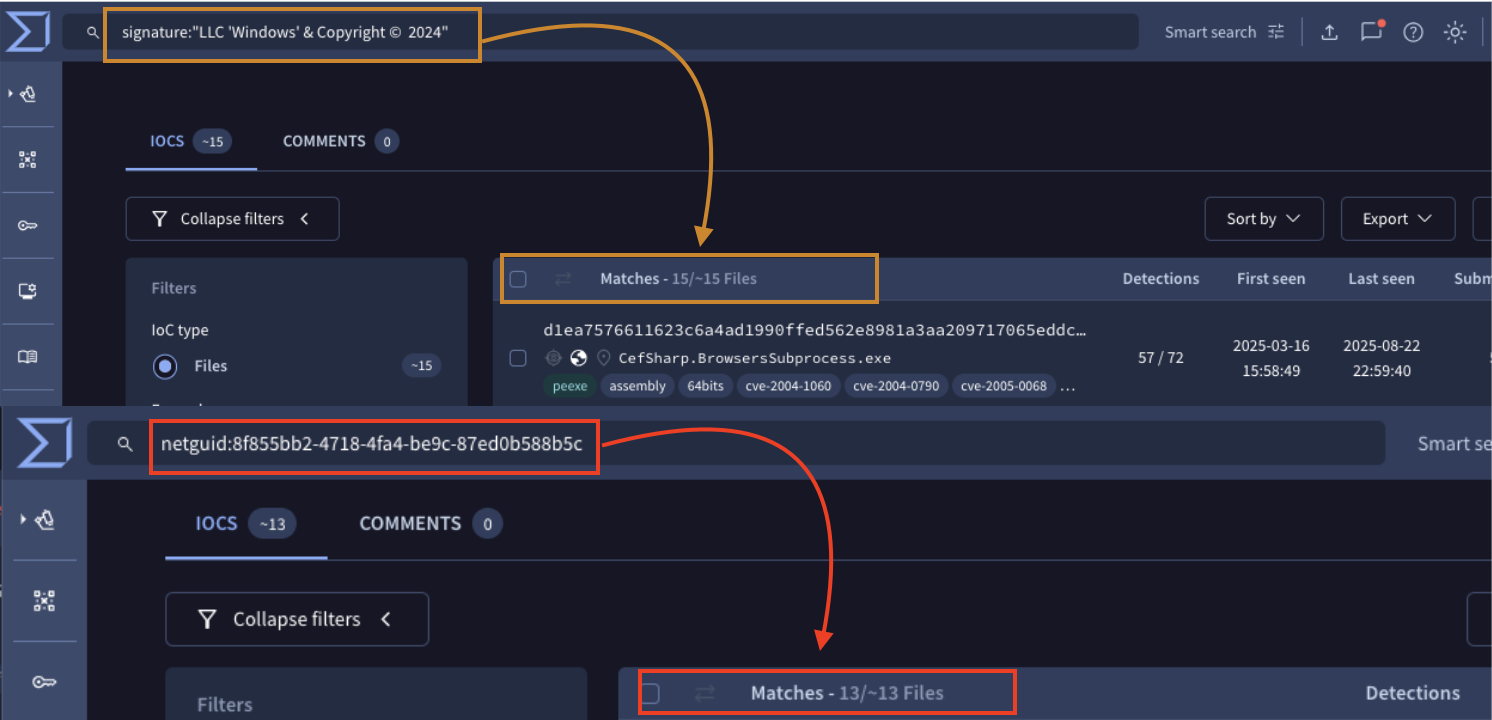
Figure 6: VT Queries results for signature and netguid tags.
Differences in the returned results could indicate the presence of .NET build outliers that deviate slightly from the main family. To better understand them, we can:
- Investigate whether these outlier samples show different behavioral patterns
- Determine why these specific builds were created — e.g., testing variants, specialized targets, or toolchain updates
- Analyze whether these binaries communicate with different infrastructures or reuse existing ones
These insights can directly enhance detection engineering and improve coverage for variant-level hunting. Beyond tactical detection, the results open the door to deeper strategic intelligence questions:
- How large is the organization behind Gremlin Stealer?
- Do the different build lines suggest the involvement of multiple threat actors or a single actor with multiple operational capabilities?
- Could these variations indicate distinct campaigns tailored for specific geographies, targets, or objectives?
Answering these questions requires a broader analysis of development patterns, campaign overlaps, and infrastructure reuse — insights that are valuable for long-term threat actor profiling.
💡 Attribution remains one of the most challenging aspects of threat intelligence. Unlike traditional forensics, where physical evidence provides concrete links, cyber attribution often relies on connecting digital breadcrumbs across fragmented datasets. Accurate attribution typically involves multiple steps, including code similarity analysis, infrastructure tracking, campaign clustering, and even business model assessments — all of which contribute to building a robust threat actor profile.
Writing Yara Rules
With our comprehensive intelligence gathering complete, we can now translate our findings into actionable detection logic. Creating a YARA rule allows us to codify the patterns we’ve discovered, enabling automated detection across security platforms. Our rule needs to balance several competing priorities: broad enough to catch variants, specific enough to minimize false positives, and resilient enough to survive minor modifications by threat actors.
When analyzing the 15 matching samples, it’s clear that some binaries contain obfuscated code, which makes relying solely on assembly instructions less effective. Instead, we’ll focus on unique strings and metadata-based attributes extracted during our VirusTotal analysis.
Here’s an initial draft of the rule:
rule GermlinStealer
{
  meta:
        description = "Detects Gremlin Stealer"
        author = "Viuleeenz"
        date = "2025-08-25"
        hash = "d1ea7576611623c6a4ad1990ffed562e8981a3aa209717065eddc5be37a76132"
        reference = "https://unit42.paloaltonetworks.com/new-malware-gremlin-stealer-for-sale-on-telegram/"
  strings:
        // Fraudulent copyright and version information
        $metadata1 = "LLC 'Windows' & Copyright" ascii wide
        $metadata2 = "CefSharp.BrowsersSubprocess" ascii wide
        $metadata3 = "CefSharp" ascii wide

        // .NET details
        $typelib_id = "7c11697d-caad-4bae-8b2a-0e331680a53b"
        $module_version_id = "8f855bb2-4718-4fa4-be9c-87ed0b588b5c"

        // Cryptocurrency wallet targeting
        //$crypto1 = "bitcoincore"
        //$crypto2 = "litecoincore"
        //$crypto3 = "electrum"
        //$crypto4 = "exodus"
        //$crypto5 = "atomicwallet"
        //$crypto6 = "monero"


        $library1 = "bcrypt.dll"
        $library2 = "dllFilePath"
        $library3 = "iphlpapi.dll"
        $library4 = "kernel32.dll"
        $library5 = "user32.dll"


  condition:
    uint16(0) == 0x5a4d and
    filesize < 500KB and
    (any of ($metadata*)) and
    (($typelib_id) or ($module_version_id)) and
    (3 of ($library*))

}
This rule focuses on three key detection pillars:
- Metadata & Branding Strings
- Fake copyright claims and Chromium subprocess references
- Helps detect samples attempting to masquerade as legitimate Microsoft software
- .NET Compilation Identifiers
- Uses
TypeLib IDandModule Version IDfor clustering ( very strong, but can be overly restrictive if the malware author recompiles )
- Uses
- Functional Capabilities
- Includes critical Windows DLLs commonly referenced by Gremlin Stealer
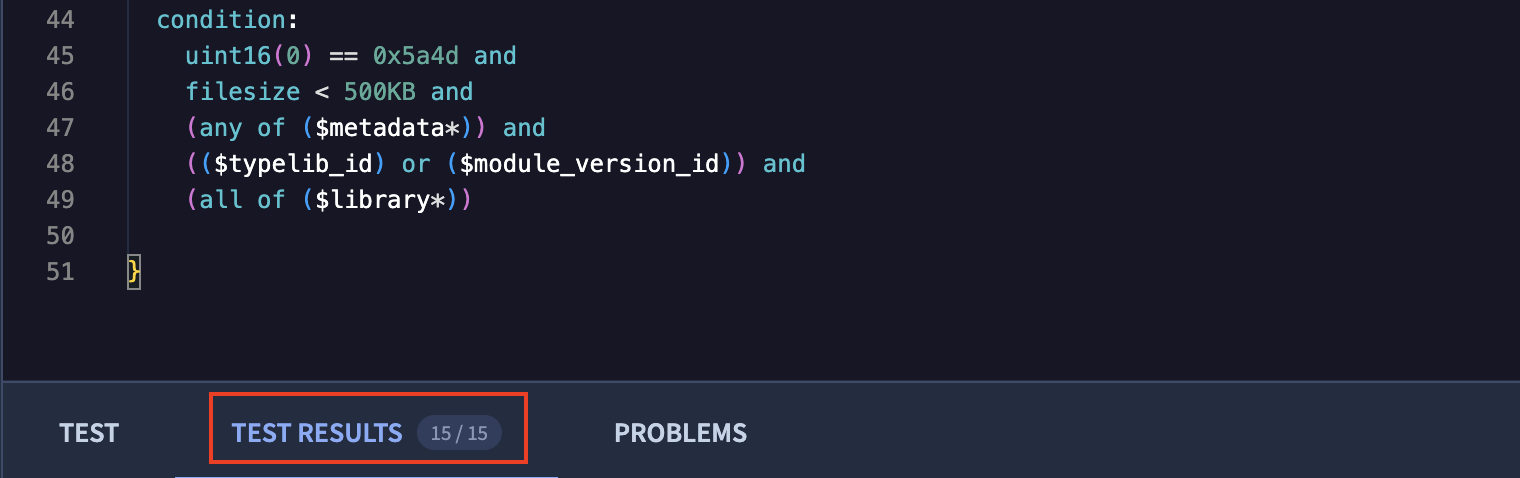
Figure 7: Yara results
💡 There isn’t a single YARA rule that works for every scenario. Even this rule isn’t perfect. It relies on crypto-related strings, which could affect detection efficiency in certain environments. However, this rule was designed as an experimental approach to validate its effectiveness, so testing it made sense. Similarly, the use of .NET-specific identifiers might be a bit restrictive, potentially missing variants compiled with different settings. Ultimately, the best rule design depends on your goals and the system ingesting the files. In some cases, you may want a highly tailored, precise rule that minimizes false positives; in others, a broader rule with a higher tolerance for noise might be more appropriate. The key is balancing coverage and accuracy based on your operational needs.
Collecting Infrastructural Information
Our malware analysis has yielded valuable insights, but the investigation remains incomplete without understanding the infrastructure supporting Gremlin Stealer’s operations. Threat actors don’t operate in isolation—they require command and control servers, data exfiltration channels, and often administrative panels to manage their campaigns. By mapping this infrastructure, we can uncover additional IOCs and gain deeper insight into the scope of their operations.
Starting from the previously identified IP address 207.244.199[.]46, we can leverage tools like Urlscan and Validin to expand our research. By querying this IP, we immediately uncover interesting insights, including a glimpse of what appears to be the Gremlin control panel.
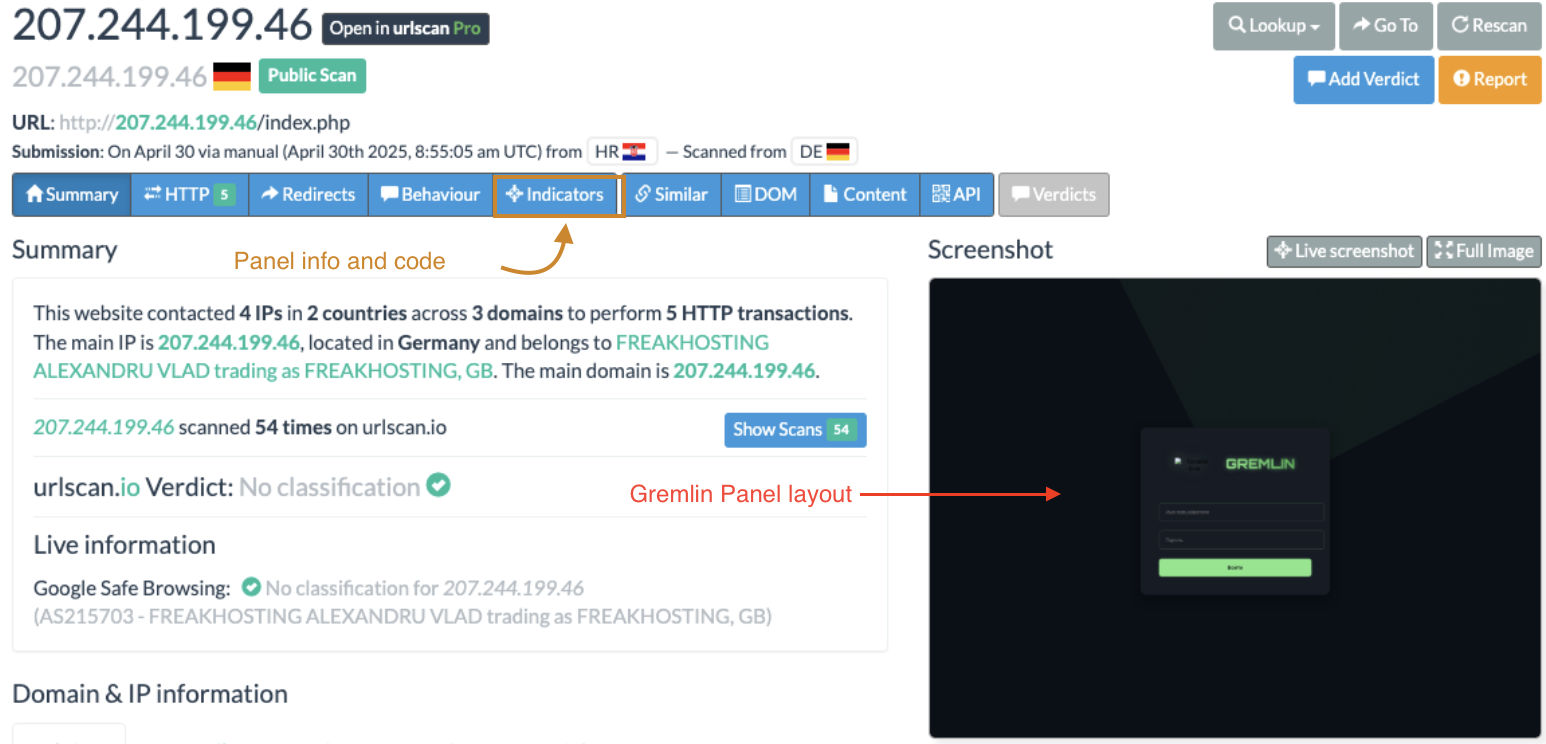
Figure 8: Gremlin Stealer Control Panel
Digging deeper, we can extract the HTML source code, DOM structure, and associated assets, including images and icons, from the landing page. By computing hashes of these elements, we create new pivot points that can be used to identify related infrastructure and potential additional panels.
At this stage, we’ve already collected:
- The landing page content and visual assets
- The DOM hash and other unique fingerprints
- Metadata such as page title and associated icon hashes
Using these artifacts, we can pivot further using Validin. Starting with the same IP, we uncover additional details such as the host title used by the panel. This information becomes valuable because we can search for the same title across other servers, potentially revealing related panels deployed on different IPs.
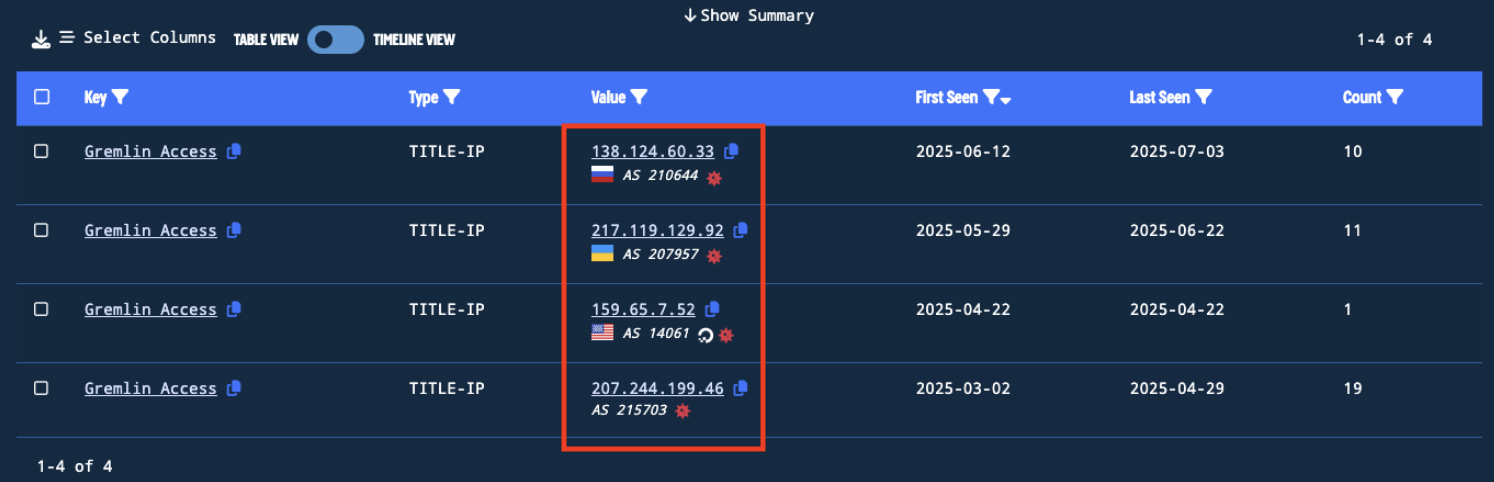
Figure 9: Additionally Control Panel IPs
Interestingly, the same host title is seen on multiple IP addresses. This is an important discovery:
- It suggests a broader infrastructure behind Gremlin Stealer.
- It gives us new candidate servers to investigate.
- Some of these IPs might still host active panels, providing opportunities for deeper intelligence gathering 👀.
Sketching a Threat Actor Profile
With the intelligence collected so far (e.g., malware samples, behavioral patterns, and infrastructure insights), it is possible to begin sketching a preliminary threat actor profile. By correlating static indicators like .NET identifiers and metadata, behavioral traits such as browser targeting and command-line arguments, and infrastructural data including C2 IPs and panel hostnames, we can start to infer the operational capabilities and methods of the actor behind Gremlin Stealer.
This profile helps answer key questions:
- Scope and scale: How many campaigns or variants are likely active?
- Technical sophistication: Which coding practices, obfuscation techniques, and exfiltration methods are employed?
- Operational patterns: Do multiple IPs, host titles, or panel infrastructures suggest a centralized organization or distributed teams?
- Targeting focus: Are specific industries or regions being prioritized?
While attribution remains challenging, building a structured profile allows analysts to prioritize investigations, anticipate next moves, and design more effective detection rules. Over time, as new samples and infrastructure emerge, this profile can be refined into a comprehensive understanding of the threat actor’s TTPs, infrastructure, and strategic objectives.
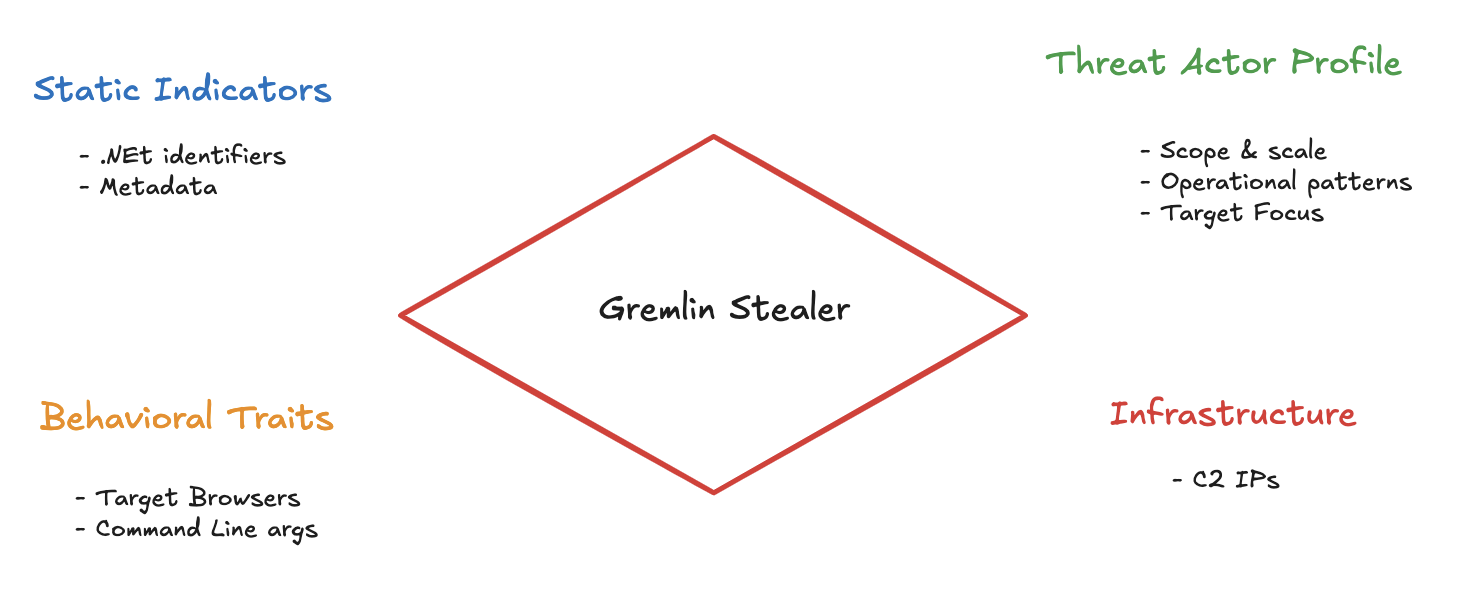
Figure 10: Attempt of Gremlin Stealer sketching profile
Conclusion
Remember the question we started with: “If you are a threat researcher reading a blog post about a novel threat that could potentially impact your organization, or if you need to investigate this threat to enrich your internal telemetry for better tracking and detection, how would you proceed?”
Through our Gremlin Stealer investigation, we’ve demonstrated that the answer isn’t as daunting as it might initially seem. You don’t need to be a reverse engineering expert to extract meaningful intelligence from a single malware sample.
Starting with just one hash from Unit42’s report, we systematically built a comprehensive threat profile. The key insight? Effective threat hunting is more about methodology than advanced technical skills. It’s about asking the right questions, knowing where to look for answers, and systematically connecting the dots between seemingly unrelated pieces of information.
Every indicator we discovered became a stepping stone to the next discovery. This iterative approach transformed a single IoC into a robust detection strategy capable of identifying an entire malware family and its supporting infrastructure.
So the next time you encounter a novel threat with limited public intelligence, don’t be intimidated. Start with what you have, apply systematic thinking, and let curiosity guide your investigation. The tools and techniques demonstrated here are accessible to any security professional willing to invest the time to learn them. After all, threat hunting isn’t just about finding malware, it’s about understanding the adversary. And that understanding begins with a single question and the determination to find the answer.
Happy hunting! 🔍
IOCs
Potential Control Panel IPs:
- 138.124.60[.]33
- 217.119.129[.]92
- 207.244.199[.]46
- 159.65.7[.]52
Additonal Gremlin Stealer
Gremlin Stealer - Sha256 d1ea7576611623c6a4ad1990ffed562e8981a3aa209717065eddc5be37a76132 32d081039285eed1fb97dc814da1a97dac9d6efcf5827326067ca0ba2130de05 971198ff86aeb42739ba9381923d0bc6f847a91553ec57ea6bae5becf80f8759 598ba6b9bdb9dcc819e92c10d072ce93c464deaa0a136c4a097eb706ef60d527 01dc8667fd315640abf59efaabb174ac48554163aa1a21778f85b31d4b65c849 7458cb50adfcce50931665eae6bd9ce81324bc0b70693e550e861574cb0eb365 208ecca5991d25cc80e4349ce16c9d5a467b10dedcb81c819b6bc28901833ea9 7ed4eea56c2c96679447cc7dfc8c4918f4f7be2b7ba631bc468e8a180414825a 8202ba2d361e6507335a65ccc250e01c2769ed22429e25d08d096cd46a6619ff 281b970f281dbea3c0e8cfc68b2e9939b253e5d3de52265b454d8f0f578768a2 a9f529a5cbc1f3ee80f785b22e0c472953e6cb226952218aecc7ab07ca328abd 9aab30a3190301016c79f8a7f8edf45ec088ceecad39926cfcf3418145f3d614 ab0fa760bd037a95c4dee431e649e0db860f7cdad6428895b9a399b6991bf3cd d11938f14499de03d6a02b5e158782afd903460576e9227e0a15d960a2e9c02c 691896c7be87e47f3e9ae914d76caaf026aaad0a1034e9f396c2354245215dc3
如有侵权请联系:admin#unsafe.sh