
Hello, World! So far, you've learnt how to list files in the current directory and read their contents and it was all visible file. How would you know, I was using the -a flag the entire time. After reading through this post you will learn about why brain is now wired to use ls -la.
Also, I realised from my last two posts that they didn't contain much information, just a basic introduction and a direct jump to the solution. I will try to resolve this issue by providing some background and history on hidden files in Linux.
If you are coming from Windows (like me), then you might have had "some important stuff" that you need to save to the computer and hide it from your siblings, you open the properties of the file directory, check Hidden and save it.
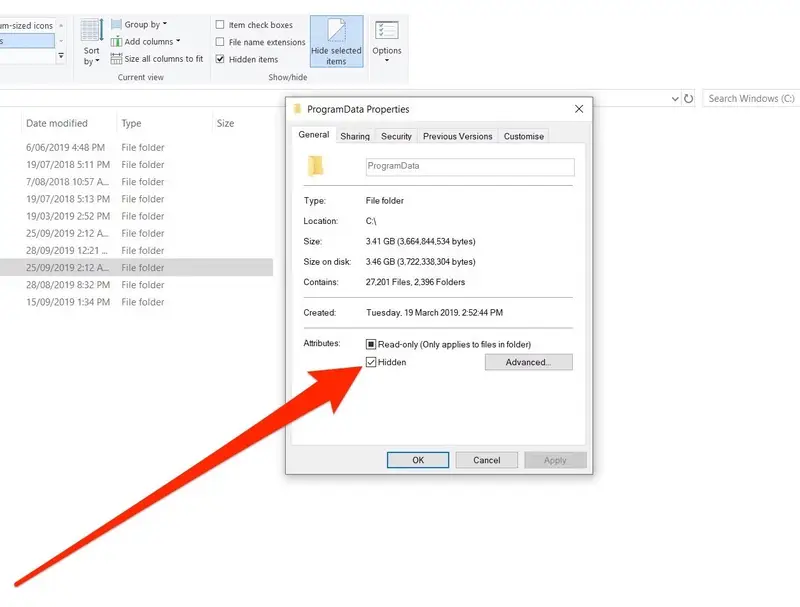
This won't show in the file explorer normally unless you enable it from the folder options or use special flag with dir command in the command prompt.

A hidden file (or directory) is a normal directory entry that is made invisible by the directory enumeration function and becomes visible only when a special flag is passed to it. In Windows, special flag is set which can be retrieved from the dwFileAttributes field of the BY_HANDLE_FILE_INFORMATION structure, whereas in POSIX operating systems such as Unix, Linux, and others, file names beginning with dot are considered hidden.
I see you are intrigued, but it was more of a disappointment for me to learn that this was caused by a bug introduced earlier when the ls command was written to hide the current directory (.) and parent double-dot (..), the authors checked if the file name began with a dot and simply ignored it unless the -a flag was set, which set ignore_mode to IGNORE_MINIMAL.
The command uses the libc readdir(3) function to enumerate through the files in the (everything is file, even a directory), making no distinction between any of them.
The challenge description is self-explanatory.
The password for the next level is stored in a hidden file in the inhere directory.


Understanding Linux File Permissions
Get in-depth knowledge of Linux file permission from administration and infosec point of you.


Hidden Files & Directories in Unix-like Environments • Unix and Unix-like environments
Explore hidden files and directories in Unix and Unix-like systems. Learn their purpose, usage, and management for enhanced system understanding and control.
 Wikipedia

readdir(3) - Linux manual page

readdir(3) - Linux manual page