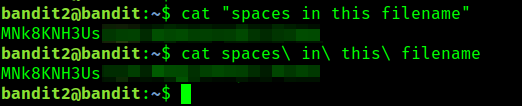
This post continues from Bandit Level 1 to 2, showing how to handle spaces in command-line arguments when reading files with spaces in their names using cat.


Hello World! In the last exercise you have learnt about command line arguments. I purposefully left out one piece of information to share. Based on the usage of command line arguments so far, I believe it is be clear that they are separated by spaces. This means that when you leave a space between arguments, they are treated as two arguments.
There is no restriction to have spaces in the file names as well, and in fact you might have renamed your files as in "Good Old Photos". How will you read the file in the linux if spaces means argument split? Of course there's a way in the shell to operate on such files.
Before moving forward, I would like to share something, that I find spaces in text file names a bit annoying and usually feel the urge to replace them with hyphens or sometimes underscores.
Use the password you got from the solution of last solution to login to the Level 2. Upon listing the files in the home directory, you will notice a file named "spaces in the file name".
This looks unusual because, unlike .bash_logout which appears as two words but is actually one word separated by an underscore this file genuinely contains spaces in its name.
When you pass the file name as-is to the cat command, it returns an error saying “no such file exists” in four lines, formatted as cat: {name of file}: No such file or directory. This is because the program is interpreting the spaces in the filename as delimiters, trying to open four separate files instead of the single file.
💡
This happens because cat accepts multiple filenames as arguments, and spaces separate these arguments. For example, if you have 2 files in the directory named Hello World and Hello, then cat Hello World will print the content of Hello but return an error for World. It will finally exit with error code 1.

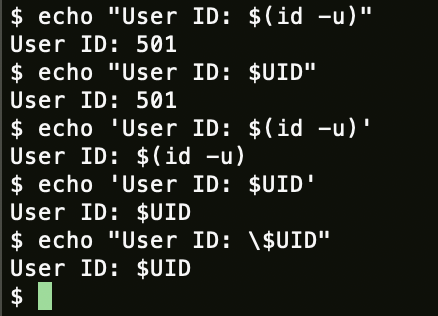
The solution is pretty simple: add quotes around the file name or escape the spaces using \. Which quotes should you use, single or double? In this case, either works. The difference is that double quotes allow shell expansion, while single quotes prevent it. So, if your text contains shell tokens and you want them interpreted literally, use single quotes.
Using either of the approach, you can read the contents of the file. Which is, in fact, the password of next level.

If you do not begin the text with single quotes, your shell will use backslashes by default when you press TAB and quotes when you do.

cat(1) - Linux manual page


Problems passing arguments containing spaces to bash script and then on to python
I am a definite newbie to python. I’ve written some pretty basic programs that use shell scripts to pass user supplied arguments to my python programs. The problem I have now is that several of my parameters have spaces (for example an address line…


Pass arguments with spaces to a command in Bash (Example)
A protip by killwing about bash.


Difference between single and double quotes in Bash
In Bash, what are the differences between single quotes (″) and double quotes (”″)?
 Stack Overflowjrdioko