

Hello World! In the last post, you learnt the basics of SSH and how man pages can be incredibly handy when you don’t have access to an interactive session or a browser. Once you learn to read man pages, it marks a turning point in the journey as a Linux user.
In the beginning, I used to ask very basic questions, even those which whose answers are explained clearly in the manual. My friends used to respond with the common phrase “RTFM” (Read the Frickin’ Manual). This is something many people go through when they start learning Linux.
A simple calculator program is useless unless it can accept an expression or numbers to perform an operation. What if we could provide arbitrary values to the program and an operation to apply on those numbers, something like calc + 1 2 3 4?
It’s impractical to write separate tools for every variation of a task. When you run a command in the terminal, you often need to provide additional information to customise its behaviour. Just like functions, commands can accept arguments (or parameters). In the shell, we call them command line arguments (arguments in short).
You have already used them in earlier exercises. For example, -p and [email protected] when using ssh. These arguments supply extra details to the program, such as options, strings, or numbers. In fact, even common commands like ls are often configured with arguments. This is done through a feature in shell, called alias.

ls command is aliased to ls --color=auto💡
All arguments are passed as strings and it's the programmer's responsibility to validate and convert them into the appropriate data types.
There are two kind of arguments: Positional and Named. The positional arguments are based on order, like SSH [email protected] and named arguments can be used anywhere around the positional argument, but after the base command of course.
💡
If you want to follow the full syntax, the double hyphen (--) symbol acts as the separator between named and positional arguments. As in, $ [COMMAND] [NAMED ARGS ...] -- [POSITIONAL ARGS...]
In POSIX, all the named arguments are prefixed with - (short hand) or -- (long format). This convention is followed all the OS that implements POSIX specifications to allow interoperability of the programs.
In the last part, we got the password for this level. I hope, you copied it somewhere. It's time to copy that and paste when prompted for the password by the SSH client.
ssh -p2220 [email protected]Login to bandit level 1
As usual, the solution starts with listing all the files in the current directory. And as you can notice, there is some weird looking file named - (hyphen). Pretty simple huh! Just read it using cat and we are done.

But when you will type cat - or cat "-", it will give you blocking interface which echoes the text you have just entered. This behaviour dates back to 70's, and has a historical connections.

- fileInteresting! But how can someone exit from this? In a new line press CTRL+D, followed by Enter keypress which sends End of Transmission (0x04 from ASCII table) to the cat command's stream and it will exit.
From the man page of cat, it's confirmed that when you pass no file argument or it's hyphen, the program will interpret it as stdin and open the stream to read from it.

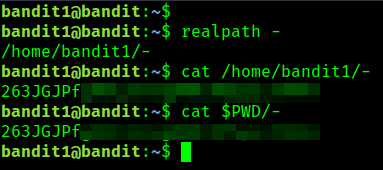
Perfect! It's all making sense now. Since - is treated as a signal to read from stdin, cat interprets it that way. To ensure it treats - as a filename instead, you need to provide its absolute path, either using realpath or by prefixing it with $PWD.
💡
$PWD/- and $(pwd)/- work because you run them from the same directory as the target file. But I would recommend you to use realpath instead, as it gives the absolute path regardless of your current directory.

- to catGreat, you have solved another challenge! This is the password for the next level. Store it in a Notepad document so that you don't have to go through all level again.
RTFM - Wikipedia
 Wikimedia Foundation, Inc.Contributors to Wikimedia projects

What’s the difference between one-dash and two-dashes for command prompt parameters?
I was wondering why is it that some programs requires their command prompt parameters to have two dashes in front whereas some (most) only require one dash in front? For example most programs look…
 Super UserPacerier

Where is the `--` (double dash) argument documented?
There are some utilities that accept a -- (double dash) as the signal for “end of options”, required when a file name starts with a dash: $ echo “Hello World!” >-file $ cat -- -file Hello Worl…
 Unix & Linux Stack Exchangeuser232326

Why does cat with no argument read from standard input?
In advice about how to design good CLI commands I read: If your command is expecting to have something piped to it and stdin is an interactive terminal, display help immediately and quit. This mea…
 Retrocomputing Stack ExchangeJohn Skiles Skinner

Why does Ctrl-D (EOF) exit the shell?
Are you literally “ending a file” by inputting this escape sequence, i.e. is the interactive shell session is seen as a real file stream by the shell, like any other file stream? If so, which file?…
 Unix & Linux Stack ExchangeGeeb

Bash aliases
A guide to Linux bash aliases
 MediumJose Garcia
POSIX Conventions for Command Line Arguments


Is there anything special about command line arguments prefixed with dashes?
When I do something like: ./foo -uxw --bar something Does the shell automatically parse these commands, or does each program have to do the parsing itself?
 Stack Overflowuser1516425

Utility Conventions

cat(1) - Linux manual page

realpath(1) - Linux manual page