
Prerequisites:Node ≥ 18,Git,a modern IDE (Cursor or VS Code), andan API‑key‑enabled AI assistan 2025-8-1 11:18:30 Author: hackernoon.com(查看原文) 阅读量:12 收藏
Prerequisites:
- Node ≥ 18,
- Git,
- a modern IDE (Cursor or VS Code), and
- an API‑key‑enabled AI assistant (Claude Desktop, GitHub Copilot, etc.).
Why MCP isn’t just another buzzword
When I first heard Anthropic describe MCP as “USB-C for AI,” I was skeptical. Another “universal protocol”? Cool idea, but would it work in the real world?
Turns out — it does.
MCP provides your AI assistant with secure, sandboxed access to development tools. It’s like giving Copilot or Claude a temporary, read-only pass to your file system, CLI, or API layer — with your rules.
Big players like Microsoft, GitHub, Atlassian, and Stripe already ship official MCP servers. My team (a four-engineer startup crew) wired a few into our stack and saw ~30 minutes of saved context-switching per dev per day.
Typical five‑minute wins
|
Before MCP |
After MCP |
|---|---|
|
Search Jira manually, copy ticket ID, then write a PR title. |
Ask Copilot: “Link this branch to the Jira bug I mentioned in stand-up and open a draft PR.” |
|
Bounce across browser tabs checking Azure quotas. |
Tell Claude: “List Azure storage accounts over 80% capacity.” |
|
Eyeball README diffs commit by commit. |
Ask Cursor: “Summarize README changes since the last release.” |
Multiply that by dozens of micro‑tasks per day, and you claw back serious focus time.
A two‑minute tour of the MCP architecture

- Client – Your IDE or AI chat agent.
- Server – A local/remote process that exposes tools (functions) and read-only context.
- Handshake – JSON-RPC; the client fetches the manifest and asks your permission before doing anything.
Since it’s a standard protocol, you can mix and match Microsoft’s Azure server, GitHub’s source control server, and your own “team-lunch-suggester” without extra glue code.
Quick‑start: spin up a filesystem MCP server
-
Install Node if you haven’t already (
node --versionshould print ≥ 18). -
Run the reference server (works on macOS, Windows, Linux):
npx -y @modelcontextprotocol/server-filesystem ~/projectsTip — point it at a single workspace folder, not your whole disk.
-
Register it in your client.
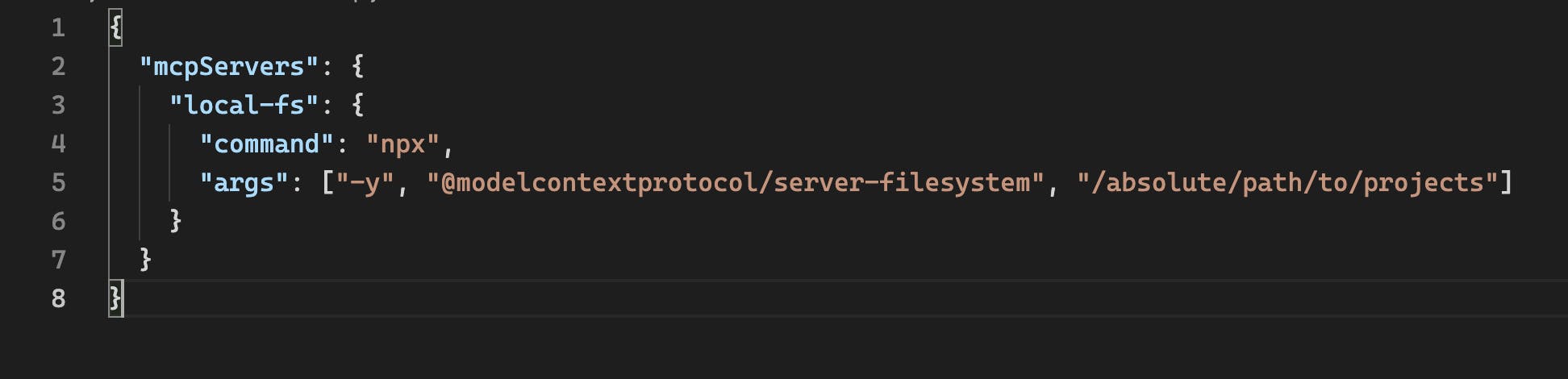
-
Restart Cursor → click the 🛠 Tools icon → approve permissions.
Try this prompt in your AI assistant:
“Create a folder
mcp-demoand write a hello-world Python script in it.”
You’ll see the request pop up. Approve it — and boom, the file appears.

Curated servers for everyday dev chores
|
Category |
Server |
What it adds |
Link |
|---|---|---|---|
|
Source control |
GitHub MCP |
Open PRs, triage issues, run code‑search | |
|
CI / Tests |
Playwright MCP |
Headless browser automation from chat |
|
|
Docs |
Microsoft Learn Docs |
Semantic search across official docs |
DevBlog post |
|
Secrets scanning |
GitGuardian MCP |
Detect API keys before you commit | |
|
Cloud infra |
Azure Resource MCP |
Query quotas, spin up VMs |
DevBlog post |
(Replace links with the canonical GitHub or HackerNoon URLs before publishing.)
Automating five high‑leverage daily tasks
-
Issue triage
Scan the last 20 GitHub issues labeled bug; group by component and estimate fix effort. -
**Code review scaffolding \ Let Copilot fetch diff stats, generate a checklist, and pre-fill the PR template.
-
**Environment setup \ Spin up Docker Compose, run migrations, and seed data with a single agent command.
-
**Live log analysis \ Point the server at
/var/logand ask your assistant to grep + summarize. -
**Daily stand-up reports \ Have your agent summarize commits and Jira updates into a Slack-ready message.
Measuring the productivity gain
We didn’t run formal benchmarks — but the difference was obvious within a week.
Instead of bouncing between Jira, GitHub, Slack, and the terminal, we could just ask the assistant to do the glue work. Things like:
- Linking a branch to a Jira ticket and opening a draft PR
- Writing quick stand-up summaries from commit logs
- Grepping logs or checking Azure quotas without breaking flow
Our team felt noticeably less interrupted. I’d go as far as saying it brought back that “deep work” vibe we hadn’t felt in a while: fewer pings, fewer browser tabs, and way less mental overhead.
Security & best practices
- Principle of least privilege – expose only the paths and APIs you need.
- Per‑tool prompts – keep “Ask before each action” turned on until you trust the workflow.
- Pin versions – use exact NPM/SKUs (
@mcp/[email protected]) to avoid breaking changes. - Audit logs – most clients write JSON logs (
~/.config/your‑client/logs/mcp‑*.log); ship them to Loki or ELK.
For a deep dive on threat models, see MCP Is a Security — Here’s How the Agent Security Framework Fixes It (HackerNoon, April 2025).
Troubleshooting cheatsheet
|
Symptom |
Fix |
|---|---|
|
|
Port already in use → change |
|
“Server disconnected” on first call |
Your process exited; run it in |
|
Agent spams permission prompts. |
Use per‑tool scopes in the manifest to whitelist benign actions. |
Where to go next
- Read “Model Context Protocol — How to Get Started” for a deeper conceptual intro.
- Browse the Awesome MCP Servers list for niche integrations (Notion, Airtable, Stripe, Home‑Assistant).
If you build something cool, drop me a line on Instagram at @jawad7khan. I’d love to see what you've automated!
如有侵权请联系:admin#unsafe.sh