Learn Linux basics with Bandit Level 0→1! Explore SSH, ls, cat, man pages, and file reading while uncovering Unix's history and secure access methods.

• 11 min read

Hello World! This is a entry point of the Bandit war-game challenge. Your goal is to login to the remote Linux system and retrieve the password for the level 1. But how do you login to the Linux systems remotely? The server could be running in different geographical location, if not same city or province.
The answer is pretty simple, SSH!!
In the early days of computing, users often accessed the mainframes remotely through terminals. Communication occurs via a network connection, so it must adhere to certain rules; the networking jargon for this is protocol, and SSH is the protocol used to securely send commands to a remote system in unsecured network environments.
Telnet is one of the oldest protocols, having been in use long before Linus Torvalds even considered developing the Linux kernel. However, because it communicates in plain text, it is designed to work within a local and trusted network environment.
OpenSSH: Goals
the OpenSSH project goals page

Why SSH is Secure?
SSH connections prioritise reliability and security over speed, so they run on the TCP/IP stack. The IP layer is in charge of routing packets across the internet, while TCP is in charge of determining which port number packets are sent and received at endpoints.
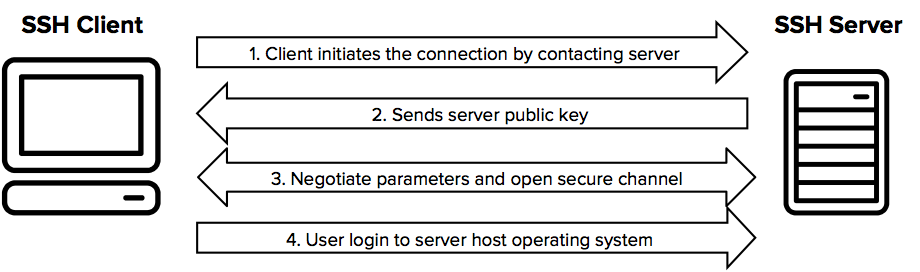
When a client initiates an SSH connection, the server responds by sending the public key. The server chooses the strongest supported key exchange algorithm, in this case ED25519, which is also compatible with the client.

On the next SSH connection, the SSH client stores the public key in the ~/.ssh/known_hosts file, so you won't see the fingerprint message.

The server's public keys, used for SSH connections, are stored in /etc/ssh/ssh_host_*.pub files.

Following key setup, a symmetric key is negotiated between the client and server to encrypt any further communications. Public-private key pair (aka asymmetric keys) encryption is used to secure this first key negotiation.
You may be thinking, "If the public key is the same for everyone, can't I just decrypt someone else's network traffic and extract the symmetric key 😈?" The answer is loud NO! Asymmetric cryptography uses key pairs. Data encrypted with a public key can only be decrypted by the corresponding private key, and vice versa. Even though the public key is available to everyone, you can't decrypt messages encrypted with it.
For some cases, when you can to execute SSH commands through automation, this can become a blocker. You can disable this prompt and enforce ssh client to add it in the known_hosts file using StrictHostKeyChecking=off ssh option.
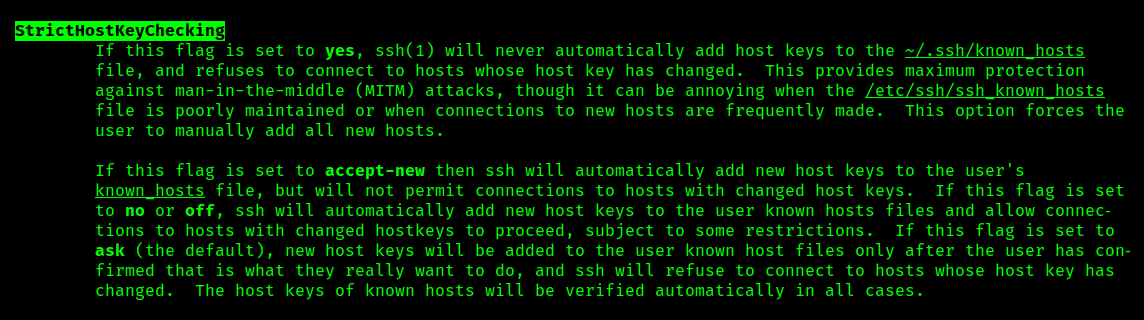
It can be passed to ssh client using -o option or from the ssh_config file. In the following screenshot I have demonstrated the former approach.

StrictHostKeyChecking=off option.Under What User Context are Commands Executed?
In Linux, all commands run within a specific user context. Linux is inherently multi-user, allowing numerous users to perform operations. A user's identity is established through a username (aka logon name), which can be specified with the -l flag or prepended to the hostname, separated by an @ symbol.
ssh -l tbhaxor example.com
ssh [email protected]
Providing logon name tbhaxor to connect to example.com system.
But how does a user prove their identity? SSH commonly utilises two authentication methods: password-based and identity file authentication. We'll delve into identity files in a later challenge. For now, since Level 0 provides a password, let's focus on that.
With password authentication, the SSH server prompts for the user's password. The user must enter the same password they use on the remote system. The SSH server then verifies the provided username and password against the /etc/shadow and /etc/passwd files. If authentication succeeds, the user gains a remote shell with the corresponding user context. Otherwise, the client typically prompts for it two more times. After three failed attempts, the connection is terminated with a failure message.
When the username is incorrect, the SSH server does not respond with a separate message; this is an additional security measure that prevents attackers from brute-forcing valid usernames.

OpenSSH vs SSH
The protocol definition is simply a piece of documentation created and peer-reviewed by experts. The software engineers then implements it using a programming language to create a usable application. OpenSSH is an implementation of the SSH protocol. It is based on a client–server architecture and available as a package and can be installed with apt in Debian-based Linux distributions.
apt install openssh-server
apt install openssh-client
Or you can install both client and server using ssh package as mentioned here
apt install sshIt is the OpenSSH server (sshd) from openssh-server package which constantly listens for connection requests. After authenticating the client, it configures the appropriate service (for example, a remote shell or file transfer via scp).
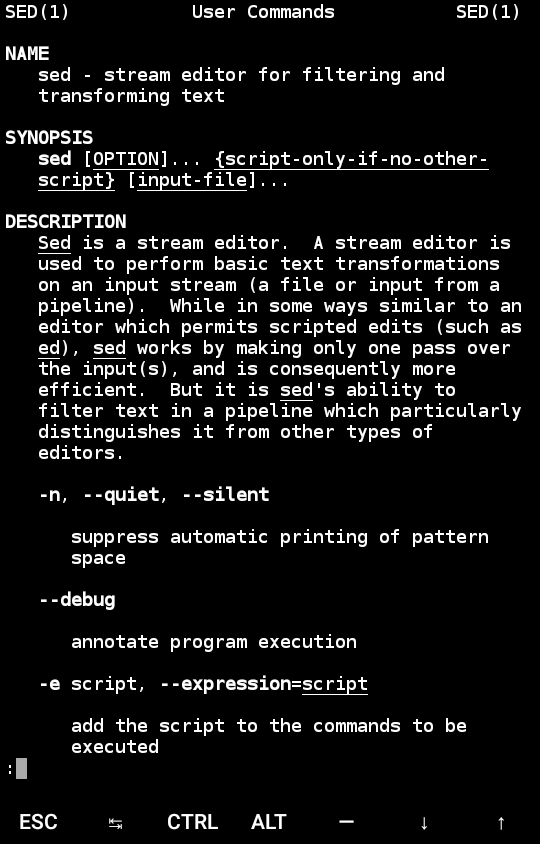
Just like a new microwave comes with a manual explaining its features and usage, Linux packages often include documentation in the form of man pages. These digital manuals provide information about a program's functionality and how to use it. The absence of man pages can negatively impact user perception, as they may view the program as low-quality or incomplete.
It was first published on November 3, 1971 (11 years after UNIX) by Dennis Ritchie and Ken Thompson, UNIX and C programming language developers. The manual is generally split into eight sections scheme which was defined in Research UNIX (early version of UNIX) and inherited by new operating systems, like Linux.
I have already shared the screenshot from man-page. Didn't get it? Scroll above and check the screenshot with caption "SSH_KNOWN_HOSTS FILE FORMAT from sshd man page" .
The lab starts with 0th level which gives us the username and password to login the SSH connection. The hostname for the challenge will be same bandit.labs.overthewire.org for all the levels, it's the username and password change.
OverTheWire: Level Goal

In the website of Level 0, you are given another piece of information along with hostname and login credentials; the port number. By default SSH runs on TCP 22 port which can be changed to different one. From the man page of sshd, it can be done using -p option.

-p optionGenerally, a config file is provided to the sshd, known as sshd_config, and the port number or listen address can be specified using Port or ListenAddress options.

sshd_config to override the default port.But why would someone change the default? As a newbie I used to scratch my head. IANA is responsible for defining and maintaining a list of default port, anyone can reference to this list and prevent using 22 for thier application. The answer is pretty simple:
- It is common to change the default SSH port to a different number. This is done to improve security and reduce the likelihood of automated attacks. You can see these bruteforce attacks by deploying a simple Apache app on DigitalOcean and observing the random requests.
- Another reason to use non-standard ports is to allow multiple instances of the same service to run on a single machine. Normally, two processes can't bind to the same port at the same time.
OverTheWire uses different ports because they are running multiple challenges.
To connect to an SSH server that is listening on a port other than 22, you must specify the port number when using the SSH client using -p option to specify a custom port.
After typing in the following command, it will prompt for the password. This is an entry level, so password is given by the bandit team – bandit0. Once you type this, and if this is the first time, it will prompt for saving the key fingerprint.
ssh -p2220 [email protected]After typing the password bandit0 it will launch an interactive bash shell for you.

Congrats! This solves the level. But to move on to next level, you need a password for level 1 which is given in Bandit Level 0 → Level 1.
The password for the next level is stored in a file called readme located in the home directory. Use this password to log into bandit1 using SSH. Whenever you find a password for a level, use SSH (on port 2220) to log into that level and continue the game.So what is a file, how can you list or read files, and what the hell is directory and home directory? If you already know this, you may skip following sections to Retrieving Password for Bandit 1 section.
A file is an abstraction to store information on the disk (for persistence) or temporarily as some intermediate result (for example, procfs or tmpfs). In the POSIX operating systems, everything is treated as a file, even the directories that store information of another files or directories.
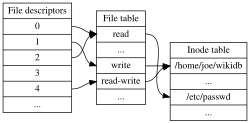
It uses inode data structure internally to store the metadata about the file, so that programs can interpret them differently. This is where DAC permissions and user/groups etc are stored. I have written a post on this, you may like it – Understanding Linux File Permission.
inode - Wikipedia
 Wikimedia Foundation, Inc.Contributors to Wikimedia projects
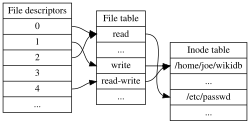
In a multiuser operating system like Linux, a home directory is a directory that is local to the current user. When a user is allowed to login on the system, the system lands them into this directory by default. In their home directory, the user can create and update files, and it is by default visible to that user.
This approach is used to improve organisation and security. They separate and organise each user's files, making them easy to manage. Most importantly, they prevent unauthorised access between users, ensuring the privacy and integrity of individual user data on a shared system.
For example, as a bandit0 user, I can't see any files from bandit1 because of permissions. By default, Linux uses /home/{username} directory as username's home directory, and in the login shell it is shown as tilde ~ symbol.
Retrieving Password for Bandit 1
In the Linux, you can run ls command to list the files in the current directory, where -la is a combination of -l (long format) and -a (include dotfiles).
💡
It's OK if you are seeing dotfiles term for the first time. I will be discussing this in upcoming posts either way. For now, you can think of them as hidden files.
ls(1) - Linux manual page


To list directories or files, provide their paths. For example, to list all files from the /tmp directory without switching, run the following command.
ls -la /tmpYou can read the contents of a file using the cat command. It is primarily used to concatenate two or more files and print the results to the standard output. If you only provide one file name, the contents will be printed.
cat(1) - Linux manual page


Coming back to the bandit0 shell, you can use the following command set to list all the files in the home directory (i.e /home/bandit0) and read the contents of readme file containing the password of bandit1 lavel.
ls -la
cat readme
List all the files in home directory and read contents of readme file

bandit1 level.💡
TIP!
For efficient progress in the Bandit challenges, maintain a local file to record level passwords and solution notes, as passwords are not automatically saved.
Exploiting File Permissions Misconfigurations
In this post, you will learn how misconfiguration in file permission can lead to privilege escalation via practical demonstration of 2 attack defence labs
tbhaxor's BlogGurkirat Singh

OpenSSH: Goals
the OpenSSH project goals page

What’s the difference between ssh and openssh packages?
I am setting up a LAMP server and want to use SSH. I saw a command for sudo apt-get install ssh and wondered if it was the same thing as openssh? If I was to now do a apt-get install openssh would I
 Ask Ubuntujb61264

Comparison of SSH clients - Wikipedia
 Wikimedia Foundation, Inc.Contributors to Wikimedia projects

Comparison of SSH servers - Wikipedia
 Wikimedia Foundation, Inc.Contributors to Wikimedia projects

OpenSSH server
OpenSSH is a powerful collection of tools for remotely controlling networked computers and transferring data between them. Here we’ll describe some of the configuration settings possible with the O…
 Ubuntu Server

What is SSH (Secure Shell)? | SSH Academy
SSH is a software package that enables secure system administration and file transfers over insecure networks.
 SSH Communications SecurityAdmin

Multi-user software - Wikipedia
 Wikimedia Foundation, Inc.Contributors to Wikimedia projects

man page - Wikipedia
 Wikimedia Foundation, Inc.Contributors to Wikimedia projects
Research Unix - Wikipedia
 Wikimedia Foundation, Inc.Contributors to Wikimedia projects

inode - Wikipedia
 Wikimedia Foundation, Inc.Contributors to Wikimedia projects
Understanding Linux File Permissions
Get in-depth knowledge of Linux file permission from administration and infosec point of you.


cat(1) - Linux manual page


ls(1) - Linux manual page