文章介绍了如何利用AWS Lambda和DynamoDB Streams构建事件驱动架构,通过实时响应数据变化实现可扩展、松耦合的应用。文章详细讲解了配置步骤、最佳实践及使用LocalStack进行本地开发的方法。 2025-6-21 19:49:2 Author: hackernoon.com(查看原文) 阅读量:14 收藏
As cloud-native architectures become the norm, developers are increasingly turning to event-driven design for building scalable and loosely coupled applications. One powerful pattern in this space leverages AWS Lambda in combination with DynamoDB Streams. This setup enables real-time, serverless responses to data changes, without polling or manual infrastructure management.
This article explains how to implement an event-driven system using DynamoDB Streams and AWS Lambda. A step-by-step implementation example using LocalStack is also included to demonstrate how the architecture can be simulated locally for development and testing purposes.
Why Go Event-Driven?
Event-driven architectures offer several key advantages:
- Scalability: Parallel execution and elastic compute
- Loose Coupling: Components communicate via events, not hardwired integrations
- Responsiveness: Near real-time processing of changes
When paired with serverless services like AWS Lambda, these advantages translate into systems that are cost-effective, resilient, and easy to maintain.
System Architecture

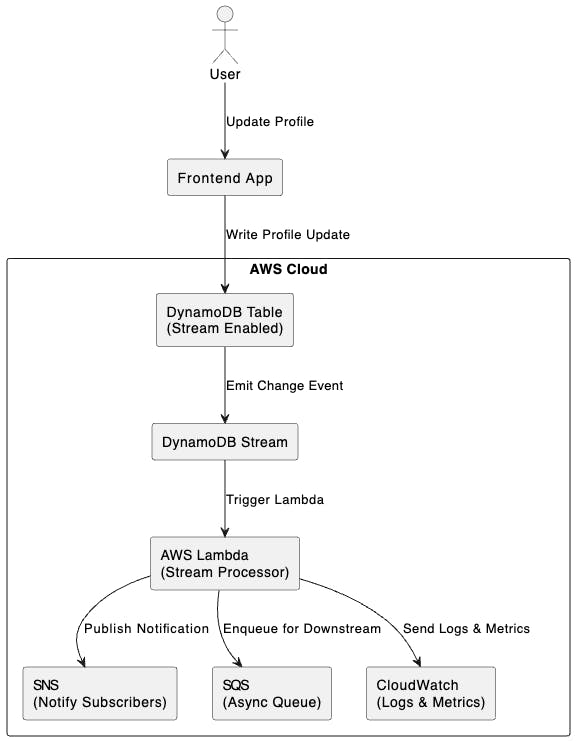
Here’s the core idea:
- A DynamoDB table is configured with Streams enabled.
- When a row is inserted, updated, or deleted, a stream record is generated.
- AWS Lambda is invoked automatically with a batch of these records.
- Lambda processes the data and triggers downstream workflows (e.g., messaging, analytics, updates).
Common Use Case
Imagine a system that tracks profile updates. When a user changes their details:
- The DynamoDB table is updated.
- A Lambda function is triggered via the stream.
- The Lambda validates the update, logs it, and pushes notifications.
It’s fully automated and requires no server to maintain.
Implementation Steps
Step 1: Enable DynamoDB Streams
Turn on Streams for your table with the appropriate view type:
"StreamSpecification": {

  "StreamEnabled": true,

  "StreamViewType": "NEW_AND_OLD_IMAGES"

}
Step 2: Connect Lambda to the Stream
Using the AWS Console or Infrastructure as Code (e.g., SAM, CDK), create an event source mapping between the stream ARN and your Lambda.
Step 3: Write the Lambda Handler
Here’s a basic Node.js example:
exports.handler = async (event) => {

  for (const record of event.Records) {

    const newImage = AWS.DynamoDB.Converter.unmarshall(record.dynamodb.NewImage);

    console.log('Processing update:', newImage);

    // Run your business logic

  }

};
Step 4: Add Resilience
- Retry behavior: Configure DLQs (Dead Letter Queues) for failed messages.
- Idempotency: Design logic to safely handle duplicate deliveries.
- Monitoring: Use CloudWatch and X-Ray to trace and log invocations.
Operational Insights and Best Practices
- Use provisioned concurrency for latency-sensitive Lambdas.
- Tune batch size and parallelism.
- Use CloudWatch Logs, Metrics, and X-Ray.
- Keep function execution under a few seconds.
- DynamoDB Streams do not guarantee global ordering of events across shards. Systems must be designed to tolerate and correctly handle out-of-order event processing.
- Stream records are retained for a maximum of 24 hours. Downstream consumers must process events promptly to avoid data loss.
- Ensure that IAM roles and policies are tightly scoped. Over-permissive configurations can introduce security risks, especially when Lambdas interact with multiple AWS services.
When This Pattern Is a Good Fit
- You need to respond to data changes in near real-time without polling.
- The workload is stateless and highly scalable, making it ideal for serverless execution.
- The solution must integrate seamlessly with other AWS services like SNS, SQS, or Step Functions.
When to Consider Other Approaches
- Your system requires strict, global ordering of events across all data partitions.
- You need to support complex, multi-step transactions involving multiple services or databases.
- The application demands guaranteed exactly-once processing, which can be difficult to achieve without custom idempotency and deduplication logic.
Proof of Concept Using Localstack
Prerequisites
- Docker - https://www.docker.com
- AWS CLI - https://aws.amazon.com/cli/
- awslocal CLI - pip install awscli-local
- Python 3.9+
Step 1: Docker Compose Setup
Create a docker-compose.yml file in your project root:

version: '3.8'

services:

  localstack:

    image: localstack/localstack

    ports:

      - "4566:4566"  # LocalStack Gateway

      - "4510-4559:4510-4559"  # External services

    environment:

      - SERVICES=lambda,dynamodb

      - DEFAULT_REGION=us-east-1

      - DATA_DIR=/tmp/localstack/data

    volumes:

      - /var/run/docker.sock:/var/run/docker.sock

      - ./lambda-localstack-project:/lambda-localstack-project

    networks:

      - localstack-network

networks:

  localstack-network:

    driver: bridge
Then spin up LocalStack:
docker-compose up -d
Step 2: Create a DynamoDB Table With Streams Enabled
awslocal dynamodb create-table \

  --table-name UserProfileTable \

  --attribute-definitions AttributeName=id,AttributeType=S \

  --key-schema AttributeName=id,KeyType=HASH \

  --stream-specification StreamEnabled=true,StreamViewType=NEW_AND_OLD_IMAGES \

  --billing-mode PAY_PER_REQUEST
Step 3: Write the Lambda Handler
Create a file called handler.py:
import json

def lambda_handler(event, context):

    """

    Lambda function to process DynamoDB stream events and print them.

    """

    print("Received event:")

    print(json.dumps(event, indent=2))


    for record in event.get('Records', []):

        print(f"Event ID: {record.get('eventID')}")

        print(f"Event Name: {record.get('eventName')}")

        print(f"DynamoDB Record: {json.dumps(record.get('dynamodb'), indent=2)}")

    return {

        'statusCode': 200,

        'body': 'Event processed successfully'

    }
Step 4: Package the Lambda Function
zip -r my-lambda-function.zip handler.py
Step 5: Create the Lambda Function
awslocal lambda create-function \

  --function-name my-lambda-function \

  --runtime python3.9 \

  --role arn:aws:iam::000000000000:role/execution_role \

  --handler handler.lambda_handler \

  --zip-file fileb://function.zip \

  --timeout 30
Step 6: Retrieve the Stream ARN
awslocal dynamodb describe-table \

  --table-name UserProfileTable \

  --query "Table.LatestStreamArn" \

  --output text
Step 7: Create an Event Source Mapping
awslocal lambda create-event-source-mapping \

  --function-name my-lambda-function \

  --event-source <stream_arn> \

  --batch-size 1 \

  --starting-position TRIM_HORIZON
Replace `<stream_arn>` with the value returned from the previous step.
Step 8: Add a Record to the Table
awslocal dynamodb put-item \

  --table-name UserProfileTable \

  --item '{"id": {"S": "123"}, "name": {"S": "John Doe"}}'
Step 9: Check the Docker logs to see the message printed by the lambda function
It should be something like below:
Received event:
{

  "Records": [

    {

      "eventID": "98fba2f7",

      "eventName": "INSERT",

      "dynamodb": {

        "ApproximateCreationDateTime": 1749085375.0,

        "Keys": {

          "id": {

            "S": "123"

          }

        },

        "NewImage": {

          "id": {

            "S": "123"

          },

          "name": {

            "S": "John Doe"

          }

        },

        "SequenceNumber": "49663951772781148680876496028644551281859231867278983170",

        "SizeBytes": 42,

        "StreamViewType": "NEW_AND_OLD_IMAGES"

      },

      "eventSourceARN": "arn:aws:dynamodb:us-east-1:000000000000:table/UserProfileTable/stream/2025-06-05T01:00:30.711",

      "eventSource": "aws:dynamodb",

      "awsRegion": "us-east-1",

      "eventVersion": "1.1"

    }

  ]

}

Event ID: 98fba2f7

Event Name: INSERT

DynamoDB Record: {

  "ApproximateCreationDateTime": 1749085375.0,

  "Keys": {

    "id": {

      "S": "123"

    }

  },

  "NewImage": {

    "id": {

      "S": "123"

    },

    "name": {

      "S": "John Doe"

    }

  },

  "SequenceNumber": "49663951772781148680876496028644551281859231867278983170",

  "SizeBytes": 42,

  "StreamViewType": "NEW_AND_OLD_IMAGES"

}
Summary
At this point, you’ve successfully built a fully functional, locally hosted event-driven system that simulates a production-ready AWS architecture—all without leaving your development environment.
This implementation demonstrates how DynamoDB Streams can be used to capture real-time changes in a data store and how those changes can be processed efficiently using AWS Lambda, a serverless compute service. By incorporating LocalStack and Docker Compose, you’ve created a local development environment that mimics key AWS services, enabling rapid iteration, testing, and debugging.
Together, these components provide a scalable, cost-effective foundation for building modern event-driven applications. This setup is ideal for use cases such as asynchronous processing, audit logging, data enrichment, real-time notifications, and more—all while following best practices in microservices and cloud-native design.
With this foundation in place, you’re well-positioned to extend the architecture by integrating additional AWS services like SNS, SQS, EventBridge, or Step Functions to support more complex workflows and enterprise-grade scalability.
Conclusion
AWS Lambda and DynamoDB Streams together provide a powerful foundation for implementing event-driven architectures in cloud-native applications. By enabling real-time responses to data changes without the need for persistent servers or polling mechanisms, this combination lowers the operational burden and accelerates development cycles. Developers can focus on writing business logic while AWS handles the heavy lifting of scaling, fault tolerance, and infrastructure management.
With only a few configuration steps, you can build workflows that respond instantly to create, update, or delete events in your data layer. Whether you’re enriching data, triggering notifications, auditing activity, or orchestrating downstream services, this serverless approach allows you to process millions of events per day, all while maintaining high availability and low cost.
Beyond its technical benefits, event-driven architecture promotes clean separation of concerns, improved system responsiveness, and greater flexibility. It enables teams to build loosely coupled services that can evolve independently—ideal for microservices and distributed systems.
Further Reading
- DynamoDB Streams -https://docs.aws.amazon.com/amazondynamodb/latest/developerguide/Streams.html
- AWS Lambda Event Source Mappings - https://docs.aws.amazon.com/lambda/latest/dg/invocation-eventsourcemapping.html
- Building Idempotent Lambdas - https://aws.amazon.com/blogs/compute/building-idempotent-applications-on-aws/
如有侵权请联系:admin#unsafe.sh