本文介绍了电子邮件健康的重要性及其对营销效果的影响。通过优化发送者声誉、列表质量、认证和参与度等因素,可以提高 inbox 放置率并减少垃圾邮件投诉。定期清理不活跃订阅者、设置 DMARC 和避免垃圾邮件触发器是提升 email 健康的关键措施。 2025-4-24 05:23:50 Author: securityboulevard.com(查看原文) 阅读量:2 收藏
Did you know that more than 17% of emails marketers send never reach consumers’ inboxes? Yours could be one of them, unless you take email health seriously. By prioritizing email health, you’re not just improving deliverability. You’re also boosting your brand reputation, reducing spam complaints, and increasing ROI. It’s a small step with a big ripple effect.
Key Takeaways
- Email health is your domain’s ability to successfully send messages to the inboxes while avoiding the spam folder.
- Domain owners are interested in their email health because it’s closely linked to metrics like ROI, inbox placement, brand reputation, etc.
- You can check your email health by monitoring bounce rates, spam complaint rates, blacklists, and inbox placement.
- Some useful and actionable tips to boost email health include setting up DMARC, removing inactive subscribers, avoiding spam triggers, leveraging segmentation, etc.
- For long-term maintenance of good email health, conduct monthly audits, A/B testing of subject lines, and re-engagement campaigns for inactive subscribers.
What is Email Health and Why Does It Matter?
Email health is the combination of factors like sender reputation, authentication, list quality, and engagement that determines whether your emails reach inboxes or go to spam. You can see your email health as a ‘credit score’ for your sending domain. It determines whether ISPs (Gmail, Outlook) trust your messages or not.


Let’s find out why it matters:
Inbox Placement & Revenues
When your email health is in good shape, you will enjoy higher inbox placement. The budget spent on email marketing campaigns will no longer go to waste. This, in turn, will increase revenues and reduce costs, leading to higher profits.
Spam & Blacklists
A poor email health often leads messages to the spam folder. With poor email health, your domain and IP address might get blacklisted as well. In both cases, you will end up in a situation where your message doesn’t reach the intended recipient.
Subscriber Trust
Good email health will help you build and maintain trust with your subscribers. They will feel safe opening your emails, without fearing malware or fraud.
5 Key Factors Affecting Email Health
Email health builds on 5 main pillars.
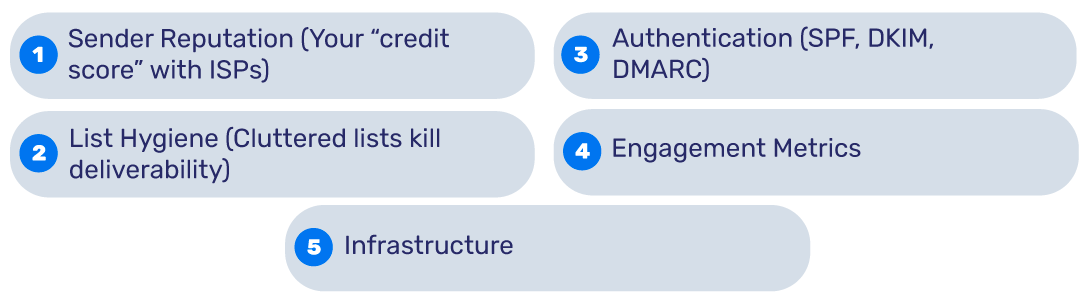
1. Sender Reputation (Your “credit score” with ISPs)
Do you constantly experience high bounce rates, get many spam complaints, or have low engagement rates? This is an indicator of low sender reputation, hence poor email health. You can use online resources like Google Postmaster Tools to check yours.
2. List Hygiene (Cluttered lists kill deliverability)
Poor email hygiene can destroy your email deliverability. The presence of inactive subscribers in your email lists implies you’re sending emails to uninterested or irrelevant recipients. This can lead to low engagement and decrease your email deliverability. To avoid this problem, you should monitor and cleanse inactive subs, hard bounces, and spam traps monthly.
3. Authentication (SPF, DKIM, DMARC)
No DMARC? You’re inviting spoofers. Not using email authentication or doing so inaccurately creates an open room for malicious actors to exploit your domain. This will endanger you and your recipients, potentially affecting your brand reputation and sensitive data. SPF, DKIM, and DMARC can help protect your email communications from cybercriminals.
4. Engagement Metrics
ISPs regularly track opens and clicks. If they see the recipients don’t engage with your emails, they are likely to mark your emails as spam.
5. Infrastructure
You should have a dedicated IP address for sending emails if you have a high volume of emails. Additionally, you always need to leverage warm-up strategies for new IPs.
How to Check Your Email Health
Here are some tools & metrics that will help you check your email health.
Bounce Rate (>2% = trouble)
If your bounce rate is above 2%, you are in trouble. You can fix this issue by verifying new signups with double opt-in. This will ensure only relevant users are in your list of subscribers, so no money is wasted on those who don’t care.
Spam Complaint Rate
The ideal spam complaint rate is below 0.1%. To bring spam complaints to this ideal percentage, add prominent unsubscribe links, and authenticate your emails.
Blacklists
There are many tools you can use to check if you’re on a blacklist or not. You can use PowerDMARC’s blacklist checker to monitor your domains, emails, IPv4 and IPv6 Addresses in over 200 real-time DNS Blacklists. If you find your domain or IP address listed on an IP address, you should immediately investigate and address it.
Email Authentication Check
If any of your SPF, DKIM, and DMARC records are misconfigured, your emails might be flagged as suspicious. Use an SPF record checker to validate your SPF record and ensure it correctly lists all authorized sending sources. This helps improve trust and deliverability.
Inbox Placement Tests
Online tools like Litmus or MailTester let you conduct inbox placement tests quickly and accurately. You should test with Gmail, Outlook, and Yahoo seeds for comprehensive results.
Email Health Checklist: 7 Actionable Fixes to Increase Inbox Placement
1. Purge Inactive Subscribers
If your email lists include subscribers who haven’t opened emails for more than 6 months, you should immediately remove them. Inactive, irrelevant subscribers only bring harm and no benefits. The earlier you remove them, the faster you’ll improve email deliverability.
2. Set Up DMARC
DMARC enforcement will protect your domain from unauthorized access and usage. This will enhance your email security, improve domain reputation, and contribute to email deliverability. To set up DMARC, try starting with a relaxed policy like p=none. Then, gradually move toward stricter policies like “quarantine” or “reject.” Hosted DMARC services can help you by taking care of such technical nuances.
3. Segment Your List
Always segment your email lists based on target audience needs, interests, preferences, and other characteristics. Ensure you have tailored, customized, and targeted content for each segment. This will help you boost engagement and contribute to better email health.
4. Warm Up New IPs
Don’t immediately overwhelm IPs. Instead, start with just 50 emails daily and gradually ramp up the volume. This will help you warm up new IPs and ensure smoother and hassle-free email communications.
5. Use Feedback Loops
Try to get spam complaints directly from ISPs. Leveraging this kind of feedback loop will ensure you address problems on time and avoid spam complaints from actual customers.
6. Avoid Spam Triggers
Using words and phrases like “FREE,” “fast cash,” “bonus,” “join millions,” and others can immediately trigger spam filters. Using all caps or too many emojis can trigger these filters and prevent your email from reaching the primary inbox. Instead, keep your content to the point, relevant, customized, and informative.
7. Monitor Weekly
Take your email deliverability and sending sources using DMARC reports and reporting platforms like PowerDMARC. Such platforms offer easy-to-follow dashboards and detailed analytics, which makes it easier to detect and address issues like low engagement, high bounce rates, or CTR. Try to monitor your email health at least once a week.
Best Practices for Long-Term Maintenance
In addition to the above checklist, the following are some best practices to maintain your email health in the long term:

Monthly Audits
Try conducting monthly audits where you check different aspects of your email health. The checks should cover blacklists, authentication, engagement, and other areas that can impact your email security and deliverability. Such audits will help you secure a good reputation not just in the short term but also in the long term, helping you attract new customers and keep existing ones.
A/B Test Subject Lines
Get the creative juices flowing and craft different subject lines that you can test against each other. Choose the one that yields higher open rates; this can contribute to higher engagement, better reputation, and boost deliverability.
Re-engagement Campaigns
We said you should remove inactive users as soon as possible. However, before this phase, there is one more important step. You should try your best to win them back. Whether through free giveaways, segmentation, customized content, or anything else creative, try to win back their hearts. If you do everything right and they still don’t engage, it’s time to prune them and focus on those who care.
Final Words
Good email health can ensure higher inbox placement, more profits, less spam, and enhanced credibility. It consists of 5 main pillars—authentication, list hygiene, sender reputation, engagement metrics, and overall infrastructure.
PowerDMARC can help you improve your email health through easy email authentication setup and management. Contact us today to boost inbox placement and improve email deliverability!

*** This is a Security Bloggers Network syndicated blog from PowerDMARC authored by Milena Baghdasaryan. Read the original post at: https://powerdmarc.com/email-health-guide/
如有侵权请联系:admin#unsafe.sh