Microsoft 移除了 Windows 11 预览版中的 'BypassNRO.cmd' 脚本,强制用户在安装时使用 Microsoft 账户以提升安全性和体验。此前用户可通过该脚本设置本地账户绕过要求。 2025-3-30 14:45:20 Author: www.bleepingcomputer.com(查看原文) 阅读量:13 收藏
Microsoft has removed the 'BypassNRO.cmd' script from Windows 11 preview builds, which allowed users to bypass the requirement to use a Microsoft Account when installing the operating system.
This change was introduced in the latest Windows 11 Insider Dev preview build, which means it will likely be coming to production builds.
"We're removing the bypassnro.cmd script from the build to enhance security and user experience of Windows 11," reads the Windows 11 Insider Preview Build 26200.5516 release notes.
"This change ensures that all users exit setup with internet connectivity and a Microsoft Account."
Since the release of Windows 11, Microsoft has made it hard to use the operating system with a local account, instead forcing users to log in with a Microsoft Account.
Microsoft says this is done to make using the company's ecosystem of cloud-based features and services easier, such as using your account to store BitLocker recovery keys.
"When a user signs in with a Microsoft account, the device is connected to cloud services," explains Microsoft.
"The user can share many of their settings, preferences, and apps across devices."
However, many users do not want to use a Microsoft Account, thinking it reduces their privacy and allows Microsoft to monitor their activities.
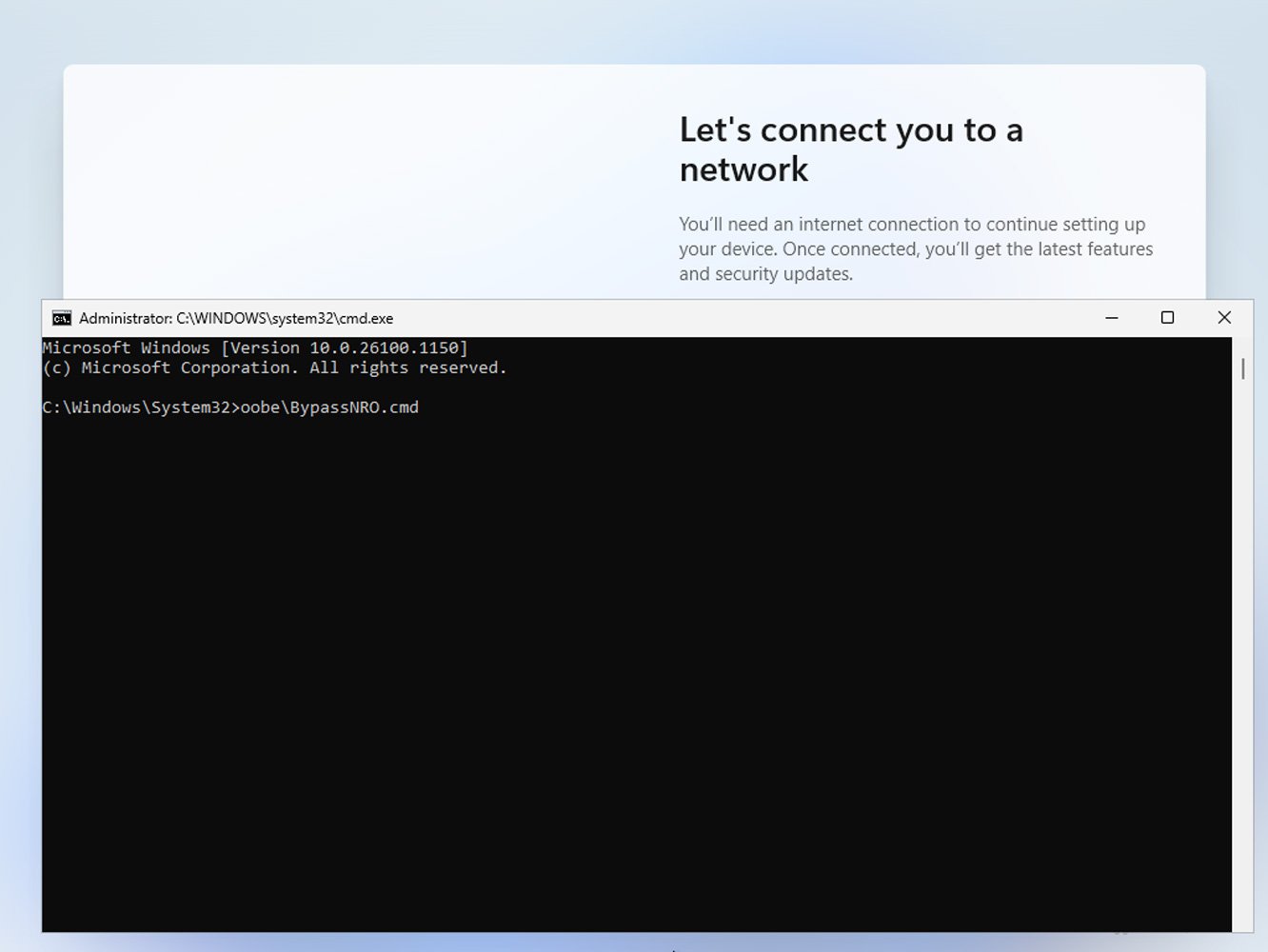
A popular method to bypass a Microsoft Account during setup is to use a script named 'C:\windows\system32\oobe\BypassNRO.cmd.' When run during Windows 11 setup, it creates a Registry value that removes the requirement to connect to the Internet during setup, which allows you to set up the operating system with a local account instead.
The script can be run during setup by pressing Shift+F10 at the "Let's connect you to a network" screen to open a Windows command prompt.
In the command prompt window, type c:\windows\system32\oobe\BypassNRO.cmd to run the script and reboot your computer.
Source: BleepingComputer
On reboot, the Windows 11 setup will run again, and when you get to the networking screen, you will now have the option to skip-networking and set up a local account.
While Microsoft is now removing this script, they have not yet removed the BypassNRO Registry value. This means you can manually enter the following commands to achieve the same functionality as the now-removed script.
reg add HKLM\SOFTWARE\Microsoft\Windows\CurrentVersion\OOBE /v BypassNRO /t REG_DWORD /d 1 /f
shutdown /r /t 0
If you feel comfortable modifying the Windows Registry, you can manually create the BypassNRO manually using Regedit, which can be launched from the Shift+F10 command prompt.
Unfortunately, it would not be surprising to see Microsoft remove the functionality of this Registry value in the future, making this technique no longer work.

如有侵权请联系:admin#unsafe.sh