这篇文章探讨了URL和文件名显示中的安全问题。作者指出攻击者可能通过伪装文件扩展名或利用Unicode字符隐藏真实类型来欺骗用户。操作系统虽然基于扩展名处理文件并警告潜在风险,但存在未知危险类型和安全提示易被绕过的漏洞。最佳实践包括分离扩展名、隐藏不可信信息、处理长文件名等方法来提升安全性。 2025-2-21 20:32:53 Author: textslashplain.com(查看原文) 阅读量:33 收藏
Many years ago, I wrote the first drafts of Chromium’s Guidelines for Secure URL Display. These guidelines were designed to help feature teams avoid security bugs whereby a user might misinterpret a URL when making a security decision.
From a security standpoint, URLs are tricky because they consist of a mix of security-critical information (the Origin) and attacker-chosen content (the rest of the URL). Additionally, while URLs are conceptually simple, there are many uncommon and complicated features that lead to misunderstandings. In many cases, the best approach for safely-rendering a URL is to instead render its Origin, the most security-sensitive component and the one best protected against spoofing.
The challenge of securely displaying filenames is similar, but not identical. A filename consists of two components of varying levels of trustworthiness:

The (red) attacker-chosen “base name” is entirely untrustworthy. However, the (green) file type-declaring extension at the end of the string is security-critical on many platforms because it determines how the file will be handled.
In most cases when opening a file, the file’s extension is parsed and interpreted by the operating system’s shell, meaning that the OS will correctly choose the handler for a given file, no matter what spoofing tricks an attacker may use.
As a part of this file-invocation process, the OS will correctly apply security policy based on the type of the file (e.g. showing a pre-execution warning for executables and no warning before sending a text file to notepad). If attacker sends a dangerous file (e.g. a malicious executable) with an incorrect extension, the result is typically harmless, for example, showing the code as text inside Notepad:

So, if the OS behaves correctly based on a filename’s actual extension, is there any meaningful spoofing threat at all?
Yes. There are two important threats:
- Not all dangerous file types are known by the system
- Systems will typically allow a user to run/open potentially unsafe files if they first accept a security prompt
Problem #1: Not All Dangerous Types are marked as such
Windows contains a built-in list of potentially-dangerous file type extensions, but third-party handler software can introduce support for new extensions (e.g. Python or Perl) without properly indicating to Windows that files of that type may be dangerous. As such, the OS will allow the user to invoke files of that type from untrusted sources without warning.
If the user installs a handler for one of these dangerous types, the burden is on the user to avoid invoking a file of that type if they do not trust the file.
However, a spoofing vulnerability that obscures the file’s true type could trick a user into (for example) running a Python script when they thought they were going to open a text file.
Problem #2: Security Prompts
One protection against malicious files is the user recognizing that a file is potentially dangerous before they copy or download it to their computer from an untrusted location. A spoofing attack could trick the user into failing to recognize a potentially-dangerous file (e.g. a .hta file) when a safe file (e.g. a .html file) is expected.
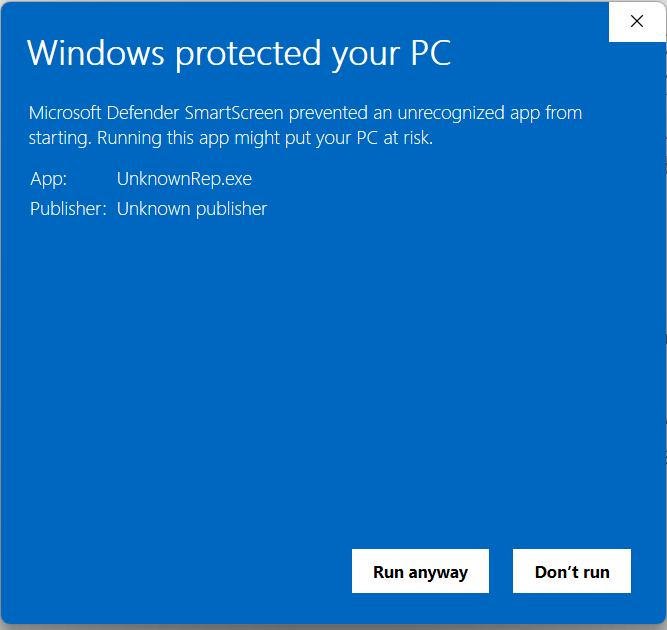
Similarly, another protection against malicious files is the OS warning shown before executing a potentially dangerous file. This warning might be the SmartScreen Application Reputation warning:

…or the decades-old Attachment Execution Services warning:

A spoofing attack against these security UIs could render them ineffective: a user who clicks “Run anyway” or “Open” based on spoofed information would be compromised.
Attacks
In most cases, an attacker has significant latitude when choosing the base filename and thus can execute any of many attacks:
- An overlong filename might cause UI truncation, such that the user cannot even see the real extension.
- A filename containing many embedded whitespaces (spaces, tabs, or any of dozens of Unicode characters) might push the extension so far away from the start of the filename that it’s either truncated or the user simply doesn’t see it.

- A filename containing a Unicode right-to-left override character might display with the extension in the middle. For example:

In HTML, this could render as This is safe and not an exe.txt because the RTL-override character has reversed the text direction in the middle of the string.
- A filename of
Trusted File.pdf from Google.commight be mistaken as a PDF from Google, when it’s really a.comexecutable from elsewhere.Ultimately, there’s not a ton you can do against this one — relying on users to understand which file types are dangerous and which are not is a dicey proposition.
Some notes on Filename Limits
In many scenarios, filenames are limited to MAX_PATH, or 260 characters. While Windows can be configured to increase MAX_PATH to ~32k and apps manifested to declare their support, this feature is not broadly used and thus attackers cannot rely upon its availability.
Characters with special meaning in the filesystem, specifically, \/:*?"<>| are not allowed to appear in names. There’s also small list of filenames that are prohibited on Windows to avoid overlapping with device names (e.g. con,lpt1, etc).
At the low-level there are other forms of abuse as noted in the documentation: The shell and the file system have different requirements. It is possible to create a path with the Windows API that the shell user interface is not able to interpret properly. In most cases, the attacker would’ve already had to have significant access to the system to abuse these.
Best Practices
The most important best practice for security UI is to ensure that users can recognize which information is trustworthy and which information isn’t.
To address a spoofing attack in 2024, the Internet Explorer MIME Handler security dialog was enhanced. First, it now clearly identifies itself as a security warning, and indicates that the file may be harmful. Next, it was updated to ensure that the filename extension is broken out on its own line to mitigate the risk of user confusion:

Ideally, untrustworthy information should be omitted entirely. As you can see in this example, this attacker uses a great deal of whitespace in the filename field to try to trick the user into thinking they’re opening a harmless .pdf file instead of a dangerous .hta file. While breaking out the extension to its own line helps somewhat, a user might still be fooled.
In contrast, the SmartScreen AppRep warning dialog hides attacker-chosen information (like the filename) by default to reduce the success of spoofing:

If your scenario requires that the user must be able to see an attacker-chosen filename, you should follow as many of these best practices as you can:
- Break out the filename extension to its own field/line.
- Hide the attacker-controlled filename by default.
- Ensure that long filenames are displayed fully.
If you must elide text to fit it within the display area, trim from the untrustworthy base filename, ensuring that the extension is visible. (In CSS, you might use rtl text-overflow:ellipsis)
- Sanitize or remove potentially spoofy characters (whitespace, Unicode RTL-overrides, etc)
- Guard against injection attacks (e.g. if your UI is written in HTML or powered by JavaScript, ensure that you don’t suffer from HTML-injection or XSS attacks in the filename)
- Ensure that the display of the filename field is distinct from all other parts of your security UI, and that words chosen by the attacker cannot be mistaken as text or advice from your app.
Thanks for your help in keeping users safe!
如有侵权请联系:admin#unsafe.sh