IntroductionMany of us have probably been faced with testing an application with cus 2020-12-7 14:56:0 Author: appsec-labs.com(查看原文) 阅读量:15 收藏
Introduction
Many of us have probably been faced with testing an application with custom HTTP request authentication or message signing. The requests from these applications can be proxied but they have built-in replay protection mechanisms in some form. As such, it isn’t possible to resend these requests outside of the application therefore making all external tools useless. Hacking the application through the Developer Tools debugger (for Web apps) isn’t fun, so we need to find an easy way to dissect any bypass these protections.
In this blog post, I will demonstrate a simple method that leverages Burp Suite and the Hackvertor extension to bypass message signing protection. This method will work across all Burp components, extensions, and for external tools such as sqlmap if proxied via Burp Suite.
Message Signing Problem
Typically we see message signing protections on mobile apps and our default solution is to write Burp session management extensions that take the request and re-sign it. That’s easy when we have a simple Android application that we can decompile and almost copy-paste the cryptographic logic into our extension without even understanding what is going on inside. With Web/JavaScript, more complex Android applications ,and with iOS applications, it is more complex.
Typical message signing protections can be divided into two types:
- Request agnostic — the client application signs a parameter with a dynamic key and places it somewhere in the request. The dynamic key can be either received from the server or be a result of complex calculation and authentication calls at the client side. Either way, they key exists somewhere on the client side.
- Request oriented — the client application signs specific HTTP request fields(such as URL parameters, headers, body parameters, etc,) and places the signature somewhere in the request.
Hackvertor can help us with both of these types. The first type is pretty straightforward and for the second type we can use the tag parameter functionality which Hackvertor provides.
Getting Started with Hackvertor
The official documentation describes Hackvertor as follows:
“Hackvertor is a tag-based conversion tool that supports various escapes and encodings including HTML5 entities, hex, octal, unicode, url encoding etc.
- It uses XML-like tags to specify the type of encoding/conversion used.
- You can use multiple nested tags to perform conversions.
- Tags can also have arguments allowing them to behave like functions.
- It has an auto decode feature allowing it to guess the type of conversion required and automatically decode it multiple times.
- Multiple tabs
- Character set conversion”
See: https://portswigger.net/bappstore/65033cbd2c344fbabe57ac060b5dd100
In short, Hackvertor allows us to add dynamic code into a request using custom tags. Also, it is possible to nest tags.
For example:
- Adding random values for different XSS attempts sent to different parameters
( alert(<@javascript\_0("output = Math.floor(Math.random(1) \* Math.floor(100000))","d18d46af69f167efe810a6b936ca056d")><@/javascript\_0>)
- Generating random IP for X-Forwarded-For request header
- Sending values with complex encodings (for the easy ones it may be possible to use the new Burp inspector from version 2020.11 onwards) and more. The tags are being processed across all the Burp components such as scanner, extensions etc.
With Hackvertor we can almost take as-is the client-side JavaScript code that encrypts the message and embed that piece of code into our custom tag. Custom tags allow us to run JavaScript or Python processing. The tag can be linked either to a code snippet or to a local code file.
Each time the request passes through Burp, the Hackvertor extension is being called to process the tags. During this process, the tags are being replaced by the output. The tags can be nested and parameterized.
Nesting example:
The following nested tags can be used:
<@d\_base64\_7><@jwt\_5("HS256","secret")>{"timestamp":"<@timestamp\_6 />"}<@/jwt\_5><@/d\_base64\_7>
d_base64 — This decodes the contents of the tag as Base64.
jwt — This creates a base64 encoded jwt using the algorithm (hs256) and secret key (secret) passed as parameters and using the contents of the tags as the contents of the JWT.
As such, this would result in the following when evaluated (the garbled text at the end is the decoded JWT signature:
{ "alg": "HS256", "typ": "JWT" }{"timestamp":"1607272072"} t·Ú4¹ð85@un70ÚFÅÇîcêéQì7ÉB×c
Typical use-cases:
Repeater — tags set in the request will be processed before it will be sent.
For example, the following tags in a URL:
GET /?a=&base64=SomeParamValue HTTP/1.1
Would be evaluated to become the following when the request is sent:
/?a=1607255133&base64=U29tZVBhcmFtVmFsdWU=
Intruder — we have three options for using the tags:
- Embed them into request — for each intruder call the tags will be processed. We can set payloads inside the tags. This will be similar to the repeater example above.
- Use tags as payloads — it is possible to add tags as payloads; these payload tag would be processed with all other request tags just before Intruder sends the request.
- Payload processing rules — Hackvertor module can be chosen to build a payload processing flow (Intruder tab-> Payloads tab -> Payload Processing section -> Add -> Invoke Burp Extension -> Select Processor
Intruder processing steps:
- Identify the payload placeholder (tags aren’t being processed at this step)
- Get a payload into the queue
- Applies payload processing rules
- Add the result into the raw request
- Run tags processing for all the tags in the request
- Send the request
There are actually plenty of different mix-and-match options.
Proxy — tags will be rendered when they pass through the proxy (Allow tags in proxy should be enabled). The main usage scenario here as to add Hackvertor capabilities for external tools such as sqlmap.
For example, if the value of the parameter vulnerable to SQL Injection is being encrypted at the client-side, we will set our sqlmap map input request to include tags and will define the sqlmap injection point as a tag parameter. Next, we will set sqlmap map to use Burp as a proxy. Now, when the tagged sqlmap request would pass via proxy the tags will be processed.
Scanner and Extensions — Mostly the same as with other components. The tags will be processed after the Scanner or an extension injects its payload. To handle tasks such as parameter encryption, it should be run with the “Scan defined insertion points option” via the intruder, since the Scanner will think that our tags are parameter values that should be injected. The insertion points should be defined inside the tags.
The Challenge
We have an application with a non-typical authentication flow. It authenticates against multiple identity providers (IdP) and each IdP uses different factors. After successful authentication with each one, it receives a secret. That secret is being used to sign a custom JWT token which is being used to call the application server.
For each server call, the app re-signs the JWT token using this secret and including a current timestamp. As such the window when the token is valid is around 1–3 seconds which prevents reuse even inside Repeater. For now, we will ignore the security problems that may arise from this type of client-side encryption and rather we will focus on regenerating the JWT tokens on-the-fly using Hackvertor to get rid of that replay protection.
Steps to Get Up And Running
1. Get Hackvertor
Install it from the BApp Store using the Extender tab in Burp Suite

2. Create a custom tag
Chose “Create custom tag” from Burp Suite’s Hackvertor menu bar at the top
The “Allow tags in Proxy” option should be selected when we want the Proxy to process tags. This is needed to support external scanners such as sqlmap or to inject the tags into requests coming from the application/client-side.

3. Tag Configuration:
- Tag name — it will be used inside Burp tools such as repeater. Also, we can set the proxy to process Hackvertor tags which will allow us to create tags through the application that would be converted when they pass through Burp proxy.
- Argument1 — let’s stay with String type.
- Param Name — that’s the name of the JavaScript parameter to which the input will be assigned. In our code we will take the input data from it.
- The code area — we can either write out code inline if it is a short simple script or we can specify the file path as shown in the screenshot.
Note: the code file is being reloaded each time the tag is being processed (at least with Repeater)

4. Write the code
Probably the most complex and time-consuming task is to replicate the encryption code.
- Identify the code in the debugger
- Identify all the functions used by the code and then copy them
- Get rid of all the unneeded junk from the code that won’t run outside of the original application — unnecessary function params, global params, etc
- Make sure the code flow is correct — change parameter names and function calls appropriately
- Identify the use of external libraries such as CryptoJS and include them inline. Fix any reference problems in code that may arise from changing the libraries.
- In our example, CryptoJS is taken from here:https://cdnjs.com/libraries/crypto-js
- Other repositories where libraries may be stored includehttps://www.jsdelivr.com andhttps://www.npmjs.com
6. Be sure to use exactly the same libraries, and same cryptographic configuration (VI, padding, mode, etc)
7. The most tedious task — making sure we exactly replicate the encryption flow
- Checking all the used methods, padding, encryption configuration
- Checking how the values are being accessed (base64, UTF8, Arrays, JSON)
- Make sure to use the types the same way as the original code.
Our test code is as follows. The JWT encryption values should be added manually having been extracted using a debugger.
//cryptoJS inline code https://cdnjs.com/libraries/crypto-js
!function(t,e){"object"==...

function SignJWT(payload, secret) {
  var header = {"alg": "HS256","typ": "JWT"};

  var stringifiedHeader = CryptoJS.enc.Utf8.parse(JSON.stringify(header));
  var encodedHeader = base64url(stringifiedHeader);
  var stringifiedData = CryptoJS.enc.Utf8.parse(JSON.stringify(payload));
  var encodedData = base64url(stringifiedData);
  var token = encodedHeader + "." + encodedData;
  var signature = CryptoJS.HmacSHA256(token, secret);
  signature = base64url(signature);
  var signedToken = token + "." + signature;
  return signedToken;
}

function base64url(input) {
  enSrc = CryptoJS.enc.Base64.stringify(input);
  enSrc = enSrc.replace(/=+$/, '');
  enSrc = enSrc.replace(/\\+/g, '-');
  enSrc = enSrc.replace(/\\//g, '\_');
  return enSrc;
}

function GenerateJWT(JWTparams) {
  var iat = Math.floor((new Date()) / 1000);
  var exp = iat + 300;

  var JWTpayload = {
    "exp": exp,
    "userID": JWTparams.param1,
    "iat": iat
  };
  var resultJWT = SignJWT(JWTpayload, JWTparams.secret);
  return resultJWT;
}

//The value of output will be printed to the request text; should be a string
// inputJson - param name defined as Argument1 in "Create custom tag window"
output =  GenerateJWT(JSON.parse(decodeURIComponent(inputJson)));
5. Insert our custom tag


6. Prepare the input parameters
Our code expects to receive a URL-encoded JSON array. as a parameter. The following command will prepare the input in the Dev Tools Console
escape(JSON.stringify({"param1":"userid","secret":"c2VjcmV0"}));
The following screenshot shows executing this command. The only input requirement for the URL encoded JSON array being used as a parameter is that it should be a string that doesn’t break the string context (with a “ character for example)

7. Inserting a tag
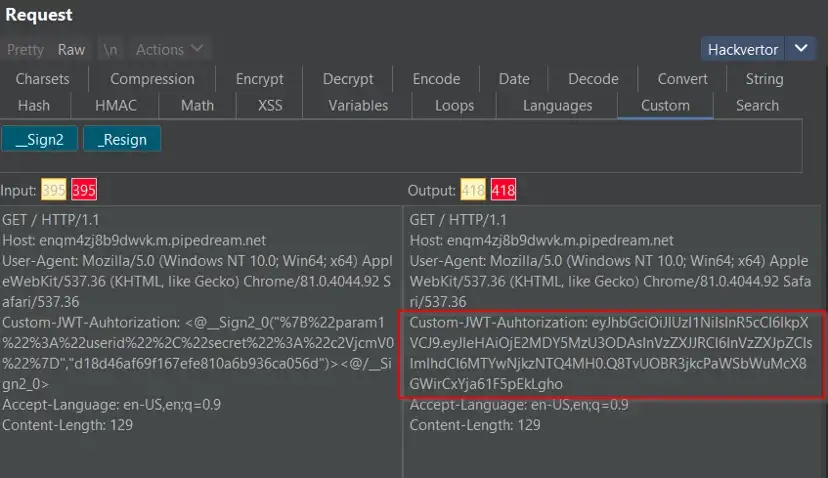
Here we can see the custom tag processing results. On each HTTP call the tag will be executed and the new JWT token with the current timestamp will be embedded in the request (replacing the tag)

The following screenshot shows the Base64 decoded JWT payload that has been automatically created by our script.

8. Success!
Voila! No more replay protection!
Example of using parameters
This feature is helpful when the API validates request parameter signing. In such a case, two values are being sent to the API — the parameters and the signature covering the parameters. The signature is usually being calculated based on some client-side logic plus a secret key.
For example, lets say that the API receives a query filter in the URL and the query signature in the body (although it is more common that signatures are being sent as headers). We suspect that the query is vulnerable to SQL Injection and we want to run sqlmap on it. We learned earlier in this article how we address all the steps, except for one — usage of parameters. To calculate the signature we need to pass to our tag the value of another parameter. To do so we will use the following tags:
Everything inside the tag will be passed as a string to Hackvertor variable1 (you can also nest other tags inside)
This will output the value contained in variable1.
The following example shows that we set request parameter aaaaa and its value as variable1 and pass it to the base64 encoding tag inside the request body.

Wrap up
Hackverter is a great swiss knife tool and multiple things can be accomplished with it. It is especially useful for dissecting and replicating certain types of message signing, especially for JavaScript signed messages.
如有侵权请联系:admin#unsafe.sh