After a frustrating morning with my troublesome P1 Gen 7 laptop, I decided it was time to bite the bullet and stop working off laptops full-time, a habit that I inexplicably fell into at the start of the pandemic.
I first surveyed the high-end desktop options at various vendors, but after the P1 fiasco and a similarly bad experience with HP a decade ago, I wasn’t keen on paying a large premium for a high-end system. Ultimately, after shopping around for a day or two, I dropped $999 on an iBuyPower system at Costco. (Technically, I paid for almost all of it using “Costco cash” from this summer’s cruise).

The iBuyPower “Trace Mesh” system includes:
| Component | Approx Retail |
| Intel i7-14700F (28 total threads) | $300 |
| MSI Nvidia 4060 RTX 8GB | $300 |
| ASUS Prime B760M-A AX6 II motherboard | $120 |
| 32GB XPG Lancer Blade RGB DDR5 | $110 |
| 600W Power Supply | $40 |
| A giant case full of rainbow LED fans | $80 |
| 2TB Kingston NV2 storage | $100 |
| Win11 Home | $100 (sorta) |
| An RGB keyboard and mouse combo | $30 maybe? |
| Post-Purchase Additions | ——————————– |
| Windows 11 Pro/Enterprise | As an employee, free |
| 2TB Samsung 990 Pro with heatsink | $150 |
| 48gb Crucial Pro DDR5 | $140 |
I’m happy to see that it’s unlikely that I would’ve saved any money by building this system myself. To be honest, it surely would’ve cost more, because I’d’ve probably paid the $200 premium to get an i9-14900.
While none of the components are strictly “top-of-the-line”, they’re close enough to rank in the 98th percentile on PassMark, with a score of 12302.

This solidly trounces my 2024 P1 Gen 7 (scored 9006), early 2020 desktop, an expensive Ryzen 3950X (scored 8762), my almost unused X1 Gen 3 (scored 5636), and my trusty old T480S (scored 2101), all of which cost more when I bought them.
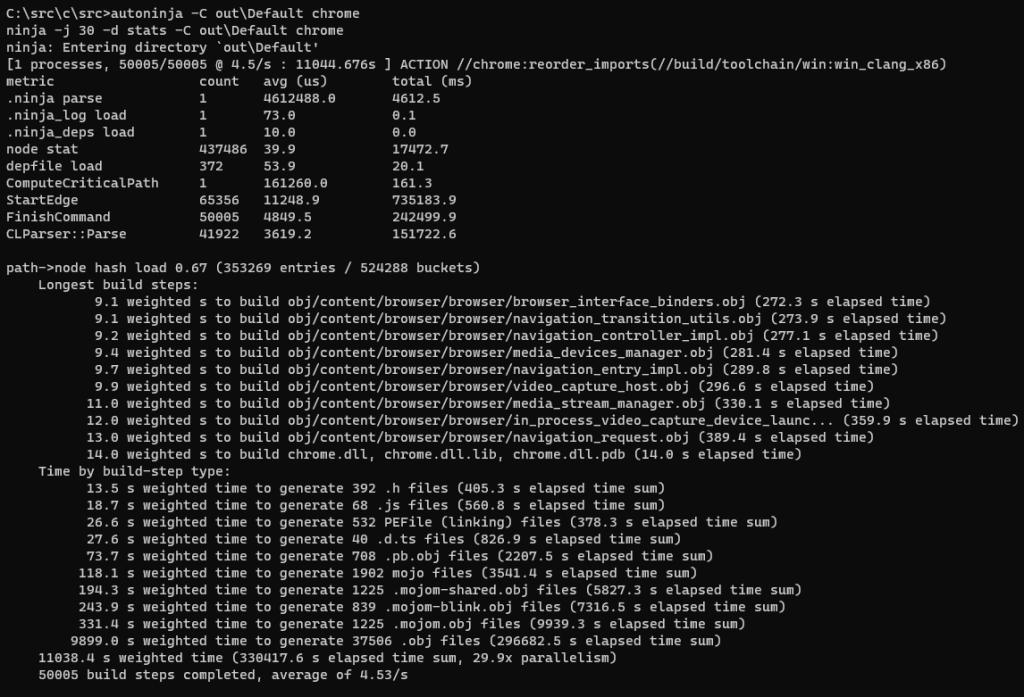
As is customary with my new machines, shortly after I finished assembling it, I built Chrome.

Taking a bit over 3 hours, it was not fast. Fortunately, I don’t build Chrome often anymore.

Notably, this time was dramatically slower than the 53 minute 2020-era build time on the 3950X. I’m sure Chrome has gotten larger, and I’m not able to disable Defender on a work device, and it’s possible that the Optane in the 3950X really does make a big difference. At some point, I’ll probably retry the 3950X against the current Chromium codebase to see how it fares.
Tomorrow, the 48GB of extra ram arrives, and I get to see if I even notice any change. :)
-Eric
Impatient optimist. Dad. Author/speaker. Created Fiddler & SlickRun. PM @ Microsoft 2001-2012, and 2018-, working on Office, IE, and Edge. Now working on Microsoft Defender. My words are my own, I do not speak for any other entity. View more posts