
IntroductionPwndora is a massive and fast IPv4 address range scanner, integrated with multi-thr 2022-1-28 00:6:26 Author: hakin9.org(查看原文) 阅读量:14 收藏
Introduction
Pwndora is a massive and fast IPv4 address range scanner, integrated with multi-threading.
Using sockets, it analyzes which ports are open, and collects more information about targets, each result is stored in Elasticsearch. You can integrate with Kibana to be able to visualize and manipulate data, basically it's like having your own IoT search engine at home.
Features
- Port scanning with different options and retrieve software banner information.
- Detect some web technologies running on servers, using Webtech integration.
- Retrieves IP geolocation from Maxmind free database, updated periodically.
- Possibility to take screenshots from hosts with HTTP using Rendertron.
- Anonymous login detection on FTP servers.
- Send notifications with results using Slack API.
Visual

Getting Started
Make sure you have $HOME/.local/share directory, to avoiding issues with Webtech.
To use slack argument, you should configure Incoming Webhooks URL in config.py
- Clone this repository
- Install requirements with Python PIP
- Set password for Elasticsearch and Kibana containers in docker-compose.yml
- Configure connection to Elasticsearch in connect.py
- Set paths of Maxmind ASN, city databases and Rendertron URL in config.py
- Launch containers in background with Docker Compose.
- Finally start scanner
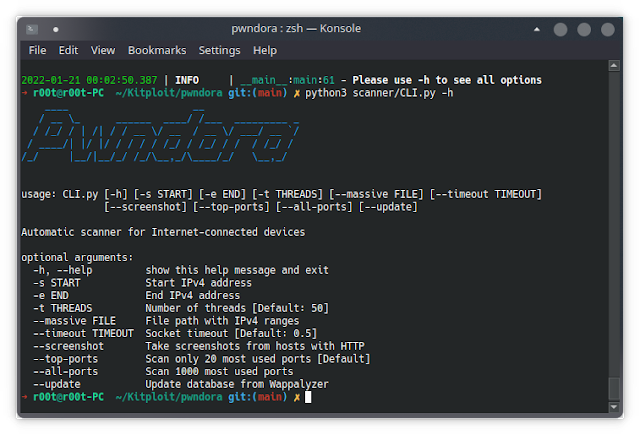
Usage
usage: CLI.py [-h] [-s START] [-e END] [-t THREADS] [--massive FILE] [--timeout TIMEOUT]
              [--screenshot] [--top-ports] [--all-ports] [--update]
options:
  -h, --help         show this help message and exit
  -s START           Start IPv4 address
  -e END             End IPv4 address
  -t THREADS         Number of threads [Default: 50]
  --massive FILE     File path with IPv4 ranges
  --timeout TIMEOUT  Socket timeout [Default: 0.5]
  --screenshot       Take screenshots from hosts with HTTP
  --top-ports        Scan only 20 most used ports [Default]
  --all-ports        Scan 1000 most used ports
  --update           Update database from Wappalyzer
  --slack            Send notifications by Slack
Examples
If this is your first time running, you should use the --update argument.
Scan only a single IPv4 address range:
python3 CLI.py -s 192.168.0.0 -e 192.168.0.255 -t 150 --top-ports
Scan from a text file with multiple IPv4 address ranges:
python3 CLI.py --massive Argentina.csv -t 200 --all-ports --screenshot
If you use an excessive amount of threads, some ISPs may detect suspicious traffic and disconnect you from the network.
Kibana example

Contributing
If you have ideas or future features, feel free to participate to continue making this project great.
Contact
License
Original repository: https://github.com/alechilczenko/pwndora
如有侵权请联系:admin#unsafe.sh