
好的,我现在需要帮用户总结一篇文章,控制在100个字以内。首先,我得通读整篇文章,理解主要内容。文章主要讲的是1Password这个数字保险箱和密码管理器新增了内置的反钓鱼URL保护功能。它通过弹出警告来提醒用户潜在的钓鱼风险,这样用户就不会不小心泄露账户信息了。 接下来,我要确定关键点:新增功能、弹出警告、防止钓鱼攻击、保护用户账户安全。这些是文章的核心内容,需要在总结中体现出来。 然后,我得控制字数在100字以内,所以要简洁明了。避免使用复杂的句子结构,直接陈述事实。比如,“1Password新增反钓鱼功能,弹出警告提醒潜在风险,保护用户账户安全。” 最后,检查一下是否符合用户的要求:用中文、不使用特定的开头语句、控制在100字以内。确保没有遗漏重要信息,并且表达清晰。 </think> 1Password新增反钓鱼功能,通过弹出警告提醒用户潜在风险,防止误入恶意网站泄露账户信息。 2026-1-25 18:45:16 Author: www.bleepingcomputer.com(查看原文) 阅读量:1 收藏
The 1Password digital vault and password manager has added built-in protection against phishing URLs to help users identify malicious pages and prevent them from sharing account credentials with threat actors.
The subscription-based password management service is widely used in the enterprise environment by many well-known organizations. Recently, Windows added support for native passkey management via 1Password.
Like all tools of this kind, 1Password will not fill in a user’s login data when visiting a website with a URL that does not match the one stored in their vault.

While this provides intrinsic protection against phishing attempts, some users may still fail to recognize that something is wrong and attempt to enter account credentials on dangerous pages.
As 1Password admits, relying on this protective layer alone is incomplete from a security perspective because users may still fall for typosquatted domains, where the threat actor registers a misspelled or similar-looking domain name.
Users may still think they landed on the correct site, but their password manager glitched out, or that their vault is still locked, and proceed to enter the credentials manually.
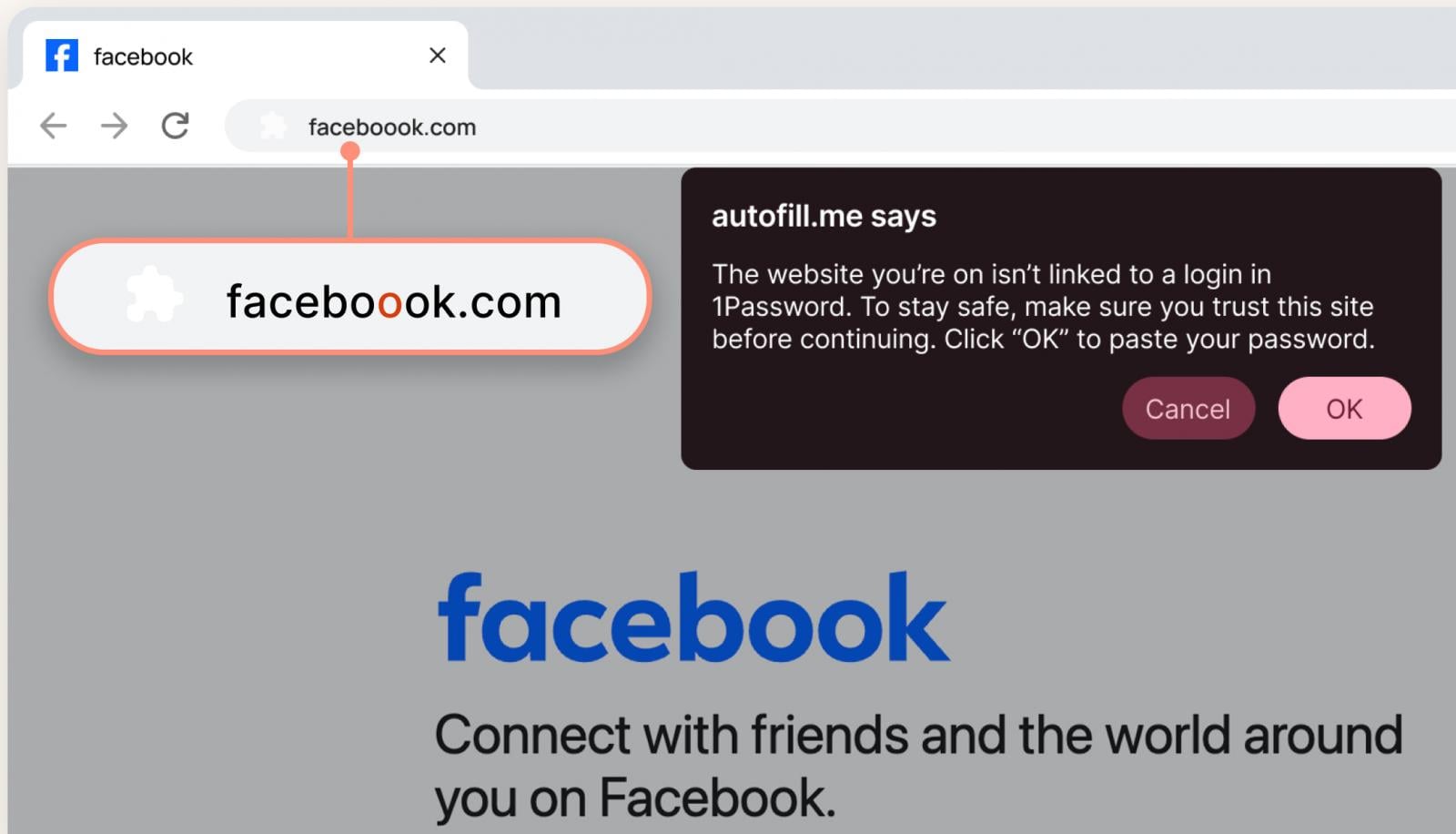
To address this security gap, 1Password users will benefit from an extra layer of protection in the form of a pop-up alerting them of potential phishing risk.
"It's easy for a user to miss that extra 'o' in the URL, especially if the rest of the page looks convincing," the vendor explains under a Facebook domain typosquatting example.
Source: 1Password
The vendor says that "the pop-up reminds [users] to slow down and look more closely before proceeding."
The new feature will be enabled automatically for ‘individual’ and ‘family plan’ users, while Admins may activate it manually for company employees through the Authentication Policies in the 1Password admin console.
In its announcement, the password management company highlights that the phishing threat has increased with the proliferation of AI tools that help attackers perpetrate more convincing scams at a higher volume.
A 2000-person survey conducted by 1Password in the U.S. showed that 61% had been successfully phished and that 75% do not check URLs before clicking links.
In corporate environments, where a single account compromise is enough to allow external actors to move laterally across networks and systems, 1Password found that a third of the employees reuse passwords on work accounts, with nearly half of them having fallen victim to phishing attacks.
Almost half of the survey participants responded that phishing protection is the responsibility of the IT department, not theirs, and 72% admitted they had clicked suspicious links.
Finally, more than 50% of the respondents said that it is more convenient to just delete suspicious messages than report them.

7 Security Best Practices for MCP
As MCP (Model Context Protocol) becomes the standard for connecting LLMs to tools and data, security teams are moving fast to keep these new services safe.
This free cheat sheet outlines 7 best practices you can start using today.
如有侵权请联系:admin#unsafe.sh